
PFSH2 - Montre de sport Pyle - Notice d'utilisation et mode d'emploi gratuit
Retrouvez gratuitement la notice de l'appareil PFSH2 Pyle au format PDF.


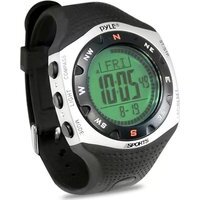
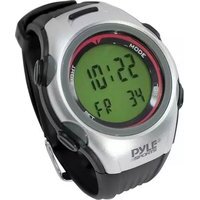
| Type de produit | Montre de sport |
| Marque | Pyle |
| Modèle | PFSH2 |
| Dimensions du boîtier | Environ 45 mm de diamètre |
| Poids | Environ 50 g |
| Type d'écran | LCD numérique avec rétroéclairage |
| Alimentation | Batterie lithium-ion rechargeable via câble USB |
| Autonomie de la batterie | Jusqu'à 7 jours en usage normal |
| Fonctions principales | Chronomètre, podomètre, calories brûlées, notifications de smartphone, réveil, affichage de l'heure et de la date |
| Connectivité | Bluetooth 4.0 |
| Étanchéité | Résistant aux éclaboussures (IP67) |
| Matériau du bracelet | Silicone souple |
| Longueur du bracelet | Ajustable pour poignet de 150 à 220 mm |
| Entretien et nettoyage | Essuyer avec un chiffon doux et sec. Éviter les produits chimiques. |
| Sécurité | Ne pas exposer à des températures extrêmes. Utiliser uniquement le chargeur fourni. |
| Pièces détachées et réparabilité | Bracelet interchangeable. Pour toute réparation, contacter le service client Pyle. |
| Informations générales | Montre de sport connectée compatible iOS et Android. Notice d'utilisation disponible en téléchargement. |
FOIRE AUX QUESTIONS - PFSH2 Pyle
Questions des utilisateurs sur PFSH2 Pyle
0 question sur cet appareil. Repondez a celles que vous connaissez ou posez la votre.
Poser une nouvelle question sur cet appareil
Téléchargez la notice de votre Montre de sport au format PDF gratuitement ! Retrouvez votre notice PFSH2 - Pyle et reprennez votre appareil électronique en main. Sur cette page sont publiés tous les documents nécessaires à l'utilisation de votre appareil PFSH2 de la marque Pyle.
MODE D'EMPLOI PFSH2 Pyle
HYGROMETER
- The hygrometer displayed is the humidity of the case inside. Hence, it is influenced by your body.
- To display the actual humidity, the unit must be taken off the hand for about 15 to 30 minutes and must not be exposed to direct sunlight.
THERMOMETER
- The thermometer displayed is the temperature of the case inside. Hence, it is influenced by your body temperature.
- To display the actual temperature, the unit must be taken off the hand for about 15 to 30 minutes and must not be exposed to direct sunlight.
LOW BATTERY INDICATOR
- Please change battery if the Low Battery Indicator display. The Altimeter, Hygrometer and Thermometer need a good battery to operate. Unusually battery and voltage level will affect the accuracy of the sensors.


Art No.: PYLE_SPORTS-PFSH2
PYLE®
SPORTS
FISHING / HUNTING HANDHELD

PFSH2
INSTRUCTION MANUAL
www.pyleaudio.com
Congratulations on your selection of this Unique Fishing/Hunting Handheld. To get the most of your purchase, be sure to carefully read this instruction manual and keep it on hand for later reference.
Important! The fishing/hunting time data, sunrise/set data, moonrise/set data, moon phase indicator, tidal information produced by this Fishing/Hunting Handheld are all based on calculation co-related with the current time, current date and current location.
Because of this, make sure the data input in this Fishing/Hunting Handheld is correct before using such data.
MAIN DISPLAY KEY FLOW
Key "A" (UP) - To view next fishing period
Key "B" (DOWN) - To view previous fishing period
Key "C" (MODE) - Return to current date
Key "D" (SET) - Toggle to display clock or daily alarm

-1-
FUNCTION
TIDE
- Moon phase
• Moon age - Current time fishing/hunting favorability level
- 4 Favorable fishing/hunting periods per day with favorability level
- Fishing/Hunting alarm on starting of fishing/hunting period
- Future fishing/hunting time calculation
- Tide graph with time data
- Future tide calculation up to year 2039
· Daily alarm
• Auto Calendar - Stored 212 cities position and funitidal interval
ALTIMETER
- Altitude Range (-500 to 9000 meter/-1600 to 29500 feet)
- Max./Min. memory for Altitude
- Altitude history and graphical display of the last
12 hours altitude readings - Altitude alarm
- Stop watch up to 9hr 59min 59.9sec
• Altitude total gain or loss 44999meter/ feet
BAROMETER
- Pressure Range 300.0 hPa/ mbar to 1100.0 hPa/ mbar
• Resolution of 0.1hPa/mbar (0.01 inHg)
• Max / Min. memory for Pressure
• Pressure History and Graphical display of the last
12 hours pressure readings
• Barometric Weather Forecast
(Sunny, Slightly Cloudy, Cloudy, Rainy, Storm)
• Pressure Trend Indicators
• Sunrise / Sunset Time
• Moonrise / Moonset Time
THERMOMETER
- Thermometer (-50°C to +70°C / -58°F to +150°F)
-°C / °F Selectable
• Max./Min. memory for Thermometer
HYGOMETER
• Relative (20% to 95%)
- Max / Min, memory for relative humidity
BATTERY INSTALLATION
Remove the battery cover from the back of the computer by using a small coin, install the 3V battery (CR2032) with the positive (+) pole facing the battery cover and close the cover properly as in Fig. 1.

MAJOR FUNCTION MODE
Press button C(MODE) to enter different mode.
![graph TD A["1450 15:50"] --> B["TIDE MODE"] B --> C["26°C"] C --> D["ALTIMETER MODE"] D --> E["Barometer MODE"] E --> F["3-"] style A fill:#f9f,stroke:#333 style B fill:#ccf,stroke:#333 style C fill:#cfc,stroke:#333 style D fill:#fcc,stroke:#333 style E fill:#cff,stroke:#333](/content/2026/06/1358551/images/42676cf208122216f90ef54c77e36d5b76bcb7414248e056f5caba04df6f254b.jpg)
MAIN DISPLAY ILLUSTRATION
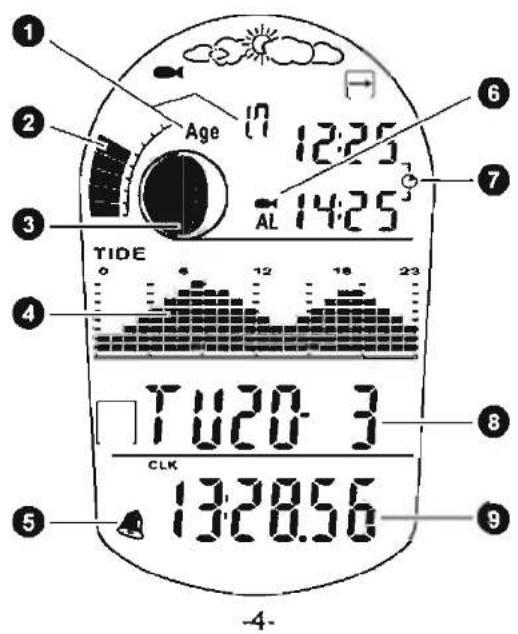
TIDE MODE
- Moon age
- Fishing/ Hunting level indicator
- Moon phase indicator
- Tide graph
- Daily alarm
- Fishing/ Hunting alarm
- Fishing/ Hunting periods
- Current date
- Clock
ALTIMETER MODE
- Moon age
- Fishing/ Hunting level indicator
- Moon phase indicator
- Altimeter graph
- History hours of altitude changes
- Daily alarm
- Humidity
- Temperature
- Current altitude
- Stop watch

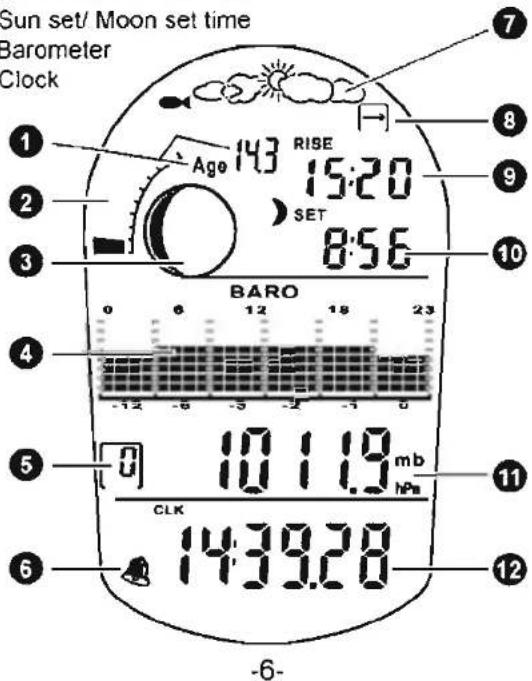
BAROMETER MODE
- Moon age
- Fishing/ Hunting level Indicator
- Moon phase indicator
- Barometer graph
- History hours of atmospheric changes
- Daily alarm
- Weather forecast
- Pressure trend indicator
- Sun rise/ Moon rise time
- Sun set/ Moon set time
- Barometer
- Clock
UNIT SETTING
Altimeter Unit (M/ft) Setting The *M* digit will start to flicker, press A(UP)/ B(DOWN) to select M(Meter) or ft(Feet). Then press D(SET) to confirm.

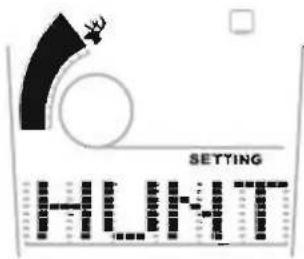
FISHING/ HUNTING DISPLAY SETTING
Fishing/ Hunting Display Setting Press A(UP)/ B(DOWN) to select show the Fishing or Hunting display. Then press D(SET) to confirm.

Barometer Unit (mb/hPa/inHg) Setting
The "mb/hPa" digit will start to flicker, press A(UP)/ B(DOWN) to select mb/hPa or inHg. Then press D(SE:Γ) to confirm

Temperature Unit (°C/°F) Setting
The Celsius digit will start to flicker, press A(UP)/ B(DOWN) to select C or F. Then press D(SET) to confirm.

SELECT SETTING MODE
Press and hold the button D (SET) for approximate 3 seconds until the CLK start to flicker on the display. CLOCK SETTING is shown. After using the A (UP) / B (DOWN) button to switch to different SETTING mode.
Press and hold the
D button (SET) for
approximate
3 seconds
![graph LR CLK["CLK"] -->|Press A button (UP)| CITY["CITY"] CITY -->|Press B button (DOWN)| ALM["ALM"] ALM -->|Press A button (UP)| City City -->|Press B button (DOWN)| CLK style CLK fill:#f9f,stroke:#333 style CITY fill:#ccf,stroke:#333 style ALM fill:#cfc,stroke:#333](/content/2026/06/1358551/images/970a4105401e9b1e548a8b78999236770eedff5523cb9f0fb0b3dfa12197e29f.jpg)
(Figure 2)
CLOCK SETTING
Be sure to correctly configure the current time and date and your local data before using the functions of this Fishing Handheld.
To set time (Ref to Figure 2)
- Press D (SET) button to indicate 12Hr and 24Hr format. Use A (UP) or B (DOWN) button to select and press D (SET) button to confirm the setting.

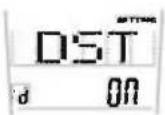
- Press A (UP) or B (DOWN) button to select DST on or off. If DST is set to ON, clock and local GMT is add 1 hour automatically.
Note:
If DST is ON, icon shows on the display.

- After confirmation, the second digits will flicker. To set minute digits, press A (UP) or B (DOWN) button and adjust minute digits to desire value then press D (SET) button to confirm.
- Repeat the process until you get desired value for year, month and day then day of week will automatically calculate and display.
- Press C (MODE) button to exit the setting screen.
- The year can be set in the range of 2000 to 2039.

- HYGROMETER
- THERMOMETER
- LOW BATTERY INDICATOR
- PYLE®
- SPORTS
- FISHING / HUNTING HANDHELD
- PFSH2
- INSTRUCTION MANUAL
- MAIN DISPLAY KEY FLOW
- FUNCTION
- TIDE
- ALTIMETER
- BAROMETER
- HYGOMETER
- BATTERY INSTALLATION
- MAJOR FUNCTION MODE
- MAIN DISPLAY ILLUSTRATION
- TIDE MODE
- ALTIMETER MODE
- BAROMETER MODE
- UNIT SETTING
- FISHING/ HUNTING DISPLAY SETTING
- BAROMETER UNIT (MB/HPA/INHG) SETTING
- TEMPERATURE UNIT (°C/°F) SETTING
- SELECT SETTING MODE
- CLOCK SETTING
Marque : Pyle
Modèle : PFSH2
Catégorie : Montre de sport