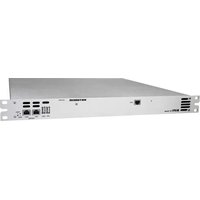
UFO IP512 - Décodeur numérique KATHREIN - Notice d'utilisation et mode d'emploi gratuit
Retrouvez gratuitement la notice de l'appareil UFO IP512 KATHREIN au format PDF.


| Type de produit | Décodeur numérique IP |
| Marque | Kathrein |
| Modèle | UFO IP512 |
| Dimensions (L x l x h) | 140 x 85 x 30 mm |
| Poids | 200 g |
| Alimentation | 5 V CC, 2 A |
| Connectivité | HDMI, Ethernet RJ45, USB 2.0 |
| Résolution vidéo | Jusqu'à 1080p |
| Formats audio | MPEG-1/2/4, AAC, AC3 |
| Protocoles réseau | DHCP, IGMP, VLAN |
| Entretien et nettoyage | Nettoyer avec un chiffon doux et sec. Ne pas utiliser de produits abrasifs. |
| Sécurité | Utiliser uniquement l'adaptateur secteur fourni. Débrancher en cas d'orage. |
| Pièces détachées et réparabilité | Télécommande, câble HDMI, adaptateur secteur. Réparation par un professionnel recommandée. |
| Température de fonctionnement | 0 °C à 40 °C |
| Consommation électrique | 10 W max |
| Contenu de la boîte | Décodeur, télécommande, câble HDMI, adaptateur secteur, guide de démarrage rapide |
FOIRE AUX QUESTIONS - UFO IP512 KATHREIN
Questions des utilisateurs sur UFO IP512 KATHREIN
0 question sur cet appareil. Repondez a celles que vous connaissez ou posez la votre.
Poser une nouvelle question sur cet appareil
Téléchargez la notice de votre Décodeur numérique au format PDF gratuitement ! Retrouvez votre notice UFO IP512 - KATHREIN et reprennez votre appareil électronique en main. Sur cette page sont publiés tous les documents nécessaires à l'utilisation de votre appareil UFO IP512 de la marque KATHREIN.
MODE D'EMPLOI UFO IP512 KATHREIN
19"-Kopfstelle 18-fach-DVB-S(2)/-T(2)/-C - DVB-IPTV

Merkmale
■ Stand-Alone-19"-Kopfstelle (1HE) mit 16 DVB-S(2) mit DiSEq™1.0 Unterstützung, sowie zwei DVB-S(2)/-T(2)/-C Multi-standard Frontends (Standards nicht kombinierbar, keine DiSEqC™1.0 Unterstützung für DVB-S(2) Eingang 9) und Umsetzung auf DVB-IPTV.
■ Simultaner Service Pool mit 494 SPTS und 18 MPTS oder 512 SPTS
■ Service-Namen und Programm Umbenennung
■ Unterstützt SAP (Sessinon Announcement Protocol) und M3U
■ Zwei redundate Weitbereichsnetzteile mit automatischer Redundanzschaltung und Lüfterüberwachung
■ Fernwartung und -konfiguration sind mit der Konfigurationssoftware USW 800 einstellbar
■ Umfangreiche Basisband-Signalverarbeitung mit z. B. Programmfilterfunktionalität
■ 8 Sat-ZF-Eingänge mit DiSEq™1.0-Funktionalität für Sat-Multischalter flexibel auf 2 x 8 Frontends verteilbar sowie ein Eingang (nicht schaltbar DVB-S(2)) für beide Multistandard-Frontends
■ Spannungsversorgung für zwei LNB und eine aktive Antenne
■ Alle Übertragungsparameter sind mit der Konfigurationssoftware USW 800 einstellbar
■ Unlimitierte Kaskadierung über IP-Netzwerk oder über den internen Switch (Systemverbund). Gemeinsame Administrierung und Konfiguration des Systemverbunds
■ 6-fach Entschlüsselungsfunktion (serielle oder paralelle Entschlüsselung) ^1)
■ Hot-Swap für Netzteil und Lüfter
■ SNMP-Vorbereitung
Geräteelemente

① 6 x CI-Steckplatz (PCMCIA) ^1)
② 2 x USB-Anschluss (Typ A)
③ 2 x Netzwerk-Anschluss (RJ45)
④ IP-Ausgang (RJ45)
⑤ Status-LED
⑥ Reset-Taste

① 8 x Sat-ZF-Eingang | Eingangspegel: 45-90 dBμV (F-Buchse)
② 1 x Sat-/Terrestrisch-/Kabel-Eingang | Eingangspegel: 55-100 dBμV (F-Buchse)
③ 2 x Weitbereichsnetzteil | Stromversorgung
LED und Reset-Taste
Status-LED
grün: OK
grün, blinkend: Softwareupdate wird durchgeführt
rot: Fehlverhalten
rot, blinkend: Fehlverhalten des Lüfter oder Netzteils. Prüfen Sie das Anschlusskabel und die Lüfter
orange: Kopfstelle startet
orange, blinkend: Kopfstelle wird von der Konfigurationssoftware USW 800 identifiziert
Reset-Taste
Drücken < 5 s ^1) : Kopfstelle startet neu.
Drücken > 5 s ^1) : Kopfstelle stellt sich zurück auf die Werkseinstellungen und startet neu. Reset-Taste erst loslassen, wenn die Status-LED orange leuchtet.
Drücken > 5 s ^1) : Wenn ein USB-Stick angeschlossen ist und sich darauf eine gültige Update datei befindet, dann führt die Kopfstelle ein Update durch und startet neu. ^2)
1) Die Reset-Taste ist zum Schutz vor versehentlicher Betätigung versenkt. Verwenden Sie zum Drücken der Reset-Taste ein Hilfsmittel, z. B. einen Kugelschreiber.
2) Voraussetzung: Es befindet sich eine gültige Updatedatei auf dem USB-Stick. Mehr dazu in der Anleitung der Konfigurationssoftware USW 800.
Konfigurieren
- Installieren und starten Sie am Computer die Konfigurationssoftware USW 800.
- Konfigurieren Sie alle Kopfstellenparameter nach Bedarf.
– Die aktuelle Version der USW 800 und ihre Anleitung erhalten Sie kostenlos auf www.kathrein-ds.com.
Montage
Die UFO 19"-Series Produkte sind nur für die Montage in 19-Zoll-Schränken / Gehäusen vorgesehen.
Für die sichere Installation in 19-Zoll-Schränken / Gehäusen, müssen für die linke und rechte Seite zusätzliche Führungsschienen verwendet werden. Diese sind nicht Teil des Lieferumfangs.
Lieferumfang
• UFO IP512 | UFO IP512/CI
- Anwendungshinweis (Die aktuelle Version diesees Dokuments finden Sie auf www.kathrein-ds.com)
- Sicherheitshinweis
- 2 x Netzkabel
- Käfigmutternset
19" Head-end 18-way DVB-S(2)/-T(2)/-C - DVB-IPTV

Features
Stand-alone 19" DVB-IPTV head-end with 16 DVB-S(2) frontend and 2 DVB-S(2)/-T(2)/-C multi-standard frontend (combination of Standards not possible, no DiSEqC™ support for DVB-S (2) Output 9)
■ Simultaneous service pool with 494 SPTS and 18 MPTS or 512 SPTS
■ Free selection of input programmes from various input transponders and muxing on to 1 or up to 18 MPTS output(s)
■ Service name / Programme re-naming
■ Two wide range power supplies, redundancy mode
■ All functionalities and parameters can be set using the USW 800 configuration software
■ Comprehensive baseband signal processing such as program & PID filter, TSID, ONID, SID, PID remapping
■ 8 Sat-IF inputs and 1 input for both multi-standard frontends. DiSEqC™ 1.0 functionality for flexible signal distribution across Sat multi-switches
■ Power supply for two LNB and one active antenna
■ Remote maintenance and configuration
■ Unlimited cascadability via IP and internal switch.
Common administration and configuration of the system network
■ Flexible serial or parallel decoding of up to six CAMs per Unit ^1)
■ Hot-Swap for power supply and fan
■ SNMP preparation
Device elements

① 6 x CI slot (PCMCIA) ^1)
② 2 x USB ports (Typ A)
③ 2 x Network ports (RJ45)
④ IP output (RJ45)
⑤ Status LED
⑥ Reset button

① 8 x Sat-IF input | Input level: 45-90 dBμV (F-connector)
② 1 x sat/terrestrial/cable Input | Input level: 55-100 dBμV (F-connector)
③ 2 x Wide range Power supply
1) UFO IP512/CI
LED and Reset button
Status-LED
green: OK
green, flashing: software update in progress
red: error
red, flashing: Fan or power supply faulty, check the power plug cable and fan
orange: head-end starting
orange, flashing: head-end is being identified by the USW 800 configuration software
Reset button
Press < 5 s ^1) : the head-end will reboot.
Press > 5 s ^1) : the head-end will reset to the factory setting and will reboot. Do not release the reset button until the status LED lights up orange
Press > 5 s ^1) : the head-end will look for an update on the connected USB stick, perform the update and reboot. ^2)
1) To prevent accidental activation, the reset button is recessed. To activate the reset button, use a tool such as a ball-point pen.
2) Pre-requirement: There is a valid update file on the USB stick. See the USW 800 configuration software for more info.
Configuring
- Install and start the USW 800 configuration software on the computer.
- Configure all the head-end parameters as required.
- The current version of the USW 800 and the user guide are available free of charge at www.kathrein-ds.com.
Installation
The UFO 19"-Series are only for mounting in 19" cabinets/housings. In order to ensure a safe installation it is mandatory to use additional guide rails for the left- and right-handside. These are not in the scope of delivery.
Scope of supply
• UFO IP512 | UFO IP512/CI
- User Instructions (You can find the current version of this document at www.kathrein-ds.com)
- Safety instructions
- 2 x power plug
- Captive nut set
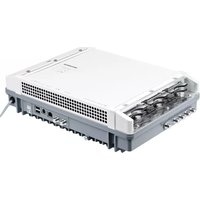


Marque : KATHREIN
Modèle : UFO IP512
Catégorie : Décodeur numérique