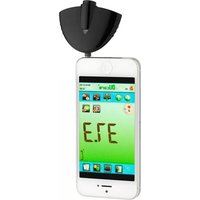
31.1133 - Thermomètre TFA - Notice d'utilisation et mode d'emploi gratuit
Retrouvez gratuitement la notice de l'appareil 31.1133 TFA au format PDF.


| Type de produit | Thermomètre numérique d'intérieur |
| Marque | TFA |
| Modèle | 31.1133 |
| Dimensions (environ) | 10 x 3 x 1,5 cm |
| Poids (environ) | 50 g |
| Alimentation | 1 pile bouton LR44 (incluse) |
| Plage de mesure | 0°C à 50°C |
| Précision | ±1°C |
| Affichage | LCD avec chiffres de 10 mm |
| Unités de mesure | °C uniquement |
| Fonctions principales | Mesure de température ambiante, indicateur de pile faible, arrêt automatique |
| Entretien et nettoyage | Essuyer avec un chiffon doux et sec ; ne pas utiliser de produits abrasifs |
| Sécurité | Ne pas exposer à l'humidité excessive ni à des températures extrêmes ; tenir hors de portée des enfants |
| Pièces détachées et réparabilité | Pile remplaçable ; appareil non réparable par l'utilisateur |
| Informations générales | Thermomètre d'intérieur compact, idéal pour la surveillance de la température ambiante |
FOIRE AUX QUESTIONS - 31.1133 TFA
Questions des utilisateurs sur 31.1133 TFA
0 question sur cet appareil. Repondez a celles que vous connaissez ou posez la votre.
Poser une nouvelle question sur cet appareil
Téléchargez la notice de votre Thermomètre au format PDF gratuitement ! Retrouvez votre notice 31.1133 - TFA et reprennez votre appareil électronique en main. Sur cette page sont publiés tous les documents nécessaires à l'utilisation de votre appareil 31.1133 de la marque TFA.
MODE D'EMPLOI 31.1133 TFA

Infrared-Thermometer 31. 1133. 01 for temperature measurement on the forehead

GB
Qui ck Gui de
- Download the app OUcare (IRT OUcare) from the Apple App Store for your iPhone or from the Google Play store for your Android smartphone or open the already downloaded app.

Launch the app IRT OUcare

- Place the O/S switch in the correct turn it to a suitable position for your position of the operating system of your measurement.
martphone (switch position 1 for android, 2 Apple iOS for).
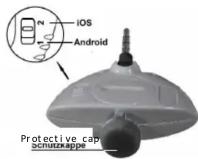
- Plug the device into the earphon jack of your smartphone and remove the protective cap.

Button becomes active

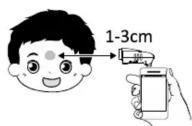
- Direct the sensor to the forehead. Keep a distance of 1 to 3cm to the forehead! The measuring time is approximately 1 second. Make sure that the distance to the forehead is not changed during the measurement.
- The last user (1-9) will appear top left corner. To start the measurement press the round button on the screen.

in the with activated voice output you will hear the measured temperature. The unit is now ready for another test. (Display L/H: temperature is out of range)
Temperature measurement of an object or surface
By touching the button

you change the mode to the measure of the temperature of an object or surface.

The procedure is the same as for the measurement on the forehead. But there is no voice output.
Additional functions of the I RTOUcare app
Change between °C / °F
By touching the button

the values are displayed in the selected unit.
Offset - Kompensation
- By touching the button

an adjustment to any future measurement can be set. This function is only intended for the measurement of body temperature, e.g. to adjust the individual normal temperature to 37 °C.
User defined settings
- By touching the button

you will enter the language setting.
Specific languages, available in the paid version only.
Voice output on/off
- By touching the button


you will be able to set user profiles (max. 9 user). Select a specific user.
- By touching the button


your measurements (1st line: name, 2nd line: email address).
- By touching the button

you are able to set up to 5 mobil numbers to send your measurements
via SMS service- (1st line: name, line: mobile number).
- By touching the button

the current settings are displayed. Measuring object, temperature unit and offset compensation (at body-temperature) can be changed.
Graphic display of measured values • By touching es the button

you see the measured values in a chart. T = individual values, D = daily average. Changing between object and body temperature is possible.
List of measured recorded values
- By touching the button

you get a list of history readings chronological order. Change between
2nd object and body temperature, display, sending and deleting of single values possible.
- By touching the button

you are able to add a value manually.
The LED-Indicator

red: no contact or empty battery
green: Function OK
CAUTI ON
Disconnect the infrared thermometer after use from smartphone. Only then will it off automatically. Otherwise, still consume power.
your urns t will
Rev. 22/12/2014/GB
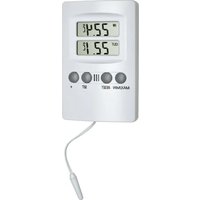

Marque : TFA
Modèle : 31.1133
Catégorie : Thermomètre