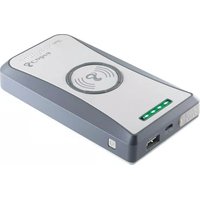
JumPack Mini CPP 8500 - Chargeur de batterie COBRA - Notice d'utilisation et mode d'emploi gratuit
Retrouvez gratuitement la notice de l'appareil JumPack Mini CPP 8500 COBRA au format PDF.


| Type de produit | Chargeur de batterie de démarrage (boosteur) |
| Marque | Cobra |
| Modèle | JumPack Mini CPP 8500 |
| Capacité de la batterie intégrée | 8500 mAh (estimation) |
| Courant de démarrage (crête) | 400 A (estimation) |
| Tension de sortie démarrage | 12 V CC |
| Ports de sortie supplémentaires | 2 ports USB (5 V / 2,1 A chacun) |
| Lampe torche intégrée | Oui, avec fonction SOS et flash |
| Entrée de charge | Micro USB 5 V / 2 A |
| Temps de charge estimé | 4 à 6 heures |
| Dimensions (L x l x H) | Environ 18 x 8 x 3 cm |
| Poids | Environ 350 g |
| Matériau du boîtier | Plastique ABS résistant aux chocs |
| Protections électriques | Contre inversion de polarité, court-circuit, surcharge, décharge excessive |
| Température de fonctionnement | -20 °C à 60 °C |
| Entretien et nettoyage | Nettoyer avec un chiffon doux et sec ; ne pas utiliser de produits agressifs |
| Pièces détachées disponibles | Câbles de démarrage, câble USB de charge |
| Réparabilité | Non réparable par l'utilisateur ; contacter le SAV |
FOIRE AUX QUESTIONS - JumPack Mini CPP 8500 COBRA
Questions des utilisateurs sur JumPack Mini CPP 8500 COBRA
0 question sur cet appareil. Repondez a celles que vous connaissez ou posez la votre.
Poser une nouvelle question sur cet appareil
Téléchargez la notice de votre Chargeur de batterie au format PDF gratuitement ! Retrouvez votre notice JumPack Mini CPP 8500 - COBRA et reprennez votre appareil électronique en main. Sur cette page sont publiés tous les documents nécessaires à l'utilisation de votre appareil JumPack Mini CPP 8500 de la marque COBRA.
MODE D'EMPLOI JumPack Mini CPP 8500 COBRA

CPP8500 mini
User Manual

Portable Power - Anytime, Anywhere
Thank you for purchasing the Cobra JuniPack® mini CPP8500 jump starter portable power pack. Before using
this product, please read these instructions carefully to learn about the features and capabilities of the JumPack
learn about the features and capabilities and how you can get the best out of it.
Note: Please charge your JumPack mini completely prior to using it for the first time.
03218 Cotera Electronics Corp. Part No. 460-1133-P Printed in China Version A
IMPORTANT SAFETY INSTRUCTIONS
Precautions when working with the CPP8500:
WARNING: Keep the unit clear of fire and water.
WARNING: Shock Hazard. Keep away from children. Do not insert fingers or foreign objects into the Jump Start Cable Input, the USB Output Port, or the Charge Input Jack. Do not submerge this product in water, expose to rain, snow, condensation, or spray for long periods. Do not open the JumPack. The battery is self-contained and there are no user replaceable parts inside the JumPack. Do not use the JumPack if it is damaged or modified. Damaged or modified batteries may exhibit unpredictable behavior resulting in fire, explosion, or risk of injury.
Do not operate the JumPack or accessories with a damaged cord or plug. To reduce the risk of damage to cords pull from the connector rather than the cord when unplugging.
Use of an accessory or an attachment not included with or recommended for the JumPack may result in a risk of fire, electric shock, or injury.
WARNING: Explosion Hazard. Do not use this product where there are flammable fumes or pores, such as on inadequately vested biles
are Namissable flumes of gases, such as an inadequately venous bridge of a boat or near propane tanks. Do not use this product in an enclosure containing automotive-type lead-acid batteries.
WARNING: Fire Hazard
DO NOT CRUSH OF PUNCTURE. CAUTION: Operating temperature and environment
Do not expose to temperatures over +113°F (+45°C) or under -14°F (-10°C). Using at high or low temperatures may reduce the internal battery capacity and shorten the battery life. Exposure to fire or temperatures over +265°F (+130°C) may cause explosion. Exercise care when using in wet conditions.
Note: In extreme cold weather conditions, please store indoors for best results.
Under abusive conditions, liquid may be ejected from the battery; avoid contact. Liquid ejected from the battery may cause irritation or burns. Note: If contact accidentally occurs, flush with water. If liquid contacts eyes, additionally seek medical help.
The CPP8500 is supplied with a rechargeable Li-Cobalt battery. When charging the JumPack work in a well ventilated area and do not restrict ventilation in any way. Proper charging practices will increase the life of the batteries. The unit and battery must be disposed of properly when it no longer holds a charge. Proper charging practices will increase the life of the batteries. For information on battery recycling call toll free 800-822-8837.
CAUTION: This device is not intended for use in a commercial repair facility. Proceedings when working with vehicle batteries
Precautions when working with vehicle batteries: WARNING: Explosion and fire hazard
- Follow all instructions published by the battery manufacturer and the manufacturer of the equipment in which the battery is installed.
- Make sure the area around the battery is well-ventilated.
- Never smoke or allow a spark or flame in the vicinity of the engine or batteries.
- Be careful not to drop a metal object on the battery or allow a metal tool to simultaneously touch the positive and negative cable ends or battery terminals.
- Remove personal metal items such as rings, bracelets, necklaces and watches when working with batteries. Batteries produce a short-circuit current high enough to weld a ring or other similar objects to metal, causing a severe burn.
- If you need to remove a battery, always remove the negative terminal from the battery first. Make sure all accessories are
off to prevent causing a spark. - Someone should be within range of your voice, or close enough to come to your aid when you work near batteries.
- Have plenty of fresh water, soap and a supply of baking soda on hand in the area of the batteries in case of contact with battery acid.
Hand in the area of the batteries in case of contact with battery acid. Baking soda neutralizes lead acid battery electrolyte.
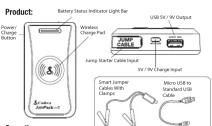
Operation: Recharging the lumPark
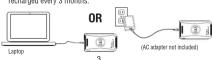
The CPP8500 can be quickly recharged with the supplied micro USB to standard USB cable connected to a 5V/9V Quick Charge ™ compatible 2.0 USB source, laptop or USB output AC adaptor (not included).
When the JumPack is charging, the Battery Status Indicator Light Bar will show the current battery charge level. The last section of the light bar that is lit will blink to show that the JumPack is charging. When the JumPack is fully charged the light bar will turn off automatically. For best battery performance the JumPack should be fully recharged every 3 months.
Check Battery Capacity:
To check the battery capacity of the JumPack press the Power/Charge Button on the left side of the unit with no device connected. The green lightbar will show the remaining battery capacity.

1st Section on: 10%-40% charge
2nd Section on: 40%-65% charge
3rd Section on: 65%-85% charge
4th Section on: 85%-100% charge
Note: When charging a device the section light may decrease. The battery capacity indicator cannot accurately measure the capacity during rapid charging. To confirm the real battery capacity, disconnect the device being charged and press the Power/Charge Button.
4

- Make sure the JumPack is fully charged.
- Turn off all the accessories on the vehicle.
- Connect the RED clamp to the POSITIVE post of the battery
and the BLACK clamp to the NEGATIVE post of the battery. - Connect the battery cables into the jump cable port. Be sure that the plug is firmly pressed into the Jump Starte
Be sure that the plug is firmly pressed into the alarm Starter Cable Input. - Check the tricolor status LED on the jumper cables. When the
LED is green the JumPack is ready to start the vehicle. - Turn the ignition key to start the vehicle. Do not crank the ignition for more than 3 SECONDS.
Vignition for more than 5 SECONDS NOTE: If you are does not start after?
NOTE: In your car does not start after 3 attempts, consult with a mechanic.
If the engine starts: - Disconnect the
- Shenzhen's battery posts from the 50mm shell, then from the battery posts.
- Leave the engine running for at least twenty minutes to
allow the vehicle battery to recharge. - If the vehicle does not start on the first try, WAIT FOR 1 MINUTE before trying to start the vehicle again
1 MINUTE before drying to start the vormor again.
Charging a USB Device
To charge a USB device, connect the device's cable to the JumPack's USB /W/TV Output.
USB 5V/9V output. The lampRocky/5t
The JumpPack will turn on and start charging the device automatically. The green light bar will indicate the device is charging.
Once the device reaches its charge capacity and ceases charging
the light bar will turn off
Note: When charging a device the section lit may decrease because the lum/Desk cannot accurately measure the capacity during rapid charging.
StimPack cannot accurately measure the capacity during rapid charging. To confirm the actual battery charge level, disconnect the device being
to confirm the basic battery charge level, assumed the series being charged and press the Power/Charge Level Button.
Note: Some smartphones and portable devices use Qualcomm
Quick Charge ® technology that allows fast charging. The JumPack is compatible with Quick Charge devices. The JumPack can be exchanged
compatible with quick charge devices. The SumPack can be recharged with a Quick Charge adapter (not included).
Charging a Device with the Wireless Charge Feature:
-
Make sure the JumPack is fully charged
-
Press and release the Power Charge Button on the side of
the JumPack. (The LED lightbar will show the capacity of the lumPack).
-
Dines the
-
Place the smartphone on top of the SuniPack will the screen facing up.
-
The smartphone will begin to charge.
-
Once the device is fully charged or removed the JumPack will
stop charging and shut down.
[Non-Text]
(1) 2023年
LED Lightbar
Power Charge Button
6
Charging a USB Device:
To charge a USB device, connect the device's cable to the JumPack's
USB 5V/9V Output
The JumPack will turn on and start charging the device automatically.
The green light bar will indicate the device is charging. Once the device reaches its charge capacity and caesar charging
the light bar will turn off.
Note: When charging a device the section lit may decrease because the JumPack cannot accurately measure the capacity during rapid charging. To confirm the actual battery charge level, disconnect the device being charged and press the Power/Charge Level Button.
Note: Some smartphones and portable devices use Qualcomm Quick Charge ® technology that allows fast charging. The JumPack is compatible with Quick Charge devices. The JumPack can be recharger with a Quick Charge adapter (not included).
Charging a Device with the Wireless Charge Feature:
-
Make sure the JumPack is fully charged.
-
Press and release the Power Charge Button on the side of
the JumPack. (The LED lightbar will show the capacity of the JumPack)
3 Place the s
-
Please the undersigned list up of the Sunday 3rd with the screen facing up.
-
The smartphone will begin to charge.
-
Once the device is fully charged or removed the JumPack will

Product Features:
• 360 Amp Peak Current Jump Starter
• Wireless Device Chargin
- Rapidly charge your Quick Charge™ - compatible devices
78% faster.
• Rechargeable by Quick Charge compatible USB adaptors
B. 2014年1月1日
Product Specifications:
• Li-Cobalt rechargeable battery: 11.1V/22.2Wh
- Size: 5.67 L x 3.07 W x 0.94 H - Weight: 0.63 lbs
- Weight: 0.65 lbs. - Rechorna times: 2.8 hours with standard USB charner
1.5 hours with a fast charge adaptor
• Starting/Peak Current: 180 Amps / 360 Amps
• USB Output: Works with Quick Charge
compatible-devices USB Inputs Works with Quick Stores
• USB Input: Works with Quick Charge compatible-devices
Comparable-Buttees
Troubleshooting Wireless Charging
Troubleshooting, Wireless Charging
PROBLEM SOLUTION
Phone does not charge a. Confirm your phone is Wireless
whlessly when placed on Ian of the lumPack. Charging-compliant.
on top of the drain don mini. B. Ensure that your phone is turned on. a. Ensure the /knot's mini internal battery in
-
Ensure the SunPack mini internal battery is July charged
-
Place your phone on top of the lumPack
mini with front side aligned and centered on
the Cobra snake logo.
e. Push and release the Power Charge Button
on the other side of the JuniPack to start the wireless charge.
Wireless charge:
?
Troubleshooting: USB Charging
PROBLEM SOLUTION
iPhone does not charge. e. Feature the lamp?a's mini internal buttons is
Phone does not charge a. Ensure the SunPack mini thermal battery is when suggested to the 41-42 shopped
When connected to the JumPark USB output. Many charged:
a. Ensure the USB cable is in working condition (try another USB cable if necessary).
(If another 0.05 units is necessary). - If the jum7361 mini is too hot, leave it in a card
- If the Joint-Pack Mini is too hot, place it in a cool inotion and split for the unit to cool drum
| Location and Wall for the Unit to Door Bowls
d. Facility connected device. Test with another USB device known to be in working condition such as
- Do/So is known to be in morning condition soon as a smartphone to confirm USB output port is
operating correctly.
(1) µ0 (2)
Troubleshooting: Re-charging the JumPack
PROBLEM SOLUTION
JumPark mini won't a Confirm the USB power supply and cable are
re-charge working by testing with a working smartphone
- 30.00. Writing by seeing words: writing smartphones;
Troubleshooting: Jump Starting
PROBLEM SOLUTION
PROBLEM SOLUTION
Engine won't start when connected to the a. Ensure the Jumpack mini internal battery is
When connected to the JumPack mini. I only charged.
a. Poor battery terminal connection. Make sure the
| battery connection terminals are in direct contact with the JunPark mini claims. Move them
| With the term look from changes, more often slightly on the same terminal and make sure
there is no corrosion or similar impeding contact.
e. Vehicle battery is completely discharged. The
JumPack mini does not detect any battery
voltage. Not base to jump start with the battery in hard condition
in the letters
8
Troubleshooting: Jump Starting continued
PROBLEM SOLUTION
Ensign won't beat d. Ensign stands with the lumPark but fails to continue
Engine won't start when commented to the running. He/she battery may be in poor condition. If
When connected to the JumPark mini running vehicle battery may be in poor condition. If the engine fails to run after a second jump start and
there are no other means to jump start the vehicle
then leave the JumpPack mini continuously connected to the battery until the JumpPack mini's internal
to the battery after the burn dock, with a thermal battery in completely discharged. Try to start the
| battery or completely discharged. Try to start the vehicle. If the vehicle fails to start or run normally,
consult with a mechanic.
10.2.3.2017
FCC Statement:
This device complies with part 15 of the FCC Rules. Operation is subject to the following two conditions: (1) This device may not cause harmful
the following two conditions, (1) this device may not cause harmful interference, and (2) this device must accept any interference received.
including interference that may cause undesired operation.
Note: This equipment has been tested and found to comply with the limits for a
Class B digital device, pursuant to Part 15 of the FCC Rules. These limits are designed to provide reasonable protection against harmful interference in a
designed to provide reasonable protocol against natural interference in a residential installation. This equipment generates uses and can radiate radio
frequency energy and, if not installed and used in accordance with the instruction
may cause harmful interference to radio communications. However, there is no arguments that interference will not occur in a particular instillation.
guarantee that interference will not occur in a particular installation. If this equipment does cause harmful interference to radio or television
In this equipment does cause harmful interference to radio or television reception, which can be determined by turning the equipment off and
on, the user is encouraged to try to correct the interference by one or
more of the following measures:
- Reorient or relocate the receiving antenna.
- Increase the separation between the equipment and receiver.
- Connect the equipment into an outlet on a circuit different from that to which the receive is connected
from that to which the receiver is connected.
- Consult the dealer of an experienced radio/television technician for help.
WARNING: Any modifications made to this device that are not expressly approved by party responsible for compliance could void the user's authority.
to operate this device. 9
。
Limited 1-Year Warranty:
For Products Purchased in the U.S.A.
Cobra Electronics Corporation warrants that its Cobra CPP8500 JumPack
USB Charger, and the component parts thereof, will be free of defects in unprimable and metallic for a period of one year from the date of first
workmanship and materials for a period of one year from the date of first consumer purchase. This warranty may be entered by the first consumer
purchaser, provided that the product is utilized within the U.S.A.
Cobra will, without charge, repair or replace, at its option, defective USB
charger, products or component parts upon delivery to the Cobra Facto
Service Department, accompanied by prior or the date of first consumer purchase, such as a duplicated copy of a sales receipt.
forensers, both as a expirated copy of a saldo receipt. You must pay any initial shipping charges required to spin the product!
You must pay any initial shipping charges required to ship the product warranty service, but the return charges will be at Cobra's expense.
if the product is repaired, this warranty gives you specific rights, and
you may also have other rights which vary from state to state.
Exclusions: This limited warranty does not apply:
-
To any product damaged by accident.
-
In the event of misuse or abuse of the product, or as a result of unauthorized alterations or repairs.
-
If the aerial number has been altered
-
If the small number has been altered, deferred or removed.
-
If the average of the original price exceeds the U.S.A.
-
If the owner of the product resides outside the O.S.A.
All implied warranties, including warranties or merchantability and fitness for a particular purpose are limited in duration to the length of this
for a particular purpose are limited in duration to the longer of the warranty.
Cobra shall not be liable for any incidental, consequential or other
damages; including, without limitation, damages resulting from loss of
use or cost of installation.
Some states do not allow limitations on how long an implied warranty into and/or do not allow the provision or limitation of insitatorial as
lasts and/or do not allow the exclusion of limitation or incidental or consequential damages, so the above limitations may not apply to you.
For Products Purchased Outside The U.S.A
Please contact your local dealer for warranty information
•
10
Product Service:
For any questions about operating or installing this new Cobra product.
or if parts are missing...PLEASE CALL COBRA FIRST...do not
return this product to the store. If this product should require factory
service, please call Cobra before sending the product. This will ensure the fastest turn-around time on any repair. If Cobra asks that the product be
lastest turn around time on any repair. In some cases that the product is sent to its factory, the following must be furnished to have the product
serviced and returned:
- For Warranty Repair include some form of proof-of-purchase, such as
a mechanical reproduction or carbon of a sales receipt. Make sure the date of purchase and product model number are clearly readable. If the
also for parentheses and product model namish are closely relevant. If on originals are sent, they cannot be returned;
-
Send the entire product:
-
Enclose a description of what is happening with the product. Include
a typed or clearly printed name and address of where
the product is to be returned, with phone number (required for shipment):
-
Back product naturally to prevent damage in transit. If possible
-
Pack product securely to prevent use the original packing material
-
Ship prepaid and insured by way of a traceable carrier such as United
Parcel Service (UPS) or Priority Mail with delivery confirmation to avoid
loss in transit to: Cobra Factory Service, Cobra Electronics Corporation, 5500 West Portland Street, Chicago, Illinois 62707 U.C. 4
6500 West Conland Street, Chicago, Illinois 60707 U.S.A.,
a. If the product is in warranty, upon receipt of the product it will be repaired or exchanged depending on the model.
Please allow approximately 3 – 4 weeks before contacting Cobra for
status. If the product is out of warranty, a letter will automatically be sent with information as to the original share or reinvestment shares.
sent onl information as to the repair charge of replacement charge. For any questions, please svil 770-930-9287 for resistance or visit us
For any questions, please call 773-649-308/ for assistance or visit us online at www.cobra.com.
11
Customer Support & Trademarks:
Customer Support
Should there be any problems with this product or further information needed on its first-time plans visit www.who.com in support. Amounts
issued on its features please visit www.cobra.com for support, frequently asked questions. Declarations of Conformity, and the electronic manual
For warranty and customer service information please contact the seller.
WEEE
For European Community Users
Cobra Electronics Corporation couples with Directive 2012/19/EU OF THE EUROPEAN PARLIAMENT AND OF THE COUNCIL 4 JULY 2012 co
THE LONDON PARLIAMENT AND OF THE DOGICLE 4 SOCT 2012 on waste electrical and electronic equipment (WEEE).
Waste Electric
This product has required the extraction and use of natural resour
production. It may contain hazardous substances that could impact health and the environment. If not properly disposed, to order to valid the dissemination
the environment, if not properly disposed. In order to avoid the contamination of those substances in our environment and to diminish the pressure on the
natural resources, we encourage you to use the appropriate take-back systems
for product disposal. Those systems will reuse or recycle most of the materials of the products you are diminishing in a currency.
of the product you are disposing in a sound way. The agent and advisor his nominal informs you that the product
The crissed out: wheeled bin symbol informs you that the product should not be disposed of along with municipal waste and invites you
to use the appropriate separate take-back systems for product disposal.
If you need more information on the collection, reuse and recycling
systems, please contact your local or regional waste administration. You may also contest your supplies for more information on the
You may also contact your support for more environmental performances of this produc
The product label is located on the better
Trademark Statement
Cobra ® and the snake design are registered trademarks of
Cobra Electronics Corporation, USA.
Cobra Electronics Corporation
Electronics Corporation, USA. Ovlocomm Quick Charges is a trademark of Ovlocomm Incorporated.
Qualcomm Quick Charge - is a trademark of Qualcomm Incorporation. Other trademarks and trade names are those of their respective companies.
Other trademarks and base names are close to their respective owners
12
[Non-Text]
[Non-Text]
[Non-Text]
nd
7
rbs
als
[Non-Text]
。
g.
[Non-Text]
[Non-Text]
[Non-Text]
-
√
BAS
©
©
[NO TEXT]
入
-
FC
-

Marque : COBRA
Modèle : JumPack Mini CPP 8500
Catégorie : Chargeur de batterie