
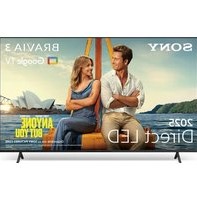
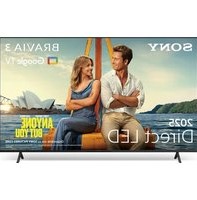
Bravia KD-55X7500H - Téléviseur SONY - Notice d'utilisation et mode d'emploi gratuit
Retrouvez gratuitement la notice de l'appareil Bravia KD-55X7500H SONY au format PDF.


| Type de produit | Téléviseur LED 4K Ultra HD |
| Marque | Sony |
| Modèle | Bravia KD-55X7500H |
| Taille de l'écran (diagonale) | 55 pouces (139 cm) |
| Résolution | 3840 x 2160 pixels (4K) |
| Technologie d'affichage | LED LCD avec rétroéclairage Direct LED |
| HDR | HDR10, HLG, Dolby Vision |
| Système d'exploitation | Android TV 9.0 Pie |
| Processeur | X1 4K HDR Processor |
| Connectivité | HDMI (3), USB (2), Ethernet, Wi-Fi 802.11ac, Bluetooth 4.2 |
| Dimensions sans pied (L x H x P) | 123,3 x 71,3 x 5,9 cm |
| Dimensions avec pied (L x H x P) | 123,3 x 78,1 x 26,9 cm |
| Poids sans pied | 17,3 kg |
| Poids avec pied | 17,7 kg |
| Consommation électrique (veille) | 0,5 W |
| Consommation électrique (typique) | 95 W |
| Tension d'alimentation | 220-240 V, 50/60 Hz |
| Fonctions principales | Smart TV avec Google Assistant, Chromecast intégré, Netflix, YouTube, Amazon Prime Video |
| Compatibilité montage mural | VESA 200 x 200 mm |
| Entretien et nettoyage | Éteindre et débrancher avant nettoyage ; utiliser un chiffon sec et doux |
| Sécurité | Arrêt automatique, verrouillage parental, support mural recommandé |
| Pièces détachées et réparabilité | Indice de réparabilité 6,8/10 ; pièces disponibles via réseau agréé |
FOIRE AUX QUESTIONS - Bravia KD-55X7500H SONY
Questions des utilisateurs sur Bravia KD-55X7500H SONY
0 question sur cet appareil. Repondez a celles que vous connaissez ou posez la votre.
Poser une nouvelle question sur cet appareil
Téléchargez la notice de votre Téléviseur au format PDF gratuitement ! Retrouvez votre notice Bravia KD-55X7500H - SONY et reprennez votre appareil électronique en main. Sur cette page sont publiés tous les documents nécessaires à l'utilisation de votre appareil Bravia KD-55X7500H de la marque SONY.
MODE D'EMPLOI Bravia KD-55X7500H SONY
5-013-272-13(1)
(Except models with supplied support belt kit) KD-65X7577H / 65X7500H

Television
Reference Guide

BRAVIA
KD-65X7577H / 65X7500H / 55X7577H / 55X7500H / 49X7500H / 43X7500H
About Manuals
This TV comes with the following manuals. Please retain the manuals for future reference.
Setup Guide
• TV installation and setup.

Reference Guide (this manual) / Safety Documentation
- Safety information, remote control, troubleshooting, wall-mount installation, specification, etc.

Help Guide (On screen Manual)
- Settings, Android TV functions, Internet connection, troubleshooting, etc.
- To open it, press the HELP button on the remote control and select Help Guide.

- You can refer to the Help Guide with your smartphone.

https://rd1.sony.net/help/tv/ggar1/h_ga/
IMPORTANT – Read the End User Software Licence Agreement before using your Sony product. Using your product indicates your acceptance of the End User Software Licence Agreement. The software licence agreement between you and Sony is available online at Sony website (http://www.sony.net/tv-software-licenses2/) or on your product screen. Go to [Settings] → [BRAVIA Settings] → [Customer Support] → [Notices and licences].
Note
- Before operating the TV, please read the "Safety Information"
- Read the supplied safety documentation for additional safety information
- Instructions about "Installing the TV to the Wall" are included within this TV's instruction manual.
- Images and illustrations used in the Setup Guide and this manual are for reference only and may differ from the actual product.
Location of the identification label
Labels for the TV Model No. and Power Supply rating are located on the rear of the TV.
For models with supplied AC adapter: Labels for AC adapter Model No. and Serial No. are located on the bottom of AC adapter.
Safety Information
Installation/Set-up
Install and use the TV set in accordance with the instructions below in order to avoid any risk of fire, electric shock or damage and/or injuries. Installation
- The TV set should be installed near an easily accessible AC power outlet (mains socket).
- Place the TV set on a stable, level surface to prevent it from falling over and causing personal injury or property damage.
• Install the TV where it cannot be pulled, pushed, or knocked over.
- Install the TV so that the TV's Table-Top Stand does not protrude out from the TV stand (not supplied). If the Table-Top Stand protrudes out from the TV stand, it may cause TV set to topple over, fall down, and cause personal injury or damage to the TV.


Transporting
- Before transporting the TV set, disconnect all cables.
- Two or more people are needed to transport a large TV set.
- When transporting the TV set by hand, hold it as shown below. Do not
When transporting the TV set by hand, hold it as shown below. put stress on the LCD panel and the frame around the screen. - When lifting or moving the TV set, hold it firmly from the bottom.

- When transporting the TV set, do not subject it to jolts or excessive vibration. - When transporting the TV set for repairs or when moving, pack it using the original carton and packing material.
Topple prevention
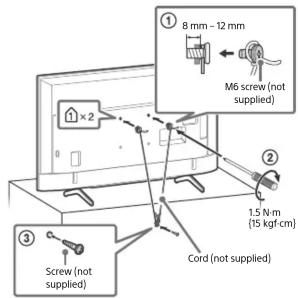
(Models with supplied support belt kit)
Refer to the Setup Guide on top of the cushion. The supplied wood screw is only for affixing to a solid object made of wood.

KD-55X7577H / 55X7500H / 49X7500H / 43X7500H
Notice for customer in UAE
TRA
REGISTERED No: ER75237/19 DEALER No: DA0105422/13
Remote Control and TV
The remote control shape, location, availability and function of remote control buttons may vary depending on your region/country/TV model.
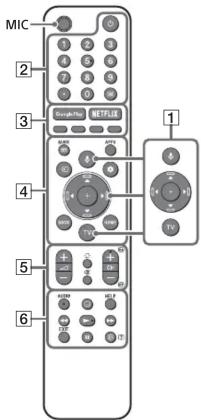
1 ↓(Microphone): Use the Google Assistant* 1*2 or voice search*2.
▲/▼/◄/►/⊕: On screen menu navigation and selection.
TV: Switch to a TV channel or input.
2 ⏻ (TV standby)
Number buttons
(dot)
(Text): Display text information.
3 Google Play / NETFLIX ^1*3 / Colour buttons
4 GUIDE: Display the digital programme guide of TV or TV box ^*1 .
APPS: Display a list of installed apps.
→ (Input select): Display and select the input source, etc.
(Action menu): Display Action menu.
BACK
HOME
5 ∠ +/- (Volume)
(Jump) (Mute)
CH +/-/▲/▼: Select the channel, or next (▲) / previous (▼) page.
6 AUDIO ^4 : Select the sound of multilingual source or dual sound (depend on programme source).
(Subtitle setting)
HELP: Display the Customer Support menu.
◀/▶/▶/||
EXIT
i+/? ( I n f o / Display information. e v e a l ) :
KD-65X7577H / 65X7500H

KD-55X7577H / 55X7500H / 49X7500H / 43X7500H

7 ⏻ (Power)/+/-
8 Remote Control sensor / LED
*1 Only on limited region/country/TV model/language.
*2 The Google Assistant or voice search requires an Internet connection.
*3 Installation might be required depending on region/country
*4 Accessibility shortcut is available by pressing and holding AUDIO

For more information, refer to the Help Guide.
Installing the TV to the Wall
Using the optional Wall-Mount Bracket (SU-WL450)\* (not supplied)
To Customers:
For product protection and safety reasons, Sony strongly recommends that installation of your TV be performed by Sony dealers or licensed contractors. Do not attempt to install it yourself.
To Sony Dealers and Contractors:
Provide full attention to safety during the installation, periodic maintenance and examination of this product.
Wall-Mount Bracket Installation Information
This TV's instruction manual only provides the steps to prepare the TV for Wall-Mount installation before it is installed on the wall. For instructions on Wall-Mount Bracket installation, see the Installation Information (Wall-Mount Bracket) on the product page for your TV model.
https://www.sony-asia.com/support
Preparing for Wall-Mount Installation
- Prepare the TV for the Wall-Mount Bracket before making cable connections.
- Follow the instruction guide provided with the Wall-Mount Bracket for your model. Sufficient expertise is required in installing this TV, especially to determine the strength of the wall for withstanding the TV's weight.
- Be sure to entrust the attachment of this product to the wall to Sony dealers or licensed contractors and pay adequate attention to safety during the installation. Sony is not liable for any damage or injury caused by mishandling or improper installation.
- The screws for Wall-Mount Bracket are not supplied.
- Only qualified service personnel should carry out wall-mount installations.
- For safety reasons, it is strongly recommended that you use Sony accessories, including: —Wall-Mount Bracket SU-WL450
- Be sure to use the screws supplied with the Wall-Mount Bracket when attaching the Wall-Mount Bracket to the TV set. The supplied screws are designed as indicated by illustration when measured from the attaching surface of the Wall-Mount Bracket. The diameter and length of the screws differ depending on the Wall-Mount Bracket model. Use of screws other than those supplied may result in internal damage to the TV set or cause it to fall, etc.

- Be sure to store the unused screws and Table-Top Stand in a safe place until you are ready to attach the Table-Top Stand. Keep the screws away from small children.
* Only on limited region/country/TV model.
Note
- Place the TV with its screen facing down on a level and stable surface covered with a thick and soft cloth when removing the Table-Top Stand from the TV to prevent damaging the surface of the LCD display. (KD-49X7500H / 43X7500H)
Remove the screws from the rear of the TV.
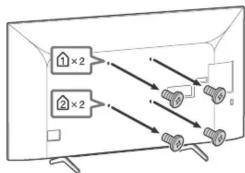
Detaching the Table-Top Stand from the TV KD-65X7577H / 65X7500H
1 Remove one side of the Table-Top Stand at a time. Firmly hold the Table-Top Stand securely with both hands while the other people lift up the TV.
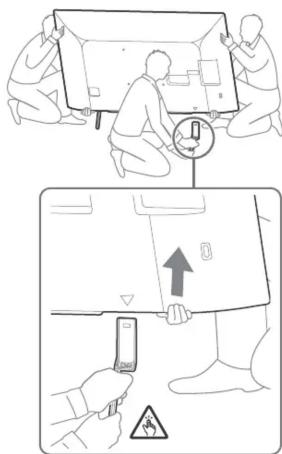
2 Repeat the previous step and remove the other side of the Table-Top Stand.
Note
- Three or more people are required to detach the Table-Top Stand.
- Be careful not to use excessive force while detaching the Table-Top Stand from the TV as it may cause the TV set to fall resulting in personal injury or physical damage to the TV.
• Take care when handling the Table-Top Stand to prevent damage to the TV. - Be careful when lifting the TV as the Table-Top Stand is detached, the Table-Top Stand may topple over and cause personal injury.
• Take care when removing the Table-Top Stand from the TV to prevent it from falling over and damaging the surface that the TV is sitting on.
KD-55X7577H / 55X7500H

natural_image
Line drawing of a flat-screen TV with mounting brackets and connectors (no text or symbols)KD-49X7500H / 43X7500H

natural_image
Technical line drawing of a rectangular electronic component with mounting holes and internal structure (no text or symbols)Troubleshooting
General troubleshooting for issues like: black screen, no sound, frozen picture, TV does not respond, or network is lost, do the following steps.
1 Restart your TV by pressing the power button on the remote control until a menu appears. Select Restart to restart the TV. If the TV does not recover, try unplugging the AC power cord (mains lead). Then press the power button on the TV, and release it. Wait for two minutes, and plug in the AC power cord (mains lead).
2 Refer to the Help Guide in Customer Support by pressing HELP on the remote control.
3 Connect your TV to the Internet and perform a software update. Sony recommends you to keep your TV software updated. Software updates provide new features and performance improvements.
4 Visit Sony support website (information provided at the end of this manual).
When you plug in the TV, the TV may not be able to turn on for a while even if you press the power button on the remote control or the TV.
It takes time to initialize the system. Wait for about one minute, then operate it again.
The remote control does not function. Replace the batteries.
The parental lock password has been forgotten. - Enter 4357 for the PIN and enter the new PIN.

For more information on troubleshooting, refer to the Help Guide.
Specifications
System
Panel system: LCD (Liquid Crystal Display) Panel, LED Backlight
TV system: Depend on your country/area selection Analogue: B/G, I, D/K, M Digital: DVB-T/DVB-T2
Colour system: PAL/SECAM/NTSC3.58/NTSC4.43
Channel coverage: Depend on your country/area selection
Analogue: UHF/VHF/Cable
Digital: UHF/VHF
Sound output: 10 W + 10 W
Wireless technology
Protocol IEEE 802.11a/b/g/n/ac (IEEE 802.11ac may not be available depending on countries/regions.) Bluetooth® Version 4.2
Input/Output jacks
Antenna (aerial)/cable
75 ohm external terminal for VHF/UHF
→ / → A V I N
Video/Audio input (phono jacks)
HDMI IN 1/2/3 (support 4K resolution, HDCP
2.3-compatible)
Video
4096 × 2160p (50, 60 Hz) ^1 , 4096 × 2160p (24 Hz), 3840 × 2160p (50, 60 Hz) ^1 , 3840 × 2160p (24, 25, 30 Hz), 1080p (30, 50, 60 Hz), 1080/24p, 1080i (50, 60 Hz), 720p (30, 50, 60 Hz), 720/24p, 576p, 576i, 480p, 480i, PC Formats ^*2
Audio:
Two channel linear PCM: 32/44.1/48 kHz 16/20/24 bits, Dolby Audio, DTS HD
ARC (Audio Return Channel) (HDMI IN 3 only)*3
Two channel linear PCM: 48 kHz 16 bits, Dolby Audio, DTS
→ DIGITAL AUDIO OUT (OPTICAL)
Digital optical jack (Two channel linear PCM: 48 kHz 16 bits, Dolby Audio, DTS)
○ (Stereo mini jack)
Headphone
1, 2
USB port 1 and 2 support High Speed USB (USB 2.0)
LAN
10BASE-T/100BASE-TX connector (Depending on the operating environment of the network, connection speed may differ. The communication rate and quality are not guaranteed.)
DC IN 19.5 V (models with supplied AC adapter
only)
AC adapter input
Power and others
Power requirements
except models with supplied AC adapter
110 V - 240 V AC, 50/60 Hz
models with supplied AC adapter only
19.5 V DC with AC adapter
Rating: Input 100 V - 240 V AC, 50/60 Hz
Energy Efficiency Class*4
(For Jordan only)
KD-65X7577H / 65X7500H: B
KD-55X7577H / 55X7500H: B
KD-49X7500H: A
KD-43X7500H: A
(For Egypt only)
KD-65X7577H / 65X7500H: C
KD-55X7577H / 55X7500H: C
KD-49X7500H: B
KD-43X7500H: C
Screen size (measured diagonally) (Approx.)
KD-65X7577H / 65X7500H: 65 inches / 163.9 cm
KD-55X7577H / 55X7500H: 55 inche
KD-49X7500H: 49 inches / 123.2 cm
KD-43X7500H: 43 inches / 108.0 cm
Power consumption
Indicated on the rear of the TV
Power consumption*4
In [Standard] mode
(For Jordan only)
KD-65X7577H / 65X7500H: 163 W
KD-55X7577H / 55X7500H: 118 W
KD-49X7500H: 76 W
KD-43X7500H: 68 W
(For Egypt only)
KD-65X7577H / 65X7500H: 162 W
KD-55X7577H / 55X7500H: 117 W
KD-49X7500H: 75.3 W
KD-43X7500H: 66.9 W
In [Vivid] mode
KD-65X7577H / 65X7500H: 241 W
KD-55X7577H / 55X7500H: 174 W
KD-49X7500H: 100 W
KD-43X7500H: 95 W
Annual energy consumption ^4
(For Jordan only)*5
KD-65X7577H / 65X7500H: 238 kWh per year
KD-55X7577H / 55X7500H: 172 kWh per year
KD-49X7500H: 111 kWh per year
KD-43X7500H: 99 kWh per year
(For Egypt only)* ^c
KD-65X7577H / 65X7500H: 450 kWh per year
KD-55X7577H / 55X7500H: 325 kWh per year
KD-49X7500H: 209 kWh per year
KD-43X7500H: 186 kWh per year
Standby power consumption ^478 : 0.50 W
Display resolution: 3,840 pixels (horizontal) ×
2,160 lines (vertical)
Output Rating
USB 1/2
5 V = 500 mA MAX
Dimensions (Approx.) (w × h × d) (mm)
with Table-Top Stand (without Table-Top Stand)
KD-65X7577H / 65X7500H: 1,463 x 904 x 340 (1,463 x 845 x 80)
KD-55X7577H / 55X7500H: 1,241 x 781 x 340 (1,241 x
721 × 79)
KD-49X7500H: 1,101 x 702 x 286 (1,101 x 645 x 57)
KD-43X7500H: 970 x 628 x 286 (970 x 570 x 57)
Mass (Approx.) (kg)
with Table-Top Stand (without Table-Top Stand)
KD-65X7577H / 65X7500H: 21 (20.1)
KD-55X7577H / 55X7500H: 15.9 (15)
KD-49X7500H: 12.5 (12)
KD-43X7500H: 10.1 (9.6)
Others
Optional accessories
Wall-Mount Bracket: SU-WL450
Operating temperature: 0 °C – 40 °C
*1 To support 18 Gbps, set [HDMI signal format] to [Enhanced format].
*2 Refer to the Help Guide for details
*3 Connect your audio system to the HDMI IN 3 to route TV audio to your audio system.
*4 This information is for EU and other countries whose relevant regulation is based on EU energy labelling regulation.
*5 Energy consumption in kWh per year, based on the power consumption of the television operating 4 hours per day for 365 days. The actual energy consumption will depend on how the television is used.
*6 Energy consumption in kWh per year, based on the power consumption of the television operating 8 hours per day for 365 days. The actual energy consumption will depend on how the television is used.
*7 Specified standby power is reached after the TV finishes necessary internal processes.
*8 Standby power consumption will increase when your TV is connected to the network.
Note
- Optional accessories availability depends on countries/region/TV model/stock.
- Design and specifications are subject to change without notice.
- Subscriptions for services and applications may be required and additional terms, conditions and/or charges may apply when using the Google Assistant.
Notes on Digital TV function
- Any functions related to Digital TV (DW) will only
work in countries or areas where DVB-T/DVB-T2 (MPEG-2 and H.264/MPEG-4 AVC) digital terrestrial signals are broadcast. Please confirm with your local dealer if you can receive a DVB-T/DVB-T2 signal where you live.
• This TV set complies with DVB-T/DVB-T2
specifications, but compatibility with future DVB-T/DVB-T2 digital terrestrial broadcasts are not guaranteed.
- Some Digital TV functions may not be available in some countries/areas.
Trademark information
• The terms HDMI, HDMI High-Definition Multimedia Interface, and the HDMI Logo are trademarks or registered trademarks of HDMI Licensing Administrator, Inc.
- Manufactured under license from Dolby Laboratories. Dolby, Dolby Audio, and the double-D symbol are trademarks of Dolby Laboratories.
- Google, Google Play, Chromecast, YouTube, Android TV and other related marks and logos are trademarks of Google LLC.
- For DTS patents, see http://patents.dts.com. Manufactured under license from DTS, Inc. DTS, the Symbol, DTS and the Symbol together, DTS-HD, and the DTS-HD logo are registered trademarks or trademarks of DTS, Inc. in the United States and/or other countries. © DTS, Inc. All Rights Reserved.
• Netflix is a registered trademark of Netflix, Inc.
- All other trademarks are the property of their respective owners.

HIGH-DEFINITION MULTIMEDIA INTERFACE

DOLBY
AUDIO


Support
https://www.sony-asia.com/support
[Non-Text]
[Non-Text]
[Non-Text]
[Non-Text]
广力云智慧零售收银系统
[Non-Text]
[Non-Text]
[Non-Text]
[Non-Text]
(1)
[Non-Text]
[Non-Text]
[Non-Text]
(1)基因通过控制 通过控制____,____的合成来控制代谢过程,进而控制生物体的性状。
[Non-Text]
[Non-Text]
[Non-Text]
[Non-Text]
[Non-Text]
[Non-Text]
[Non-Text]
[Non-Text]
[Non-Text]
[Non-Text]
[Non-Text]
[Non-Text]
[Non-Text]
[Non-Text]
[Non-Text]
[Non-Text]
[Non-Text]
[Non-Text]
[Non-Text]
[Non-Text]
[Non-Text]
[Non-Text]
[Non-Text]
[Non-Text]
[Non-Text]
[Non-Text]
[Non-Text]
[Non-Text]
[Non-Text]
[Non-Text]
[Non-Text]
[Non-Text]
[Non-Text]
[Non-Text]
[Non-Text]
[Non-Text]
[Non-Text]
[Non-Text]
[Non-Text]
[Non-Text]
[Non-Text]
[Non-Text]
[Non-Text]
[Non-Text]
[Non-Text]
[Non-Text]
[Non-Text]
[Non-Text]
[Non-Text]
[Non-Text]
[Non-Text]
[Non-Text]
[Non-Text]
[Non-Text]
[Non-Text]
[Non-Text]
[Non-Text]
[Non-Text]
[Non-Text]
[Non-Text]
[Non-Text]
[Non-Text]
[Non-Text]
[Non-Text]
[Non-Text]
[Non-Text]
[Non-Text]
[Non-Text]
[Non-Text]
[Non-Text]
[Non-Text]
[Non-Text]
[Non-Text]
[Non-Text]
[Non-Text]
[Non-Text]
[Non-Text]
[Non-Text]
[Non-Text]
[Non-Text]
[Non-Text]
© 20
[Non-Text]
[Non-Text]
[Non-Text]
[Non-Text]
[Non-Text]
[Non-Text]
[Non-Text]
[Non-Text]
[Non-Text]
[Non-Text]
[Non-Text]
© 20
[Non-Text]
[Non-Text]
[Non-Text]
[Non-Text]
[Non-Text]
[Non-Text]
https://www.sony-asia.com/support
The Ground Truth image displays a single, solid horizontal line, which is a stylistic or background element (like a rule line on paper). According to Rule 2, such lines must be ignored by the OCR result. The provided OCR content is "____", which consists of underscores. Underscores are not equivalent to a solid line and are not permitted under the “Stylistic/Background Lines (Ignore)” rule. Outputting underscores for a stylistic line is incorrect because it misinterprets the line as a placeholder fill-in-the-blank area. Since the OCR output incorrectly rendered a stylistic line as underscores (which should be ignored), this violates the rule. Therefore, the OCR result is inconsistent with the Ground Truth.
[Non-Text]
[Non-Text]
[Non-Text]
[Non-Text]
[Non-Text]
[Non-Text]
[Non-Text]
[Non-Text]
[Non-Text]
[Non-Text]
[Non-Text]
[Non-Text]
[Non-Text]
- Television
- Reference Guide
- BRAVIA
- About Manuals
- Setup Guide
- Reference Guide (this manual) / Safety Documentation
- Help Guide (On screen Manual)
- Note
- Location of the identification label
- Safety Information
- Installation/Set-up
- Transporting
- Topple prevention
- (Models with supplied support belt kit)
- TRA
- Remote Control and TV
- ⏻ (TV standby)
- Number buttons
- Google Play / NETFLIX 1*3 / Colour buttons
- HOME
- ∠ +/- (Volume)
- (Subtitle setting)
- ◀/▶/▶/||
- EXIT
- ⏻ (Power)/+/-
- Remote Control sensor / LED
- Installing the TV to the Wall
- Using the optional Wall-Mount Bracket (SU-WL450)\* (not supplied)
- To Customers:
- To Sony Dealers and Contractors:
- Wall-Mount Bracket Installation Information
- Preparing for Wall-Mount Installation
- Detaching the Table-Top Stand from the TV KD-65X7577H / 65X7500H
- Repeat the previous step and remove the other side of the Table-Top Stand.
- Troubleshooting
- Specifications
- System
- Input/Output jacks
- Power and others
- Dimensions (Approx.) (w × h × d) (mm)
- Mass (Approx.) (kg)
- Others
- Notes on Digital TV function
- Trademark information
- [Non-Text]
Marque : SONY
Modèle : Bravia KD-55X7500H
Catégorie : Téléviseur