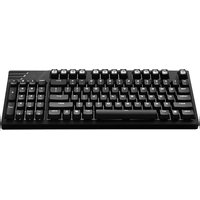
QuickFire TK - Clavier CM Storm - Notice d'utilisation et mode d'emploi gratuit
Retrouvez gratuitement la notice de l'appareil QuickFire TK CM Storm au format PDF.


| Type de produit | Clavier mécanique gaming |
| Marque | CM Storm (Cooler Master) |
| Modèle | QuickFire TK |
| Dimensions | 354 x 129 x 34 mm |
| Poids | Environ 1,1 kg |
| Alimentation | USB 2.0, 5V, 500mA |
| Type de touches | Mécaniques Cherry MX (selon variante : bleu, rouge, marron) |
| Rétroéclairage | LED (selon version, rouge ou blanc) |
| Format | 80 % (compact avec touches de navigation et pavé numérique intégré) |
| Fonctions multimédia | Via combinaison FN (volume, lecture, etc.) |
| Anti-ghosting | Oui, N-key rollover sur USB |
| Verrouillage Windows | Oui, touche dédiée ou combinaison FN |
| Longueur du câble | Environ 1,8 mètre |
| Matériau du boîtier | Plastique ABS, surface mate |
| Repose-poignet | Non amovible, intégré |
| Entretien et nettoyage | Chiffon doux sec, éviter solvants. Débrancher avant nettoyage. |
| Sécurité | Ne pas exposer à l'humidité ou aux liquides. Ne pas démonter. |
| Pièces détachées et réparabilité | Touches amovibles, mais switches soudés. Contactez SAV pour réparation. |
| Informations générales | Clavier mécanique conçu pour le gaming, layout compact avec pavé numérique intégré. |
FOIRE AUX QUESTIONS - QuickFire TK CM Storm
Questions des utilisateurs sur QuickFire TK CM Storm
0 question sur cet appareil. Repondez a celles que vous connaissez ou posez la votre.
Poser une nouvelle question sur cet appareil
Téléchargez la notice de votre Clavier au format PDF gratuitement ! Retrouvez votre notice QuickFire TK - CM Storm et reprennez votre appareil électronique en main. Sur cette page sont publiés tous les documents nécessaires à l'utilisation de votre appareil QuickFire TK de la marque CM Storm.
MODE D'EMPLOI QuickFire TK CM Storm
Thank you for purchasing the CM Storm Quick Fire TK!
A rugged gaming keyboard using the highest grade gold plated mechanical switches (CHERRY MX) rated for over 50 million keystrokes.
Using Your CM Storm Quick Fire TK Keyboard
Accessing Advanced Functions
Just like on a Laptop, pressing the FN key at the same time as any of the F1-F12 keys enables a second function programmed to this key.
By holding the FN key pressed for 3 seconds you can lock the FN key in an always on state. Pressing the FN key for 3 seconds again restores the F1-F12 keys to their default functions.
LED Backlight Control

→ ON/OFF

→ Brightness down
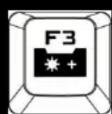
→ Brightness up

→ LED mode
Mode 1: Gaming Cluster (W, A, S, D)
Mode 2: Full LED backlight
Mode 3: Full LED backlight (breathing)
Media Keys
In FN-Lock mode F5-F11 act as media keys and let you control your favorite media player as well as your speaker/headset volume.

Windows Key Lock
In FN-Lock mode F12 key lets you disable the Windows keys so you don't get kicked out of a gaming session by accident.

Switching between full N key and 6 key rollover
In FN-Lock mode pressing the ESC and N key at the same time switches the Keyboard to NKRO mode. Pressing the ESC and 6 key switches the Keyboard to 6KRO mode.

+
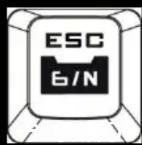
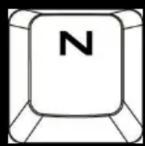
+

→
Full NKRO
Note: NKRO mode is not supported on MACs and prevents some PCs from booting
Package Content:
- Quick Fire TK Mechanical Gaming Keyboard
- User Guide
- Keycap puller
- 1.8 m braided USB Cable
System Requirements
- PC or PC compatible device with a USB port
Windows® XP/Vista/7/8
Warranty
2 years limited manufacturer warranty
Damages as a result of removing keycaps improperly are not covered by the warranty
Technical Support
Free technical support and FAQs can be found on www.cmstorm.com
For free live-chat support visit www.coolermaster.com/livehelp
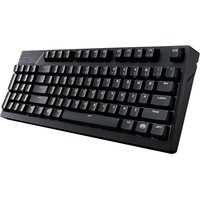
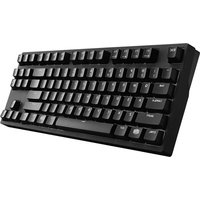
Marque : CM Storm
Modèle : QuickFire TK
Catégorie : Clavier