
Headset 730 - Casque CISCO - Notice d'utilisation et mode d'emploi gratuit
Retrouvez gratuitement la notice de l'appareil Headset 730 CISCO au format PDF.


| Type de produit | Casque sans fil |
| Marque | Cisco |
| Modèle | Headset 730 |
| Dimensions (L x l x H) | 17 x 16 x 5 cm |
| Poids | 150 g |
| Alimentation | Batterie lithium-ion rechargeable |
| Autonomie | Jusqu'à 12 heures en conversation |
| Temps de charge | Environ 1,5 heures |
| Connectivité | Bluetooth 5.0 |
| Portée Bluetooth | Jusqu'à 30 mètres |
| Réduction de bruit | Active (ANC) et passive |
| Microphone | Microphone omnidirectionnel avec réduction de bruit |
| Fonctions principales | Contrôle des appels, volume, muet; assistant vocal |
| Entretien et nettoyage | Nettoyer avec un chiffon doux et sec; ne pas utiliser de produits chimiques |
| Sécurité | Éviter l'exposition à l'humidité et aux températures extrêmes |
| Pièces détachées et réparabilité | Rembourrage d'oreillettes et câble de charge disponibles |
| Informations générales | Casque professionnel pour communications Cisco Unified Communications |
FOIRE AUX QUESTIONS - Headset 730 CISCO
Questions des utilisateurs sur Headset 730 CISCO
0 question sur cet appareil. Repondez a celles que vous connaissez ou posez la votre.
Poser une nouvelle question sur cet appareil
Téléchargez la notice de votre Casque au format PDF gratuitement ! Retrouvez votre notice Headset 730 - CISCO et reprennez votre appareil électronique en main. Sur cette page sont publiés tous les documents nécessaires à l'utilisation de votre appareil Headset 730 de la marque CISCO.
MODE D'EMPLOI Headset 730 CISCO
Cisco Headset 730
Quick Reference Guide
Turn your headset on and off
Slide the Power/Bluetooth switch on the left ear cup to the center. To turn your headset off, slide the switch down.
Pair your headset
Make sure your headset is within 3 feet (1 meter) of your intended Bluetooth device.
- Slide up and hold the Power/Bluetooth switch on the left ear cup to set your headset to pair.
- In your device settings, select your headset. Your headset displays as Cisco HS 730 followed by the last three digits of your headset serial number.
Activate NC and AMB
The Cisco Headset 730 offers two noise control functions. Noise Cancellation (NC) limits surrounding ambient noise. Ambient mode (AMB) uses your headset microphones to enhance your surroundings and enable you to talk to others around you.
To activate AMB or NC, slide the Noise Cancellation slider on the right ear cup up or down.
Cisco Headsets

You can customize your headset settings and upgrade your headset through the Cisco Headsets app. Download Cisco Headsets to your Apple or Android mobile device.


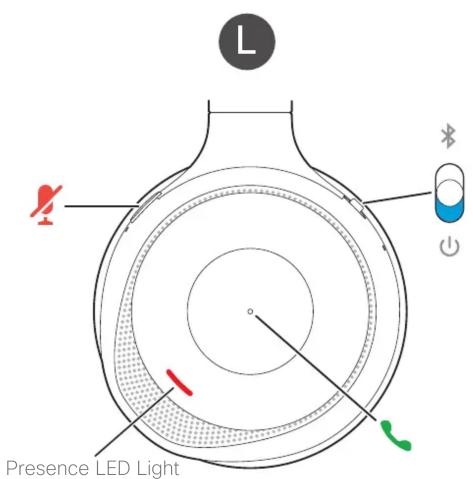
Left buttons and icons
| Bluetooth | |
| Power | |
| Call button | |
| Mute |

Right buttons and icons
| AMB | Ambient mode |
| NC | Noise Cancellation |
| // ▶ | Play button |
| +/- | Volume control |
| < / > | Skip a music track |
Music and Call Controls Headset PowerOther Headset Features
Answer a call
Press the Call button on the face of the left ear cup.
End a call
Hold the Call button on the face of the left ear cup until you hear a tone.
Adjust the volume
Press + or - on the face of the right ear cup.
Reject a call
Press the Call button twice.
Place a call on hold
Press the Call button once while on a call.
Mute your microphone
Press on the top of the left ear cup while on a call.
Pause and play your audio
Press the Play button on the face of the right ear cup.
Skip a track
Press < or > on the face of the right ear cup.
Activate your voice assistant
Press the Play button on the right ear cup twice.
Presence LED Lights
The Presence LED Lights on the headset automatically light up when you're on a call to indicate that you're busy.
When you aren't on a call, you can hold the Play button on the right ear cup to turn the Presence LED Lights on and off.
USB Adapter
The Cisco Headset 730 comes with a pre-paired USB Adapter for use with call devices that don't have a Bluetooth option. When the adapter is plugged in to a powered USB port, it automatically connects to your headset.

Unplug your adapter from the call device to disconnect your headset.
Charge your headset
Plug the USB-C cable into the left ear cup and the other end into a powered USB port.
It takes approximately 2.5 hours for the headset to fully charge.

Check your battery charge
Slide the switch on the left ear cup up and let go. The battery status LED displays one of these battery charge indications:
Full
Medium
Low
You can also listen to the battery prompt in the headset or check the Cisco Headsets app for more precise battery information.
For more information, visit:
https://www.cisco.com/go/headsetsupport
This product operates with the 2400 MHz to 2483.5 MHz band at a maximum radiated output power of 20 dBm (100 mW) EIRP.
Cisco and the Cisco logo are trademarks or registered trademarks of Cisco and/or its affiliates in the U.S. and other countries. To view a list of Cisco trademarks, go to this URL: www.cisco.com/go/trademarks. Third-party trademarks mentioned are the property of their respective owners. The use of the word partner does not imply a partnership relationship between Cisco and any other company.(OR)
cisco

- CISCO HEADSET 730
- TURN YOUR HEADSET ON AND OFF
- PAIR YOUR HEADSET
- ACTIVATE NC AND AMB
- CISCO HEADSETS
- MUSIC AND CALL CONTROLS HEADSET POWEROTHER HEADSET FEATURES
- ANSWER A CALL
- END A CALL
- ADJUST THE VOLUME
- REJECT A CALL
- PLACE A CALL ON HOLD
- MUTE YOUR MICROPHONE
- PAUSE AND PLAY YOUR AUDIO
- SKIP A TRACK
- ACTIVATE YOUR VOICE ASSISTANT
- PRESENCE LED LIGHTS
- USB ADAPTER
- CHARGE YOUR HEADSET
- CHECK YOUR BATTERY CHARGE
- FOR MORE INFORMATION, VISIT
Marque : CISCO
Modèle : Headset 730
Catégorie : Casque