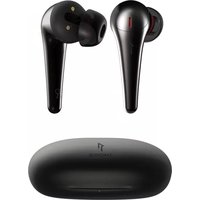
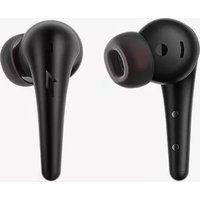
ComfoBuds Pro - Casque 1More - Notice d'utilisation et mode d'emploi gratuit
Retrouvez gratuitement la notice de l'appareil ComfoBuds Pro 1More au format PDF.


Choisissez votre langue et indiquez votre email : nous vous enverrons une version traduite specifiquement.
| Type de produit | Casque intra-auriculaire true wireless |
| Modèle | 1More ComfoBuds Pro |
| Marque | 1More |
| Dimensions (écouteur) | Environ 24.2 x 21.5 x 19.8 mm |
| Dimensions (boîtier) | Environ 55 x 44 x 22 mm |
| Poids (par écouteur) | Environ 5 g |
| Poids (boîtier de charge) | Environ 38 g |
| Type d'alimentation | Batterie lithium-ion rechargeable |
| Capacité de la batterie (écouteur) | 55 mAh chacun |
| Capacité de la batterie (boîtier) | 410 mAh |
| Autonomie (écouteurs seuls) | Jusqu'à 8 heures (avec ANC) |
| Autonomie (avec boîtier) | Jusqu'à 28 heures |
| Temps de charge (écouteurs) | Environ 1 heure |
| Temps de charge (boîtier) | Environ 2 heures |
| Fonctions principales | Réduction de bruit active (ANC), mode transparence, contrôle tactile, étanchéité IPX5 |
| Connectivité | Bluetooth 5.0 |
| Codecs audio | AAC, SBC |
| Entretien et nettoyage | Nettoyer avec un chiffon doux et sec. Ne pas utiliser de liquides agressifs. |
| Sécurité | Éviter l'exposition à l'eau excessive. Utiliser uniquement le câble de charge fourni. |
| Pièces détachées et réparabilité | Embouts de rechange disponibles. Pour toute réparation, contacter le service client. |
FOIRE AUX QUESTIONS - ComfoBuds Pro 1More
Comment appairer les écouteurs avec mon téléphone ?
Ouvrez le boîtier de charge, les écouteurs entrent automatiquement en mode appairage. Activez le Bluetooth sur votre téléphone et sélectionnez 1More ComfoBuds Pro.
Comment activer la réduction de bruit active (ANC) ?
Appuyez deux fois sur l'écouteur gauche ou droit pour basculer entre les modes ANC, transparence et désactivé. Vous pouvez aussi utiliser l'application 1More Music.
Quelle est l'autonomie de la batterie ?
Les écouteurs offrent jusqu'à 8 heures d'écoute avec ANC activé, et le boîtier fournit 20 heures supplémentaires, soit un total de 28 heures.
Comment recharger les écouteurs ?
Placez les écouteurs dans le boîtier de charge et fermez-le. Le boîtier se recharge via un câble USB-C. Assurez-vous que les contacts sont propres.
Les écouteurs sont-ils résistants à l'eau ?
Oui, ils sont certifiés IPX5, ce qui les protège contre la sueur et les légères éclaboussures, mais pas contre l'immersion.
Comment changer les embouts ?
Tirez doucement sur l'embout pour le retirer, puis emboîtez un nouvel embout de taille adaptée. Assurez-vous qu'il est bien fixé.
Pourquoi un seul écouteur fonctionne-t-il ?
Vérifiez que les deux écouteurs sont chargés et que l'application est à jour. Essayez de réinitialiser en maintenant le bouton du boîtier enfoncé 10 secondes.
Comment passer un appel avec les écouteurs ?
Les écouteurs sont équipés de microphones. Appuyez une fois sur l'écouteur pour répondre ou raccrocher, et maintenez pour refuser un appel.
Puis-je utiliser un seul écouteur en mode mono ?
Oui, chaque écouteur fonctionne indépendamment. Retirez un seul écouteur du boîtier et il se connectera automatiquement.
Comment nettoyer les écouteurs ?
Utilisez un chiffon doux et sec. Pour les grilles, utilisez une brosse douce. Évitez tout liquide pénétrant dans les ouvertures.
Questions des utilisateurs sur ComfoBuds Pro 1More
0 question sur cet appareil. Repondez a celles que vous connaissez ou posez la votre.
Poser une nouvelle question sur cet appareil
Aucune question pour l'instant. Soyez le premier à en poser une.
Téléchargez la notice de votre Casque au format PDF gratuitement ! Retrouvez votre notice ComfoBuds Pro - 1More et reprennez votre appareil électronique en main. Sur cette page sont publiés tous les documents nécessaires à l'utilisation de votre appareil ComfoBuds Pro de la marque 1More.
MODE D'EMPLOI ComfoBuds Pro 1More
1MORE MUSIC APP For users outside mainland China, please download the 1MORE MUSIC APP for product upgrades and additional features. For users outside mainland China, please download the 1MORE MUSIC APP for product upgrades and additional features. | Inside The Box  Headphones + 1 Par Charging Case × 1(65 / 8 / L) Headphones + 1 Par Charging Case × 1(65 / 8 / L)   Warranty Card × User Guide × Carrying Pouch × 1 Warranty Card × User Guide × Carrying Pouch × 1 |
Product Overview | Replace Placement[94X] Placement[94X] |
Power *Above functions are available for either earbud in individual or Stereo mode.Headphones Pairing[204X] *Above functions are available for either earbud in individual or Stereo mode.Headphones Pairing[204X] | Bluetooth Pairing To The Device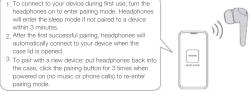 *Above functions are available for either earbud in individual or Stereo mode.Charging Methods *Above functions are available for either earbud in individual or Stereo mode.Charging Methods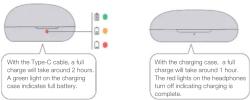 |
Battery Status Display in 1MORE MUSIC APP Touch ControlsBattery status of headphones and charging case will be displayed in 1MORE MUSIC APP. Battery Notification[341Y] Battery Notification[341Y] | Phone calls and music can be controlled by tapping on the Touch Control area of the headphone.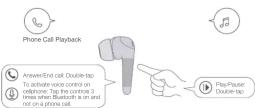 *To decline a call, please operate on paired mobile phone.*To change a song or control volume, please set up on *MORE MUSIC APP or operate on paired mobile phone or device.[87X]*Above functions are available for either headphone in individual or Stereo mode.*Above functions may vary with different devices. *To decline a call, please operate on paired mobile phone.*To change a song or control volume, please set up on *MORE MUSIC APP or operate on paired mobile phone or device.[87X]*Above functions are available for either headphone in individual or Stereo mode.*Above functions may vary with different devices. |
Auto Pause/Play:Playback will auto pause when it detects the earbuds are removed from the ears, it will auto play when it detects they are on again.[844X] ANC-Strong, ANC-Mild, WNR and Pass-through Modes(1 ANC-Strong suitable for aviation, high-speed train, metro etc.(2 ANC-Mild suitable for noisy daily circumstances, such as mails, cables, streets etc.(3 WNR Mode (Wind Noise Resistance) : Helps attenuate audible-wind noise while listening.R Press Through Mode: Let's in environmental sounds so you don't need to take out the earbuds to hear what is going on around you.The default setting of the headphones is: ANC-Strong/Pass-through (Touch and hold the Touch Control to switch on Left/Right headphone)[384X] ANC-Strong, ANC-Mild, WNR and Pass-through Modes(1 ANC-Strong suitable for aviation, high-speed train, metro etc.(2 ANC-Mild suitable for noisy daily circumstances, such as mails, cables, streets etc.(3 WNR Mode (Wind Noise Resistance) : Helps attenuate audible-wind noise while listening.R Press Through Mode: Let's in environmental sounds so you don't need to take out the earbuds to hear what is going on around you.The default setting of the headphones is: ANC-Strong/Pass-through (Touch and hold the Touch Control to switch on Left/Right headphone)[384X] | Set up personal listening mode in 1MORE MUSIC APP.[1084]ANC-Mild and WNR are included in 1MORE MUSIC APP, with ANC-Strong together for personal setup. Extra Functions1. If headphones cannot pair normally when they power on. Open the case, and quickly click the rating button in the case for 3 times to initiate screening for Left & Right pairing modes.2. To under the cellphonePut both a L/R into the case, and then press and hold the pairing button in the case for 8 seconds.3. OTA Fitness Update: can be done synchronously with 1MORE Assistant APP when Left and Right headphones Bluetooth paired to each other.*Functions of 1MORE MUSIC APP may vary with different earbuds or operating systems. For more details, please contact our customer service. Extra Functions1. If headphones cannot pair normally when they power on. Open the case, and quickly click the rating button in the case for 3 times to initiate screening for Left & Right pairing modes.2. To under the cellphonePut both a L/R into the case, and then press and hold the pairing button in the case for 8 seconds.3. OTA Fitness Update: can be done synchronously with 1MORE Assistant APP when Left and Right headphones Bluetooth paired to each other.*Functions of 1MORE MUSIC APP may vary with different earbuds or operating systems. For more details, please contact our customer service. |
| Model: E5001Headphone Weight: 5.2 gCase Weight: 40 gProduct Weight: 50.4gHeadphone Size: 42 × 23.05 × 20.93 mmCase Size: 60 × 37.5 × 30 mmHeadphone Battery Capacity: 50 m/sCase Battery Capacity: 450 m/sHeadphone Charging Time: 1hCase Charging Time: 2hHeadphone Only/Charged ShHeadphones & Case Fully Charged: 20hPlaytime/ ANC Off:Headphone Fully Charged: 5hHeadphones & Case Fully Charged: 25thHeadphones: SS QWireless Range: 10 mBluetooth Bluetooth®5.0Bluetooth Protocol: HFP / A2DP / AVRCP input: SVM 1&Working Temperature: 0 °C ~ 45 °CFrequency Band: 2.400 GHz ~ 2.4835 GHzThe specifications are acquired from laboratory testiled data.*The playback time, tested under the laboratory condition of AAC format and 50% volume, may vary with different device setting, environments, usage and other factors.Manufacturers: Tianah Acoustic Technology LimitedAstronics, Tenkao Building 1403, Zone A Yantao Industrial Park, Tayuyuan Str.,Nanshon Del., Shenzhen, P.R. ChinaMade in China |
Auto Pause/Play:

Sommaire
Cliquez un titre pour y accéder
Assistant notice
Powered by Anthropic
En attente de votre message
Informations produit
Marque : 1More
Modèle : ComfoBuds Pro
Catégorie : Casque