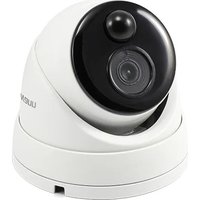
SWNHD-888MSD-EU - Caméra de surveillance SWANN - Notice d'utilisation et mode d'emploi gratuit
Retrouvez gratuitement la notice de l'appareil SWNHD-888MSD-EU SWANN au format PDF.


| Type de produit | Caméra de surveillance |
| Marque | Swann |
| Modèle | SWNHD-888MSD-EU |
| Résolution | Full HD 1080p (1920 x 1080 pixels) |
| Angle de vue | 90° diagonal |
| Vision nocturne | Oui, LEDs infrarouges, portée jusqu'à 10 mètres |
| Connectivité | Wi-Fi 802.11 b/g/n et Ethernet RJ45 |
| Alimentation | Adaptateur secteur 12V DC (inclus) |
| Dimensions | 7 x 7 x 12 cm (approx.) |
| Poids | 300 g (approx.) |
| Fonctions principales | Détection de mouvement, alertes push sur smartphone, audio bidirectionnel, enregistrement continu ou programmé |
| Stockage | Carte microSD jusqu'à 128 Go (non incluse) ou abonnement cloud Swann |
| Protection | Indice IP65 : résistant aux intempéries pour usage extérieur |
| Entretien et nettoyage | Nettoyer l'objectif avec un chiffon doux et sec ; vérifier les connexions régulièrement |
| Sécurité | Cryptage SSL pour le flux vidéo, authentification sécurisée dans l'application Swann |
| Pièces détachées et réparabilité | Adaptateur secteur, câble Ethernet et support de montage disponibles ; réparation par un professionnel recommandée |
| Informations générales | Garantie 2 ans ; compatible avec les assistants vocaux Alexa et Google Assistant |
FOIRE AUX QUESTIONS - SWNHD-888MSD-EU SWANN
Questions des utilisateurs sur SWNHD-888MSD-EU SWANN
0 question sur cet appareil. Repondez a celles que vous connaissez ou posez la votre.
Poser une nouvelle question sur cet appareil
Téléchargez la notice de votre Caméra de surveillance au format PDF gratuitement ! Retrouvez votre notice SWNHD-888MSD-EU - SWANN et reprennez votre appareil électronique en main. Sur cette page sont publiés tous les documents nécessaires à l'utilisation de votre appareil SWNHD-888MSD-EU de la marque SWANN.
MODE D'EMPLOI SWNHD-888MSD-EU SWANN
Helpdesk & Resources
Visit Swann Support Center at support.swann.com. You can register
your product for dedicated customer support, download guides, find
answers to commonly asked questions, and more.


Swann. Security Media Simulation
M888MSDCAMREV1E | © Swann 2019
Limited Warranty - Terms & Conditions5 FCC Verifica
Swann Communications warrants this product against defects in workmanship and material for a period of one (1) year from its original purchase date. You must present your receipt as proof of purchase for warranty validation. Any unit which proves defective during the stated period will be repaired without charge for parts or labour or replaced at the sole discretion of Swann. The end user is responsible for all freight charges incurred to send the product to Swann's repair centres. The end user is responsible for all shipping costs incurred when shipping from and to any country other than the country of origin.
The warranty does not cover any incidental, accidental or consequential damages arising from the use of or the inability to use this product. Any costs associated with the fitting or removal of this product by a tradesman or other person or any other costs associated with its use are the responsibility of the end user. This warranty applies to the original purchaser of the product only and is not transferable to any third party. Unauthorized end user or third party modifications to any component will render all warranties void. By law some countries do not allow limitations on certain exclusions in this warranty. Where applicable by local laws, regulations and legal rights will take precedence.
For Australia: Our goods come with guarantees which cannot be excluded under Australian Consumer Law. You are entitled to a replacement or refund for a major failure and for compensation for any other reasonably foreseeable loss or damage. You are also entitled to have the goods repaired or replaced if the goods fail to be of acceptable quality.
This equipment has been tested and found to comply with the limits for Class A digital device, pursuant to part 15 of the FCC Rules. These limits are designed to provide reasonable protection against harmful interference in a residential installation. This equipment generates, uses and can radiate radio frequency energy and, if not installed and used in accordance with the instructions, may cause harmful interference to radio or television reception, which can be determined by turning the equipment off and on, the user is encouraged to try to correct the interference by one or more of the following measures:
- Reorient or relocate the receiving antenna
- Increase the separation between the equipment and the receiver
- Connect the equipment into an outlet on a circuit different from that to which the receiver is connected
- Consult the dealer or an experienced radio/TV technician for help
These devices comply with part 15 of the FCC Rules. Operation is subject to the following two conditions:
(4) These devices may not have harmful interference.
(2) These devices must accept any interference received, including interference that may cause undesired on-
(a) These services under acceptable, interest and reserve, including interest and the, unless ensured operation.

Swann
1. 实验原理
4K Dome
Security Camera
With Face Recognition
Instruction Manual
1 Introduction
Congratulations on the purchase of your Swann 4K
Dome Security Camera with Face Recognition.
- Cut the cost of crime & know what's happening
with this robust dome camera to suit homes, off- fire, small businesses & retail stores
- See focus, licence plates, packages & capture
audio with state-of-the-art 4K Ultra HD, that's
4x clearer than 1080p with powerful digital
zoom - ensuring you won't miss a thing
- Swann's True Detect heat & motion-based PIR
detection reliably captures & records activity,
with Retiable push notifications & fewer lace trippers. Face recognition software lets you
identify specific people such as children to
alert you they are home safe
Important instructions
- Make sure the camera is fixed correctly and stable
if fastened in place.
- Never place strain of any kind on the network ca-
Use connection: It's designed to cup into the Ethernet port, but it won't support weight and can be broken.
- Do not operate if wires and terminals are ignored
Important Note: All jurisdictions have specific laws
and regulations relating to the use of cameras. Be-
fore using any camera for any purpose, it is the buy-
er's responsibility to be aware of all applicable laws
and regulations that think the use of cameras.
About this Planade: The content in this manual is for information.
information purposes only and is subject to change without notice. While every effort is made to ensure
that this manual is accurate at the time of printing, no
Connecting the Camera2
To connect the camera to your NVR, simply connect the supplied Ethernet cable to the LAN connection on the
camera then plug the other end of the cable into one of the camera inputs on the back of your NVR.
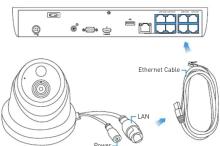
Please note: The power connector is provided as an alternative power option if required. Your NVR will
provide power over the Ethernet cable when connected and a separate power adapter is not required.
Mounting the Camera3
The camera can be mounted onto a flat vertical or horizontal surface
and must be of sufficient strength to hold the camera.
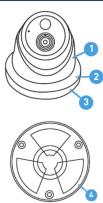
→ Hold the dome enclosure (1) and the dome ring (2) then rotate
the mounting bracket (3) clockwise to remove it from the
Position the camera bracket [6] in the location you want to
mount it, and mark the mounting holes on the surface to
position the screws (a mounting template has been included).
→ Using the appropriate screws for the surface you are mounting
to, secure the bracket in place.
→ Run the cable then place the camera into the dome enclosure
and dome ring and turn the camera to the desired position. The camera can be rotated left or right or up and down. Check the
image on your NVR and make adjustments as necessary.
→ After you've finished adjusting the viewing position, rotate the
dome ring to the mounting bracket counter clockwise to lock.
the posit
Camera Location Tips4
- Take into consideration what you want to monitor
and where you'll get the best view of it.
- How you're going to connect the camera to your
monitoring system; remember that cables and connections should be lent out of the weather.
- How to keep the camera out of harm's way. It's
recommended to mount your camera at an elevated
position.
- Place your camera as close to the area of interest
as practicable. The best position is from about
15:04m above looking slightly down, keeping 11 min the details you are looking for.
- Although the sky looks nice when you look at the
live view from your camera, it is an unlikely direction
for an offender to approach. Make sure your camera
has minimal sky in it as the light in daylight can make
- Think about the most likely way a potential offender
may approach your home, use your camera to give
you the best coverage of these areas.
- The camera's casing is resistant to different weather conditions and temperature. It would solve on
overwhelming event to damage the housing.
- Even though the camera is weather and water-
resistant, prolonged exposure to adverse weather
conditions such as sunlight or excessive moisture,
may eventually damage the internal components of the camera and adversely affect its performance.
- Run cables inside a wall cavity or other protected
enclosure, and ensure that all wiring and connectors
are insulated and protected from moisture.
- Don't put your cable near live electrical wiring. AC
electricity generates radio noise which can interfere
Marque : SWANN
Modèle : SWNHD-888MSD-EU
Catégorie : Caméra de surveillance