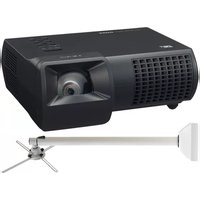
PDG-DWL100S1 - Projecteur SANYO - Notice d'utilisation et mode d'emploi gratuit
Retrouvez gratuitement la notice de l'appareil PDG-DWL100S1 SANYO au format PDF.


| Type de produit | Projecteur DLP |
| Résolution native | WXGA (1280 x 800) |
| Luminosité | 3500 lumens ANSI |
| Rapport de contraste | 2000:1 |
| Durée de vie de la lampe | Jusqu'à 4000 heures (mode normal) |
| Dimensions (L x P x H) | 295 x 213 x 98 mm |
| Poids | 2,9 kg |
| Alimentation | 100-240 V ~ 50/60 Hz |
| Consommation électrique | 280 W (mode veille : 0,5 W) |
| Fonctions principales | Projection avant, arrière, plafond ; correction trapèze verticale ; zoom numérique |
| Entrées vidéo | HDMI, VGA, composite, S-Vidéo |
| Entrée audio | Jack 3,5 mm |
| Sortie audio | Jack 3,5 mm |
| Connectivité | RS-232, USB (pour service) |
| Haut-parleur intégré | 1 x 10 W |
| Entretien et nettoyage | Nettoyage du filtre à air toutes les 100 heures ; essuyer le boîtier avec un chiffon doux |
| Sécurité | Verrou Kensington, mot de passe de sécurité |
| Pièces détachées et réparabilité | Lampe de rechange, filtre à air ; indice de réparabilité 7,5/10 |
| Informations générales | Marque Sanyo, modèle PDG-DWL100S1 ; fabriqué en Chine |
FOIRE AUX QUESTIONS - PDG-DWL100S1 SANYO
Questions des utilisateurs sur PDG-DWL100S1 SANYO
0 question sur cet appareil. Repondez a celles que vous connaissez ou posez la votre.
Poser une nouvelle question sur cet appareil
Téléchargez la notice de votre Projecteur au format PDF gratuitement ! Retrouvez votre notice PDG-DWL100S1 - SANYO et reprennez votre appareil électronique en main. Sur cette page sont publiés tous les documents nécessaires à l'utilisation de votre appareil PDG-DWL100S1 de la marque SANYO.
MODE D'EMPLOI PDG-DWL100S1 SANYO
BUNDLE
PDG-DWL100S1/ DXL100S1
WXGA/XGA ULTRA SHORT THROW PROJECTOR WITH MOUNT

PDG-DWL100/DXL100
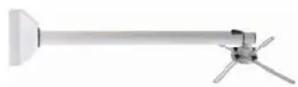
POA-WMST01
(Wall mount)

DLP

Built-in Network

Ultra
Short-Throw

Closed Caption
SANYO SPECIAL BUNDLE MODEL
SANYO offers special bundle package for projector and wall mount.
SHORT THROW PROJECTION FROM ONLY 34 INCHES AWAY (PDG-DWL100)
Project a large 80" diagonal image from the world's shortest projection distance of 34(DWL100) -39(DXL100) inches is achieved by advanced ultra short-focus mirror optical system. This means large images even in relatively small rooms.
FLEXIBILITY WITH D-SUB15 VGA INPUT AND MONITOR OUT
The PDG-DWL100S/DXL100S offers excellent versatility via 2 D-Sub 15 input/output terminals. Using an optional adapter cable, the D-Sub 15 input can even accept component video signals. One of them can also be connected and used for monitor output for greater flexibility.
8-WATT SPEAKER PLUS MANY FEATURES FOR EDUCATION USE
Projectors are increasingly used in more media-rich presentations and are becoming a truly multi-media device. The PDG-DWL100/DXL100 have a 8-watt speaker, loud enough for an average classroom or business meeting room. This eliminates the need for a separate speaker system.
NETWORKING CAPABILITY
The PDG-DWL100/DXL100 are equipped with SANYO's exclusive PJ Network Interface for wired networking, a common feature among SANYO's extensive line of commercial projectors. Networking allows the monitoring of projector functions and operation from a long distance via a web browser. Emails can be sent automatically to report the operating status.
SPACE SAVING DESIGN
The use of a short-throw lens makes it possible to move the projector from the center of the classroom or meeting room, to a spot closer to the screen. This frees up more room space, and cuts down on the possibility of viewers blocking the image.
CLOSED CAPTION
Closed captioning provides the audio portion of a television signal as printed words on the projected screen - helpful for hearing impaired individuals or audio off situations.
KEYSTONE CORRECTION
To compensate for keystone (trapezoidal) picture distortion, the PDG-DWL100/DXL100 provides vertical keystone correction with a correction range up to ±15 degrees.

PRESENTATION TECHNOLOGIES
21605 Plummer Street
Chatsworth, CA 91311
Ph: 888-337-1215 (toll-free)
Fax: 818-717-2719
www.sanyoprojectors.com
| Bundle Model | PDG-DWL100S1 | PDG-DXL100S1 |
| Bundle - Projector | PDG-DXL100PDG-DWL100 | |
| Bundle - Mount | POA-WMST01 | POA-WMST01 |
* Boxes are shipped separately
| Model | PDG-DXL100PDG-DV | ||
| Resolution WXGA (1280 x 800) | XGA (1024 x 768) | ||
| Brightness (typical) | 2700 Lm2600 Lm | ||
| Contrast Ratio (Full on / off) 1750:1 | 750:1 | ||
| Image Size 46"-110" | 40"-110" | ||
| Aspect Ratio 16:10 | 4:3 | ||
| Projection Lamp 225W | |||
| Scanning Frequency | H:31.35-79.98kHz, V:50-75Hz | ||
| Fan Noise 34dBA / 28dBA (Normal / Eco) | |||
| Voltage 100-240V AC ; 50/60 Hz | |||
| Power Consumption 320W / 240W (Normal / Eco) | |||
| Input signal compatibility | WXGA, UXGA, SXGA,XGA, SVGA, VGA480i/p, 575i/p, 576i/p 720p,1080i/p | WXGA, UXGA, SXGA,XGA, SVGA, VGA480i/p, 576i/p 720p,1080i/p | |
| Color System | NTSC, PAL, SECAM, NTSC4.43, PAL-M/PAL-N | ||
| Projection Lens (inch) | F 2.60 f=0.27" | ||
| Throw Ratio | N/A (from lens 0.61:1)N/A | ||
| Throw Distance (feet) | 1.62'-4.47'1.65'-3.95 | ||
| Zoom / Focus | Fixed/Manual | ||
| Up / Down Ratio | 23:-3 | ||
| Digital Keystone Correction | V +/- 15° | ||
| Digital Zoom | 4x - 1x | ||
| Speaker Output | 8W | ||
| Weight (Ibs) | 8.4Ibs | 8.2Ibs | |
| Dimensions (inch) W,H,D | 12.1"x4.7"x11.5" | ||
| Replacement Lamp | CHSP8EM01GC01 | ||
| Replacement Remote | CH458EL01G001 | ||
| Lamp Life * (hour) | Up to 3000h / 4000h (Normal / Eco) | ||
| Input | PC/Video | D-sub 15 x 2 (RGB, Component)D-sub 15 x 1 (RGB, Monitor out)Mini DIN 4pin x 1 (S-Video)RCA x 1 (Composite)HDMI x 1 (Ver.1.3) | |
| Audio | Stereo mini jack x 1 | ||
| Output | PC/Video | D-sub 15 x 1 (in common) | |
| Audio | Stereo mini jack x 1 | ||
| Control | Mini DIN 8pin x 1 (control port)RJ-45 x 1 (Wired LAN) | ||
| Other Feature | Auto Input Search, Digital Zoom, Freeze,Closed caption | ||
| Included Accessories | Power cord Quick reference guideVGA cable Owner's manual (CD-ROM)Lens cap Remote controlAAA batteries x 2 | ||
| Warranty | Three years parts and labor; 90 days original lamp;Quick Repair Program under warranty | ||
Because its products are subject to continuous improvement, SANYO reserves the right to modify product design and specifications without notice and without incurring any obligations.
* Lamp hour may vary due to room conditions, usage, and maintenance. The replacement time is a general estimate. The brightness of a lamp usually decreases over time and use.
(from ler


- BUNDLE
- PDG-DWL100S1/ DXL100S1
- WXGA/XGA ULTRA SHORT THROW PROJECTOR WITH MOUNT
- SANYO SPECIAL BUNDLE MODEL
- SHORT THROW PROJECTION FROM ONLY 34 INCHES AWAY (PDG-DWL100)
- FLEXIBILITY WITH D-SUB15 VGA INPUT AND MONITOR OUT
- 8-WATT SPEAKER PLUS MANY FEATURES FOR EDUCATION USE
- NETWORKING CAPABILITY
- SPACE SAVING DESIGN
- CLOSED CAPTION
- KEYSTONE CORRECTION
Marque : SANYO
Modèle : PDG-DWL100S1
Catégorie : Projecteur