HUAWEI E5573s-320 - Routeur

E5573s-320 - Routeur HUAWEI - Notice d'utilisation et mode d'emploi gratuit

Retrouvez gratuitement la notice de l'appareil E5573s-320 HUAWEI au format PDF.

📄 10 pages Français FR Télécharger 💬 Question IA 10 questions ⚙️ Specs
Notice HUAWEI E5573s-320 - page 1
Choisissez votre langue et indiquez votre email : nous vous enverrons une version traduite specifiquement.
Type de produit Routeur mobile 4G LTE
Marque Huawei
Modèle E5573s-320
Dimensions (L x l x H) 90 x 60 x 14 mm
Poids 70 g
Alimentation Batterie Lithium-ion 1500 mAh (rechargeable via micro-USB)
Autonomie Jusqu'à 6 heures (usage normal)
Réseau mobile 4G LTE (cat 4) jusqu'à 150 Mbps, compatible 3G/2G
Wi-Fi IEEE 802.11 b/g/n, 2.4 GHz, jusqu'à 10 utilisateurs simultanés
Débit Wi-Fi maximal 72 Mbps (théorique)
Ports 1 x micro-USB (charge), 1 x emplacement carte micro-SIM
Affichage Indicateurs LED (alimentation, Wi-Fi, signal réseau, batterie)
Fonctions principales Point d'accès Wi-Fi portable, partage de connexion, support VPN, pare-feu NAT
Sécurité Chiffrement WPA/WPA2, mot de passe Wi-Fi personnalisable, filtrage MAC
Application de gestion Huawei HiLink (iOS/Android) ou interface web 192.168.1.1
Entretien et nettoyage Nettoyer avec un chiffon sec et doux ; ne pas utiliser de produits liquides ou abrasifs
Pièces détachées disponibles Batterie, câble micro-USB, adaptateur secteur (en option)
Réparabilité Indice de réparabilité estimé : 6/10 (batterie amovible, réparation possible par professionnel)
Température de fonctionnement 0°C à 35°C
Température de stockage -10°C à 45°C
Informations générales Routeur mobile Huawei E5573s-320 ; adapté aux voyages et usage nomade

FOIRE AUX QUESTIONS - E5573s-320 HUAWEI

Comment allumer le routeur Huawei E5573s-320 ?
Appuyez sur le bouton d'alimentation situé sur le côté de l'appareil pendant environ 3 secondes jusqu'à ce que les LED s'allument.
Comment configurer le Wi-Fi pour la première fois ?
Connectez-vous au réseau Wi-Fi par défaut (nom et mot de passe inscrits sous la batterie). Ouvrez un navigateur et allez sur 192.168.1.1 pour accéder à l'interface de configuration.
Puis-je changer le mot de passe Wi-Fi ?
Oui, connectez-vous à l'interface web ou à l'application Huawei HiLink. Dans les paramètres Wi-Fi, modifiez le SSID et la clé de sécurité. Validez pour appliquer les changements.
Comment savoir combien de données j'ai consommées ?
Vous pouvez vérifier la consommation via l'interface web (onglet Statistiques) ou dans l'application Huawei HiLink. Certains opérateurs fournissent aussi un suivi via le compte client.
Que faire si l'appareil ne s'allume pas ?
Assurez-vous que la batterie est chargée. Branchez le câble micro-USB sur un chargeur secteur (5V/1A) pendant au moins 30 minutes. Si rien ne se produit, essayez un autre câble ou chargeur.
Comment réinitialiser le routeur aux paramètres d'usine ?
Insérez un trombone ou un objet fin dans le trou de réinitialisation (généralement à côté du bouton d'alimentation) pendant environ 5 secondes jusqu'à ce que les LED clignotent. Les paramètres par défaut seront restaurés.
Quelle est la portée du Wi-Fi ?
Dans des conditions normales, la portée est d'environ 10 à 15 mètres en intérieur. Les obstacles (murs, meubles) peuvent réduire cette distance.
Puis-je utiliser le routeur sans carte SIM ?
Non, le routeur nécessite une carte micro-SIM active avec un abonnement data pour fonctionner. Sans carte SIM, il ne peut pas se connecter au réseau mobile.
Comment mettre à jour le firmware ?
Téléchargez la dernière version du firmware sur le site de Huawei ou via l'application HiLink. Connectez-vous à l'interface web, allez dans 'Paramètres système' > 'Mise à jour logicielle' et suivez les instructions.
Que faire si le débit est lent ?
Vérifiez la puissance du signal (LED signal) : rapprochez-vous d'une fenêtre ou d'un endroit dégagé. Évitez les interférences en changeant le canal Wi-Fi dans les paramètres. Redémarrez l'appareil si nécessaire.

Questions des utilisateurs sur E5573s-320 HUAWEI

0 question sur cet appareil. Repondez a celles que vous connaissez ou posez la votre.

Poser une nouvelle question sur cet appareil

L'email reste privé : il sert seulement à vous prévenir si quelqu'un répond à votre question.

Aucune question pour l'instant. Soyez le premier à en poser une.

Téléchargez la notice de votre Routeur au format PDF gratuitement ! Retrouvez votre notice E5573s-320 - HUAWEI et reprennez votre appareil électronique en main. Sur cette page sont publiés tous les documents nécessaires à l'utilisation de votre appareil E5573s-320 de la marque HUAWEI.

MODE D'EMPLOI E5573s-320 HUAWEI

Driver Installation Guide for MAC10.15 OS

HUAWEI E5573s-320 - Driver Installation Guide for MAC10.15 OS - 1

natural_image Huawei corporate logo featuring a red stylized flower or star design (no text or symbols)

HUAWEI

Huawei Technologies Co., Ltd.

All rights reserved

Once the package is downloaded from support web-page, user will find below software's and documents in the downloaded zip file.

  1. MobileWiFi.zip (This can be used to install MobileWiFi Driver in MAC system)
  2. Driver Installation Guide for MAC10.15 OS (NDIS).doc (this document)

Here is the information on how to use these software to install MobileWiFi in the MAC OS.

1.1 Install Procedure

1.1.1 privacy setting

a. Download MobileWiFi.zip to MAC system and extract it. Double click on "MobileWiFi_Driver.app"

MobileWiFi Favorites AirDrop Recents Applications Desktop Documents Downloads Locations backup Tags Red Orange Yellow Green Blue Name Date Modified Size Kind About Copyright Notice.pdf May 6, 2011 at 2:43 AM 79 KB PDF Do MobileWiFi Nov 27, 2014 at 6:46 PM 120 KB MobileWiFi_Driver Nov 27, 2014 at 6:46 PM 1.5 MB "MobileWiFi_Driver" can't be opened because it was not downloaded from the App Store. Your security preferences allow installation of only apps from the App Store. Salarl downloaded this file today at 6:59 PM from consumer-tkbdownload.huawei.com Show in Finder OK

b.

Finder File Edit View Go Window Help About This Mac System Preferences... App Store... Recent Items Force Quit Finder Sleep Restart... Shut Down... Lock Screen ^#Q Log Out huawei... ^#Q

C.

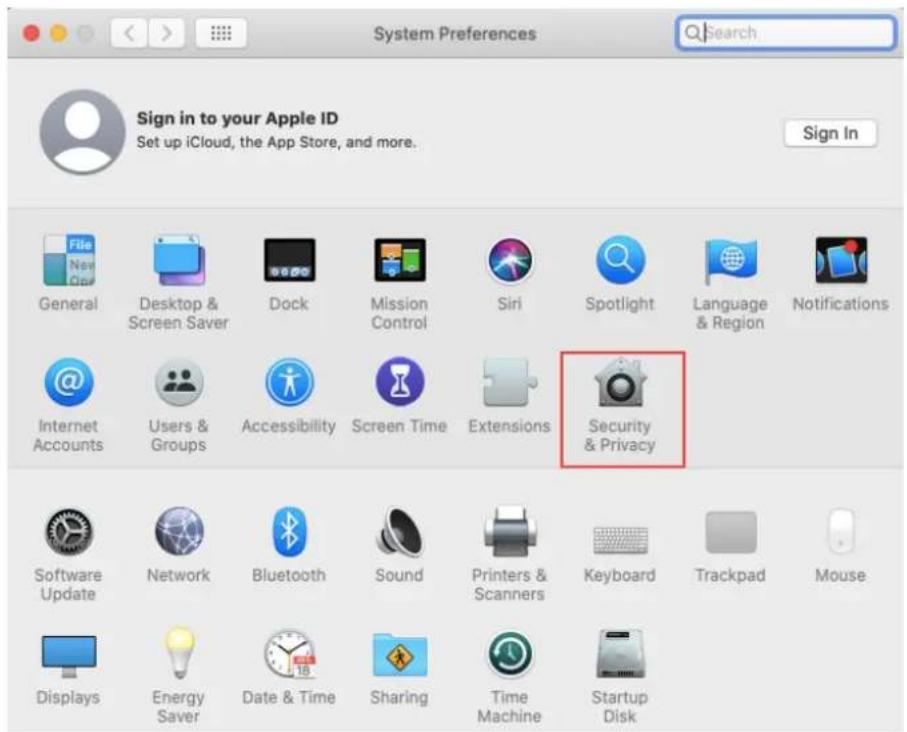
System Preferences Sign in to your Apple ID Set up iCloud, the App Store, and more. Sign In General Desktop & Screen Saver Dock Mission Control Siri Spotlight Language & Region Notifications Internet Accounts Users & Groups Accessibility Screen Time Extensions Security & Privacy Software Update Network Bluetooth Sound Printers & Scanners Keyboard Trackpad Mouse Displays Energy Saver Date & Time Sharing Time Machine Startup Disk

d.

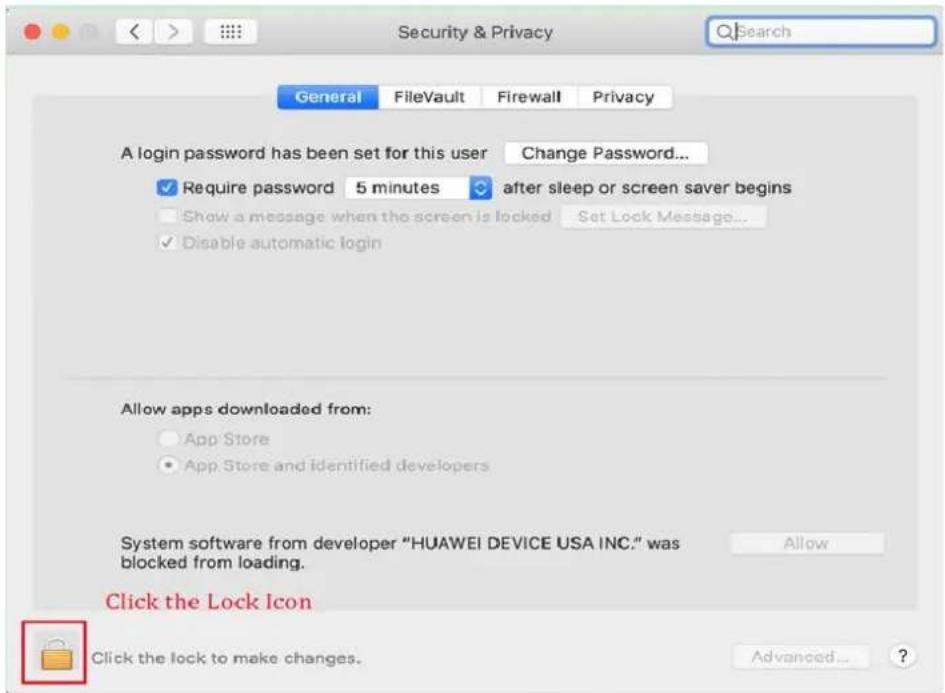
Security & Privacy General FileVault Firewall Privacy A login password has been set for this user Change Password... ✓ Require password 5 minutes after sleep or screen saver begins Show a message when the screen is locked Set Lock Message... ✓ Disable automatic login Allow apps downloaded from: App Store App Store and identified developers System software from developer "HUAWEI DEVICE USA INC." was blocked from loading. Allow Click the Lock Icon Click the lock to make changes. Advanced... ?

e.

Security & Privacy System Preferences is trying to unlock Security & Privacy preferences. Enter your password to allow this. Username: mbb Password: ************ Cancel Unlock Enter the System password and click on "Unlock" Button Allow apps downloaded from: App Store App Store and identified developers System software from developer "HUAWEI DEVICE USA INC." was blocked from loading. Allow Authenticating... Advanced... ?

f.

Security & Privacy General FileVault Firewall Privacy A login password has been set for this user Change Password... ✓ Require password 5 minutes after sleep or screen saver begins Show a message when the screen is locked Set Lock Message... ✓ Disable automatic login Allow apps downloaded from: App Store App Store and identified developers Click on "Allow" Button System software from developer "HUAWEI DEVICE USA INC." was blocked from loading. Allow Click the lock to prevent further changes. Advanced... ?

g. Re-open the following prompt box, Click "open" button
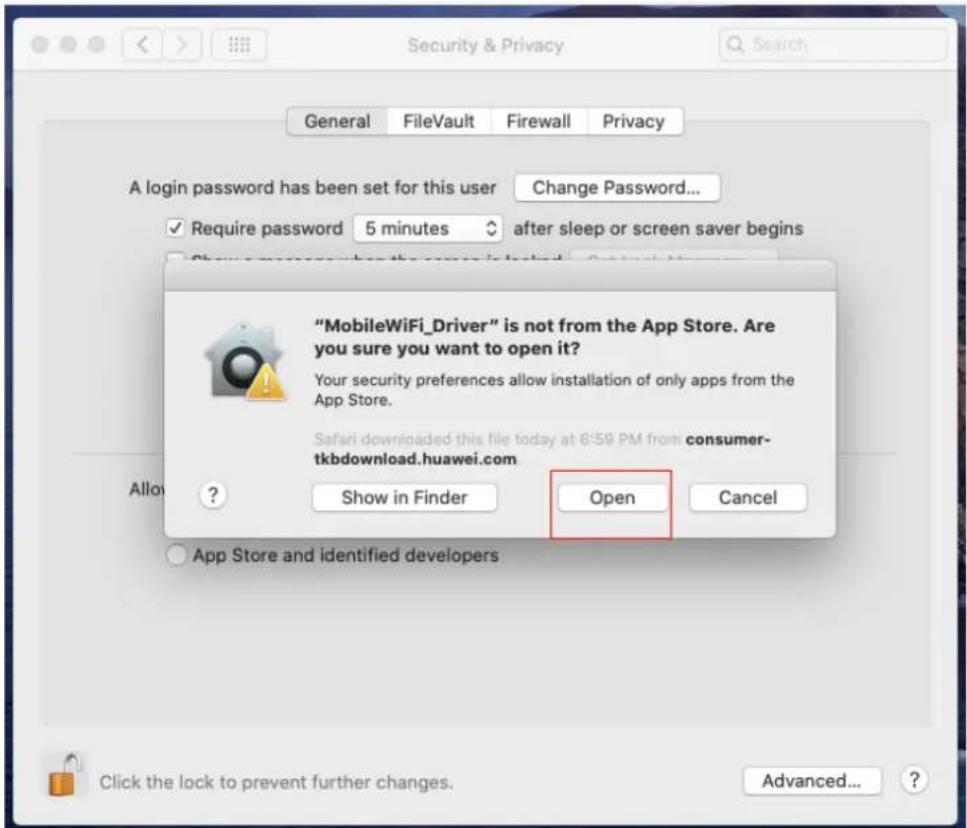
Security & Privacy General FileVault Firewall Privacy A login password has been set for this user Change Password... ✓ Require password 5 minutes after sleep or screen saver begins "MobileWiFi_Driver" is not from the App Store. Are you sure you want to open it? Your security preferences allow installation of only apps from the App Store. Safari downloaded this file today at 6:58 PM from consumer- tkbdownload.huawei.com Allow ? Show in Finder Open Cancel App Store and identified developers Click the lock to prevent further changes. Advanced... ?

1.1.2 Installation steps

MobileWIFI_Driver to initiate the installation process.

Install Driver Welcome to the Driver Installer Introduction License Destination Select Installation Type Installation Summary You will be guided through the steps necessary to install this software. click Continue button Go Back Continue

Click continue button

Install Driver Software License Agreement Introduction License Destination Select Installation Type Installation Summary English Huawei Technologies Co., Ltd. END-USER LICENSE AGREEMENT FOR HUAWEI SOFTWARE IMPORTANT-READ CAREFULLY: This END-USER License Agreement ("EULA") is a legal agreement between you (either an individual or a single entity) and Huawei Technologies Co., Ltd. ("HUAWEI") for the HUAWEI Software accompanying this EULA, which includes computer software and may include associated media, printed materials, and "online" or electronic documentation ("SOFTWARE PRODUCT" or "SOFTWARE"). By installing, copy or otherwise using the SOFTWARE PRODUCT, you agree to be bound by the terms of this EULA. If you do not agree to the terms of this EULA, discontinue installation, copy, or use of the SOFTWARE PRODUCT, destroy all copies and all component parts of the SOFTWARE PRODUCT, and promptly contact HUAWEI for instructions on return of the SOFTWARE PRODUCT for a refund. SOFTWARE PRODUCT LICENSE The SOFTWARE PRODUCT is protected by copyright laws and international copyright treaties, as well as other applicable intellectual property laws and treaties. This is a License and not a "sale" of the Print... Save... Go Back Continue

To continue installing the software you must agree to the terms of the software license agreement. Click Agree to continue or click Disagree to cancel the installation and quit the Installer. click Agree button Read License Disagree Agree software and may include associated media, printed materials, and "online" or electronic documentation ("SOFTWARE PRODUCT" or "SOFTWARE"). By installing, copy or otherwise using the SOFTWARE PRODUCT, you agree to be bound by the terms of this EULA. If you do not agree to the terms of this EULA, discontinue installation, copy, or use of the SOFTWARE PRODUCT, destroy all copies and all component parts of the SOFTWARE PRODUCT, and promptly contact HUAWEI for instructions on return of the SOFTWARE PRODUCT for a refund. SOFTWARE PRODUCT LICENSE The SOFTWARE PRODUCT is protected by copyright laws and international copyright treaties, as well as other applicable intellectual property laws and treaties. This is a License and not a "sale" of the Print... Save... Go Back Continue

Standard Install on "1015" Introduction License Destination Select Installation Type Installation Summary This will take 541 KB of space on your computer. Click Install to perform a standard installation of this software on the disk "1015". please click install button Change Install Location... Go Back Install

Standard Install on "1015" This will take 541 KB of space on your computer. Click Install to perform a standard installation of this software on the disk "1015". Installer is trying to install new software. Enter your password to allow this. User Name: Password: Please enter your system user name and password, then click on "Install Software" button Cancel Install Software Go Back Install

Security & Privacy Enabling this system software requires a restart A login ✓ Show a message when the screen is locked ✓ Disable automatic login Restart OK After installation is successful, then click on "Restart" Button Allow apps downloaded from: • App Store • App Store and identified developers Click the lock to prevent further changes. Advanced... Install Mobile Partner The installation was completed successfully. Introduction Read Me Licence Destination Select Installation Type Installation Summary The installation was successful. The software was installed. Go back Close

1.1.3 After installation finish, double click MobileWiFi to open the device's homepage.

MobileWiFi Favorites AirDrop Recents Application... Desktop Documents Downloads Locations Macintosh... 1014 169.25... Network Tags 红色 橙色 About Copyright Notice.pdf MobileWiFi MobileWiFi_Driver

Assistant notice
Powered by Anthropic
En attente de votre message
Informations produit

Marque : HUAWEI

Modèle : E5573s-320

Catégorie : Routeur