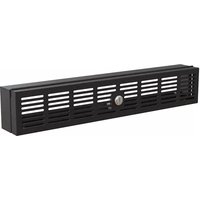
RKSECLK2U - Serrure de sécurité StarTech.com - Notice d'utilisation et mode d'emploi gratuit
Retrouvez gratuitement la notice de l'appareil RKSECLK2U StarTech.com au format PDF.


| Type de produit | Tiroir clavier rackmount 2U avec pavé tactile |
| Marque | StarTech.com |
| Modèle | RKSECLK2U |
| Hauteur du rack | 2U (8,9 cm) |
| Dimensions (L x P x H) | 48,3 cm x 41,9 cm x 8,9 cm |
| Poids | 11,4 kg |
| Alimentation | USB (bus power, 5V / 500 mA) |
| Interface | USB 2.0 type A |
| Type de clavier | 101 touches, membrane |
| Type de pavé tactile | Capteur capacitif, support multi-touch |
| Fonctionnalités principales | Montage en rack 2U, tiroir coulissant, verrouillage en position fermée, rétroéclairage LED blanc |
| Compatibilité | Systèmes d'exploitation : Windows, macOS, Linux (No driver required) |
| Entretien et nettoyage | Nettoyer avec un chiffon doux légèrement humide ; ne pas utiliser de solvants agressifs |
| Sécurité | Éviter les chocs et l'humidité ; ne pas insérer d'objets métalliques dans les ouvertures |
| Pièces détachées et réparabilité | Câble USB amovible (standard mini-USB vers USB-A) ; remplacement possible |
| Informations générales | Garantie 2 ans, certification CE, FCC, RoHS |
| Contenu de la boîte | 1 x tiroir clavier, 1 x câble USB, 1 x kit de montage, 1 x manuel d'utilisation |
| Température de fonctionnement | 0°C à 40°C |
| Humidité de fonctionnement | 20 % à 80 % HR (sans condensation) |
FOIRE AUX QUESTIONS - RKSECLK2U StarTech.com
Questions des utilisateurs sur RKSECLK2U StarTech.com
0 question sur cet appareil. Repondez a celles que vous connaissez ou posez la votre.
Poser une nouvelle question sur cet appareil
Téléchargez la notice de votre Serrure de sécurité au format PDF gratuitement ! Retrouvez votre notice RKSECLK2U - StarTech.com et reprennez votre appareil électronique en main. Sur cette page sont publiés tous les documents nécessaires à l'utilisation de votre appareil RKSECLK2U de la marque StarTech.com.
MODE D'EMPLOI RKSECLK2U StarTech.com
2U Hinged Security Lock Panel
Product Diagram (RKSECLK2U)

| Component Function | ||
| 1 | Hinged Security Panel | Used to restrict access to the device within the Rack. |
| 2 | Lock | Used to secure the Hinged Security Panel closed. |
Requirements
For the latest requirements, please visit www.startech.com/RKSECLK2U
• Cage Nut Tool x 1(optional)
• Phillips Head Screwdriver x 1
Package Contents
• Hinged Security Lock Panel x 1
- M5 Screws x 4
• M5 Cage Nuts x 4
- Keys x 2
- Quick-Start Guide x 1
Installation
Notes: Make sure that there are empty Cage Nut Holes on the Rack's Rails, above and below the Device that you wish to secure.
The Hinged Security Panel is meant to be used to secure 1U height equipment and will render the rack unit above and below the protected device unusable.
- Locate the Device within a Rack that you would like to secure.
- Insert the M5 Cage Nuts (x 4) into the Cage Nut Holes on the Rack's Rails above and below the device.
Note: A Cage Nut Tool can be used to help insert the Cage Nuts.
- Align the Cage Nut Holes on the Hinged Security Panel, with the M5 Cage Nuts on the Rack's Rail.
- Insert the M5 Screws (x 4) through the Cage Nut Holes and into the Cage Nuts.
- Using a Phillips Head Screwdriver, tighten the M5 Screws.
- When the Hinged Security Panel is installed, use the Key (included) to unlock and lock the Lock, securing the Device.
Product Dimensions
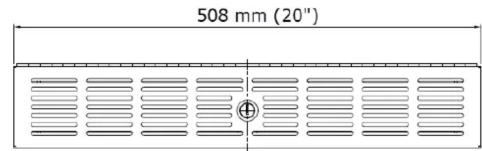

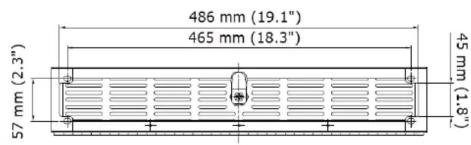

Lock Dimensions
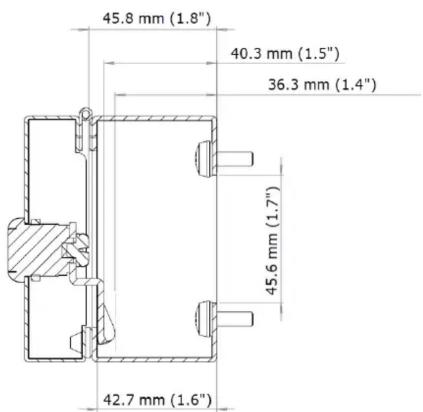
Use of Trademarks, Registered Trademarks, and other Protected Names and Symbols
This manual may make reference to trademarks, registered trademarks, and other protected names and/or symbols of third-party companies not related in any way to StarTech.com. Where they occur these references are for illustrative purposes only and do not represent an endorsement of a product or service by StarTech.com, or an endorsement of the product(s) to which this manual applies by the third-party company in question. StarTech.com hereby acknowledges that all trademarks, registered trademarks, service marks, and other protected names and/or symbols contained in this manual and related documents are the property of their respective holders.
Warranty Information
This product is backed by a three-year warranty.
For further information on product warranty terms and conditions, please refer to www.startech.com/warranty.
Limitation of Liability
In no event shall the liability of StarTech.com Ltd. and StarTech.com USA LLP (or their officers, directors, employees or agents) for any damages (whether direct or indirect, special, punitive, incidental, consequential, or otherwise), loss of profits, loss of business, or any pecuniary loss, arising out of or related to the use of the product exceed the actual price paid for the product. Some states do not allow the exclusion or limitation of incidental or consequential damages. If such laws apply, the limitations or exclusions contained in this statement may not apply to you.
StarTech.com Ltd. StarTech.com LLP
45 Artisans Cres
45 Artisans Cres London Ontario
London, Ontario NEW 550
N5V SE9 Canada
Canada
StarTech.com LLP
2500 Crystallids
2500 Creekside
Parkwy
Lockbourne, Ohio
43137
USA
0.5.A.
StarTech.com Ltd.
Unit B. Pinnacle 15
Unit B, Finmac Coverton Rd.
Gowerton Rd,
Brackmills
Northampton
NN4 7BW
United Kingdom
FR: startech.com/fr
DE: startech.com/de
ES: startech.com/es
ES: startech.com/c5 NL:startech.com/nl
NL. startech.com/mi IT: startech.com (it
II: startech.com/it
JP: startech.com/jp
广力云智慧零售收银系统
Marque : StarTech.com
Modèle : RKSECLK2U
Catégorie : Serrure de sécurité