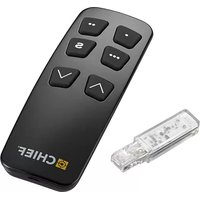
PACREM - Télécommande Chief - Notice d'utilisation et mode d'emploi gratuit
Retrouvez gratuitement la notice de l'appareil PACREM Chief au format PDF.


| Type de produit | Télécommande infrarouge |
| Marque | Chief |
| Modèle | PACREM |
| Dimensions (L x l x h) | 200 x 50 x 25 mm |
| Poids (avec piles) | 120 g |
| Alimentation | 2 piles AAA (1,5 V) |
| Portée infrarouge | Jusqu'à 10 mètres |
| Angle de fonctionnement | ± 30° horizontal et vertical |
| Fréquence porteuse | 38 kHz |
| Nombre de touches | 20 touches |
| Fonctions principales | Allumer/éteindre, volume, chaînes, menu, navigation, source, muet |
| Compatibilité | Appareils Chief et compatibles |
| Matériau du boîtier | Plastique ABS |
| Couleur | Noir |
| Entretien et nettoyage | Essuyer avec un chiffon doux sec. Ne pas utiliser de produits abrasifs. |
| Sécurité | Ne pas exposer à l'humidité, aux chocs ou aux températures extrêmes. |
| Piles fournies | Oui, 2 piles AAA |
| Garantie | 2 ans |
| Pays de fabrication | Chine |
| Réparabilité | Pièces détachées disponibles sur demande auprès du service client Chief. |
FOIRE AUX QUESTIONS - PACREM Chief
Questions des utilisateurs sur PACREM Chief
0 question sur cet appareil. Repondez a celles que vous connaissez ou posez la votre.
Poser une nouvelle question sur cet appareil
Téléchargez la notice de votre Télécommande au format PDF gratuitement ! Retrouvez votre notice PACREM - Chief et reprennez votre appareil électronique en main. Sur cette page sont publiés tous les documents nécessaires à l'utilisation de votre appareil PACREM de la marque Chief.
MODE D'EMPLOI PACREM Chief
INSTALLATION INSTRUCTIONS
PACREM Bluetooth® Remote and Dongle Installation and Instructions
Unpack carton and verify contents. If any listed parts are missing, immediately contact a Chief Customer Service representative.
PARTS
![② press and hold ③ release after synching ④ A (1) [Bluetooth® Remote] CHIEF B (1) [Bluetooth® Dongle]](/content/2026/06/1340683/images/b6bcca3188adbcc9727e773706f30ae54e46272c6aca3906b2665a62201eb389.jpg)
Figure 1
Dongle Installation
- Plug in the Bluetooth® dongle (B) into the available RJ45 port on the motor control box. (See Figure 2)
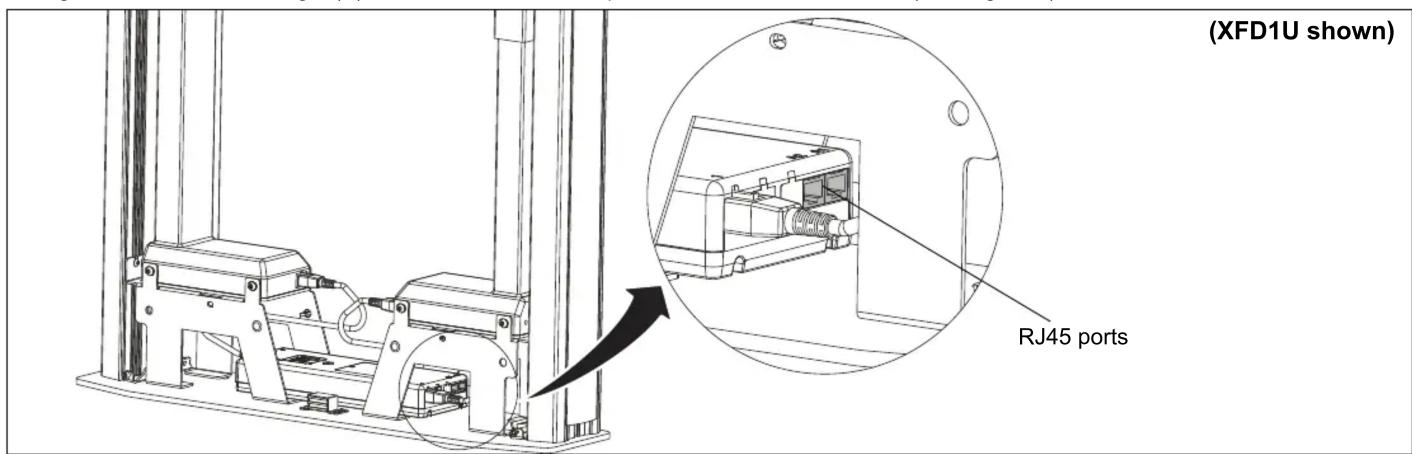
Figure 2
NOTE: Dongle will have a blue "blink" when properly connected.
Remote Installation
- Press and hold top two buttons on the Bluetooth® remote (A). (See Figure 1)
NOTE: The blinking "blue" light on the dongle (B) will stay solid while holding the remote buttons.
-
When the "blue" light on the dongle (B) turns off, the remote is synched and buttons can be released.
-
Test remote functionality by using the up and down buttons. (See Figure 1)
NOTE: The Bluetooth® remote does not require batteries to be installed. The battery pre-installed in the remote will last up to 10 years.
Continued...
Legrand | AV, and its affiliated corporations and subsidiaries (collectively, "Legrand | AV"), intend to make this manual accurate and complete. However, Legrand | AV makes no claim that the information contained herein covers all details, conditions or variations, nor does it provide for every possible contingency in connection with the installation or use of this product. The information contained in this document is subject to change without notice or obligation of any kind. Legrand | AV makes no representation of warranty, expressed or implied, regarding the information contained herein. Legrand | AV assumes no responsibility for accuracy, completeness or sufficiency of the information contained in this document.

CHIEF®
A brand of □ legrand
Chief, a products division of Legrand
6436 City West Parkway, Eden Prairie, MN 55344
• P: 800.582.6480 / 952.225.6000 • F:877.894.6918 / 952.894.6918
8800-003064 Rev01
©2019 Legrand | AV
www.legrandav.com
11/19
INSTALLATION INSTRUCTIONS
Continued...
Height Adjustment
- Press "UP" or "DOWN" buttons to raise or lower height as desired.
Save Height Levels
- Adjust height until desired preset level is reached using "UP" and "DOWN" buttons.
- Press "SAVE" button ("S")
- Press one of three preset buttons (., .. or ...) to save preset position.
- Repeat Steps 6-8 as desired.
Troubleshooting
If lifting function does not work properly, try to following troubleshooting steps. If none of these work, contact customer service.
-
If there is uneven movement, initialize the control box (reset)
-
Hold "Down" button until lift has reached it's lower limit.
- Briefly release "Down" button
-
Press and hold "Down" for three seconds, wait until all movement has stopped, then release
-
If there is no movement, check the following
-
Check all cable connectors between controllers and actuators.
-
Check power cable connection to control box.
-
If there is slight movement and then reverse travel, check for any obstructions that may be interfering such as cables or peripheral devices.
- Contact customer service if none of the above steps fix the problem.
Legrand | AV, and its affiliated corporations and subsidiaries (collectively, "Legrand | AV"), intend to make this manual accurate and complete. However, Legrand | AV makes no claim that the information contained herein covers all details, conditions or variations, nor does it provide for every possible contingency in connection with the installation or use of this product. The information contained in this document is subject to change without notice or obligation of any kind. Legrand | AV makes no representation of warranty, expressed or implied, regarding the information contained herein. Legrand | AV assumes no responsibility for accuracy, completeness or sufficiency of the information contained in this document.

CHIEF®
A brand of legrand
Chief, a products division of Legrand
6436 City West Parkway, Eden Prairie, MN 55344
• P: 800.582.6480 / 952.225.6000 • F:877.894.6918 / 952.894.6918
8800-003064 Rev01
©2019 Legrand | AV
www.legrandav.com
11/19

Marque : Chief
Modèle : PACREM
Catégorie : Télécommande