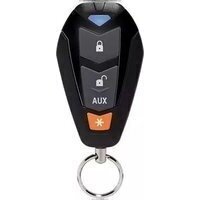
7145V - Télécommande Viper - Notice d'utilisation et mode d'emploi gratuit
Retrouvez gratuitement la notice de l'appareil 7145V Viper au format PDF.


| Type de produit | Télécommande de démarrage et d'alarme |
| Marque | Viper |
| Modèle | 7145V |
| Dimensions | 6 x 3,5 x 1,5 cm |
| Poids | 25 g |
| Alimentation | Pile CR2032 3V |
| Fonctions principales | Verrouillage/déverrouillage, démarrage à distance, activation/désactivation alarme |
| Portée | Jusqu'à 300 mètres |
| Fréquence | 433 MHz |
| Entretien et nettoyage | Nettoyer avec un chiffon doux et sec. Éviter les liquides. |
| Sécurité | Code roulant anti-recopie |
| Pièces détachées | Pile de rechange CR2032 disponible dans le commerce |
| Réparabilité | Ne pas ouvrir ni réparer soi-même. Contacter un installateur professionnel. |
| Informations générales | Compatibilité avec systèmes Viper. Programmation requise avant utilisation. |
FOIRE AUX QUESTIONS - 7145V Viper
Questions des utilisateurs sur 7145V Viper
0 question sur cet appareil. Repondez a celles que vous connaissez ou posez la votre.
Poser une nouvelle question sur cet appareil
Téléchargez la notice de votre Télécommande au format PDF gratuitement ! Retrouvez votre notice 7145V - Viper et reprennez votre appareil électronique en main. Sur cette page sont publiés tous les documents nécessaires à l'utilisation de votre appareil 7145V de la marque Viper.
MODE D'EMPLOI 7145V Viper

REPLACEMENT TRANSMITTER
4-Button Remote Control
The following Learn Routine can be used to program this replacement transmitter to the system. In order to enter the Learn Routine, the system's Valet/Program switch must be plugged into the BLUE port.
-
Door. Open a door.
-
Key. Turn the key to the ON position.
-
Choose. Within 5 seconds press and release the Valet/Program button the number of times corresponding to selected channel listed below.
After you have selected the channel, press the Valet/program button once more and hold it. The LED flashes the same number of times as the channel selected and the siren/horn sounds (if connected) to confirm the selected channel. DO NOT release the valet/program button.
-
Transmit. While holding the Valet/Program button, press the 🔒 button on the transmitter. The siren/horn sounds (if connected) to confirm that the transmitter has been taught to the receiver.
-
Release. Now that the code is learned you may release the valet/program button and remove the key.
Note: Refer to the owner's guide for transmitter/remote control operation.
| Channel Number | Function |
| 1 or 7 | Auto-learn standard configuration (Ch 1 for 4105V) |
| 9 | Delete all transmitters* |
* For the R350 and 350plus, the delete all transmitters feature erases all remote controls from the system memory. All programmable features will reset and will need to be reprogrammed. It is recommended that you have a directed dealer reprogram the system features.
FCC/ID Notice
This device complies with Part 15 of FCC rules. Operation is subject to the following conditions: (1) This device may not cause harmful interference, and (2) This device must accept any interference received, including interference that may cause undesired operation.
CAUTION! Changes or modifications not expressly approved by the party responsible for compliance could void the user's authority to operate this device.
natural_image
Blank white image with no visible content, text, or symbols© 2012 Directed, Vista, CA 92081. All rights reserved.
DIRECTED.
OK/13D
MADE IN CHINA

AMERICA'S LARGEST AFTERMARKET
AUTO SECURITY COMPANY
www.directed.com
MADE IN CHINA
LHD715V0


Marque : Viper
Modèle : 7145V
Catégorie : Télécommande