
CFD-S22 - Système Hi-Fi SONY - Notice d'utilisation et mode d'emploi gratuit
Retrouvez gratuitement la notice de l'appareil CFD-S22 SONY au format PDF.


| Type de produit | Système Hi-Fi portable |
| Marque | Sony |
| Modèle | CFD-S22 |
| Dimensions (L x H x P) | 400 x 200 x 250 mm |
| Poids | 3,5 kg |
| Alimentation | Secteur 230 V ~ 50 Hz ou 6 piles R20 (non fournies) |
| Consommation électrique | 15 W |
| Fonctions principales | Lecteur CD audio, Platine cassette, Radio FM/AM, Lecteur USB (lecture MP3), Entrée audio auxiliaire |
| Puissance de sortie | 2 x 5 W RMS |
| Haut-parleurs | 2 haut-parleurs pleine gamme de 10 cm |
| Bandes radio | FM 87,5 - 108 MHz, AM 530 - 1710 kHz |
| Formats compatibles | CD-DA, CD-R/RW, MP3 (via USB) |
| Connectivité | Prise casque 3,5 mm, Entrée audio 3,5 mm, Port USB type A |
| Entretien et nettoyage | Débranchez l'appareil et nettoyez avec un chiffon doux et sec. Ne pas utiliser de solvants. |
| Sécurité | Ne pas exposer à l'humidité ou aux éclaboussures. Utilisez uniquement l'adaptateur secteur fourni. |
| Pièces détachées et réparabilité | Pièces disponibles via le service après-vente Sony. Indice de réparabilité : 7,2/10 |
| Informations générales | Fabriqué en Chine. Garantie 2 ans. |
FOIRE AUX QUESTIONS - CFD-S22 SONY
Questions des utilisateurs sur CFD-S22 SONY
0 question sur cet appareil. Repondez a celles que vous connaissez ou posez la votre.
Poser une nouvelle question sur cet appareil
Téléchargez la notice de votre Système Hi-Fi au format PDF gratuitement ! Retrouvez votre notice CFD-S22 - SONY et reprennez votre appareil électronique en main. Sur cette page sont publiés tous les documents nécessaires à l'utilisation de votre appareil CFD-S22 de la marque SONY.
MODE D'EMPLOI CFD-S22 SONY
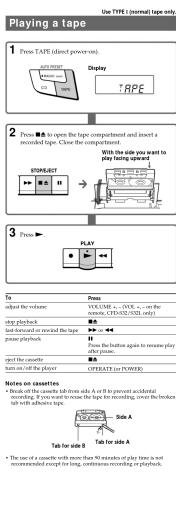
Use TYPE I (normal) tape only




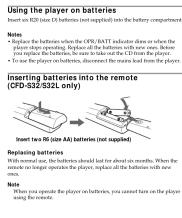
Choosing Power Sources

Location of controls
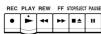

Number buttons for VOLUME = CD/RADIO DIRECT OPERATION
* The name of this button is PLAY MODE•MONO/5T for CFD-822/532, PLAY MODE•MONO/5T, RS4=CFD-671/672/078.
TEAT MODE+MOAO/ST DO IN CHOLE/SEE/SEE/SEE
Tip
To listen through headphones, connect the headphones to the Ⓞ (headphones) jack.
(二)

* MODE on the remote has the same function as PLAY MODE • MONO/ST on the player.
Adjusting the sound emphasis (MEGA BASS/TONE)
Reinforcing the house roof
Reinforcing the Free MEGA BAS5
"MEGA BASF" appears in the display
To return to normal sound, press the button again
Adjusting the tone (CFD-832/832L only)
Press TONE.
to enhance the high km
the low tone LD
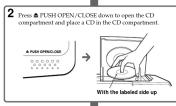
Playing a CD



| To | Press |
| adjust the volume | VOLUME + , - (VOL + , - on the remote, CFD-532/532 only) |
| stop playback | ■ |
| pause playback | ▶▶ ▶ ▶ on the remote, CFD-532/532 onlyPress the button again to resume play after pause. |
| go to the next track | ▶▶ |
| go back to the previous track | ▶◀ |
| remove the CD | ▲ PUSH OPEN/CLOSE |
| turn on/off the player | OPERATE (or POWER) |
Using the display
Checking the total track number and playing time
Press DISPLAY ENT•MEMORY in stop mode.
(No text)
Total track number 125527
Total dividend time
Total buying class ____
Checking the remaining time
Press DISPLAY ENT•MEMORY while playing a CD.
To display Press DISPLAY ENT·MEMORY
the current track number and once
the remaining time on the current track
the number of tracks left twice and remaining time on the CD
the current track number three times
and playing time
"For a track whose number is more than 20, the remaining time appears as "···" in the display.
•
Locating a specific track
Locating a specific track
To locate Press
a specific track directly a number button of the track.
a point while listening to the sound ▶(forward) or ▶(backward) while playing until you find the point.
a point while observing ▶▶(forward) or ◀◀ (backward) in
the display pause until you find the point.
Tip
When you locate a track numbered over 10, press >10 first, then the
corresponding number buttons. ExampleTo play in the number 73, now a10 first, from 2 and 3.
Example: To pay back number 23, prime >10 line, then 2 and 5
Note You want books a special book if TMUE or TCE is lit in the display.
You cannot be able to specific track if .SET OF .POST is hit in the display. Turn off the indication by pressing ■.
(1) AD = BD = 1
Repeat Play
repeat May
1 Press CD.
-
100% of the total
-
Proceed as follows:
To repeat Do this
a single track 1 Press PLAY MODE • MONO/ST until "TIF 1" appears
2 Press the number button for the track
you want to repeat.
all the tracks 1 Press PLAY MODE•MONO/ST until /TIP #1.17
KIF ACC. appeal. † Press ▶
tracks in random order 1 Press PLAY MODE ▲MONO/ST until
“SHUF RED” appears.
2 Рокон ▶■.
programmed tracks 1 Press PLAY MODE•MONO/ST until
- PCM REP "appears." 2 Pass the number buttons for the tracks.
you want to programme in the order you
want up to 20 tracks.
3 Рисло ▶III.
To cancel, Repeat Plan
Prox PLAY MODE+MON/OST until "FREE" disgrams from the display.
From FY1 2014, the EPS of 3.5x was reported for fiscal year ended September 30, 2014.
Shuffle Play
1 Press CD
。
2 Press PLAY MODE • MONO/ST until "SHUF" appears in the display.
display.
3 Press ▶ to start shuffle play.
[Non-Text]
To cancel Shuffle Play
HEAT-PLAY MODE®KBOXO/ST mini “SHUP” disappears from the display.
m = 311
Programme Play
1 Press CD
- 本报告
2 Press PLA
display.
- Draw the
Programme in the order you want. You can arrange the planning
order of u



▶ to start program play.
(五) 2017年1月1日
el Programme Play AV MODEs MONO/ST until "PGM" dispatches from the display.
4) 深圳-50(60) 2018-103 (盐酸盐) 热石板
k The order of Tracks before play
PLAY ENT-MEMORY.
se you press the button, the track number appears in the
ed bound.
re the current
ence if the CD is stopped and twice
program will be erased. Then create a new programme following
umming procedu
[Non-Text]
a play the same program again, since the program is saved until
en the CD compartment. In record your own program. After you've created the programme.
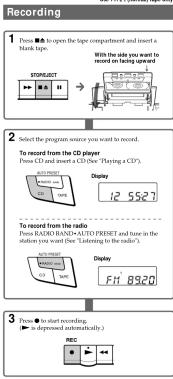
blank tape and press ● to start recording.
[Non-Text]
Enjoying Sound effects (LOOP/FLASH)
(CFD-S32/S32L only)
You can repeat part of a CD (LOOP) and can "flash" the CD sound (FLASH) during a flash.
string playback.
1 Play a CD.
2
■ Press and mail DOOF or FLASET at the joint, you want to start the function.
To Press and Hold
amount a selected part of a CT1LODE on the automatic
"flash" the CD sound FLASH on the remote
(No text)
To cancel the LOOP or FLASH function
Release the button
The player returns to normal play
Notes on CDs
• Before playing.
center out.
(1)
[Non-Text]


y intended for vinyl LPs.
fect sunlight of hair sources such as hot air parked in direct sunlight as there can be a
feature inside the car.
on the C.D, nor scratch the surface of the C. in its case
by all investors
gerprints on the CD, it may cause tracking
[Non-Text]
[Non-Text]
[Non-Text]
[Non-Text]
[Non-Text]
[Non-Text]
[Non-Text]
[Non-Text]
[Non-Text]
[Non-Text]
[Non-Text]
1
■ Press RADIO BAND•AUTO PRESET until the band you want appears in the display (direct reasoning)
Each time you press the button, the indication changes as
followed:
CFD-S22/S32- *PM1* → *PM2* → *AM* CFD-S21/S31/ (621- *PM1* → *PM2* → *PM6* →
“LW”.
m = 311


Marque : SONY
Modèle : CFD-S22
Catégorie : Système Hi-Fi