
CFD-V10 - Système Hi-Fi SONY - Notice d'utilisation et mode d'emploi gratuit
Retrouvez gratuitement la notice de l'appareil CFD-V10 SONY au format PDF.


| Type de produit | Système Hi-Fi portable |
| Marque | Sony |
| Modèle | CFD-V10 |
| Dimensions (L x H x P) | 400 x 220 x 250 mm |
| Poids | 3,5 kg |
| Alimentation | Secteur 230 V ~ 50 Hz ou 6 piles R20 (non fournies) |
| Consommation électrique | 15 W |
| Fonctions principales | Lecteur CD, platine cassette, radio FM/AM |
| Puissance de sortie | 2 x 5 W RMS |
| Entrée auxiliaire | Oui (prise jack 3,5 mm) |
| Sortie casque | Oui (prise jack 3,5 mm) |
| Bandes radio | FM 87,5-108 MHz, AM 530-1710 kHz |
| Antenne FM | Fil escamotable |
| Affichage | Écran LCD rétroéclairé |
| Réveil/minuterie | Oui (arrêt différé et réveil) |
| Entretien et nettoyage | Nettoyer avec un chiffon sec et doux. Ne pas utiliser de solvants ni d'eau. |
| Sécurité | Ne pas exposer à l'humidité, aux sources de chaleur, ni insérer d'objets métalliques. |
| Pièces détachées et réparabilité | Les pièces sont disponibles auprès du service après-vente Sony. Réparation par un technicien agréé recommandée. |
| Informations générales | Utilisation intérieure uniquement. Température de fonctionnement : 5 °C à 35 °C. |
FOIRE AUX QUESTIONS - CFD-V10 SONY
Questions des utilisateurs sur CFD-V10 SONY
0 question sur cet appareil. Repondez a celles que vous connaissez ou posez la votre.
Poser une nouvelle question sur cet appareil
Téléchargez la notice de votre Système Hi-Fi au format PDF gratuitement ! Retrouvez votre notice CFD-V10 - SONY et reprennez votre appareil électronique en main. Sur cette page sont publiés tous les documents nécessaires à l'utilisation de votre appareil CFD-V10 de la marque SONY.
MODE D'EMPLOI CFD-V10 SONY
WARNING
To prevent fire or shock hazard, do not expose the player to rain or moisture.
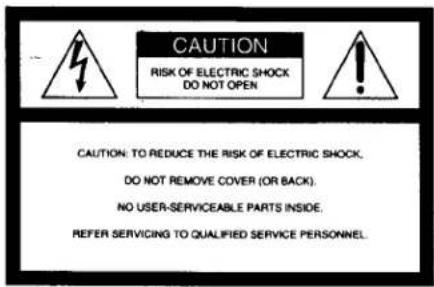
This symbol is intended to alert the user to the presence of uninsulated "dangerous voltage" within the product's enclosure that may be of sufficient magnitude to constitute a risk of electric shock to persons.
This symbol is intended to alert the user to the presence of important operating and maintenance (servicing) instructions in the literature accompanying the appliance.
CAUTION
The use of optical instruments with this product will increase eye hazard.
Warning
Do not install the appliance in a confined space, such as a bookcase or built-in cabinet.
The FUNCTION selector is located at the front. When you turn on the player, the OPR/BATT indicator lights up.
For customers in Canada
To prevent electric shock, match wide blade of plug to wide slot, fully insert.
Information
For customers in the United States
This equipment has been tested and found to comply with the limits for a Class B digital device, pursuant to Part 15 of the FCC Rules. These limits are designed to provide reasonable protection against harmful interference in a residential installation. This equipment generates, uses and can radiate radio frequency energy and, if not installed and used in accordance with the instructions, may cause harmful interference to radio communications. However, there is no guarantee that interference will not occur in a particular installation. If this equipment does cause harmful interference to radio or television reception, which can be determined by turning the equipment off and on, the user is encouraged to try to correct the interference by one or more of the following measures:
—Reorient or relocate the receiving antenna.
—Increase the separation between the equipment and receiver.
—Connect the equipment into an outlet on a circuit different from that to which the receiver is connected.
—Consult the dealer or an experienced radio/TV technician for help.
You are cautioned that any changes or modifications not expressly approved in this manual could void your authority to operate this equipment.
Owner's Record
The model number is located at the bottom and the serial number is located in the battery compartment. Record the serial number in the space provided below. Refer to these numbers whenever you call upon your Sony dealer regarding this product.
Model No. CFD-V10 Serial No.
lattery life
For CD radio cassette-corder:
FM recording
Sony R20P: approx. 13.5 h
Sony alkaline LR20: approx. 20 h
Tape playback
Sony R20P: approx. 7.5 h
Sony alkaline LR20: approx. 15 h
CD playback
Sony R20P: approx. 2.5 h
Sony alkaline LR20: approx. 7 h
Dimensions
Approx. 425 × 160 × 246 mm (w/h/d) (16 ¾ × 6 ¾ × 9 ¾ inches) (incl. projecting parts)
Aass
Approx. 4 kg (8 lb. 13 oz) (incl. batteries)
upplied accessory
AC power cord (1)
Design and specifications are subject to change without notice.
Precautions
On safety
- As the laser beam used in the CD player section is harmful to the eyes, do not attempt to disassemble the casing. Refer servicing to qualified personnel only.
- Should any solid object or liquid fall into the player, unplug the player, and have it checked by qualified personnel before operating it any further.
On power sources
- For AC operation, use the supplied AC power cord; do not use any other type.
• The player is not disconnected from the AC power source (mains) as long as it is connected to the wall outlet, even if the player itself has been turned off. - Unplug the player from the wall outlet when it is not to be used for an extended period of time.
- For battery operation, use six size D (R20) batteries.
- When the batteries are not to be used, remove them to avoid damage that can be caused by battery leakage or corrosion.
- The nameplate indicating operating voltage, power consumption, etc. is located at the bottom.
On placement
- Do not leave the player in a location must heat course, or in a place
- Do not place anything within 10 mm of the side of the cabinet. The ventilation holes must be unobstructed for the player to operate properly and prolong the life of its components.
- If the player is left in a car parked in the sun, be sure to choose a location in the car where the player will not be subjected to the direct rays of the sun.
- Since a strong magnet is used for the speakers, keep personal credit cards using magnetic coding or spring-wound watches away from the player to prevent possible damage from the magnet.
On operation
- If the player is brought directly from a cold to a warm location, or is placed in a very damp room, moisture may condense on the lenses inside the CD player section. Should this occur, the player will not operate properly. In this case, remove the CD and wait about an hour for the moisture to evaporate.
- If the player has not been used for a long time, set it in the playback mode to warm it up for a few minutes before inserting a cassette.
If you have any questions or problems concerning your player, please consult your nearest Sony dealer.
Notes on CDs
- Before playing, clean the CD with a cleaning cloth. Wipe the CD from the center out.
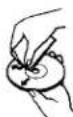
- Do not use solvents such as benzine, thinner, commercially available cleaners or anti-static spray intended for vinyl LPs.
- Do not expose the CD to direct sunlight or heat sources such as hot air ducts, nor leave it in a car parked in direct sunlight as there can be a considerable rise in temperature inside the car.
- Do not stick paper or sticker on the CD, nor scratch the surface of the CD.
• After playing, store the CD in its case.
If there is a scratch, dirt or fingerprints on the CD, it may cause tracking error
Location of controls


Playing a CD
1 Set FUNCTION to CD.

2 Press ▲OPEN/CLOSE down to open the CD compartment and place a CD on the CD compartment.
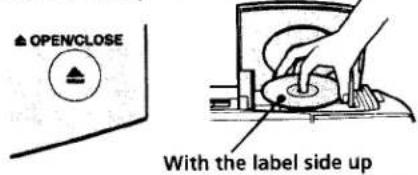
3 Close the compartment.

4 Press ▶II.
The player plays all the tracks once.

| To | Do this |
| Adjust the volume | Turn VOLUME. |
| Adjust the tone | Turn TONE. |
| Stop playback | Press ■. |
| Pause playback | Press ▶II. Press again to resume play after pause. |
| Go to the next track | Press ▶I. |
| Go back to the previous track | Press ◀◀. |
| Locate a point while listening to the sound | Press ▶▶(forward) or ◀◀(backward) while playing and hold down until you find the point. |
| Remove the CD | Press ▲OPEN/CLOSE. |
| Turn off the player | Set FUNCTION to TAPE (CD/RADIO OFF). |
Listening to the radio
1 Set FUNCTION to FM or AM.

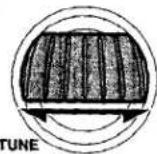
2 Turn TUNE to tune in a radio station. If the received FM stereo is too weak, the reception becomes monaural.
| To | Do this |
| Adjust the volume | Turn VOLUME. |
| Adjust the tone | Turn TONE. |
| Turn off the radio | Set FUNCTION to TAPE (CD/RADIO OFF). |
To improve broadcast reception
Reorient the antenna for FM. Reorient the player itself for AM.

Playing a tape
1 Set FUNCTION to TAPE (CD/RADIO OFF).

2 Press ■▲ to open the tape compartment and insert a recorded tape. Close the compartment.
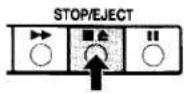

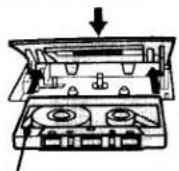
With the side you want to play on facing upward.
3 Press ▶.
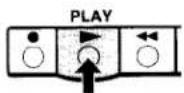
| To | Do this |
| Adjust the volume | Turn VOLUME. |
| Adjust the tone | Turn TONE. |
| stop.playback | Press ■▲. |
| fast-forward or rewind the ape | Press ▶▶ or ◀◀ for the side facing upward |
| 'ause playback | Press II. Press the button again to resume play after pause. |
| ject the cassette. | Press ■▲. |
Recording
1 Insert a blank tape.


With the side you want to record on facing forward.
2 Select the program source you want to record.
To record from the CD player, set FUNCTION to CD and insert a CD.
To record from the radio, set FUNCTION to FM or AM and tune in the station you want.
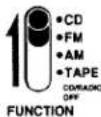
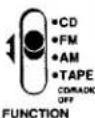
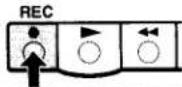
3 Press ● (▶ is depressed automatically.)
| To | Press |
| Stop recording | ■▲ |
| Pause recording | ■Press the button again to resume recording after pause. |
Tips
- Adjusting the volume or the tone will not affect the recording level.
- For best results, use the AC power as a power source for recording.
• To erase a recording, proceed as follows: 1 Set FUNCTION to TAPE (CD/RADIO OFF).
2 Press ●
Notes on cassettes
Break off the cassette tab from side A or B to prevent accidental recording. If you want to reuse the tape for recording, cover the broken tab with adhesive tape.

- The use of a cassette with more than 90 minutes of play time is not recommended except for long, continuous recording or playback.
Troubleshooting
General
The power does not come on.
- Connect the AC power cord securely.
• Make sure the batteries are inserted correctly. - Replace all the batteries with new ones if they are weak.
There is no audio.
• Make sure the FUNCTION selector is set to the function you want to operate.
- Adjust the volume.
- Unplug the headphones when listening through speakers. (excluding US model.)
CD Player
The CD does not play/ “--” lights in the display even when a CD is in place.
• Make sure that the CD compartment is closed.
- Place the CD with the label surface up.
- Clean the CD.
• Take out the CD and leave the CD compartment open for about an hour to dry moisture condensation
- Make sure the FUNCTION selector is set to CD.
The sound drops out.
- Reduce the volume.
- Clean the CD, or replace it if the CD is badly damaged
- Place the player in a location free from vibration.
- Cleans the lens with a commercially available blower.
Radio
Audio is weak or has poor quality.
- Replace all the batteries with new ones if they are weak.
- Move the player away from the TV.
The picture of your TV becomes unstable.
- If you are listening to an FM program near the TV with an indoor antenna, move the player away from the TV.
Tape player
The tape does not move when you press an operation button.
- Close the cassette compartment securely.
The ● button does not function/ The tape does not play.
• Make sure the safety tab on the cassette is in place.
- Make sure the FUNCTION selector is set to CD, AM or FM.
The tape does not erase completely.
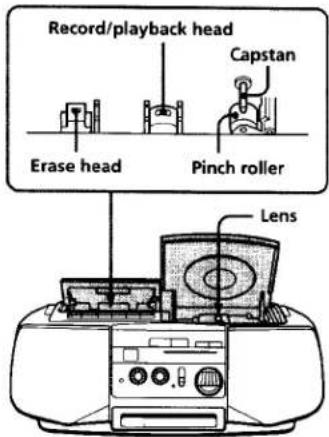
- Clean the erasing heads.
- Replace all the batteries with new ones if they are weak.
The tape does not record.
- Make sure the tape is inserted properly.
• Make sure the safety tab of the cassette is in place.
The audio is weak/The audio quality is poor.
- Clean the heads, pinch roller and capstan with a cotton swab slightly moistened with cleaning fluid or alcohol.
- Demagnetize the heads and all metal parts in the tape path with a commercially available tape head demagnetizer.
The sound is distorted.
- The TYPE II (high position) or TYPE IV (metal) tape is being used. Use TYPE I (normal) tape only.
Choosing the power sources
Use the AC power source whenever you record since recording consumes much power.
Connecting the AC power cord
Insert one end of the supplied AC power cord to the AC IN socket at the rear of the player, and the other end to the wall outlet.

Using the player on batteries
Insert six size D (R20) batteries (not supplied) into the battery compartment. To use the player on batteries, disconnect the AC power cord from the player.
Specifications
AUDIO POWER SPECIFICATIONS
POWER OUTPUT AND TOTAL HARMONIC DISTORTION
With 2.8-ohm loads, both channels driven from 150 - 10,000 Hz; rated
2 W per channel-minimum RMS power, with no more than
10 % total harmonic distortion in AC operation.
Other Specifications
CD player section
System
Compact disc digital audio system
Laser diode properties
Material: GaAlAs
Wave length: 780 nm
Emission duration: Continuous
Laser output: Less than 44.6 μW
(This output is the value measured at a distance of about 200 mm from the objective lens surface on the optical pick-up block with 7 mm aperture.)
Spindle speed
200 r/min (rpm) to 500 r/min (rpm) (CLV)
Number of channels
Frequency response
20 - 20,000 Hz +1 / -2 dB
Wow and flutter
Below measurable limit
Radio section
Frequency range
FM: 87.6 - 108 MHz
Cassette-corder section
Recording system
4-track 2 channel stereo
Fast winding time
Approx. 120 s (sec.) with Sony
cassette C-60
Frequency response
TYPE I (normal): 70 - 10,000 Hz
General
Speaker
Full range: 10 cm dia., 2.8 ohms, cone type (2)
Outputs
Headphones jack (stereo minijack)
For 16 - 68 ohms impedance
headphones (excluding US model)
Power output (excluding US model)
2 W + 2 W (at 2.8 ohms, 10 %
harmonic distortion)
Power requirements
230 V AC, 50 Hz (Australian model)
120 V AC, 60 Hz (Other models)
9 V DC, 6 size D (R20) batteries
Power consumption
AC 20 W
- WARNING
- To prevent fire or shock hazard, do not expose the player to rain or moisture.
- CAUTION
- For customers in Canada
- Information
- For customers in the United States
- Owner's Record
- lattery life
- FM recording
- Tape playback
- CD playback
- Dimensions
- Aass
- Precautions
- On safety
- On power sources
- On placement
- On operation
- Notes on CDs
- Listening to the radio
- To improve broadcast reception
- Playing a tape
- Recording
- Tips
- Notes on cassettes
- Troubleshooting
- General
- The power does not come on.
- There is no audio.
- CD Player
- The CD does not play/ “--” lights in the display even when a CD is in place.
- The sound drops out.
- Radio
- Audio is weak or has poor quality.
- The picture of your TV becomes unstable.
- Tape player
- The tape does not move when you press an operation button.
- The ● button does not function/ The tape does not play.
- The tape does not erase completely.
- The tape does not record.
- The audio is weak/The audio quality is poor.
- The sound is distorted.
- Choosing the power sources
- Connecting the AC power cord
- Specifications
- AUDIO POWER SPECIFICATIONS
- Other Specifications
- CD player section
- Radio section
- Cassette-corder section
Marque : SONY
Modèle : CFD-V10
Catégorie : Système Hi-Fi