
CFD-S36 - Système Hi-Fi SONY - Notice d'utilisation et mode d'emploi gratuit
Retrouvez gratuitement la notice de l'appareil CFD-S36 SONY au format PDF.


| Type de produit | Système Hi-Fi portable |
| Marque | Sony |
| Modèle | CFD-S36 |
| Couleur | Noir / Argenté |
| Dimensions (L x H x P) | Environ 450 x 250 x 200 mm |
| Poids | Environ 3 kg (sans piles) |
| Alimentation principale | Secteur 230 V ~ 50 Hz |
| Alimentation de secours | 8 piles LR20 (format D) |
| Lecteur de disques | CD audio compatible CD-R/RW |
| Radio | FM / AM (MW) avec antenne télescopique |
| Lecteur de cassette | Stéréo, enregistrement et lecture |
| Haut-parleurs | 2 voies stéréo intégrées |
| Puissance de sortie | 2 x 5 W (RMS) |
| Fonctions principales | Lecture CD, radio, cassette, programmation, répétition, mélange |
| Entrée auxiliaire | Prise jack 3,5 mm |
| Sortie casque | Prise jack 3,5 mm |
| Entretien et nettoyage | Nettoyer avec un chiffon doux et sec ; ne pas utiliser de solvants |
| Sécurité | Ne pas exposer à l'humidité ; débrancher en cas d'orage |
| Pièces détachées et réparabilité | Contacter le SAV Sony pour les pièces d'origine |
| Accessoires fournis | Cordon secteur, manuel d'utilisation |
| Informations générales | Appareil compact idéal pour la maison ou en extérieur |
FOIRE AUX QUESTIONS - CFD-S36 SONY
Questions des utilisateurs sur CFD-S36 SONY
0 question sur cet appareil. Repondez a celles que vous connaissez ou posez la votre.
Poser une nouvelle question sur cet appareil
Téléchargez la notice de votre Système Hi-Fi au format PDF gratuitement ! Retrouvez votre notice CFD-S36 - SONY et reprennez votre appareil électronique en main. Sur cette page sont publiés tous les documents nécessaires à l'utilisation de votre appareil CFD-S36 de la marque SONY.
MODE D'EMPLOI CFD-S36 SONY


| Troubleshooting | Type PlayerThe tape does not mean when you press an operation button.1. Create the entire component correctly.2. Play a button does not function or the tape does not play or run.3. Make the safety lab on the phone.4. Use of the phone to use the records when you operate in the home.5. Use the phone to use the record.6. Use the record is not and more frequently used than your own.7. Use the record is not and more frequently used than your own.8. Use the record is not and more frequently used than your own.9. Use the record is not and more frequently used than your own.10. Use the record is not and more frequently used than your own.11. Use the record is not and more frequently used than your own.12. Use the record is not and more frequently used than your own.13. Use the record is not and more frequently used than your own.14. Use the record is not and more frequently used than your own.15. Use the record is not and more frequently used than your own.16. Use the record is not and more frequently used than your own.17. Use the record is not and more frequently used than your own.18. Use the record is not and more frequently used than your own.19. Use the record is not and more frequently used than your own.20. Use the record is not and more frequently used than your own.21. Use the record is not and more frequently used than your own.22. Use the record is not and more frequently used than your own.23. Use the record is not and more frequently used than your own.24. Use the record is not and more frequently used than your own.25. Use the record is not and more frequently used than your own.26. Use the record is not and more frequently used than your own.27. Use the record is not and more frequently used than your own.28. Use the record is not and more frequently used than your own.29. Use the record is not and more frequently used than your own.30. Use the record is not and more frequently used than your own.31. Use the record is not and more frequently used than your own.32. Use the record is not and more frequently used than your own.33. Use the record is not and more frequently used than your own.34. Use the record is not and more frequently used than your own.35. Use the record is not and more frequently used than your own.36. Use the record is not and more frequently used than your own.37. Use the record is not and more frequently used than your own.38. Use the record is not and more frequently used than your own.39. Use the record is not and more frequently used than your own.40. Use the record is not and more frequently used than your own.41. Use the record is not and more frequently used than your own.42. Use the record is not and more frequently used than your own.43. Use the record is not and more frequently used than your own.44. Use the record is not and more frequently used than your own.45. Use the record is not and more frequently used than your own.46. Use the record is not and more frequently used than your own.47. Use the record is not and more frequently used than your own.48. Use the record is not and more frequently used than your own.49. Use the record is not and more frequently used than your own.50. Use the record is not and more frequently used than your own.51. Use the record is not and more frequently used than your own.52. Use the record is not and more frequently used than your own.53. Use the record is not and more frequently used than your own.54. Use the record is not and more frequently used than your own.55. Use the record is not and more frequently used than your own.56. Use the record is not and more frequently used than your own.57. Use the record is not and more frequently used than your own.58. Use the record is not and more frequently used than your own.59. Use the record is not and more frequently used than your own.60. Use the record is not and more frequently used than your own.61. Use the record is not and more frequently used than your own.62. Use the record is not and more frequently used than your own.63. Use the record is not and more frequently used than your own.64. Use the record is not and more frequently used than your own.65. Use the record is not and more frequently used than your own.66. Use the record is not and more frequently used than your own.67. Use the record is not and more frequently used than your own.68. Use the record is not and more frequently used than your own.69. Use the record is not and more frequently used than your own.70. Use the record is not and more frequently used than your own.71. Use the record is not and more frequently used than your own.72. Use the record is not and more frequently used than your own.73. Use the record is not and more frequently used than your own.74. Use the record is not and more frequently used than your own.75. Use the record is not and more frequently used than your own.76. Use the record is not and more frequently used than your own.77. Use the record is not and more frequently used than your own.78. Use the record is not and more frequently used than your own.79. Use the record is not and more frequently used than your own.80. Use the record is not and more frequently used than your own.81. Use the record is not and more frequently used than your own.82. Use the record is not and more frequently used than your own.83. Use the record is not and more frequently used than your own.84. Use the record is not and more frequently used than your own.85. Use the record is not and more frequently used than your own.86. Use the record is not and more frequently used than your own.87. Use the record is not and more frequently used than your own.88. Use the record is not and more frequently used than your own.89. Use the record is not and more frequently used than your own.90. Use the record is not and more frequently used than your own.91. Use the record is not and more frequently used than your own.92. Use the record is not and more frequently used than your own.93. Use the record is not and more frequently used than your own.94. Use the record is not and more frequently used than your own.95. Use the record is not and more frequently used than your own.96. Use the record is not and more frequently used than your own. |

http://www.world.sony.com/
Choosing Power Sources

Location of controls

Tip
To listen through headphones, connect the headphones to the ○ (Headphones) jack
N (sub-)inral) juni
Adjusting the sound emphasis (MEGA BASS/MEGA Xpand)
[Non-Text]
Reinforcing the bass sound
FRANK MEGA BASE "MEGA BASE" 20%
To return to normal sound, press the button again.
[Non-Text]
Getting the MEGA Xpand effect (CFD-836 only)
Press MEGA Xpand.
"Multi-A Spinal" appears in the display. You can get the effect of expansion of the sound field.
Theorem 6.2. Theorem 10.3. (A) Let (r) be a finite field of (r) .
Playing a CD


| Using the display | |
| Checking the total track number and playing time | |
| Press DISPLAY ENT-MEMORY is to stop mode. | |
| Total track number 120 5521 | |
| Total playing time | |
| Checking the remaining time | |
| Press DISPLAY ENT-MEMORY while playing a CD. | |
| To display | Press DISPLAY ENT-MEMORY |
| the current track number and the remaining time on the current track* | once |
| the number of tracks left and remaining time on the CD | twice |
| the current track number and playing time | three times |
| *For a track whose number to more than 30, the remaining time appears as < . . . * in the display. | |
| Locating a specific track | |
| To locate | Prows |
| a specific track directly | a number button of the track. |
| a point while listening to the sound | ▶▶(forward) or ▶▶(backward) while playing until you find the point. |
| a point while listening to the sound | ▶▶(forward) or ▶▶(backward) while playing until you find the sound. |
(2) 10.3.2. (2)
Tip
When you locate a track numbered over 10, press >10 first, then the corresponding number buttons.
Example: To play track number 23, press >10 first, then 2 and 3.
Beta
Note You cannot locate a specific track if "SHUE" or "PGM" is lit in the display.
Turn off the indication by pressing ■.
[Non-Text]
Repeat Play
1
Press CD.
- Record on Friday
- Hooled as follows.
To repeal Do this
2.1 Press MODE until "REF 1" appears. 2.2 Press the number button for the track
you want to repeat.
all the tracks 1 Press MODE until "REF ALL" appears.
tracks in random order 1 Press MODE until "SHUE REP" appears
2 Press ▶II.
programmed tracks 1 Press MODE until "PGM REP" appears.
- Press the number buttons for the tracks you want to program in the order you
want up to 20 tracks.
3 Press ▶II.
To cancel Repeat Play
Press MODE until "REP" disappears from the display.
Shuffle Play
- P###CD
• 2017
2 Press MODE until "SHUF" appears in the display.
3 Press ▶ to start shuffle play
[Non-Text]
To cancel Shuffle Play
Press MODE until "SHUF" disappears from the display.
Program Play
.
■ Press CD
2 Press MODE until "PGM" appears in the display.
。
- Press the number of tools for the disks you want to program in the order you want. You can arrange the playing order of
[Non-Text]
Display
Programmed tra
Playing and
(2) 求阳市
4 Press ▶II to start program play.
[Non-Text]
Press MODE until "PGM" disappears from the display
[Non-Text]
To check the order of tracks before play
Press DISPLAY ENT • MEMORY.
programed order.
[Non-Text]
To change the current program
Press ■ once if the CD is stopped and booze if the CD is playing. The current program will be erased. Then create a new program following the
1
。
You can record your own program. After you've created the program,
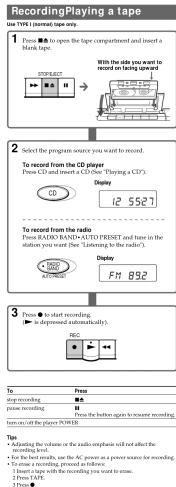
: Blank tape and press ● to start recording
About CD-Ra/CD-RWs
This player is compatible with CD-Rs/CD-RWs but playback capability
Italy vary depending on the quality of the issue, the recording device and application software.
[Non-Text]
Notes on CDs
- before playing,


to herein, thinner, commercially available
ny intended for vinyl LPs.
direct sunlight or heat sources such as hot air parked in direct sunlight or there can be a
crature inside the car.
or on the C.D., and research in the market of the 2 in its case.
(二)利润分配
gerprints on the CD, it may cause tracking e
Listening to the radio
1
Press IRADIO BAND-AUTO PRESET until the band you want ARDO in the display (direct view on)
Team appears in the display (direct power-on). Each time you press the button, the indication changes as
follows:
-
Other models "Fst" → "Am".
Display
BAND EM
AUTO PREDICT
-
2
2
to change in the display.
m = 311
\ = - / EM 892
m = 311
The player automatically scars the radio frequencies and stars when it finds a clear station.
m = 311
to change the frequency step by step.
-
(No text)
16
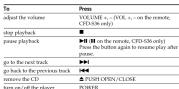
adjust the volume VOLUME +, - (VOC +, - on the retention, CFD-S36 only)
am
The Ground Truth image displays a single, solid horizontal line. According to Rule 2 (UNDERSCORE & LINE RULES), this is a stylistic or background line, not a placeholder underscore. Therefore, the OCR result must ignore it and output nothing or only meaningful text. The provided OCR content is "____", which consists of four underscores. This is an incorrect interpretation of the line as a placeholder, violating the rule that stylistic lines must be ignored. The OCR has hallucinated underscores where none should exist based on the GT's visual context. Hence, the OCR result is inconsistent with the Ground Truth.
To in
Reorient the antenna for FM/TV/WEATHER. Reorient the player itself
释义
(1) 12 (2) 12 (3)
[Non-Text]
图 1
[Non-Text]
(1) 12 (2) 12 (3)
21.
18 Use PM broadcast is noise, promo MDEE until "Mono" inserts in Frc
[Inphi
[Non-Text]
Pre
You can store radio stations into the pla
u-40 radio stations (CFD+S36 USA model), 20 for FM and 10 for AM and
AM
- 2014年1月1日(星期六)星期四
1 P
- Hold down RADIO BAND-AUTO PRESET for 2 seconds and
“
Display


DISPLAYENT•MEMORY. stations are stored in memory
number are stored ordinary hours the latter requested to higher ones.
。
If a station cannot be preset automatically
You need to preset a station with a weak signal manual
- 2017年1月1日至2018年1月1日(含)的公司股票交易均价为4.56元/股,与前一交易日收盘价相比,涨幅为-0.97%。
1 Press RADID BAND • AUTO
2 Tune in a station you want.
3 Hold down the number buttons that you want to grab the new station.
on for about 2 seconds.
To select the preset number over 30, press >30 first, then the corresponding number buttons. You need to hold down the last number
corresponding number of time. You need to find down the size number button to enter for about 2 seconds.
(1)
2 National.) Dianluy
CD/RADIO DIRECT OPERATION
-EM-05
1 2 3 4 5
小
The Ground Truth image displays a single, solid horizontal line. According to Rule 2 (UNDERSCORE & LINE RULES), this is a stylistic or background line, not a placeholder underscore. Therefore, the OCR result must ignore it and output nothing or only meaningful text. The provided OCR content is "____", which consists of four underscores. This is an incorrect interpretation of the line as a placeholder, violating the rule that stylistic lines must be ignored. The OCR has hallucinated placeholder underscores where none should exist in the GT. Hence, the OCR result is inconsistent with the Ground Truth.
T1-202
FM 892
The following table is blank:
The new station replaces the old one.
Playing preset radio stations
Playing preset radio stations
1 Press RADIO BAND• AUTO PRESET to select the band.
2
2 Press the number buttons to tune in the stored station. To tune in a precast station over 10 press >10 first, then
To take in a pocket manner over 10, press > to fix, then corresponding number buttons.
(Example: To tune in a preset station 12, press >10 and 1 first,
[Non-Text]
CD/RADIO DIRECT OPERATION
1 2 3 4 5 6
① ② ③ ④ ⑤
2017年1月1日
[Non-Text]
Checking the weather forecast
(CFD-S36 USA model only)
(2) 100% of the company
1 Press WEATHER.
The power turns on automatically.
WEATHER
。
2 Hold down TUNE + or - until the channel indication begins to
change in the display.
The plover automatically scans the weather forecast stations.
The party is transitioned by that line it is a clear solution of steps and steps when it finds a clear station.
If you can't tune in a station, press the button repeatedly to
change the frequency step by step.
Display
(3) 1
Wb Ich
-
1p Weather band provides continuous broadcast of the latest seafles
Information (directly from National Weather Service offices).
Marque : SONY
Modèle : CFD-S36
Catégorie : Système Hi-Fi