
Walkman WM-DD9 - Magnétocassette SONY - Notice d'utilisation et mode d'emploi gratuit
Retrouvez gratuitement la notice de l'appareil Walkman WM-DD9 SONY au format PDF.


| Type de produit | Magnétocassette portable (Walkman) |
| Marque | Sony |
| Modèle | Walkman WM-DD9 |
| Dimensions (environ) | 110 x 80 x 30 mm |
| Poids (environ) | 220 g (sans piles) |
| Alimentation | 2 piles AA (LR6) ou adaptateur secteur 3 V CC |
| Autonomie des piles | Environ 10 heures avec piles alcalines |
| Fonctions principales | Lecture de cassettes, arrêt, pause, avance et retour rapides, auto reverse, Dolby B NR, contrôle du volume |
| Types de cassettes compatibles | Cassettes compactes (type I, II, IV) |
| Sorties | Prise casque stéréo (mini-jack 3,5 mm) |
| Entrées | Prise microphone (mini-jack 3,5 mm) |
| Rapport signal/bruit | 55 dB (avec Dolby B) |
| Réponse en fréquence | 30 – 16 000 Hz (avec cassette type IV) |
| Pleurage et scintillement | 0,08 % WRMS |
| Entretien et nettoyage | Nettoyer régulièrement les têtes, le cabestan et le galet presseur avec un coton-tige imbibé d'alcool isopropylique. Démagnétiser les têtes après 50 heures d'utilisation. |
| Sécurité | Utiliser uniquement des piles recommandées ; ne pas exposer à l'humidité, aux températures extrêmes ou aux chocs ; éteindre l'appareil lors du transport. |
| Pièces détachées et réparabilité | Courroies de transmission, têtes magnétiques, potards, contacts ; réparation par un technicien qualifié recommandé. |
| Informations générales | Walkman haut de gamme des années 1980-1990, apprécié pour sa conception robuste et sa qualité sonore. Vérifier l'état des courroies avant achat d'occasion. |
FOIRE AUX QUESTIONS - Walkman WM-DD9 SONY
Questions des utilisateurs sur Walkman WM-DD9 SONY
0 question sur cet appareil. Repondez a celles que vous connaissez ou posez la votre.
Poser une nouvelle question sur cet appareil
Téléchargez la notice de votre Magnétocassette au format PDF gratuitement ! Retrouvez votre notice Walkman WM-DD9 - SONY et reprennez votre appareil électronique en main. Sur cette page sont publiés tous les documents nécessaires à l'utilisation de votre appareil Walkman WM-DD9 de la marque SONY.
MODE D'EMPLOI Walkman WM-DD9 SONY
SONY
Cassette Player
WM-DD9
Operating Instructions
3-751-279-21(1)


WALKMAN
DD QUARTZ WALKMAN
WALKMAN is a Trademark of Sony
Corporat on 1990 by Sony Corporat on
this manual thoroughly and retain it for future reference.
OWNER'S RECORD
The model number is located at the rear and the serial number is in the inside of the cassette holder. Record the serial number in the space provided below. Refer to these numbers whenever you call upon your Sony dealer regarding this product.
Model No. WM-009 Serial No. ____
Table of Contents
| Features | ● |
| Precautions | ● |
| Parts Identification | ● |
| Using with a Rechargeable Battery | ● |
| Using with a Battery | ● |
| Using Alternate Power Sources | ● |
| Tape Playback | ● |
| How to Use the Carrying Case | ● |
| Cleaning the Head | ● |
| Specifications | ● |
WARNING
To prevent fire or shock hazard, do not expose the unit to rain or moisture.
INFORMATION
This equipment generates and uses radio frequency energy and if not installed and used properly, that is, in strict accordance with the manufacturer's instructions, may cause interference to radio and television reception. It has been type tested and found to comply with the limits for a Class B computing device in accordance with the specifications in Subpart J of Part 15 of FCC Rules, which are designed to provide reasonable protection against such interference in a residential installation. However, there is no guarantee that interference will not occur in a particular installation. If this equipment does cause interference to radio or television reception, which can be determined by turning the equipment off and on, the user is encouraged to try to correct the interference by one or more of the following measures:
Reconent the receiving antenna Relocate the equipment with respect to the receiver Move the equipment away from the receiver Plug the equipment into a different outlet so that equipment and receiver are on different branch circuits. It necessary, the user should consult the dealer or an experienced radio/television technician for additional suggestions. The user may find the following booklet prepared by the Federal Communications Commission helpful: "How to identify and Resolve Radio-TV Interference Problems". This booklet is available from the U.S. Government Printing Office, Washington, DC 20402. Stock No. 004-000-00345-4
Features
- Two-motor Disc Drive mechanism and Quartz lock capstan servo assure accurate and stable tape transport, greatly reducing wow and flutter. One motor is provided for the forward direction and another for the reverse direction. Since the rotation of motors is controlled by the accurate frequency of the quartz servo, distortion of the sound caused by the unit being moved is slight.
Drive system of normal auto-reverse Walkman

Capstan for the forward direction
Capstan for the reverse direction
Drive system of WM-DD9
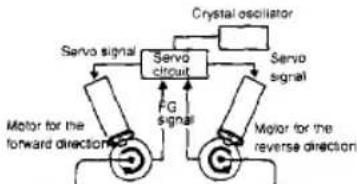
flowchart
graph TD
    A["Motor for the forward direction"] --> B["Servo signal"]
    B --> C["Servo circuit"]
    C --> D["Motor for the reverse direction"]
    D --> E["Servo signal"]
    E --> F["Scrystal oscillator"]
    F --> G["Servo signal"]
    G --> H["FC signal"]
    H --> I["Motor for the reverse direction"]
Capstan for the forward direction
• Advanced EX amorphous head
Double gutters and fine gap produce clearer sound in the lower and upper reister respectively.
Single crystalline material employed for the wiring of the head transmits the signal accurately.
- Twin turbo earphones with larger sub turbo-duct allow a wider dynamic range, and its shape provides a comfortable fitting.
- The sturdy 2 mm-thick (maximum) casing assures the durability of the unit.
• Dolby NR* system (B and C types) reduces tape hiss noise. - MEGA BASS selector for heavy and powerful mega bass sound.
- A Size AA (R6) battery or rechargeable battery can be inserted without attaching a case to the unit.
• Dolby noise reduction manufactured under license from Dolby Laboratories Licensing Corporation. “DOLBY” and the double-D-symbol □□ are trademarks of Dolby Laboratories Licensing Corporation.
Parts Identification

① DC IN 1.5 V (external power input) jack
2 REV/FWD (battery/tape transport direction) indicator
1 STOP button
( fast winding) button
3 HOLD. OPEN FOR TAPE/BATT (battery) switch
Slide to HOLD to avoid an accidental operation. To open the cassette holder, slide to OPEN FOR TAPE/BATT. To open the battery compartment lid, slide again to OPEN FOR TAPE/BATT.
Cassette holder
7 (fast winding) button
PLAY/DIR (play/tape transport direction change) button
DOLBY NR (Dolby noise reduction) (C/B:OFF) selector
10 MEGA BASS (MAX/MID/NORM) selector
TAPE (NORM/CrO2, METAL) selector
12 Hole for attaching the carrying case
13 VOL (volume) control
14 ☐ (earphones) jack (stereo minijack)
Battery compartment lid
MODE (tape transport mode) selector
Using with a Rechargeable Battery
Before using the unit, charge the rechargeable battery with the supplied battery charger.
How to charge
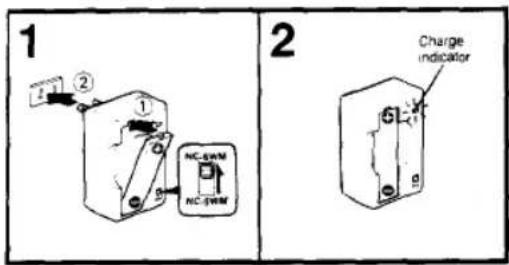
1 Plug in the battery charger after inserting the rechargeable battery.
2 The charge indicator blinks and then comes on. Unplug the battery charger when the indicator goes off.
| High speed charging (50% charge in 10 minutes) | After the charge indicator flashes for a few (approx. 10) seconds (checking the remaining amount of power), it charges to blinking and high speed charging starts.*When the indicator lights steadily (10 minutes later), the rechargeable battery is 50% charged. |
| Full charge | Leave the charger for approx. 20 more minutes until the indicator goes off. (Total charging time: approx. 30 minutes) |
- If the indicator lights steadily instead of blinking after a few (approx. 10) seconds of flashing
This shows that the power in the rechargeable battery still has power. If this happens, charging is in the normal speed mode instead of the high speed mode. Leave the charger and the battery will be charged when the indicator goes off.
Charging time varies according to the remaining amount of power. (approx. 40 min.)
Note If an exhausted or inferior rechargeable battery is inserted, blinking of the indicator may not change to steady lighting at either position of the selector.
In this case, replace the rechargeable battery with a new one.
8
How to insert the rechargeable battery
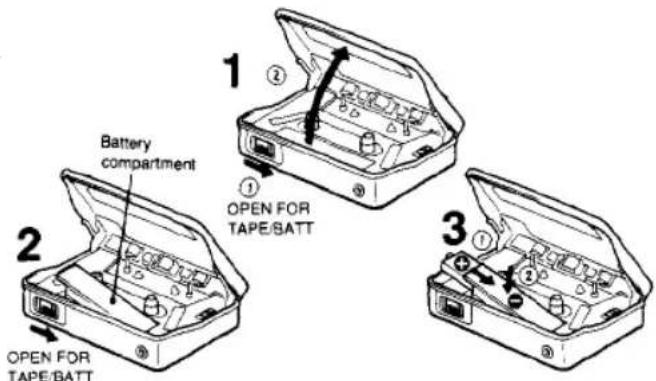
When you use an optional rechargeable battery
Sony NC-6WM and NC-5WM rechargeable battery are available.
NC-6WM — The same procedure as the supplied rechargeable battery.
NC-5WM or NC-6WM at a normal speed
Set the selector on the battery charger to NC-SWM
You cannot charge the battery at a high speed. The indicator lights up and the battery will be charged in approx. 40 minutes. (The indicator will go off.)
Notes
- Be sure to plug in the battery charger after inserting the rechargeable battery, otherwise the battery will not be charged porperly.
• The battery may become warm up during charging, but this is not a problem. - Use the supplied battery charger only for the NC-5WM and NC-6WM.
- Do not use the battery charger near a receiver. If you do, it may interfere with the receiver.
- Unplug the battery charger from the wall outlet when the indicator goes off.
- If the rechargeable battery is new or after a long storage, it may not charge completely. (The operating time is shorter.) This is not a problem and the battery will be charged completely after it has been used several times.
Using with a Battery

Notes
- Insert the battery with correct polarity.
- When the unit is not to be used for a long period of time, remove the battery to avoid damage caused by battery leakage and corrosion.
When the battery becomes weak
The REV/FWD indicator will glow faintly and the tape playback sound will be distorted, or unstable. In addition, tape playback will stop automatically.
n this case, replace the battery or recharge the battery when using the echargeable battery.
Concerning the battery life. see "Specifications".
Using Alternate Power Sources
Connect a power cord such as the AC-D1M AC power adaptor (not supplied), etc. to the DC IN 1.5 V jack.
Concerning alternate power sources, see the "Specifications"

Note on battery replacement or alternate power source connection
When replacing the battery or connecting an alternate power source, the unit will operate. This is not a problem.
D
1


To playback a cassette, press ◀▶
To listen to the other side of the cassette during playback, press ◀▶
To stop the tape, press ■
To wind the tape rapidly in the direction of FWD, press
To wind the tape rapidly in the direction of REV, press
On playback mode
MODE selector*
| To play back both sides of the cassette onceWhen the playback starts from the reverse side of the cassette, the unit stops automatically at the end of that side. | |
| To play back both sides of the cassette repeatedly |
* The MODE selector is inside the cassette holder.
On the REV/FWD indicator
| Indicator during playback | Whenis pressed | Whenis pressed | |
| Forward side | Lights. | Blinks. | Lights. |
| Reverse side | Lights. | Lights. | Blinks. |
12
To get the best performance from your tape
| For normal(TYPE II) tapes |  |
| For CrO2 (TYPE II)or metal (TYPE IV)tape |  |
| For Dolby NR-processed tapes (B-type) |  |
| For Dolby NR-processed tapes (C-type) |  |
| For heavy and powerful sound:Set MEGA BASS to the desired position.Bass boosts in the order of NORM, MID and MAX. |  |
Notes
- If you press or after pressing ■, the tape stops automatically at the end.
- or is pressed while the unit is playing back, then the unit starts playing back automatically after winding the tape completely. To stop the tape press ■.
- Do not open the cassette holder while the unit is operating.
13
How to Use the Carrying Case

natural_image
Illustration showing a mechanical component and a close-up of a person's seatbelt with a magnified inset (no text or symbols)Cleaning the Head

Clean your tape head after every 10 hours of use to enjoy optimum stereo sound. Moisten a cotton swab or a soft cloth with alcohol and wipe the head, the pinch-rollers and the capstans.

Specifications
Wow and flutter
±0.1% W. Peak (DIN)
0.07% WRMS (NAB)
S/N ratio
48 dB
Total harmonic distortion 1.0%
Frequency response (DOLBY NR off)
20-20.000 Hz
Output
Earphones jack, load impedance 8 - 300 ohms
Power output
5 mW + 5 mW at DC operation (16 ohms)
Power requirements
1.5 V DC
Rechargeable battery
One Size AA (R6) battery
DC IN 1.5 V jack accepts:
Sony AC-D1M power adaptor (not supplied) for
use on 120 V AC, 60 Hz
Sony EBP-500B battery case (not supplied) for
use with two Size AA (R6) batteries
Sony DCC-70 car battery cord (not supplied) for
use with 12 V car battery
Battery life
| Battery | Playback |
| Rechargeable NC-6WM fully charged | Approx. 2.5 hours |
| Sony battery SUM-3 (NS) | Approx. 1 hour |
| Sony alkaline battery AM3 (N) | Approx. 5.5 hours |
For maximum performance, we recommend the use of alkaline batteries.
Specifications
Dimensions
Approx. 76.8 × 108 × 28.3 mm (w/h/d)
(3 ^1 /8 × 4 ^3 /8 × 1 ^1 /8 inches)
not incl. projecting parts and controls
Approx. 77.7 × 109.2 × 33.1 mm (w/h/d)
(3 ^+ /e × 4 ^3 /8 × 1 ^15 /16 inches)
incl. projecting parts and controls
Weight
Approx. 330 g (12 oz) incl. rechargeable battery
not incl. other accessories
Accessories supplied
Carrying case (1) Battery charger (1)
Rechargeable battery (1)
Stereo earphones (open-air type, 1)
Earphones case (1) Ear adaptor (2)
Design and specifications subject to change without notice.
Accessories not supplied
Battery case EBP-500B
AC power adaptor AC-D1M
Car battery Cord DCC-70
Rechargeable battery NC-6WM, NC-5WM Battery charger BC-7L
Head demagnetizer HE-5C Head cleaning pen CLH-5
Cleaning kit KK-4, KK-31
Stereo earphones MDR-E575, MDR-E555, MDR-E4840
Your dealer may not handle some of the above listed accessories.
Please ask the dealer for detailed information about the accessories available in your country.
Note: Use only the recommended AC power adaptor or car battery cord manufactured by Sony.
Polarity of the plugs of other manufacturers may be different.

Sony Corporation
Printed in Japan
- WM-DD9
- OWNER'S RECORD
- Table of Contents
- WARNING
- INFORMATION
- Features
- • Advanced EX amorphous head
- Parts Identification
- Using with a Rechargeable Battery
- How to charge
- How to insert the rechargeable battery
- When you use an optional rechargeable battery
- Notes
- Using with a Battery
- When the battery becomes weak
- Using Alternate Power Sources
- Note on battery replacement or alternate power source connection
- How to Use the Carrying Case
- Cleaning the Head
- Specifications
- Accessories not supplied
Marque : SONY
Modèle : Walkman WM-DD9
Catégorie : Magnétocassette