
Walkman WM-AF54 - Magnétocassette SONY - Notice d'utilisation et mode d'emploi gratuit
Retrouvez gratuitement la notice de l'appareil Walkman WM-AF54 SONY au format PDF.


| Type de produit | Magnétocassette portable |
| Marque | Sony |
| Modèle | Walkman WM-AF54 |
| Dimensions (approx.) | 80 x 110 x 30 mm |
| Poids (avec piles) | Environ 200 g |
| Alimentation | 2 piles AA (1,5 V chacune) |
| Fonctions principales | Lecture de cassettes, arrêt, avance rapide, retour rapide, éjection, volume |
| Radio intégrée | Oui, AM/FM avec tuner analogique |
| Auto Reverse | Oui, changement automatique de côté |
| Sortie audio | Prise casque stéréo 3,5 mm |
| Autonomie des piles | Environ 15 heures (lecture cassette) |
| Accessoires inclus | Casque d'écoute, ceinture clip |
| Entretien et nettoyage | Nettoyer les têtes avec un coton-tige imbibé d'alcool isopropylique |
| Sécurité | Ne pas exposer à l'humidité ni aux chocs violents |
| Pièces détachées et réparabilité | Courroie de transmission, têtes de lecture disponibles; réparable par un technicien |
| Informations générales | Walkman emblématique des années 1990, idéal pour écouter vos cassettes préférées |
FOIRE AUX QUESTIONS - Walkman WM-AF54 SONY
Questions des utilisateurs sur Walkman WM-AF54 SONY
0 question sur cet appareil. Repondez a celles que vous connaissez ou posez la votre.
Poser une nouvelle question sur cet appareil
Téléchargez la notice de votre Magnétocassette au format PDF gratuitement ! Retrouvez votre notice Walkman WM-AF54 - SONY et reprennez votre appareil électronique en main. Sur cette page sont publiés tous les documents nécessaires à l'utilisation de votre appareil Walkman WM-AF54 de la marque SONY.
MODE D'EMPLOI Walkman WM-AF54 SONY
Sony Corporation
©1989
Printed in Taiwan R.O.C.
SPORTS
WALKMAN
WALKMAN is a trademark of Sony Corporation.
Owner's Record
The model number is located at the bottom and the serial number is located on the side of the battery compartment.
Record the serial number in the space provided below.
Refer to these numbers whenever you call upon your Sony dealer regarding this
product.
Model No. WM-AF54
Serial No.
Precautions
Notes on batteries
- Remove the batteries when you will not use the unit for a long time to prevent damage from battery leakage and corrosion.
- When the sound becomes unstable, try a new set of batteries.
- Insert one battery into the supplied tube to avoid causing a short circuit.
(See illustration A).
Handling the rechargeable battery
- Recharge when the sound becomes noisy or distorted.
- Keep the battery away from fire.
- Do not let the battery terminals touch anything metal.
- If the electrolyte inside the battery should come into contact with clothing or skin, wash it off with water immediately.
Handling your WALKMAN
- Avoid exposure to temperature extremes, direct sunlight, moisture, sand, dust, or mechanical shock. Never leave in a car parked in the sun.
- Before opening or shutting the cassette compartment lid, be sure to wipe off water, dust or sand on the outside of the unit.
- Since water in the headphones jack may cause rust, cover it with the attached rubber cap when the headphones are not used.
- If the unit or the headphones have been dropped in salt water, be sure to wash them in still fresh water. Never wash them under running water, and never use soap or detergent.
- The supplied headphones are not meant to be immersed in water or come in continuous contact with water. If they are accidentally dropped into water or if they get wet, dry them with a soft cloth. Never use an electric hair drier.
- You should run the unit for a few minutes before inserting a cassette if it has not been used for a long time.
• We do not recommend the use of cassettes longer than 90 minutes.
Tips on headphone listening
- Do not listen with headphones while driving, cycling, etc.
- Listen at a moderate volume to avoid damaging your ears and to avoid disturbing those close to you.
Maintenance
- Prolonged use may contaminate the tape head. If the sound becomes noisy or distorted, clean the head and tape path shown below with alcohol.

natural_image
Black-and-white illustration of a mechanical device with a lever and two circular components (no text or symbols)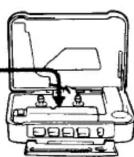
- Clean your headphone plug periodically for optimum sound.
- Do not use alcohol, benzine, or thinner to clean the case.
Tips on rubber packing
- Any sand or dust on the rubber packing will prevent the cassette compartment lid from shutting tightly, and water may leak in. Brush off the dust once in a while.
- We recommend changing the packing every year. Replacement packing is available at an authorized Sony Service Facility.
If you have any question or problem concerning your unit, please consult your nearest Sony dealer.
Opening and Closing the Cassette Compartment Lid
To Open
1

2

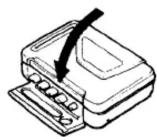
to close
1
2

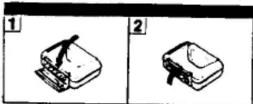
If the cassette compartment lid does not open*
Follow the steps in the illustration.
When the cassette compartment lid is open, remember to close the cover. (The unit is not water-resistant when the cover is open.)
• Since the unit is airtight, the lid may not open because of a sudden change in air pressure, which happens after being transported on a plane or moving from a warm place to a cold place.


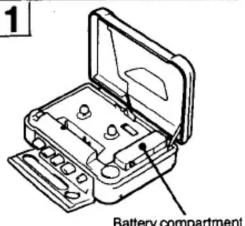
Installing the Batteries
1
2

3


4

natural_image
Diagram of a mechanical device with a gear and lever mechanism (no text or symbols)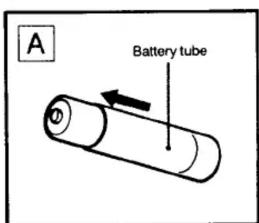
SONY
3-750-037-21(1)
Radio Cassette Player
WM-AF54
Operating Instructions
Before operating the unit, please read the manual thoroughly and return a long future reference
[Non-Text]
Soby Corporation 2008 FYED in Seven ROE
SPORTS WALKMAN WALKMAN 100 Independent of Baby Corporation
Covate Report
Owner's Record
The model number is located at the bottom and the serial number is totaled a
the side of the battery companies
Note: The same number in the space provided above Polar is these numbers a whenever you had used what Sony study resources
product
Model No: WBA/AFSL Bond No ____
m = 311
Precautions
1 Reclusions
Notes at Batteries
- Remove the batteries when you will not use the unit for a long time to prevent damage
from battery levelages and corrosion
- When the sound becomes unstable, try a new set of bellows
(See Supplementary 5.1)
2017年1月1日
Handling the rechargeable bar
- Recharge when the surge becomes easy or distorted
- Hold the battery down from the - Do not tell the battery in the first three years
If the electrical words list below they do not go on
In the case of water, the water is about 100 gm and contact with boiling oil, which is well with water immediately.
The following table is presented in the image.
Holding your evaluation
Aged debenture to temperature at intersections, direct sunlight, mounted, band clash or magnetoliter shock. Inside, there is a very cold light in the air.
Before opening or shutting the investment amount at 100 m² of cash, we
of hand on the outside of the ure
Since water in the headphones pick may cause rust, cover it with the attached rubber
Cap when the Headphones are not used
- The end of the second place have been dropped in last week. But sure to wash them in all bank water. How much from one was a total of 200,000 dollars
The number of binders can not be shown as a version of the
The water is not shown in the spot. The water is also increased in water for a single or continuous contact with water. If they are accidentally dropped into water as if they get water, they are
with a soft cloth. Never use an electric hair dash
You should run the unit for a few minutes before entering a cassette if it was not taken used by a home phone.
We do not want to use the following methods:
(1) 2017年,公司实现营业收入3.5亿元,同比增长4%和19.8%。
you can telephone listening
Do not listen with headsharrest single driving, cycling, etc.
Cement at a historical volume to (not damaging your own) and to avoid detouring these
(1)
demonies
Prenamped too may terminate the tape head. If the sound becomes false or disturbed
with the first and second path shown below with above
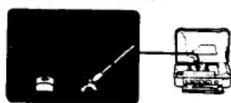
• Clean your telephone plus periodically by automatic sound
+ Do not use alcohol, beverages, or Denver to clear the case
Due an additional review
- Any proof or dust up the industrial industries will prevent me over time.
It is sure that the rubber jacketing and prevents the cottoned compartment to move snubbing lightly, and water may last up. Crush of the dust drops on a slide
• We recommendation changing the pushing every year. Replacement packing as available of
an authorized Tony Service Agency
Euro bank EUR zone: Euro zone: EUR zone: Euro zone: EUR zone
- We have any opinion on whether making your own. Some default was reserved. Every doctor
Opening and Closing
the Cassette Compartment Ltd


Installing the Batteries

Inserting a Cassette

Playing Back a Tape

Receiving Radio

Specifications

Attaching the Carrying Holder
Inserting a Cassette
Take up any slack in the tape before insertion.

To get the performance from your tape
For normal tapes (TYPE I)
For CrO_2 (TYPE II) or metal (TYPE IV) tapes
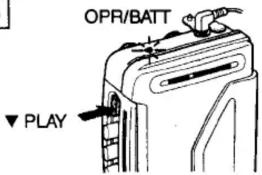
Playing Back a Tape
Insert a cassette. (See "Inserting a cassette".)
1

2

3
4

To rewind the tape: ▲ REW
To advance the tape rapidly: ↓ FF To stop: ■ STOP -

At the end of the tape
The tape stops. The locked ▼ PLAY button will be released automatically.
The locked▲ or ▼ button must be released by pressing ■ STOP button.
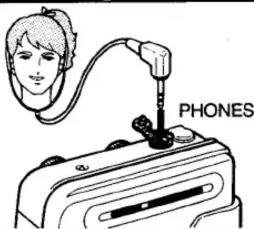
Receiving Radio
1
2
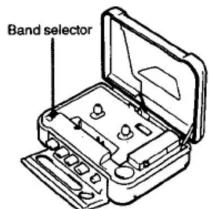
| For normal FM reception |  |
| When a very strong FM station signal causes noise. The noise will be reduced. |  |
| For AM reception |  |
3

4
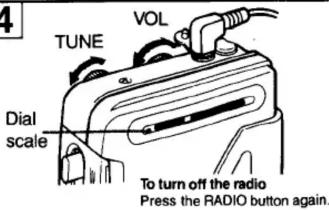
To improve receiving condition
FM
Since the headphone cord serves as an FM antenna, extend it for better reception.
AM
Since the reception is affected by the direction of the unit, rotate it horizontally for optimum reception.
Specifications
Frequency range
FM: 87.6-108 MHz
AM: 530-1,605 kHz
Power requirement
3 V DC, two size AA (R6) batteries
BP-700 rechargeable battery
Battery life (hours)
| Batteries | Radio reception | Playback |
| Sony battery SUM3 (NS) | approx. 17 | approx.4 |
| Sony alkaline battery AM3 (N) | approx. 35 | approx. 8 |
Accessories supplied
Stereo headphones (open-air type, 1)
Optional accessories
Carrying holder (1) Battery tube (1)
Rechargeable battery BP-700/charger (BC-700) kit
BPC-700K
Design and specifications subject to change without notice.
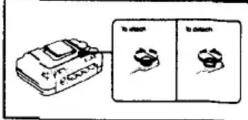
Attaching the Carrying Holder

To attach

To detach

- Owner's Record
- Precautions
- Notes on batteries
- Handling the rechargeable battery
- Handling your WALKMAN
- Tips on headphone listening
- Maintenance
- Tips on rubber packing
- Opening and Closing the Cassette Compartment Lid
- Installing the Batteries
- WM-AF54
- Inserting a Cassette
- Playing Back a Tape
- Receiving Radio
- Specifications
- Attaching the Carrying Holder
Marque : SONY
Modèle : Walkman WM-AF54
Catégorie : Magnétocassette