
Walkman WM-FX28 - Magnétocassette SONY - Notice d'utilisation et mode d'emploi gratuit
Retrouvez gratuitement la notice de l'appareil Walkman WM-FX28 SONY au format PDF.


| Type de produit | Magnétocassette portable |
| Marque | Sony |
| Modèle | Walkman WM-FX28 |
| Dimensions | 109 x 82 x 37 mm |
| Poids | 240 g (avec piles) |
| Alimentation | 2 piles AA / adaptateur secteur |
| Autonomie | Environ 40 heures (lecture cassette) |
| Type de cassette | Cassette audio compacte (Normal, Chrome, Métal) |
| Fonctions principales | Lecteur cassette, radio AM/FM, arrêt automatique, prise microphone |
| Radio | AM 530-1605 kHz, FM 87.5-108 MHz |
| Sortie audio | Prise casque stéréo 3,5 mm |
| Contrôle du son | Volume, tonalité, réducteur de bruit (Mega Bass) |
| Entrée auxiliaire | Non |
| Entretien et nettoyage | Nettoyer les têtes avec un coton-tige imbibé d'alcool isopropylique |
| Sécurité | Ne pas exposer à l'humidité ni aux chocs |
| Pièces détachées et réparabilité | Piles, écouteurs, courroie de transmission disponibles en ligne |
| Informations générales | Notice de 12 pages disponible au format PDF |
FOIRE AUX QUESTIONS - Walkman WM-FX28 SONY
Questions des utilisateurs sur Walkman WM-FX28 SONY
0 question sur cet appareil. Repondez a celles que vous connaissez ou posez la votre.
Poser une nouvelle question sur cet appareil
Téléchargez la notice de votre Magnétocassette au format PDF gratuitement ! Retrouvez votre notice Walkman WM-FX28 - SONY et reprennez votre appareil électronique en main. Sur cette page sont publiés tous les documents nécessaires à l'utilisation de votre appareil Walkman WM-FX28 de la marque SONY.
MODE D'EMPLOI Walkman WM-FX28 SONY
WALKMAN
Radio Cassette Player
WM-FX28
Operating Instructions
WALKMAN is a trademark of Sony Corporation.
Sony Corporation © 1993
Printed in Malaysia
OWNER'S RECORD
The model number is located on the bottom and the serial number is located inside the cassette holder. Record the serial number in the space provided below. Refer to them whenever you call upon your Sony dealer regarding this product.
Model No. WM-FX28
Serial No.
INFORMATION
This equipment has been tested and found to comply with the limits for a Class B digital device, pursuant to Part 15 of the FCC Rules. These limits are designed to provide reasonable protection against harmful interference in a residential installation. This equipment generates, uses, and can radiate radio frequency energy and, if not installed and used in accordance with the instructions, may cause harmful interference to radio communications. However, there is no guarantee that interference will not occur in a particular installation. If this equipment does cause harmful interference to radio or television reception, which can be determined by turning the equipment off and on, the user is encouraged to try to correct the interference by one or more of the following measures:
- Reorient or relocate the receiving antenna.
- Increase the separation between the equipment and receiver.
- Connect the equipment into an outlet on a circuit different from that to which the receiver is connected.
- Consult the dealer or an experienced radio/TV technician for help.
This device complies with Part 15 of the FCC Rules. Operation is subject to the following two conditions:
(1) This device may not cause harmful interference, and
(2) this device must accept any interference received, including interference that may cause undesired operation.
You are cautioned that any changes or modifications not expressly approved in this manual could void your authority to operate this equipment.
Featuring
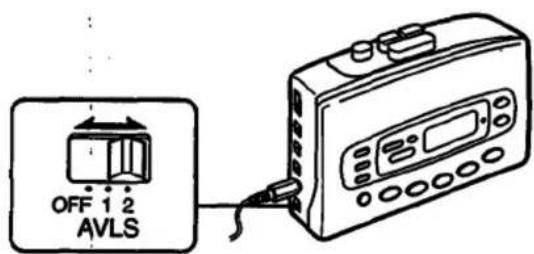
AVLS (Automatic Volume Limiter System)
The AVLS selector allows you to limit the maximum volume of your Walkman personal stereo without degrading the sound quality.
- When the AVLS selector is set to either position 1 or 2 (around 95 dB, 85 dB respectively), the volume will be kept at a moderate level without the degradation of the sound quality, even if you attempt to turn the volume up higher.
- When the AVLS selector is set to either position 1 or 2, the playback sound may be distorted or unstable according to the music (especially bass boosted part). If this happens, turn down the volume.
- When the AVLS selector is turned off, you will be able to enjoy the full volume capability of your Walkman personal stereo.
Getting Started
Using with Batteries

Insert two AA (R6) batteries in correct polarity. Notes
- When you are not going to use your Walkman for a long time, remove the batteries to prevent damage from battery leakage and corrosion.
- When the batteries become weak, the BATT indicator will glow faintly and the sound will be distorted or unstable. In such a case, replace both batteries.
- Replace both batteries within 15 minutes, and do not to remove them for at least 15 minutes once they are replaced, or all the memories will be canceled.
Using External Power Sources
You can connect the following external power sources through the DC IN 3 V jack located on the right side. (When you plug a cord into the DC IN 3 V jack, the internal batteries are automatically bypassed.)
• House current using an AC-E30L AC power adaptor
• 12 V car battery using a DCC-E130L car battery cord
Note
Use only the recommended AC-E30L AC power adaptor (not supplied). Do not use any other AC power adaptor.

Setting the Clock
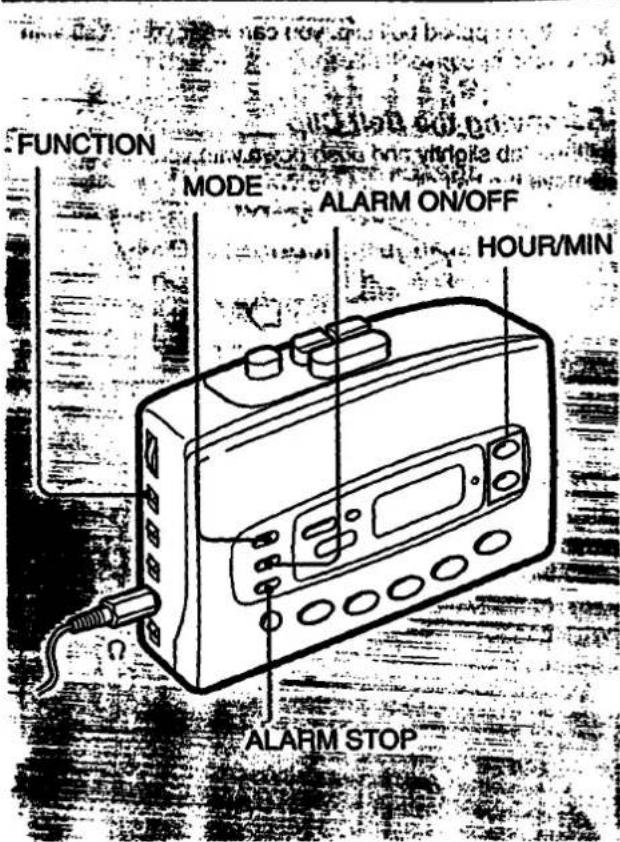
Setting Current time
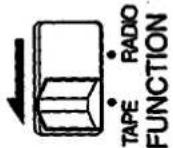
1 Set the FUNCTION selector to TAPE.
2 Press the MODE button twice to enter the current time setting mode.

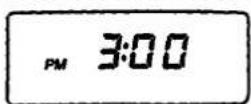
3 Set the time by using the HOUR/MIN buttons within 10 seconds of flashing.

4 Press the MODE button once to return to the current time display.

Setting the Alarm
1 Set the FUNCTION selector to TAPE.

2 Press the MODE button once to enter the alarm setting mode.


3 Set the alarm time by using the HOUR/MIN buttons within 10 seconds of flashing.
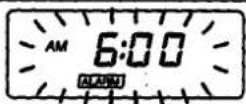

4 Press the MODE button twice to return to the current time display.

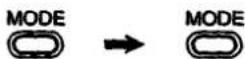
5 Press the ALARM ON/OFF button to set the alarm on.


| To stop the alarm | Press the ALARM STOP button. |
| To cancel the alarm setting | Press the ALARM ON/OFF button.The ALARM and ON indicators will go off. |
Notes
- The hour display does not advance even when the minute display returns to "00" after "59".
- You can hear the alarm from inside of the Walkman and also through the headphones when operating the tape player and radio.
• The hour display is on a 12-hour cycle.
• Even if you do not press the ALARM STOP button, the alarm will automatically stop after 10 minutes or so. - The preset alarm time will not be canceled even if you press the ALARM STOP button.
Playing Cassettes
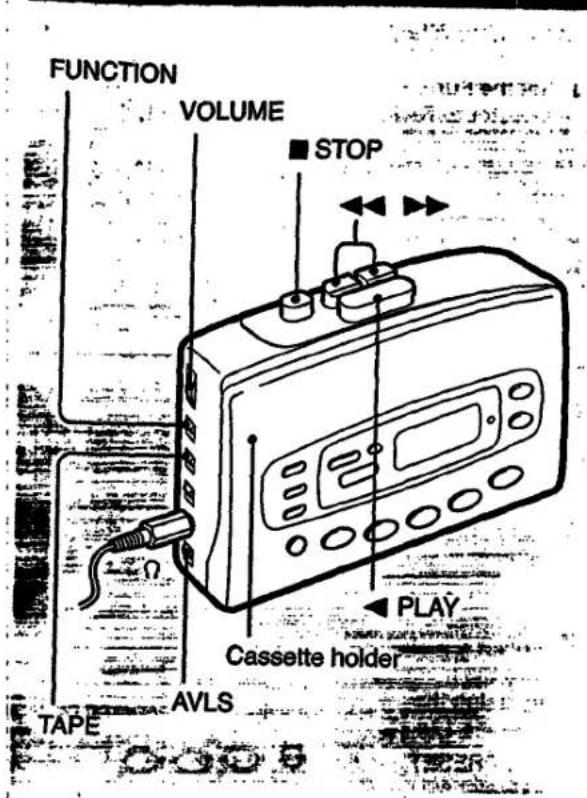
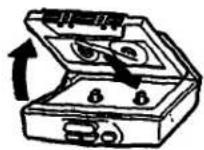
1 Insert a cassette.
2 Set the FUNCTION selector to TAPE.

3 Set the TAPE selector to NORM or CrO2/METAL to match the tape type.

4 Press the ◀ PLAY button.
PLAY
Operating the Cassette Player
| To stop | Press ■ STOP. |
| To wind the tape | Press ▶▶ or ◀◀. |
| To adjust the volume | Set the VOLUME control. |
Notes on playing cassettes
- Do not use cassettes longer than 90 minutes except for long continuous playback.
- If your Walkman has not been used for a long time, run the Walkman for a few minutes before inserting a cassette.
- Avoid winding the headphones cord around the Walkman. The buttons may be kept pressed, causing unnecessary battery usage.
- Do not open the cassette holder while the tape is running.
Listening to the Radio

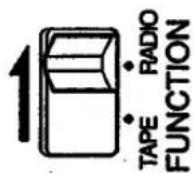
1 Set the FUNCTION selector to RADIO.

C TO Y cal p
2 Press the BAND button to select the band.


3 Press the TUNING +/- buttons to tune in the desired station.


f:
| To turn off | Set the FUNCTION selector to TAPE. |
| To adjust the volume | Set the VOLUME control. |
yvefrentnf
Notes
- When you press the TUNING – or + button for more than half a second, the automatic tuning begins, and then automatically stops every time a station is received.
- To stop the automatic tuning, press the TUNING – or + button again.
- The STEREO indicator appears on the display when receiving a stereo broadcast.
- The automatic tuning may occasionally miss the best tuning point for a radio station. If this happens, press the TUNING – or + button to adjust the tuning.
- If you have inserted a cassette with a metallic shell or label, and interference in radio reception occurs, remove the cassette.
Presetting Stations
1 Set the FUNCTION selector to RADIO.
2 Tune in the desired station by using the BAND and TUNING +/- buttons.


3 Press the ENTER button to enter the presetting mode.
The PRESET indicator appears and starts flashing.

ENTER
4 Preset the station into the memory by using the buttons 1 to 10.
The PRESET indicator will go off after 5 seconds.


Note
To preset stations on buttons 6 to 10, first press the +5 button and then press a button from 1 to 5. Both the +5 indicator and then the PRESET indicator appear in the display and go off after 5 seconds.
Note
To stop the presetting procedure just after pressing the ENTER button, press the ENTER button again. The PRESET indicator will go off.
To recall the preset station
Press the corresponding preset button.
The PRESET indicator appears and goes off after 5 seconds.
To recall preset stations on buttons 6 to 10, first press the +5 button and then press a button from 1 to 5. Both the +5 indicator and then the PRESET indicator appear in the display and go off after 5 seconds.
Improving Radio Reception
Improving FM reception
Extend the headphones cord or adjust the FM SENS selector.

Improving AM reception
Rotate the Walkman.

natural_image
Diagram of a box with directional arrows indicating rotation or movement (no text or symbols)Changing the AM Tuning Interval
The AM tuning interval is factory preset to 10 kHz in order to match the local frequency allocation system. If you use the receiver in an area where the frequency allocation system is based on 9 kHz interval, change the position of the switch with a thin instrument.

Note
If you change the interval, the memories of all the preset stations, the current time, and the alarm time will be canceled.
If the Display Shows Incorrect Information
When you use the Walkman for the first time or when you have left the Walkman without batteries for a long period of time, the display may show incorrect information or the preset stations may not be recalled correctly. If this happens, using a thin instrument, change the AM tuning interval which is illustrated above to the other position and reset it to the original position.
The memories of all the preset stations, the current time, and the alarm time will be canceled.
After that, set the clock to the current time again.
Using the Belt Clip
With the supplied belt clip, you can wear your Walkman on a belt for convenient use.
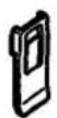
Removing the Belt Clip
Lift the tab slightly and push down with your finger to remove the belt clip from the Walkman.


Attaching the Belt Clip
Align the belt clip with the grooves on the back of the Walkman and slide the belt clip up until you hear a click, to firmly attach it to the Walkman.

Specifications
Radio Frequency
FM: 87.5 - 108 MHz
AM: 530 - 1,710 kHz
Power Requirements
3 V DC Batteries AA (R6) x 2
External DC 3 V power sources
Battery Life
(approximate hours when using the batteries specified below)
| Battery | Playback | Radio |
| Sony Alkaline AM3 (N) | 9.5 hours | 39 hours |
| Sony SUM-3 (NS) | 4.5 hours | 16 hours |
Supplied Accessories
- Stereo headphones (1)
-Belt clip (1)
Optional Accessories
- AC power adaptor AC-E30L
- Car battery cord DCC-E130L
Your dealer may not handle some of the above listed accessories. Please ask the dealer for detailed information.
Design and specifications are subject to change without notice.
Precautions
Notes on headphones
Concerning Road Safety
Do not use headphones while driving, cycling, or operating any motorized vehicle. It may create a traffic hazard and is illegal in many areas. It can also be potentially dangerous to play your headsets at high volume while walking, especially at pedestrian crossings. You should exercise extreme caution or discontinue use in potentially hazardous situations.
Preventing hearing damage
Avoid using headphones at high volume. Hearing experts advise against continuous, loud and extended play. If you experience a ringing in your ears, reduce volume or discontinue use.
Caring for others
Keep the volume at a moderate level. This will allow you to hear outside sounds and to be considerate to the people around you.
Taking Care of Your Walkman
- Avoid exposing the Walkman to extreme temperatures, direct sunlight, moisture, sand, dust or mechanical shock. Never leave the Walkman in a car parked in the sun.
- Prolonged use may contaminate the tape head. If sound drop-out or excessive noise occurs, clean the head and tape path with alcohol.

- Clean the headphones plug periodically for optimum sound.
- Do not use alcohol, benzine or thinner to clean the case.
About the Battery Compartment Lid
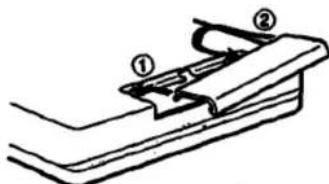
If the battery compartment lid is detached by an accidental drop, excessive force etc., attach it as illustrated in the numbered order.
If you have any question or problem concerning your Walkman, please consult your nearest Sony dealer.
SONY.
AUDIO TAPE RECORDER
COMPACT DISC COMPACT PLAYER
ELECTRONIC STILL VIDEO CAMERA
AND PLAYBACK ADAPTOR
LIMITED WARRANTY
SONY CORPORATION OF AMERICA ("SONY") warrants this product against defects in material or workmanship, as follows:
-
For a period of 90 days from the date of purchase, SONY will pay the labor charges of your SONY authorized service facility to repair the defective product. After this 90-day period, you must pay for all labor charges.
-
In addition, SONY will supply, at no charge, new or rebuilt replacements for defective parts for a period of 1 year from the original date of purchase.
Labor and Parts
To obtain warranty service during the initial 90-day period, you must take the product, or deliver the product prepaid, to a SONY authorized service facility.
Parts Only
During the remainder of the warranty period, any defective part will be replaced if it is taken, or delivered prepaid, to a SONY service center. Labor for removal and installation is available from your SONY authorized service facility or SONY service center, at your expense.
This warranty does not cover cosmetic damage, and damage due to acts of God, accident, misuse, abuse or negligence to the product, including the antenna. This warranty is valid only in the United States of America.
Proof of purchase in the form of a bill of sale or receipted invoice which is evidence that the unit is within the warranty period must be presented to obtain warranty service.
This warranty is valid only if the serial number appears on the product.
REPAIR OR REPLACEMENT AS PROVIDED UNDER THIS WARRANTY IS THE EXCLUSIVE REMEDY OF THE CONSUMER SONY SHALL NOT BE LIABLE FOR ANY INCIDENTAL OR CONSEQUENTIAL DAMAGES FOR BREACH OF ANY EXPRESS OR IMPLIED WARRANTY ON THIS PRODUCT, EXCEPT TO THE EXTENT PROHIBITED BY APPLICABLE LAW, ANY IMPLIED WARRANTY OF MERCHANTABILITY OR FITNESS FOR A PARTICULAR PURPOSE ON THIS PRODUCT IS LIMITED IN DURATION TO THE DURATION OF THIS WARRANTY.
Some states do not allow the exclusion or limitation of incidental or consequential damages, or allow limitations on how long an implied warranty lasts, so the above limitations or exclusions may not apply to you. In addition, if you enter into a service contract with the Sony Partnership as within 90 days of the date of sale, the limitation on how long an implied warranty lasts does not apply to you. This warranty gives you specific legal rights, and you may also have other rights which vary from state to state.
For your convenience, Sony Corporation of America has established the Customer Information Center to supply you with product or service information.
Important: If returning product for service, please see reverse side of this card for your nearest Sony Service Center.
SONY CUSTOMER INFORMATION CENTER
201-930-SONY (7669)
714-821-SONY (7669)
708-250-SONY (7869)
or write to:
Sony Customer Information Center
ny Drive, Mail Drop #T1-11
Park Ridge, NJ 07656
SONY CORPORATION OF AMERICA
Sony Drive, Park Ridge, New Jersey 07656
Sony Service Centers
| Aetoma | Hawaii | Missouri |
| Buenos | Hamoka | St. Louis |
| 2240 North Ecclesdale Road | 850 Magistrates Street | 124520 Natural Bridge Road |
| Tampa, NJ 85281 | Hamoka, ND 36089 | Engringe, MD 83064 |
| 10013 8410-7089 | 6006 834-9412 | 1316 251-2301 |
| California | Illinois | New Jersey |
| Barbara Bay Angella road | Chicago | Nashville BEX, Metropolitan Area |
| 4500 Riverton Drive, Suite A | 1730 West Forteman, Suite 4 | 266 Route 17 South |
| Barbara, NC 91505 | Sherrante Shopping Center | Natashville, NJ 074350 |
| (915) 842-7089 | Chicago, IL 60614 | 1208 528-1856 |
| Caza Mesa (Chugas County area) | (312) 979-9589 | Union |
| 2129 Brand West Sports | Wife (Chicago) NW1 | Sankeye Shopping Center |
| Caza Mesa, NC 69226 | 7820 North Central Avenue | US East 53rd St. James Avenue |
| (714) 648-4853 | Hills, IL 60648 | Union, NJ 07052 |
| San Bruno Ban Francisco road | (708) 941-2400 | 1208 697-5585 |
| 791 Carolina Plaza | Wilmington (Chicago) SW3 | Ohio |
| San Juan, NC 65060 | 6006-30 South Central Avenue | |
| (415) 871-2810 | Wilmington, IL 60519 | Greatland |
| San Diego | (709) 989-0049 | Pamela Grove, OH 44150 |
| 2976 Complex Drive | Kansas | 1210 845-7680 |
| San Diego, NC 83120 | Kanada City | |
| 8918 270-3724 | 11712 West 9th Street | Paraguayville |
| San Jose | Chevrolet Park | Ralfourville |
| 1356 Old Oakland Road | 828 68234 | 651 Park Avenue |
| San Jose, CA 95112 | (912) 888-2622 | King of Prunes, FL 18406 |
| 14020 380-7089 | 1215 768-0890 | |
| Colorado | Maryland (Washington DC)3 | |
| Denver | Washington DC | Westport, Nepal |
| Hoovango Point Campus | 9300 Surrey Avenue | 10610 Perry Highway, PK 1891 |
| 30740 East MI Avenue | 69040, ND 30706 | Warburg, FL 18530 |
| Aurora, DC 80276 | (201) 856-1818 | 14110 835-2488 |
| 9305 768-7969 | Massachusetts | Signal |
| Florida | Houston | Dallas |
| Park Laufandola | 980 University Avenue | North Newton Valley Shopping Center |
| 2950 University 2nd Tower | 128 Westwood Industrial Centre | Dallas, TX 78230 |
| Holyhead, FL 33030 | Westwood, IA 03090 | 2124 845-2527 |
| (301) 639-9000 | (811) 259-8130 | Houston |
| Georgia | Michigan | Houston, TX 77083 |
| Detroit | Detroit | 128 783-9761 |
| 120 Interstate North Parkway Gate | 42304 Denver Main Road | Washington |
| Tokyo 410 | Oak, MI 68050 | Seattle |
| Atlanta, GA 30339 | (312) 364-1044 | 836 4450 |
| 1041 853-5871 | Minnesota | Seattle, WA 98100 |
| Mississippi | 0568 763-6500 | |
| 4300 Wt. 26 St Street | ||
| St. Louis Park, NH 58410 | ||
| (812) 930-3000 |
Sony District Service Offices
| Western Zone | Central Zone | Eastern Zone |
| Western District | McKinley District | Eastern District |
| Sany Service Company | Sany Service Company | Sany Service Company |
| 3729 Bristol Street South | 1200 M. Arlington Hedges Rd. | 386 Route 17 South |
| Grass Hills, CA 52629 | Metsa, IL 20143 | Mohawk, NJ 07430 |
| 1710 S49 5635 | 7058 773-7858 | 1200 539 5416 |
| Berkshireton District | Gut Central District | Northumberland District |
| Sany Service Company | Sany Service Company | Sany Service Company |
| 1919 Old Oatland Road | 28300 Town Center Drive | 651 Park Avenue |
| Tow Jones, CA 95112 | Suite 500 Blvd. Mt 48050 | King of Fortuna, PA 19406 |
| 1000 1800-7676 | 1313 347-3251 | 1730 709-9840 |
| Berkshireton District | Southern District | Southern District |
| Sany Service Company | Sany Service Company | |
| 2021 Pugaya Dr., Suite 100 | 130 avenue North Railway East | |
| Nap. TX 75052 | Suite 416 | Suite 416 |
| 1241 850-5210 | Aitsea, GA 30339 | |
| 1000 953-5858 |
- WALKMAN
- OWNER'S RECORD
- INFORMATION
- Featuring
- AVLS (Automatic Volume Limiter System)
- Getting Started
- Using External Power Sources
- Note
- Setting the Alarm
- Notes
- Notes on playing cassettes
- Listening to the Radio
- Presetting Stations
- To recall the preset station
- Improving Radio Reception
- Changing the AM Tuning Interval
- If the Display Shows Incorrect Information
- Using the Belt Clip
- Removing the Belt Clip
- Attaching the Belt Clip
- Specifications
- Precautions
- Notes on headphones
- Concerning Road Safety
- Preventing hearing damage
- Caring for others
- Taking Care of Your Walkman
- About the Battery Compartment Lid
- SONY.
- LIMITED WARRANTY
- Labor and Parts
- Parts Only
Marque : SONY
Modèle : Walkman WM-FX28
Catégorie : Magnétocassette