
Walkman WM-AF58 - Magnétocassette SONY - Notice d'utilisation et mode d'emploi gratuit
Retrouvez gratuitement la notice de l'appareil Walkman WM-AF58 SONY au format PDF.


| Type de produit | Magnétocassette stéréo personnel |
| Marque | Sony |
| Modèle | Walkman WM-AF58 |
| Format de bande | Cassette compacte |
| Nombre de têtes | 2 têtes (lecture/enregistrement) |
| Auto-reverse | Oui |
| Radio intégrée | FM/AM |
| Puissance de sortie | 20 mW par canal (sous 16 ohms) |
| Alimentation | 2 piles AA (1,5 V) |
| Autonomie | Environ 4 heures (lecture cassette) |
| Dimensions | 110 x 80 x 30 mm |
| Poids | 200 g (avec piles) |
| Couleur | Noir ou argent (selon version) |
| Accessoires inclus | Écouteurs stéréo, courroie de transport |
| Fonctions spéciales | Arrêt automatique, avance/retour rapide, verrouillage des touches |
| Entretien et nettoyage | Nettoyer les têtes et le cabestan avec un coton-tige imbibé d'alcool isopropylique |
| Précautions de sécurité | Ne pas exposer à l'humidité, éviter les chocs |
| Pièces détachées et réparabilité | Courroie, têtes magnétiques, pièces mécaniques disponibles en ligne |
| Information générale | Walkman emblématique des années 80, lecture stéréo de cassettes |
FOIRE AUX QUESTIONS - Walkman WM-AF58 SONY
Questions des utilisateurs sur Walkman WM-AF58 SONY
0 question sur cet appareil. Repondez a celles que vous connaissez ou posez la votre.
Poser une nouvelle question sur cet appareil
Téléchargez la notice de votre Magnétocassette au format PDF gratuitement ! Retrouvez votre notice Walkman WM-AF58 - SONY et reprennez votre appareil électronique en main. Sur cette page sont publiés tous les documents nécessaires à l'utilisation de votre appareil Walkman WM-AF58 de la marque SONY.
MODE D'EMPLOI Walkman WM-AF58 SONY
Precautions
- Operate the unit only on 3V DC.
- When the unit is not to be used, remove the batteries to avoid damage caused by battery leakage and corrosion.
- Do not leave the unit in a location near heat sources, or in a place subject to direct sunlight, excessive dust, or mechanical shock.
- For the unit to operate at its best, it should not be subjected to temperatures below 0^ (32°F).
- Should any solid object or liquid fall into the unit, remove the batteries, and have the unit checked by qualified personnel before operating it any further.
- If the unit has not been used for a long time, set it in the playback mode and warm it up for a few minutes before inserting a cassette.
About the headphones
- Avoid listening with your headphones:
—while driving, cycling, etc.
—for an extended time at a loud volume. - Remember not to disturb those close to you with the sounds from your headphones.
- Keep the plug of your headphones clean to obtain the optimum sound. Wipe it with a dry, soft cloth.
Note on the 120-minute cassette
The use of a 120-minute cassette tape is not recommended except for long continuous playback.
Do not Immerse in Water
- Before opening or shutting the cassette compartment lid, be sure to wipe off water, dust or sand on the outside of the unit.
- Since water in the headphones jack may cause rust, cover it with the attached rubber cap when the headphones are not used.
- If the unit or the headphones have been dropped in salt water, be sure to wash them in still fresh water. Never wash them under running water, and never use soap or detergent.
- The supplied headphones or earphones are not meant to be immersed in water or come in continuous contact with water. If they are accidentally dropped into water or if they get wet, dry them with a soft cloth. Never use an electric hair dryer.
Notes on the clock
- The clock's digital display may become dim when exposed to heat. It will recover when the temperature drops to normal.
- When exposed to excessively high or low temperatures (for example, in a car), the flashing of digits or flags on the clock's display may become slower.
- In a poorly lighted place, the clock's display may become dim.
- Do not place the unit with its cassette compartment lid and clock controls facicng down. Otherwise the controls may be depressed accidentally, and be reset incorrectly.
- Do not leave the clock in the temperature below 0°C or over 40°C. If you do, it will cause malfunction and battery leakage.
- Have the clock checked by a Sony dealer every 4 years.
If you have any question or problem concerning your unit that is not covered in this manual, please consult the nearest Sony dealer (service facility).
SONY
3-769-806-21 (1)
Radio Cassette Player
WM-AF58
Operating Instructions
Before operating the unit, please read this manual thoroughly and retain it for future reference.
Owner's Record
The model number is located at the bottom and the serial number is located in the battery compartment. Record the serial number in the space provided below. Refer to these numbers whenever you call upon your Sony dealer regarding this product.
Model No. WM-AF58
Serial No.
Sony Corporation
© 1988
Printed in Taiwan, R.O.C.
SPORTS
WALKMAN
WALKMAN is a trademark of Sony Corporation.
INFORMATION
This equipment generates and uses radio frequency energy and if not installed and used properly, that is, in strict accordance with the manufacturer's instructions, may cause interference to radio and television reception. It has been type tested and found to comply with the limits for a Class B computing device in accordance with the specifications in Subpart J of Part 15 of FCC Rules, which are designed to provide reasonable protection against such interference in a residential installation. However, there is no guarantee that interference will not occur in a particular installation. If this equipment does cause interference to radio or television reception, which can be determined by turning the equipment off and on, the user is encouraged to try to correct the interference by one or more of the following measures:
Reorient the receiving antenna
Relocate the equipment with respect to the receiver
Move the equipment away from the receiver
Plug the equipment into a different outlet so that equipment and
receiver are on different branch circuits.
If necessary, the user should consult the dealer or an experienced radio/television technician for additional suggestions. The user may find the following booklet prepared by the Federal Communications Commission helpful:
"How to Identify and Resolve Radio-TV Interference Problems". This booklet is available from the U.S. Government Printing Office, Washington, DC 20402, Stock No. 004-000-00345-4.
Specifications
• Frequency range: FM: 87.6–108 MHz AM: 530–1,605 kHz
- Antennas: FM: Headphone cord antenna AM: Built-in ferrite bar antenna
- Frequency response: 40–14,000 Hz (with metal tapes or CrO₂ tapes) 40–14,000 Hz (with normal tapes)
• Power output: 15mW + 15mW at DC operation (at 10% harmonic distortion)
• Power requirements: 3V DC, two size AA (R6) batteries
- Battery life
| Batteries | Radio reception | Playback |
| Sony battery SUM-3 (NS) | approx. 17 hours | approx. 4 hours |
| Sony alkaline battery AM3(N) | approx. 35 hours | approx. 8 hours |
For maximum performance, we recommend the use of alkaline batteries.
- Dimensions: Approx. 104 × 140 × 47 mm (w/h/d) ( 4^3/8 × 5^9/8 × 1^7/8 inches) incl. projecting parts and controls
Approx. 99×138×40 mm (w/h/d) (4×5½×1½ inches) excl. projecting parts and controls - Weight: Approx. 350g (12oz) incl. batteries excl. other accessories
- Accessories supplied: Stereo headphones (open air type, 1)
Clock Section
- Digits: 6
• Functions: 6 (Hour, minute, second, day/month, date, day) - Stopwatch: 1/100 second display (up to 40 minutes) 1 second (up to 24 hours)
• Calender: Auto calender (based on February 28)
• Timekeeping accuracy: ±30 seconds/month (+5°C to +35C)
• Power supply: Solar battery/auxiliary battery, automatic switching type - Battery life: Approx. 4 years (when exposed to at least 200 lx for at least 8 hours per day) Design and specifications subject to change without notice.
| How to Use the Clock | ||
| When time and date | To set the alarm time | To use the stopwatch |
| Keep pressing for 1-2 seconds. Then press again. Press MODE T.SET 7:00:00 | Keep pressing for 1-2 seconds. Press MODE A.SET ST-W MODE 0:00:00 | Press once. Press MODE ST-W 0:00:00 |
| To select the flickering digits you want to adjust START/STOP DATE Press With each press, it moves orderly from seconds to date. | To select the flickering digits you want to adjust START/STOP DATE Press With each press, it moves orderly between minutes and hour. | To start START/STOP DATE Press (To stop, press again.) |
| To adjust the digits Press Example ALARM RESET To adjust the seconds 7:00:28 Press 7:00:00 To adjust the month 1:125 P Press 1:225 P When adjusting the digits except seconds, they change by one with each press. To make the digits advance rapidly, keep the ALARM/RESET button pressed. | To adjust the digits Press ALARM RESET To make the digits advance rapidly, keep the ALARM/RESET button pressed. | To see the lap time while stopwatch is running Press ALARM RESET To return to the stopwatch, press again. (The stopwatch continues to run while lap time is shown.) To reset after stopping the stopwatch. |
| After adjusting the clock time or the alarm time, press MODE button to return to normal display. To return to normal display from the stopwatch, press MODE button. | ||
To confirm the date, press DATE button while normal display.
To confirm the alarm time, press ALARM/RESET button while normal display.

flowchart
graph LR
    A["1 Keep pressing"] --> B["2 Press"]
    B --> C["3 When the alarm beeps"]
    C --> D["4 Check with each press of DATE button, displaying changes orderly as follows."]


How to Open and to Close the Cassette Compartment Lid

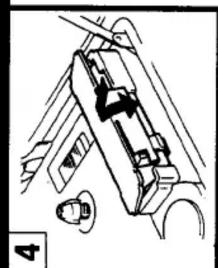
Battery Installation
natural_image
Diagram of a mechanical device with a knob and lever mechanism (no text or symbols)

Cassette Insertion

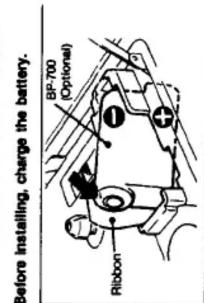
To install the Rechargeable Battery (Optional).
| any slack in the tape before insertion | |
| 2 | |
| Tape selector | For normal tapes (TYPE I) | 2 |
| For CrO₂ (TYPE II) or metal (TYPE IV) tapes |
Tape Playback Insert a cassette. (See "Cassette insertion".)
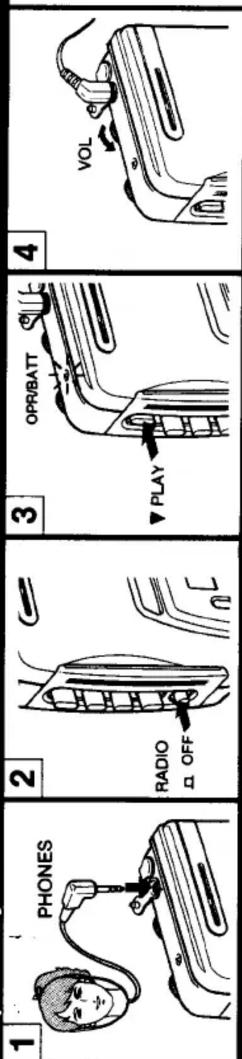

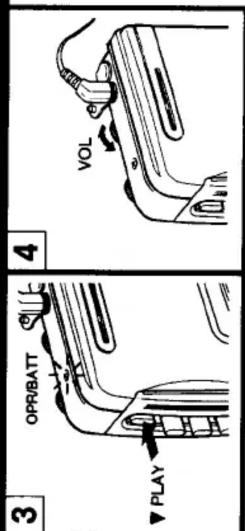

Radio Reception

Maintenance

Clean the tape head after every 10 hours of use to enjoy optimum hi-fi stereo sound. Moisten a cotton swab or a soft cloth with alcohol and wipe the parts shown below.


Clean the case with a soft cloth slightly moistened with water. Do not use alcohol, benzine or thinner as they may mar the finish.
Remove any dust or sand from the rubber packing Any sand or dust on the rubber packing will prevent the cassette compartment lid from shutting tightly, and water may leak in. Brush off the dust once in a while.
Useful life of the rubber packing Although it depends on the maintenance and the length of use, we recommend changing the packing every year. Replacement packing is available at an authorized Sony Service Station.
How to Use the Belt Clip


- Precautions
- About the headphones
- Note on the 120-minute cassette
- Do not Immerse in Water
- Notes on the clock
- SONY
- Radio Cassette Player
- WM-AF58
- Operating Instructions
- Owner's Record
- SPORTS
- WALKMAN
- INFORMATION
- Specifications
- Clock Section
- How to Open and to Close the Cassette Compartment Lid
- Battery Installation
- Cassette Insertion
- To install the Rechargeable Battery (Optional).
- Tape Playback Insert a cassette. (See "Cassette insertion".)
- Radio Reception
- Maintenance
Marque : SONY
Modèle : Walkman WM-AF58
Catégorie : Magnétocassette