
Walkman WM-FX12 - Magnétocassette SONY - Notice d'utilisation et mode d'emploi gratuit
Retrouvez gratuitement la notice de l'appareil Walkman WM-FX12 SONY au format PDF.


| Type de produit | Magnétocassette stéréo avec radio |
| Marque | Sony |
| Modèle | Walkman WM-FX12 |
| Dimensions (approx.) | 120 x 90 x 40 mm |
| Poids (avec piles) | ~300 g |
| Alimentation | 2 piles AA (R6) ou adaptateur secteur |
| Radio intégrée | FM/AM avec syntoniseur numérique |
| Auto-reverse | Lecture automatique des deux faces de la cassette |
| Prise casque | Mini-jack stéréo 3,5 mm |
| Fonctionnalités supplémentaires | Contrôle de tonalité, arrêt automatique, verrouillage des touches |
| Entretien et nettoyage | Nettoyer les têtes de lecture avec un coton-tige imbibé d'alcool isopropylique |
| Précautions de sécurité | Éviter l'humidité et les champs magnétiques ; utiliser uniquement les piles recommandées |
| Pièces détachées courantes | Écouteurs, adaptateur secteur, piles, courroie de cassette |
| Réparabilité | Réparation complexe, pièces rares ; confier à un technicien qualifié |
FOIRE AUX QUESTIONS - Walkman WM-FX12 SONY
Questions des utilisateurs sur Walkman WM-FX12 SONY
0 question sur cet appareil. Repondez a celles que vous connaissez ou posez la votre.
Poser une nouvelle question sur cet appareil
Téléchargez la notice de votre Magnétocassette au format PDF gratuitement ! Retrouvez votre notice Walkman WM-FX12 - SONY et reprennez votre appareil électronique en main. Sur cette page sont publiés tous les documents nécessaires à l'utilisation de votre appareil Walkman WM-FX12 de la marque SONY.
MODE D'EMPLOI Walkman WM-FX12 SONY
WM-FX12
WALKMAN
Operating Instructions
WALKMAN is a trademark of Sony Corporation
©1992 by Sony Corporation Printed in Malaysia
Owner's Record
The model number is located on the bottom and the serial number is located inside the cassette holder. Record these numbers in the spaces provided below. Refer to them whenever you call upon your Sony dealer regarding this product.
Model No. WM-FX12
Serial No.
WARNING
To prevent fire or shock hazard, do not expose the unit to rain or moisture.
You should:
— clean the parts shown periodically.

— run the Walkman for a few minutes before inserting a cassette if it has not been used for a long time.
— remove a cassette having a metallic shell or labels if interference in radio reception occurs.
We do not recommend:
— the use of cassettes longer than 90 minutes.
— winding the headphone cord around the Walkman. Otherwise, the buttons may be kept pressed, resulting in unnecessary battery discharge.

flowchart
graph TD
    A["TV Cable"] --> B["Tuning"]
    B --> C["Radio"]
    C --> D["Change the battery for apprx. 4 hours before use"]
    D --> E["Capacette"]
    E --> F["Add to M (80V)"]
    F --> G["Add to M (20V)"]
    G --> H["Add to M (10V)"]
    H --> I["Add to M (5V)"]
    I --> J["Add to M (3V)"]
    J --> K["Add to M (1V)"]
    K --> L["Add to M (0V)"]
    L --> M["Add to M (0V)"]
    M --> N["Add to M (0V)"]
    N --> O["Add to M (0V)"]
    O --> P["Add to M (0V)"]
    P --> Q["Add to M (0V)"]
    Q --> R["Add to M (0V)"]
    R --> S["Add to M (0V)"]
    S --> T["Add to M (0V)"]
    T --> U["Add to M (0V)"]
    U --> V["Add to M (0V)"]
    V --> W["Add to M (0V)"]
    W --> X["Add to M (0V)"]
    X --> Y["Add to M (0V)"]
    Y --> Z["Add to M (0V)"]
    Z --> AA["Add to M (0V)"]
    AA --> AB["Add to M (0V)"]
    AB --> AC["Add to M (0V)"]
    AC --> AD["Add to M (0V)"]
    AD --> AE["Add to M (0V)"]
    AE --> AF["Add to M (0V)"]
    AF --> AG["Add to M (0V)"]
    AG --> AH["Add to M (0V)"]
    AH --> AI["Add to M (0V)"]
    AI --> AJ["Add to M (0V)"]
    AJ --> AK["Add to M (0V)"]
    AK --> AL["Add to M (0V)"]
    AL --> AM["Add to M (0V)"]
    AM --> AN["Add to M (0V)"]
    AN --> AO["Add to M (0V)"]
    AO --> AP["Add to M (0V)"]
    AP --> AQ["Add to M (0V)"]
    AQ --> AR["Add to M (0V)"]
    AR --> AS["Add to M (0V)"]
    AS --> AT["Add to M (0V)"]
    AT --> AU["Add to M (0V)"]
    AU --> AV["Add to M (0V)"]
    AV --> AW["Add to M (0V)"]
    AW --> AX["Add to M (0V)"]
    AX --> AY["Add to M (0V)"]
    AY --> AZ["Add to M (0V)"]
    AZ --> BA["Add to M (0V)"]
    BA --> BB["Add to M (0V)"]
    BB --> BC["Add to M (0V)"]
    BC --> BD["Add to M (0V)"]
    BD --> BE["Add to M (0V)"]
    BE --> BF["Add to M (0V)"]
    BF --> BG["Add to M (0V)"]
    BG --> BH["Add to M (0V)"]
    BH --> BI["Add to M (0V)"]
    BI --> BJ["Add to M (0V)"]
    BJ --> BK["Add to M (0V)"]
    BK --> BL["Add to M (0V)"]
    BL --> BM["Add to M (0V)"]
    BM --> BN["Add to M (0V)"]
    BN --> BO["Add to M (0V)"]
    BO --> BP["Add to M (0V)"]
    BP --> BQ["Add to M (0V)"]
    BQ --> BR["Add to M (0V)"]
    BR --> BS["Add to M (0V)"]
    BS --> BT["Add to M (0V)"]
    BT --> BU["Add to M (0V)"]
    BU --> BV["Add to M (0V)"]
    BV --> BW["Add to M (0V)"]
    BW --> BX["Add to M (0V)"]
    BX --> BY["Add to M (0V)"]
    BY --> BZ["Add to M (0V)"]


Notes on batteries
• To prevent damage from battery leakage and corrosion, remove the batteries when you are not going to use your Walkman for a long time.
- When you plug a cord into the DC IN 3V jack (bottom), the internal batteries are automatically disconnected.
- When the sound becomes unstable, insert a new set of batteries.
To use with rechargeable battery
Be sure to charge the batteries for approximately 4 hours before using.
- Be sure to remove the batteries from the battery charger to avoid overcharging when charging has been completed.
- Use the two supplied rechargeable batteries only with this battery charger.
- The charge lamp remains lit until the batteries are removed, even if they are fully charged.
• Always recharge the two batteries together.
• The charger becomes warm during charging. This is normal.
- Unplug the charger from the wall outlet when it is not going to be used. The rechargeable batteries can be charged about 500 times.
Handling the rechargeable battery
- Recharge when the sound becomes noisy or distorted.
- Keep the battery away from fire.
- Do not let the battery terminals touch anything metal.
- If the electrolyte inside the battery should come into contact with clothing or skin, wash it off with water immediately.
External power sources
You can connect the following external power sources through the DC IN 3V jack (bottom). Only use the recommended accessories with your Walkman.
• House current using an AC-D2L AC power adaptor
- 12 V car battery using a DCC-70 car battery cord
- Two size D (R20) batteries using an EBP-500B battery case.
The illustration shows the polarity of DC IN 3 V jack.
Only use power cords with the same polarity.

Handling your Walkman
- Avoid exposure to temperature extremes, direct sunlight, moisture, sand, dust, or mechanical shock. Never leave the unit in a car parked in the sun.
Notes on Headphones
Road Safety
Do not use headphones while driving, cycling, or operating any motorized vehicle. It may create a traffic hazard and is illegal in many areas. It can also be potentially dangerous to play your headsets at high volume while walking, especially at pedestrian crossings. You should exercise extreme caution or discontinue use in potentially hazardous situations.
Preventing hearing damage
Avoid using headphones at high volume. Hearing experts advise against continuous, loud and extended play. If you experience a ringing in your ears, reduce volume or discontinue use.
Caring for others
Keep the volume at a moderate level. This will allow you to hear outside sounds and to be considerate to the people around you.
Maintenance
- Prolonged use may contaminate the tape head. If sound drop-outs or excessive noise occurs, clean the head and tape path with alcohol.
- Clean your headphone plug periodically for optimum sound.
- Do not use alcohol, benzine, or thinner to clean the case.
If you have any question or problem: concerning your Walkman, please consult your nearest Sony dealer.
Specifications
Radio
Power requirements
Battery life
(Approximate hours)
FM: 87.6—108 MHz
AM:530--1710 kHz
3 V DC batteries AA (R6) x 2
External DC 3 V power sources
| Playback | Radio | |
| Sony Alkaline AM3 (N) | 8 hrs. | 30 hrs. |
| Sony SUM-3 (NS) | 3.5 hrs. | 15 hrs. |
| Rechargeable Battery | 2.5 hrs. | 9.5 hrs. |
Accessories supplied
Optional accessories
Stereo headphones (1) Beltclip (1)
Battery charger (1)
Rechargeable battery (2)
Battery charger BPK-800
AC power adaptor AC-D2L
Car battery cord DCC-70
Battery case EBP-500B
Your dealer may not handle some of the above listed accessories. Please ask the dealer for detailed information.
Design and specifications subject to change without notice.
You can:
— wear the Walkman on a belt.
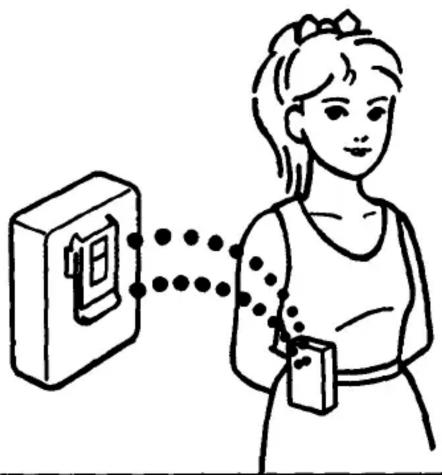

natural_image
Diagram showing two hand positioning of a device with a magnified view (no text or symbols)— improve radio reception.
FM
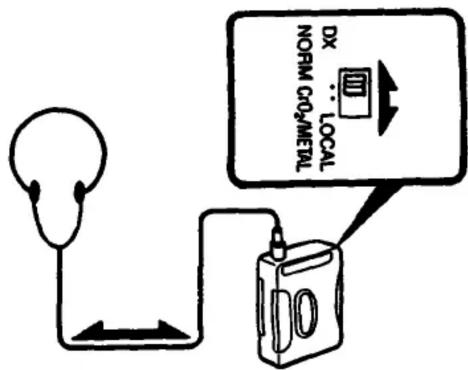
Extend the headphone cord or adjust the DX/LOCAL selector.
AM

natural_image
Simple line drawing of a box with arrows indicating rotation or movement (no text or symbols)Rotate the Walkman.

Sony Service Centers
| Arizona | Hawaii | Missouri |
| Phoenix2240 North Scottsdale RoadTampa, AZ 95281(603) 949-1588 | Hawaii950 Mapuracque StreetHonolulu, HI 98810(808) 834-8622 | St. Louis12462-O Natural Bridge RoadBridgston, MO 83044(314) 281-2301 |
| California | Illinois | New Jersey |
| Burberry (Los Angeles area)4100 Avenue Drive, Santa A | Illinois (Chicago NW)7540 Calvalt Avenue | Englandwood Cifts (R.Y. Mean, area)41 Syrian Avenue |
| Burberry, CA 91506(818) 842-7689 | Nash, IL 90848(312) 647-2400 | Englandwood Cifts, NJ 01632(201) 588-1974 |
| Costa Mesa (Orange County area)2729 Brent St Street SouthCosta Mesa, CA 92626(714) 548-4833 | Westmont (Chicago SW)6036-38 South Cass AvenueWestmont, IL 90559(312) 908-0049 | Maheshah (R.Y. Metropolitan Area)396 Route 17 SouthMaheshah, NJ 07430(201) 529-1856 |
| San Bruno (San Francisco area)751 Camino PlazaSan Bruno, CA 94066(416) 871-2810 | KansasKansas City11712 West 95 StreetOverland ParkKS 66214(913) 688-2822 | OhioCleveland6370 York RoadParma Heights, OH 44130(218) 845-7668 |
| San Diego8975 Complex DriveSan Diego, CA 92123(619) 279-2724 | Maryland (Washington D.C.) | Pennsylvania |
| San Jose1359 Old Oakland RoadSan Jose, CA 99112(406) 280-7669 | Washington D.C.1358 Holton LaneLangley Park, MD 20783(309) 439-3500001 | Philadelphia10360 Drummond RoadPhiladelphia, PA 18154(219) 837-0850/1 |
| Colorado | Massachusetts | PittsburghWestford Plaza10810 Perry Highway 18th, 18thWestford, PA 19090(412) 935-9466 |
| DenverHavana Place Center30740 East 8th AvenueAurora, CO 90014(303) 795-7669 | Boston390 University Avenue128 Westwood Industrial CenterWestwood, MA 02090(617) 329-5130 | TexasDallas401 Preston Valley Shopping CenterDallas, TX 75230(214) 681-3537 |
| Florida | Michigan | Houston5747 Richmond AvenueHouston, TX 77057(712) 783-8791 |
| Fort Lauderdale3904 North 29th AvenueHollywood, FL 33020(306) 920-5600 | Detroit24301 Indaples CircleFarmington Hills, MI 48018(313) 477-1900 | |
| Georgia | Minnesota | |
| Atlanta120 Interstate North Parkway EastSuite 410Atlanta, GA 30239(404) 953-5871 | Minnesota4300 Vc. 36'1⁄2 StreetSt. Louis Park, MN 95416(812) 920-8000 | WashingtonSeattle515 South Michigan StreetSeattle, WA 99108(212) 782-6500 |
Sony District Service Offices
| Western Zone | Central Zone | Eastern Zone |
| Western District | Mid-West District | Souism District |
| Sony Service Company | Sony Service Company | Sony Service Company |
| 2728 Brieze Street South | 7540 Calcevall Avenue | 396 Route 17 South |
| Costa Mesa, CA 92628 | Niss. G. 60648 | Marwah, NJ 07430 |
| (714) 549-4636 | (312) 647-2424 | (201) 529-1616 |
| Northwestern District | East Central District | Mid-Atlantic District |
| Sony Service Company | Sony Service Company | Sony Service Company |
| 1358 Old Oatland Road | 24301 Inexpitex Coda | 10360 Drummond Road |
| San Jose, CA 95112 | Farmington Hills, MI 48018 | Philadelphia, PA 19154 |
| (408) 280-7676 | (313) 477-4806 | (215) 633-7997 |
| Southwestern District | Southwestern District | |
| Sony Service Company | Sony Service Company | |
| 3201 Premst Dr., Suite 100 | 3504 North 29th Avenue | |
| Irving, TX 75083 | Hollywood, FL 33020 | |
| (214) 550-5200 | (305) 920-5856 |
SONY.
PERSONAL/PORTABLE AUDIO PRODUCTS
LIMITED WARRANTY
SONY CORPORATION OF AMERICA ("SONY") warrants this product against defects in material or workmanship, as follows:
- For a period of 90 days from the date of retail purchase, SONY shall at its sole and absolute option either repair the defective product at no charge or replace the defective product with the same model or its equivalent model at no charge through a SONY SERVICE CENTER.
To obtain warranty service during the initial 90-day period, you must take the product, or deliver the product prepaid, to one of the SONY SERVICE CENTERS located in the United States.
- After the initial 90-day period, SONY will supply, at no charge, new or rebuilt replacements for defective parts for a period of 1 year from the date of retail purchase.
Labor for removal and installation of these parts is available from your SONY authorized service facility or SONY SERVICE CENTER, at your expense.
Proof of purchase in the form of a bill of sale or receipted invoice, which indicates that the product is within the warranty period, must be presented to obtain warranty service. SONY suggests that the purchaser return the dealer's dated bill of sale as evidence of the data of retail purchase.
This warranty does not cover cosmetic damage, and damage to any part of the product, including the antenna, which results from acts of God, accident, misuse, abuse, improper maintenance, or connection to an improper voltage supply.
This warranty is valid only if the serial number appears on the product. This warranty is valid only in the United States of America.
REPAIR OR REPLACEMENT AS PROVIDED UNDER THIS WARRANTY IS THE EXCLUSIVE REMOY OF THE CONSUMER, SONY SHALL NOT BE LIABLE FOR ANY INCIDENTAL OR CONSEQUENTIAL DAMAGES FOR BREACH OF ANY EXPRESS OR IMPLIED WARRANTY ON THIS PRODUCT. EXCEPT TO THE EXTENT PROHIBITED BY APPLICABLE LAW, ANY IMPLIED WARRANTY OF MERCHANTABILITY OR FITNESS FOR A PARTICULAR PURPOSE ON THIS PRODUCT IS LIMITED IN DURATION TO THE DURATION OF THIS WARRANTY.
Some states do not allow the exclusion or limitation of incidental or consequential damages, or allow limitations on how long an implied warranty tests, so the above limitations or exclusions may not apply to you. In addition, if you enter into a service contract with the Sony Partnership as within 90 days of the date of sale, the limitation on how long an implied warranty tests does not apply to you. This warranty gives you specific legal rights, and you may also have other rights which vary from state to state.
Please refer to the list of SONY SERVICE CENTERS for the SONY SERVICE CENTER nearest you.
For your convenience, Sony Corporation of America has established the Customer Information Center to supply you with product or service information.
SONY CUSTOMER INFORMATION CENTER 201-930-SONY (7669)
or write to:
SONY CUSTOMER INFORMATION CENTER Sony Drive, Mal Drop M-1 Park Ridge, New Jersey 07656
- WM-FX12
- Owner's Record
- WARNING
- You should:
- We do not recommend:
- Notes on batteries
- To use with rechargeable battery
- Handling the rechargeable battery
- External power sources
- Handling your Walkman
- Notes on Headphones
- Road Safety
- Preventing hearing damage
- Caring for others
- Maintenance
- Specifications
- Radio
- Battery life
- Accessories supplied
- You can:
- SONY.
- LIMITED WARRANTY
Marque : SONY
Modèle : Walkman WM-FX12
Catégorie : Magnétocassette