
SWKA1060REDN - Balance de cuisine SWAN - Notice d'utilisation et mode d'emploi gratuit
Retrouvez gratuitement la notice de l'appareil SWKA1060REDN SWAN au format PDF.


| Type de produit | Balance de cuisine |
| Marque | SWAN |
| Modèle | SWKA1060REDN |
| Couleur | Rouge |
| Capacité maximale | 5 kg |
| Précision | 1 g |
| Fonction tare | Oui |
| Conversion d'unités | g, oz, lb:oz, ml, fl.oz |
| Écran | LCD rétroéclairé |
| Arrêt automatique | Oui, après 2 minutes d'inactivité |
| Alimentation | 2 piles CR2032 (incluses) |
| Matériau | Plastique ABS et verre trempé |
| Dimensions (L x l x H) | 20 x 15 x 2 cm |
| Poids | 300 g |
| Nettoyage | Essuyer avec un chiffon humide ; ne pas immerger |
| Sécurité | Utiliser sur une surface plane et stable ; éviter tout contact avec l'eau |
| Pièces détachées | Piles (CR2032) disponibles dans le commerce |
| Réparabilité | Non réparable par l'utilisateur ; contacter le SAV |
FOIRE AUX QUESTIONS - SWKA1060REDN SWAN
Questions des utilisateurs sur SWKA1060REDN SWAN
0 question sur cet appareil. Repondez a celles que vous connaissez ou posez la votre.
Poser une nouvelle question sur cet appareil
Téléchargez la notice de votre Balance de cuisine au format PDF gratuitement ! Retrouvez votre notice SWKA1060REDN - SWAN et reprennez votre appareil électronique en main. Sur cette page sont publiés tous les documents nécessaires à l'utilisation de votre appareil SWKA1060REDN de la marque SWAN.
MODE D'EMPLOI SWKA1060REDN SWAN
Swan
designed for life

We love what we do

we're proud of our quality
TOWNHOUSE™

Digital Kitchen Scales
Use and care guide (SWKA1060 all colours)
Help line 01733 404703
v1.0

HOW TO USE
FEATURES
- Indicate volume of water and milk
- Two weight unit systems g、lb:oz convertible
- Two volume unit systems ml、fl'oz convertible
- Low battery power / Overload indication
- With high precision strain gauge sensor
- With zero, tare function
- Auto off
■ TO INSTALL OR REPLACE BATTERY
The battery type of scale depends on the product structure. Find the battery type of your scale according to the following pictures, then install and replace battery as described.
- 1x3V CR2032 lithium battery (included). Remove isolation sheet before use;
- 2x1.5V (AA/AAA) batteries (excluded). Remove package foil before use;
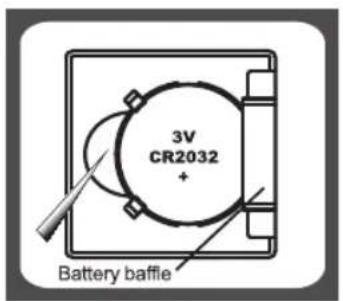
PIC 1
Open the battery case cover at the bottom of scale:
A. Take out the used battery with the aid of a sharp object, as shown in picture.
B. Install new battery by putting one side of the battery beneath the battery baffle and then pressing down the other side.

PIC 2
A. Take out used batteries, with the aid of a sharp object if needed.
B. Install new batteries by putting one side of the battery down first and pressing down the other side. (Please observe the polarity)

HOW TO USE
LCD


Weight mode

Milk volume mode

Water volume mode
■ BUTTON FUNCTION
MODE : Mode conversion
①/ZERO : Turn on\Turn off\Zero\Tare
UNIT : Convert unit systems of Metric or Imperial. (Conversion button at the bottom of scale)
■ MODE CONVERSION
After turning on scale, press MODE button to select mode as shown below:
![graph LR A["8 g"] --> B["8 mi"] B --> C["8 mi"] style A fill:#f9f,stroke:#333 style B fill:#ccf,stroke:#333 style C fill:#cfc,stroke:#333](/content/2026/06/1336654/images/fa9ce56849e1b6a4ab7fbf208d2be4924257560dc7716e953fe515c7faeff9a9.jpg)
Remark: The unit system of scale depends on sales destination or the requirement of distributor.

HOW TO USE
■ TO CONVERT WEIGHT UNIT
If the scale with both unit systems of metric (g,ml) or Imperial (lb:oz,fl'oz) press MODE bottom to choose working mode (weight,milk volume,water volume)then press UNIT conversion button to convert between two systems. Take the conversion of weight unit for example:

- When setting g as weight unit, the default volume unit is ml;
- When setting lb:oz as weight unit, the default volume unit is fl'oz.
Remark: The unit system of scale depends on scale destination or the requirement of distributor
■ TO START WEIGHING
- Weighing mode
A. Place the scale on a solid and flat surface.
B. Place bowl (if used) on the scale.
C. Press ①/ZERO to turn on.
D. Wait until LCD shows "0". Press MODE button to convert to weighing mode.
E. Load weighing object on scale (or bowl) to start weighing. LCD will show the weight reading.
F. If the weighing object is water or milk, press MODE button to choose volume mode and view the volume of weighing object.


HOW TO USE
![graph TD A[" "] --> B["0g"] B --> C["MODE"] C --> D["0ml"] D --> E["Put a liquid container."] E --> F["123ml"] F --> G["0ml"] G --> H["Pour liquid"] H --> I["412ml"] I --> J["MODE"] J --> K["424g"]](/content/2026/06/1336654/images/d505886532567b6e6890890fff6808960aa8c6703e48cc74aaa0d3d6710b1eab.jpg)
- Volume indication mode
A. Place the scale on a solid and flat surface.
B. Press ①/ZERO to turn on.
C. Wait until LCD shows "0", and press MODE button to choose "Water" or "Milk" mode.
D. Put a liquid container onto the scale platform.LCD shows weight of container.
E. Press ①/ZERO button to zero or tare weight.
F. Pour liquid (water or milk) into the container, LCD shows the volume of the liquid.
G. Press MODE button to choose "Weight" mode and view the weight of liquid.

HOW TO USE
■ "ZERO" OR "TARE" FUNCTION
To weigh different loads consecutively without removing loads from the scale. Put first Load on the scale, get weight reading. Press ①/ZERO button to reset the LCD reading to "0" before adding next load. You can repeat this operation.

Condition 1: "ZERO" function When total sum of all loads on scale ≤4% of scale's max.weight capacity. (4%=80g when capacity is 2000g; 200g when capacity is 5000g) LCD will show ———— or 0g each time ZERO is perssed. ———— means not stable, please wait for a moment. 0g and meanwhile an icon o on the left side of LCD mean ZERO function is activated. Max.weight capacity remains unchanged.
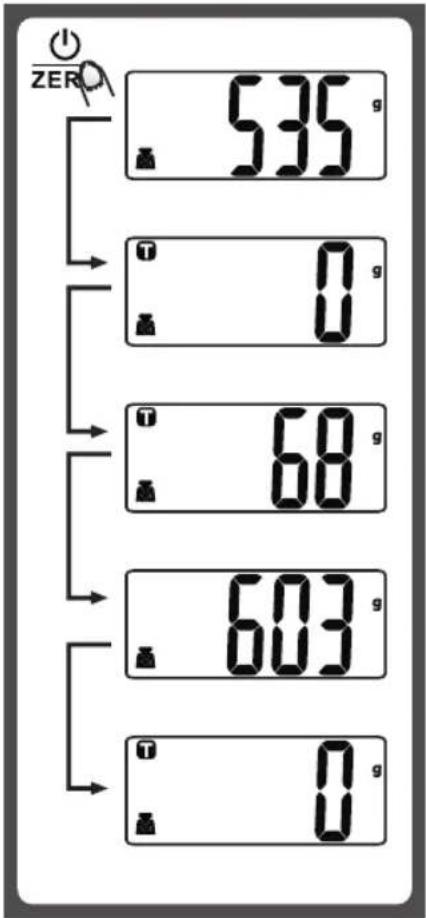
Condition 2: "TARE" function When total sum of all loads on scale >4% of scale's max.weight capacity. (4%=80g when capacity is 2000g; 200g when capacity is 5000g)
LCD will show ———— or 0g each time ZERO is pressed. ———— means not stable, please wait for a moment. 0g and meanwhile an icon T on upper left corner of LCD mean TARE function is activated. Max. Weight capacity is reduced by total weight of all loads.
■ Under this condition: By pressing ①/ZERO , you can see the total weight of all loads on the scale. If you want to weigh more loads, just press ②/ZERO to reset LCD reading to '0' again.

HOW TO USE
■ AUTO SHUT OFF
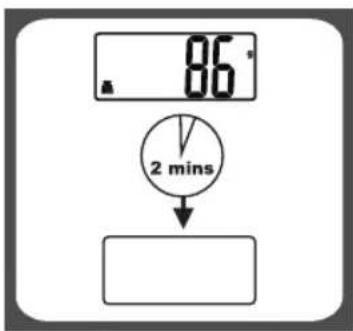
Auto shut-off occurs if display shows '0' or shows the same weight reading for 2 minutes.
■ MANUAL SHUT OFF

To maximize battery life, please press ⏻ ZERO button to turn off scale after use.
Remark: When LCD reading shows "0", press ⏻ ZERO button to shut off directly. When LCD shows weight reading, continuously press ⏻ ZERO button to shut off.
■ WARNING INDICATORS
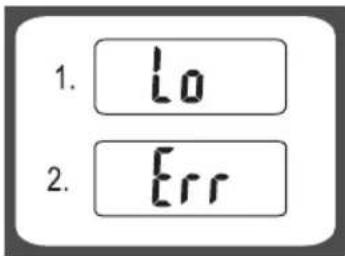
- Replace new battery.
- Scale overload. Remove item to avoid damage.Max.weight capacity is indicated on the scale.

HOW TO USE
⚠️ CLEANING AND CARE
- Clean the scale with a slightly damp cloth. DO NOT immerse the scale in water or use chemical/abrasive cleaning agents.
- All plastic parts should be cleaned immediately after contact with fats, spices, vinegar and strongly flavored/colored foods. Avoid contact with acids citrus juices.
- Always use the scale on a hard, flat surface. DO NOT use on carpet.
WARRANTY
This product is guaranteed for 2 years from the date of original purchase. If any defect arises due to faulty materials of workmanship the faulty products must be returned to the place of purchase. Refunds or replacement is at the discretion of the store. The following conditions apply:
The product must be returned to the retailer with proof of purchase.
The product must be installed and used in accordance with the instructions contained in this instruction guide.
It must be used only for domestic purposes.
It does not cover wear and tear, damage, misuse or consumable parts.
Swan Products Ltd has limited liability for incidental or consequential loss or damage.
This guarantee is valid in the UK and Eire Only.

www.swan-brand.co.uk
Scan this QR code to hear about our story

We love what we do

we're proud of our quality

Find us on Facebook
* on selected products
Copyright © Swan Products Ltd. PO Box 3117, Stoke-on-Trent ST4 9GD
Marque : SWAN
Modèle : SWKA1060REDN
Catégorie : Balance de cuisine