
NK4001 - Connecteur réseau LOGILINK - Notice d'utilisation et mode d'emploi gratuit
Retrouvez gratuitement la notice de l'appareil NK4001 LOGILINK au format PDF.


| Type de produit | Clavier numerique USB |
| Nombre de touches | 19 touches |
| Interface | USB 2.0 |
| Longueur du cable | 1,5 m |
| Dimensions (L x P x H) | 150 x 90 x 25 mm |
| Poids | 80 g |
| Alimentation | Alimentation par port USB |
| Consommation electrique | 2,5 W |
| Fonctions principales | Saisie numerique, touches de calcul, touche Entree |
| Compatibilite systeme | Windows, Mac OS, Linux |
| Entretien et nettoyage | Nettoyer avec un chiffon doux et sec |
| Securite | Conforme aux normes CE et RoHS |
| Pieces detachees et reparabilite | Non reparables, remplacer l'appareil en fin de vie |
| Informations generales | Garantie 2 ans, utilisation sur bureau |
FOIRE AUX QUESTIONS - NK4001 LOGILINK
Questions des utilisateurs sur NK4001 LOGILINK
0 question sur cet appareil. Repondez a celles que vous connaissez ou posez la votre.
Poser une nouvelle question sur cet appareil
Téléchargez la notice de votre Connecteur réseau au format PDF gratuitement ! Retrouvez votre notice NK4001 - LOGILINK et reprennez votre appareil électronique en main. Sur cette page sont publiés tous les documents nécessaires à l'utilisation de votre appareil NK4001 de la marque LOGILINK.
MODE D'EMPLOI NK4001 LOGILINK
Montageanweisung
LogiLink Professional
Cat.6/Cat.6A Modul und Rahmenset
natural_image
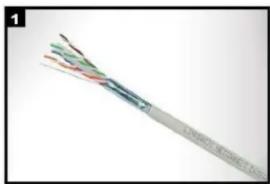
Close-up of a multi-core cable with visible insulation and insulation layers (no text or symbols)Aussenmantel des Verlegekabels ca.4 cm abnehmen und Gesamtschirmung nach hinten ziehen.
Strip off approx. 4 cm of the cable jacket and fold total shield back over it.
natural_image
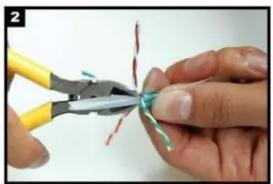
Close-up of hands using a pliers to cut metal wire with red and green markings (no text or symbols visible)Paarfolie entfernen. Remove pair shielding.

natural_image
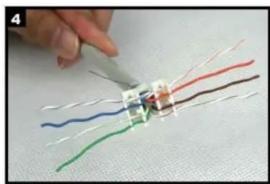
Three views of a gray industrial Ethernet connector (TCP) showing internal structure and housing, with no visible text or symbols.Der Kabelsortierer verfügt über beide Farbcodes(568A/B). Wählen Sie den entsprechenden Farbcode. Please choose colour code 568A or B according your application.
natural_image
Hand using a tool to connect wires with colored wires (no text or symbols visible)Kabel einführen und die einzelnen Adem nach der von Ihnen gewählten Belegungsvariante in den Kabelsortierer einführen. Insert the cable into the termination cap and fan out all four twisted pairs following the colour code printed on the termination cap. Make sure that all conductors are in the proper slot.

natural_image
Close-up of a hand holding a small electronic component being cut with scissors, against a plain background (no text or symbols visible)Überstehende Adern abschneiden. Trim the ends of the conductors.

natural_image
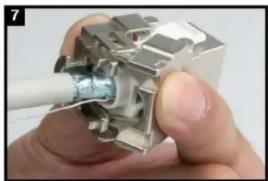
Close-up of a hand holding a white cable inserted into a metallic electrical connector (no text or symbols visible)Den Sortierer in Pfeilrichtung in das Modul einsetzen. Bitte Pfeilrichtung beachten! Install the termination cap in direction of arrow into the Keystone Jack.
natural_image
Close-up of hands holding a mechanical component with a white cable inserted (no visible text or symbols)Die Montageklappen schließen -mit diesem Vorgang wird das Modul Kontaktiert. Press both covers of the Keystone Jack to contact the cable.
natural_image
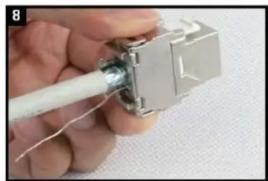
Close-up of a hand holding a white cable inserted into a metallic electrical connector (no text or symbols visible)Ggf.die Arretierung nochmals kontrollieren und schließen. Control the operation and close the Keystone Jack finally.

natural_image
Close-up of hands holding a white cable inserted into a mechanical component (no visible text or symbols)Die 180°Schirmschelle aufsetzen. Install the 180° shielding clamp.

natural_image
Close-up of a metallic electrical connector with a coiled cable (no visible text or symbols)Das Modul mit dem Kabelbinder zugentlasten und die Schirmschelle fixieren. Use cable tie for strain relief and to fix the shielding clamp.
natural_image
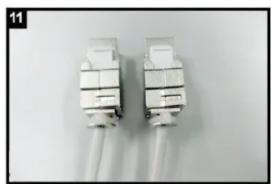
Two white electrical connectors with wires, no visible text or symbolsFür eine Doppeldose werden 2 Module benötigt. For a dual port wall outlet 2 Keystone jacks are needed.

natural_image
Exterior view of a gray plastic electrical connector housing (no text or symbols visible)Montieren Sie das Rahmenset bestehend aus Modulträger und Abdeckung. Assemble the metal frame and the coverplate.

natural_image
Electrical socket with exposed wiring and internal components (no text or symbols visible)Befestigen Sie das erste Modul durch Einclipsen im Modulträger. Assemble the first Keystone Jack with snap in operation in the metal frame.

natural_image
Close-up of a white electrical outlet socket with two wires inserted (no text or symbols visible)Dann befestigen Sie das zweite Modul im Modulträger. Assemble the second Keystone Jack in the same way.
natural_image
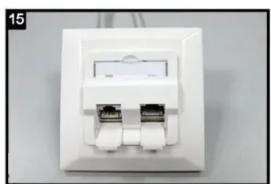
Close-up of a white wall-mounted network switch with two Ethernet ports (no visible text or symbols)Die Cat.6/Cat.6A Doppeldose ist fertig montiert. The Cat.6/Cat.6A dual port Wall Outlet is ready for use.
Marque : LOGILINK
Modèle : NK4001
Catégorie : Connecteur réseau