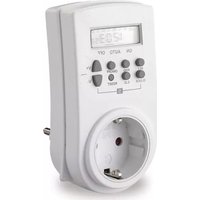
852.103 - Commutateur horaire Bachmann - Notice d'utilisation et mode d'emploi gratuit
Retrouvez gratuitement la notice de l'appareil 852.103 Bachmann au format PDF.


| Type de produit | Commutateur horaire programmable |
| Marque | Bachmann |
| Modèle | 852.103 |
| Alimentation | 230 V AC, 50/60 Hz |
| Puissance maximale | 2300 W (10 A résistif) |
| Nombre de canaux | 1 |
| Programmation | Quotidienne, hebdomadaire |
| Nombre de programmes | 10 cycles ON/OFF |
| Résolution minimale | 1 minute |
| Affichage | LED numérique |
| Type de montage | Encastré (boîte d'encastrement 60 mm) |
| Dimensions (L x H x P) | 71 x 71 x 38 mm |
| Poids | 80 g |
| Indice de protection | IP20 |
| Réserve de marche | 150 h (condensateur) |
| Température de fonctionnement | -10 °C à +40 °C |
| Entretien et nettoyage | Nettoyer avec un chiffon sec et doux. Ne pas utiliser de produits abrasifs. |
| Consignes de sécurité | Débrancher avant toute intervention. Installation par un électricien qualifié. |
| Pièces détachées | Disponibles auprès du fabricant (bouton, bornier, pile de rechange). |
| Réparabilité | Indice de réparabilité : 7.6/10 (selon la législation française) |
| Informations générales | Conforme aux normes CE. Garantie 2 ans. |
FOIRE AUX QUESTIONS - 852.103 Bachmann
Questions des utilisateurs sur 852.103 Bachmann
0 question sur cet appareil. Repondez a celles que vous connaissez ou posez la votre.
Poser une nouvelle question sur cet appareil
Téléchargez la notice de votre Commutateur horaire au format PDF gratuitement ! Retrouvez votre notice 852.103 - Bachmann et reprennez votre appareil électronique en main. Sur cette page sont publiés tous les documents nécessaires à l'utilisation de votre appareil 852.103 de la marque Bachmann.
MODE D'EMPLOI 852.103 Bachmann
BEDIENUNGSANLEITUNG
Sehr geehrter Kunde,
wir gratulieren Ihnen zum Kauf dieser Zeitschaltuhr. Wir wünschen Ihnen viel Vergnügen damit und bitten Sie folgende Punkte der Bedienungsanleitung vor Inbetriebnahme zu beachten, um Reklamationen zu vermeiden.
Wichtig: Die Zeitschaltuhr ist mit einer integrierten wiederaufladbaren Batterie versehen, die vor der ersten Benutzung aufgeladen werden muss. Bitte stecken Sie hierzu die Zeitschaltuhr in eine Steckdose. Der Ladevorgang beginnt automatisch und dauert ca. 12 Stunden. Bei Benutzung der Zeitschaltuhr wird die Batterie dauernd aufgeladen.
Sicherheitshinweise: Die Zeitschaltuhr ist kein Spielzeug und gehört nicht in Kinderhände. Benutzen Sie die Zeitschaltuhr nur in trockenen Räumen und nie im Freien. Belasten Sie die Zeitschaltuhr mit maximal 16A. Bitte nehmen Sie bei Defekten keine Reparaturen vor, sondern lassen Sie diese von einer Fachwerk-statt bzw. vom Kundendienst vornehmen.
Ungewöhnliche Anzeige: Falls Ihre Zeitschaltuhr keine oder eine falsche Anzeige aufweist, gehen Sie bitte wie folgt vor: - Vergewissern Sie sich, dass die Zeitschaltuhr keine Beschädigungen aufweist.
- Laden Sie die wiederaufladbare Batterie durch Einstecken in eine Steckdose.
- Drücken Sie mit einem spitzen Gegenstand (z.B. einem Kugelschreiber) die Reset-Taste und programmieren Sie die Zeitschaltuhr neu.
Erste Benutzung: - Laden Sie die integrierte Batterie, indem Sie die Zeitschaltuhr in eine Steckdose stecken (der Ladevorgang dauert 12 Stunden).
- Betätigen Sie die Reset-Taste mit einem spitzen Gegenstand.
Einstellung der Uhrzeit: - Drücken Sie die Set-Taste und halten Sie diese.
- Betätigen Sie die Set-Taste und die V+/V- -Tasten, um Wochentag und Uhrzeit einzustellen und um die Einstellung zu bestätigen.
Einstellung der Programme: Sie können bis zu 14 verschiedene Tages- oder Wochenprogramme speichern. Zur Vereinfachung der Programmierung können Sie folgende 15 Kombinationen von Tagen durch Betätigung der V+ und der Set-Taste auswählen:
- Mo - Tu, Th, Sa
- Tu - Sa, Su
- We - Mo, Tu, We
- Th - Th, Fr, Sa
- Fr - Mo, Tu, We, Th, Fr
- Sa - Mo, Tu, We, Th, Fr, Sa
- Su - Mo, Tu, We, Th, Fr, Sa, Su
- Mo, We, Fr
- Wenn Sie eine dieser Einstellungen speichern, erfolgt immer zu den angegebenen Wochentagen die entsprechende Schaltung der Zeitschaltuhr.
- Drücken Sie die V+ und dann die Set-Taste. Die Uhrzeit-anzeige verschwindet und auf dem Display erscheint eine „1“ und die Anzeige „ON“. Sie können nun durch Betätigung der Set- Taste die gewünschte Einschaltzeit („ON“) des ersten Programms („1“) speichern.
- Sie können nun durch Betätigung der V+-Taste zur Ausschaltzeit („OFF“) des ersten Programms („1“) wechseln und mithilfe der Set-Taste die gewünschte Ausschaltzeit speichern. Das erste Programm ist gespeichert.
- Nach Beendigung der Programmierung drücken Sie bitte die Clock-Taste. Die Zeitschaltuhr zeigt nun die aktuelle Uhrzeit an und ist betriebsbereit.
Löschen einer Programmierung: Um eine programmierte Einschaltzeit bzw. Ausschaltzeit zu löschen, drücken Sie bitte die ON/OFF-Taste. Die Schaltzeit kann nun neu programmiert werden.
Manuelle Ein-/Aus-Schaltung: Durch Betätigen der ON/OFF-Taste können Sie die Zeitschaltuhr außerhalb der gespeicherten Programme nutzen. Verändern Sie den Einstellmodus zu AN, AUTO, AUS. Die horizontale Linie auf dem LDS Display ON-AUTO-OFF erscheint. Bei Anzeige von AUTO im Display sind die gespeicherten Programme aktiv. Bei Anzeige von ON schaltet sich die Zeitschaltuhr an und bei OFF aus. Mit dieser Funktion deaktivieren Sie alle gespeicherten Programme ohne diese zu löschen.
Zufallsfunktion: Diese Zeitschaltuhr hat einen eingebauten Zufallsgenerator, der angeschlossene Geräte in einem Abstand von 1 bis 42 Minuten unregelmäßig ein- oder ausschaltet. Diese Funktion ist eine effektive Diebstahlsicherung (z.B. durch Ein- und Ausschalten von Licht während Ihrer Abwesenheit). In dem Zufallsmodus sind die gespeicherten Programme deaktiviert. Drücken Sie die RND-Taste in dem AUTO-Modus (siehe Manuelle Ein-/Aus-Schaltung) und im Display erscheint „rOFF“. Der Zufallsgenerator ist aktiviert. Wenn Sie die RND-Taste nochmals drücken, erlischt im Display „rOFF“ und der Zufallsgenerator ist wieder deaktiviert.
Countdown: - Drücken Sie die V- -Taste, um zur Einstellung des Countdowns zu wechseln, „dON (oder OFF)“ wird im Display angezeigt.
- Verwenden Sie die Set-Taste, um den Countdown einzustellen.
- Drücken Sie den C.D.-Knopf, um die Funktion zu starten. Drücken Sie C.D. erneut, um den Countdown anzuhalten.
12/24-Stunden- Modus: Drücken Sie die Clock-Taste und die Zeitanzeige springt automatisch um.
Sommer-Winterzeit-Modus: Drücken Sie die Clock-Taste und die V- -Taste gleichzeitig im AUTO-Modus. Die Zeit stellt sich automatisch um eine Stunde auf die Sommerzeit vor. Im Display erscheint die Anzeige „S“. Zur Umstellung auf die Winterzeit drücken Sie nochmals die Clock-Taste und ON/Auto/OFF-Taste. Die Anzeige „S“ erlischt.
| Technische Daten: | Timer 852.103 | Technical Data: |
| Nennspannung 230V | ~50Hz Rated Voltage | |
| Max. Belastung 16A | 3680W Max. Power | |
| Schutzgrad IP20 Protection degree | ||
| Temperaturbereich 0°C | - +55°C Temperature | |
| Kleinste Schaltzeit 1 min. Smallest time | period | |
| Batteriewiederaufladbar | NIMH 1,5V Battery rechargeable | |
| Ladedauer der Batterien | 12 h Time of charge of the battery: | |
| Der Steckdoseneinsatz hat einen integrierten Kinderschutz. | The socket has a integrated child protection | |

TECHNICAL DESCRIPTION
Dear customer!
Congratulations to your purchase of a quality product. In order to have much pleasure with this timer and to avoid wrong handling please read attentively this manual.
Important: This timer has an integrated rechargeable battery, which has to be charged before the first use. For that, please plug the timer into a socket outlet. The charge of the battery starts automatically and will take approx. 12 hours. During the use of the timer the battery will be charged permanently.
Safety regulations: This timer is not a toy and must be kept away from children. Use this timer only in dry rooms; this is not for outside use. This timer is only aligned for a maximum power of 16A. The timer has to be repaired only by an expert or after-sales service.
Unusual indication: If the display of your timer shows a wrong or no indication, please check the following:
- be sure that the timer has no outer damages
- charge the rechargeable battery (for the next 12 hours)
- push down with a pointed thing (i.e. a pen) the reset-button and program the timer again
First use: - Charge the integrated battery, plug it into a socket outlet for approx.12 hours.
- Push the Reset-button with a pointed object.
Setting of the time: - Use the Set-button as well as the V+ and V- -buttons to set the correct time and current day.
Setting of the programs: It is possible to save 14 different day- or week programs. To simplify the programming you can choose between the following 15 day combinations by using the V+-button.
- Mo - Tu, Th, Sa
- Tu - Sa, Su
- We - Mo, Tu, We
- Th - Th, Fr, Sa
- Fr - Mo, Tu, We, Th, Fr
- Sa - Mo, Tu, We, Th, Fr, Sa
- Su - Mo, Tu, We, Th, Fr, Sa, Su
- Mo, We, Fr
By saving one of these settings, the timer will always be active at the indicated days.
- Press the V+ and then the set-button; instead of the counter it appears a "1" and "ON" on the display. By pressing the set-button the switch ON time of the first program is saved.
- Change to the switch OFF time by pressing the V+-button. Press the set-button to save the OFF time. The first program is now saved.
- After finishing the programming press the clock-button. The current time will be shown on the display and the timer is operational.
To delete a program: - To delete an ON-/OFF time, the ON/OFF-button has to be pressed. Now the timer can be set again.
Manual ON/OFF switching: - With the ON/OFF-button the timer can be used apart from the memorized settings. Change the mode to ON, AUTO, OFF. The horizontal line on the display ON-AUTO-OFF appears. If the display shows AUTO the settings are active. If it shows OFF the timer is switched OFF. With this function all memorized programs can be stopped without deleting them.
Random function: - This timer has an integrated random function which switches the appliances in a time period between 1 and 42 minutes irregular ON and OFF. This function is an effective security against larceny (i.e. during your absence lights can be switched on and off). In this random mode the memorized programs are not activated. Press the RND-button during the AUTO mode and in the display appears "rOFF". The random function is activated. Press the RND-button again and the function random shuts off and "rOFF" disappears from the display.
12/24 hour modus: The timer can be used in the following modes: 12 hours or 24 hours. Please press the clock-button to define which mode you prefer.
Countdown: - Press the V- -button to change to countdown mode. "dON (or OFF)" appears on the display.
- Use the set-button to enter the countdown time.
- Press the C.D.-button to start the function. Push the button again to stop the countdown.
Daylight-saving-time mode: - Press the clock-button together with the V- -button while the timer is in the AUTO mode. The time is advanced automatically by 1 hour. In the display appears "S". To activate again the wintertime, please press again the clock-button together with the ON/AUTO/OFF button. On the display "S" disappears.


Marque : Bachmann
Modèle : 852.103
Catégorie : Commutateur horaire