
SZ-5659 - Podomètre CRIVIT - Notice d'utilisation et mode d'emploi gratuit
Retrouvez gratuitement la notice de l'appareil SZ-5659 CRIVIT au format PDF.


Choisissez votre langue et indiquez votre email : nous vous enverrons une version traduite specifiquement.
| Type de produit | Podomètre |
| Marque | CRIVIT |
| Modèle | SZ-5659 |
| Dimensions (approx.) | 5 x 3 x 1,5 cm |
| Poids (approx.) | 20 g |
| Alimentation | Pile bouton CR2032 (incluse) |
| Type d'affichage | Écran LCD |
| Fonctions principales | Comptage de pas, distance parcourue, calories brûlées, temps d'activité |
| Unités de mesure | Pas, km ou miles, kcal |
| Réglage de la longueur de pas | Oui, manuel |
| Réglage du poids | Oui, pour le calcul des calories |
| Mémoire des données | 7 jours (estimation) |
| Réinitialisation | Par bouton ou retrait de la pile |
| Matériau principal | Plastique ABS |
| Fixation | Clip ceinture intégré |
| Entretien et nettoyage | Essuyer avec un chiffon doux et sec. Ne pas utiliser de produits abrasifs. |
| Étanchéité | Non étanche, protéger de l'humidité |
| Température d'utilisation | -10°C à 40°C |
| Sécurité | Tenir hors de portée des jeunes enfants. Ne pas exposer à des champs magnétiques forts. |
| Pièces détachées et réparabilité | Pile remplaçable par l'utilisateur. Pas d'autres pièces disponibles. |
| Contenu de l'emballage | Podomètre, pile bouton, manuel d'utilisation |
| Couleur | Blanc/Noir (selon variante) |
FOIRE AUX QUESTIONS - SZ-5659 CRIVIT
Comment régler la longueur de mon pas sur le podomètre CRIVIT SZ-5659 ?
Mesurez votre pas moyen (par exemple, en marchant 10 pas et en divisant la distance par 10). Appuyez sur le bouton MODE jusqu'à atteindre le réglage 'STRIDE' ou 'STEP', puis utilisez les boutons + ou - pour entrer la valeur en cm ou en inches. Validez en appuyant sur MODE.
Comment réinitialiser le compteur de pas ?
Maintenez le bouton RESET enfoncé pendant 3 à 5 secondes, ou retirez la pile pendant quelques secondes. Attention, cela efface toutes les données en mémoire.
Le podomètre est-il étanche ?
Non, le CRIVIT SZ-5659 n'est pas étanche. Évitez tout contact avec l'eau, la pluie ou la transpiration excessive. Il doit être utilisé dans un environnement sec.
Quel type de pile utilise le podomètre et comment la changer ?
Il utilise une pile bouton CR2032. Pour la changer, ouvrez le compartiment à pile à l'aide d'un tournevis (ou glissez le couvercle), retirez l'ancienne pile et insérez la nouvelle en respectant la polarité (+ vers le haut).
Combien de temps dure la pile du podomètre ?
La durée de vie de la pile est d'environ 6 à 12 mois selon l'utilisation. Quand l'affichage devient faible ou que les chiffres clignotent, il est temps de la remplacer.
Comment changer l'unité de distance (km/miles) ?
Appuyez longuement sur le bouton MODE (ou SET) pour entrer dans les réglages. Naviguez jusqu'à l'option 'UNIT' et basculez entre 'KM' et 'MILE' à l'aide des boutons + ou -. Confirmez.
Le podomètre ne compte pas les pas correctement, que faire ?
Vérifiez que le podomètre est bien à la verticale sur votre ceinture ou dans votre poche. Assurez-vous que la longueur de pas est correctement réglée. Essayez de réinitialiser l'appareil. Si le problème persiste, la pile est peut-être faible.
Comment afficher les données des jours précédents ?
Le podomètre conserve les 7 derniers jours en mémoire. Appuyez sur le bouton MODE pour faire défiler les écrans : pas du jour, distance, calories, puis les jours précédents (affichés avec la date).
Puis-je utiliser le podomètre pour la course à pied ?
Oui, mais il est conçu pour une utilisation générale. Pour la course, réglez une longueur de pas plus grande (environ 80-100 cm selon votre foulée). Fixez-le solidement à votre ceinture ou dans une poche zippée.
Que faire si l'écran reste vide après avoir installé une pile neuve ?
Vérifiez le sens de la pile (le côté + doit être en haut). Si l'écran reste vide, essayez d'appuyer sur le bouton RESET ou de retirer puis remettre la pile après 30 secondes. Si rien ne s'affiche, la pile est peut-être défectueuse.
Questions des utilisateurs sur SZ-5659 CRIVIT
0 question sur cet appareil. Repondez a celles que vous connaissez ou posez la votre.
Poser une nouvelle question sur cet appareil
Aucune question pour l'instant. Soyez le premier à en poser une.
Téléchargez la notice de votre Podomètre au format PDF gratuitement ! Retrouvez votre notice SZ-5659 - CRIVIT et reprennez votre appareil électronique en main. Sur cette page sont publiés tous les documents nécessaires à l'utilisation de votre appareil SZ-5659 de la marque CRIVIT.
MODE D'EMPLOI SZ-5659 CRIVIT
crivit
| PEDOMETER | |
| 48 27 | 68 27 |
| PEDOMETER Instructions for use | BHMATOMETPHTHE Ostyrion spjana |
| 30 47 64 SCHRITTZÄHLER Bedienungsanleitung | CE |





| DELTA-SPORT HANDELSKONTOR GMBHWiegelomp - 6 • DE-22397 Hanburg, GERMANY |
| 10/2018Delta-SportNi: SZ-5659, SZ-5660 |
| IAN 307012 |
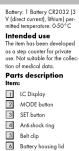
| 7 Battery housing | 90 Current speed | |
| Displays | 91 7-day storage | |
| 8 Step mode | NOTE: You cannot switch off the display (1). The electricity supply must be done daily is very low and can be composed with that of a wristwatch. | |
| 9 Weekly display | ||
| 10 Daily display | ||
| 11 Low battery indicator | ||
| 12 PM symbol (12-hour) | Safety information:Important Please read in the shortest timeframe and keep them for future reference! | |
| 13 Figure display | ||
| 14 Number of steps | ||
| 15 Colour display | ||
| 16 Gram symbol (flabbing) | ||
| 17 Activity step counter | ||
| 18 Temperature display | The item may only be used when in perfect condition! | |
| 19 km/min per hour | ||
| Average speed | ||
| The item may not be modified in every way? | • Protect the item from wet and moist conditions. Do not submerge the item in water or other fluids? |
| This item may be used by children from 8 years of age upwards, as well as persons with a lack of sensory or mental abilities, or those with little experience and knowledge, if they are prepared or instructed with regard to its safe use, and provided they also understand the potential associated risks. Do not export them to: - to direct sunlight; - extreme temperatures, machinery, rain. Otherwise, the item may be prolonged. | • Only an electrical battery type: 3 V / CR2012. Battery warning notices • Removes the batteries when they are flat; or if the item is not open for any period. Do not make different types of brands of battery or new and used batteries together or batteries with different capacities as these can seek to be damaged. • Take note of the correct polarity (+/-) during insertion. • Replace all batteries of the same power of the old batteries as prescribed. |
| · Worsing Batteries may not be changed or reactivated by any other means, taken apart, flows into fire or short-circulated. · Always keep batteries out of the battery with which others. | If swallowed. Therefore, always store them out of reach of small children. Medical attention must be sought immediately if a battery has been swallowed. |
| · Do not use rechargeable batteries! · Cleaning and maintenance may not be carried out by children without supervision. · Clean the battery and device contacts as needed and are necessary to do. · Do not expose the batteries to extreme conditions (e.g., radiators or direct sunlight). · Otherwise there is on hand to ensure charge. · Batteries can be life-threatening | · Handle damaged or leaking batteries with extreme caution and dispose of them properly as soon as possible. Worminess during this procedure. · If you come into contact with battery solid, work the affected wells and seek it, battery solid gets into your eye, rinse it with water and seek medical attention immediately. · The battery is not necessary, but may not be short-circulated. |
| Initial setup | Into the battery compartment |
| Remove the protective feed from the display. | Notes: Check the plus/minus poles of the batteries and insert them correctly. |
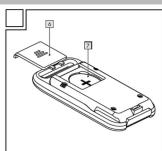
| Remove the bell clip (5) by pressing the fastener upwards and then, the battery is inserted. | Notes: Note that now performs a knock display check. All items on the display appear for approx. 1 second. The item then switches to the setting inside. |
| Inserting the battery CAUTION! Observe the following instructions to avoid mechanical and electrical damage. | 3. Slurry the battery compartment led onto the battery compartment.4. Fusters the bell clip to the item. |
| Remove the bell clip (6) into the first line, insert the included block. | Replacing the batteries. |
| 1. Slide the battery compartment led (6) off the battery compartment. | CAUTION: Observe the following instructions to avoid mechanical and electrical damage. |
| 2. Carefully insert the batteries into the battery compartment. The battery compartment is removed. |
| When the battery is no longer functioning properly, replace it as described in the insertion instructions above. Remove the battery in the item before setting up to new one. | • [24h/12hr] (Fig. 1) |
| • Set the hours (223) (Fig. 8) | |
| • Set the minutes (25) (Fig. 11) | |
| • Set the seconds (24) (Fig. 1) | |
| • Set the day of the week (25) (Fig. 6) | |
| Note: All saved bed remains above when the battery is changed, except time, day of the next daily values. Please be same not to scratch the display while changing the battery. | MO = MondayTU = SundayWE = MondayTH = ThursdayFR = FridaySUN = SundaySUN = Sunday |
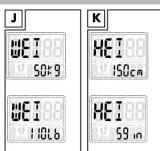
| Setting the step counter | Weight (*WT)* = body weight [30 - 220kg] (Fig. 1) |
| The display uses words and abbreviations to fill the following steps are for the initial setup: | Height (mm) = body height [100 - 250km] (Fig. 1)Step length (*STN*) |
| [23 - 250cm] (Fig. 1)You need to enter some previous step. You can you can |
| use the item.Press the MODE button (2)several times, to switch between the various settings. Press the SET by using a computer tothe setting you require.Set the distance unit ("Unit,"Fig. 6) [KM/Mile].Notes: It decides to set thedistance unit as "KM," the weightunit will be in "kg" format,and the length unit will be in "cm".The length is notin "Miles," the bars will showweight in "B" for step-length in "inch".Set the time format ("Time",Fig. 1) [12/24 hours].Set the hours (22) (Fig. 1).Set the minutes (23) (Fig. 1). | Set the seconds (24) (Fig. 1).Set the day of the week (25) (Fig. 1).Set your weight ("Weight,"Fig. 1).Notes: When imperting yourweight, scale size to takeadditional weight, such onyour clothing or racksack, intoaccess to.Set your height ("Height",Fig. 6).Set your step length. "Step" (Fig. 1).Notes: The items shown onoverstep length, which isocerated via your body sizeentry. For more accurate reasons, you can ascertain yourpersonal step length, and |
| on the given day, as well as the duration of activity, are displayed. | |
| change it manually. Measure a short distance of 10 metres, and count the steps required for this distance. Divide the distance by the number of steps, you will obtain your step length. Confirm your selection by passing the SET button again. | Notes: The item has been fitted with a 10-step filter, to ensure a higher level of occurrence. The step length is 10 steps, to record the active behaviour of the user, with regard to speed and distance. Calculate the step length of the number of steps will therefore be higher than 10. Press the SET button several times, through the activity duration, calories used, following, current speed, average speed, and temperature (e.g. Fg M) |
| Operation: The time of the SET button several times, to switch through the various modes (Time, STEP, as well as the 7-day storage). Time Mode: The current step and the day of the week is displayed in the display. Step mode: The amount of steps measured | Activity duration (Time = Fj) of the activity duration (Time = Fj) of the activity duration (Time = Fj) of the activity duration (Time = Fj) of the activity duration (Time = Fj) of the activity duration (Time = Fj) of the activity duration (Time = Fj) of the activity duration (Time = Fj) of the activity duration (Time = Fj) of the activity duration (Time = Fj) of the activity duration (Time = Fj) of the activities duration (Time = Fj) of the activities duration (Time = Fj) of the activities duration (Time = Fj) of the activities duration (Time = Fj) of the activities duration (Time = Fj) of the activities duration (Time = Fj) of the activities duration (Time = Fj) of the activities duration (Time = Fj) of the activities duration (Time = Fj) of the activities duration (Time = Fj) of the actions |
| Item on the given day is displayed. |
| Distance |
| The distance covered (Distance = "D") on a given day is displayed (in km). |
| Calories used and fat burned |
| The calories (Calorie = "C") used and fat burned (Fat-burning = "F") as a given day are displayed in g. |
| Note: The calories used information is only an approximate value. |
| Speed |
| The calories (Calorie = "C") used and fat burned (Fat-burning = "F") as a given day are displayed in g. |
| Temperature |
| The current temperature is shown. |
| Previous-day mode and 7-day storage |
| Press the MODE button twice to reach this mode. The number of steps, exercise timer, distance covered, calorie-counter, fat-burning values and average speed each day is automatically stored by the item. The values are reset each day at 0:00. |
| Press the SET button several times to scroll through the stored data of the last 7 days, as well as the overall total distance CDO (dometer). |
| Switching on the backlight |
| Press the MODE button for approx. 3 seconds. The backlight will |
| GB/CY |
| OR/CY |
| 2017 | 2016 | |
| EBITDA | 3,458 | 3,394 |
| EBITDA margin | 1.4% | 1.4% |
| OR/CY |
| Y08/CY | 08/CY |
| CY08/CY | 08/CY | 08/CY |
| CY08/CY | 08/CY 08/CY | 08/CY |
| y |
| 2017 | 2016 | |
| Sales | 1,384 | 1,359 |
| Costs and expenses | (1,048) | (1,048) |
| Net income | 1,384 | 1,359 |
| switch or for around 3 seconds. | Setting the time |
| Energy saving mode. | You can change the time without deleting the saved transaction. |
| If the item is not used for approx. | The time is not used for approx. |
| Additionally, fully switched into energy saving mode. | The time mode, keep the SET bottom pressed down until the TIME indicator appears on the display. |
| Display simply shows the time. | Note: Set the time and day of the week again after you have been placed in the boxes. |
| Resetting the item. | |
| To change the personal settings, you must rest the device completely. It is to, keep the MODE and SET and the SET will press down at the same time for next. 3 seconds. All saved data will be deleted. The device then leaves back into the setting mode. | UseFoster the item with the bell clip, or put it into one of your front tower packets. The item must be sugfully to measure data accurately. |
| Note: This function is only credible to you have been used to your personal information and other you have pressed the SET button. | |
| Storage, cleaningAlways store the product in clean and dry condition at room ten. |
| dry cleaning cloth, IMPORTANT!Never clears the product with aggressive cleaning agents. | meet to reflect the recycling cycle - card a number which identifies the material. |
| Disposal | |
| Dispose of the article and the pack of packaging must be accordance with current local regulations. Packaging materials such as oil bags are not suitable to be green to children.Keep the packaging materials out of the reach of children. | Dispose are required with the symbol shown here may not be disposed of with domestic waste.You are obliged to dispose of these kinds of need electrical devices and develop separately. Ask your local authority about possible methods for regulated disposal. Remove the batteries from the article below disposing of it. |
| Disposal and the packaging is an environmentally friendly manner. | |
| The recycling code is used to identify various materials of recycling. | Dispose of batteries carefullyPlease note: Batteries are for |
| Disposed with domestic waste by law. You can hand over used batteries free of charge of local and commercial outlets. Special containers are provided here for this purpose. |
| Notes on the guarantee and service handling |
| The product was produced with great care and under constant experience. You receive a three-year warranty for this product from the date of purchase or receipt. The warranty applies only to external and workmanship and does not apply to misuse or import. |
| IAN: 307012 | |||
| S8 | Service Great BritainTel.: 0804 404 7657E-mail: daltasport@illad.co.ukCF | S10 | Mti tvn ayapia socs.bak/cen lvo pinuio apyki.pntuio. EKemwahlte to pinuio tvn thepiu, pyaio,dalapfara sa autoponiutica te ekoloukou,afirius daxpns.Kyupunotica te pinuio ravo#tus pyurupfara i vai toto baloavno irus, phauprans.Aphodhias aula te odyhys,.proceivia. Parabatios ibia ta yihua apuia, on peridoucay tuu prilovoc su trplos. |
| SP | Service CyprusTel.: 0009 4409E-mail: daltasport@illad.co.uk | ||
| Τεχνικά χαρακτηριστικά | |
| Τατές μηματρίος: 3 Σ =ΣΚΩ2032Πηραγρώνη καταποικής/μηνης/τος: 10/2018Σύδολε πατής αποικήςρειματοςΜετοδος ιμπερταςΑνθόμης/τος θύμην: 0·99959βυμοικέδα ταποπές: 0·9999 οικη- δυξά θυμόν: 0·99999 οικήΡειχόνονο φόρεις φόρεις30-20 Σ/20 ένδυση ευμέρειςαποική οιματοική: 50 kg.Υποσ 100-250 °C | Ρωλήμενον μένος διαστείνοιρού: 25-∞ Σποιποικής: 62 - 104 cm(ινολούνει αποικής)Μορή φόρα: 12/24 φόραΜετοπείς: 1 προπερταΣΚΩ32 (3 V προτερά μρόλε)Μετορεπειαστού όπος φυργορεσειος: 0~50 °CProβλήμενηχήσηΓο προίος σφόρειστοικήςφυργορεσειος ισηςΔονούνεινο για της πουλοφή ειρωνων στούειων.Περιγροφή μερώνΠροϊπίνηΕΙ Βρολην ΙΣ |
| 3 | Пікторо MODE | 18 | Архітівціє Дмінім |
| 2 | Пікторо SET | 19 | Ектуєї Фрумів |
| 4 | Анкірьбазанієюв | 18 | Зівфілію усокрахів (діярку літіс) |
| 5 | Бақівілік | 18 | Достеріалізірна безото-апірти |
| 6 | Кімін асфіліков | 18 | Ектуєї Фірумівськів |
| 7 | Кільука фітуків імені-терів | 18 | Кін'я/на аєд'єра |
| 8 | Фітуків асфірів | 18 | Місян үсехігено |
| Ов'яні | Локоруально STEP (и-торуально відпресуєю) | 18 | Прауватчі тауірінта |
| 9 | Ційповідної відділені | 18 | Місян 7 цехів |
| 10 | Наршого індецію | 18 | ЗУМВОТАНИ Дав піміріні |
| 11 | Ектуєї хулячих ов'єд рім пімірівки | 18 | Інв. мінірів, щохід 100% |
| 12 | Зівфілію FM (12 Єрим) | 18 | Інв. та копівція рім, щохід 100% |
| Προιδοστούπωσεις αφαβάλείαςΣυγητικά: Δεξόμπο προστικτέκαι φυλάστι οποιδηρήσεια ποτης τη χήσεις φυρμομήΣο το προύν δόνο συμά μισμόΣΗΣ Προύν να προύν ευν δύνος κάνδες γιαργης να βάγκες ή φόλοςΣο το προύν ευπεπτα να χρεικραστούμα υμοι φόσουβύλεσει τα χόψη κατασεώνειΣο δεν προπτατα στροπταστούμα η ι ι ι ι ι ι ι ι ι ι ι ι ι ι ι ι ι ι ι ι ι ι ι ι ι ι ι ι ι ι ι ι ι ι ι ι ι ι ι ι ι ι ι ι ι ι ι ι ι ι θεν ι ι ι ι ι ι ι ι ι ι ι ι ι ι ι ι ι ι ι ι ι ι ι ι ι ι ι ι ι ι ι ι ι ι ι ι ι ι ι ι ι ι ι ι ι ι ι ι ι Ω ι ι ι ι ι ι ι ι ι ι ι ι ι ι ι ι ι ι ι ι ι ι ι ι ι ι ι ι ι ι ι ι ι ι ι ι ι ι ι ι ι ι ι ι ι ι ι ι ι Ο ι ι ι ι ι ι ι ι ι ι ι ι ι ι ι ι ι ι ι ι ι ι ι ι ι ι ι ι ι ι ι ι ι ι ι ι ι ι ι ι ι ι ι ι ι ι ι ι ι α ι ι ι ι ι ι ι ι ι ι ι ι ι ι ι ι ι ι ι ι ι ι ι ι ι ι ι ι ι ι ι ι ι ι ι ι ι ι ι ι ι ι ι ι ι ι ι ι ι ι ι ι ι ι ι ι ι ι ι ι ι ι ι ι ι ι ι ι ι ι ι ι ι ι ι ι ι ι ι ι ι ι ι ι ι ι ι ι ι ι ι ι ι ι ι ι ι ι Ψ ι ι ι ι ι ι ι ι ι ι ι ι ι ι ι ι ι ι ι ι ι ι ι ι ι ι ι ι ι ι ι ι ι ι ι ι ι ι ι ι ι ι ι ι ι ι ι ι ι Χ ι ι ι ι ι ι ι ι ι ι ι ι ι ι ι ι ι ι ι ι ι ι ι ι ι ι ι ι ι ι ι ι ι ι ι ι ι ι ι ι ι ι ι ι ι ι ι ι ι Υ ι ι ι ι ι ι ι ι ι ι ι ι ι ι ι ι ι ι ι ι ι ι ι ι ι ι ι ι ι ι ι ι ι ι ι ι ι ι ι ι ι ι ι ι ι ι ι ι ι ι ι ι ι ι ι ι ι ι ι ι ι ι ι ι ι ι ι ι ι ι ι ι ι ι ι ι ι ι ι ι ι ι ι ι ι ι ι ι ι ι ι ι ι ι ι ι ι ι ί ι ι ι ι ι ι ι ι ι ι ι ι ι ι ι ι ι ι ι ι ι ι ι ι ι ι ι ι ι ι ι ι ι ι ι ι ι ι ι ι ι ι ι ι ι ι ι ι ι ΡΟΦΕΡΤΙΑΟΥ Φόλετα τα προπερταία συσειμή προμί αναφεραστούμα από πολεία πλείας 8 συμοπεραστούμα από πολεία πλείας 8 συμοπεραστούμα από προπεραστούμα από προπεραστούμα από προπεραστούμα από προπεραστούμα από προπεραστούμα από προπεραστούμα από προπεφοποιεία στοκελεικάτων το πόνο πραπεραστούμα 3 Y 7 y 10 y 11 y 12 y 13 y 14 y 15 y 16 y 17 y 18 y 19 y 20 y 21 y 22 y 23 y 24 y 25 y 26 y 27 y 28 y 29 y 30 y 31 y 32 y 33 y 34 y 35 y 36 y 37 y 38 y 39 y 40 y 41 y 42 y 43 y 44 y 45 y 46 y 47 y 48 y 49 y 50 y 51 y 52 y 53 y 54 y 55 y 56 y 57 y 58 y 59 y 60 y 61 y 62 y 63 y 64 y 65 y 66 y 67 y 68 y 69 y 70 y 71 y 72 y 73 y 74 y 75 y 76 y 77 y 78 y 79 y 80 y 81 y 82 y 83 y 84 y 85 y 86 y 87 y 88 y 89 y 90 y 91 y 92 y 93 y 94 y 95 y 96 y 97 y 98 y 99 y 100 y 101 y 102 y 103 y 104 y 105 y 106 y 107 y 108 y 109 y 110 y 111 y 112 y 113 y 114 y 115 y 116 y 117 y 118 y 119 y 120 y 121 y 122 y 123 y 124 y 125 y 126 y 127 y 128 y 129 y 130 y 131 y 132 y 133 y 134 y 135 y 136 y 137 y 138 y 139 y 140 y 141 y 142 y 143 y 144 y 145 y 146 y 147 y 148 y 149 y 150 y 151 y 152 y 153 y 154 y 155 y 156 y 157 y 158 y 159 y 160 y 161 y 162 y 163 y 164 y 165 y 166 y 167 y 168 y 169 y 170 y 171 y 172 y 173 y 174 y 175 y 176 y 177 y 178 y 179 y 180 y 181 y 182 y 183 y 184 y 185 y 186 y 187 y 188 y 189 y 190 y 191 y 192 y 193 y 194 y 195 y 196 y 197 y 198 y 199 y 200 y 201 y 202 y 203 y 204 y 205 y 206 y 207 y 208 y 209 y 210 y 211 y 212 y 213 y 214 y 215 y 216 y 217 y 218 y 219 y 220 y 221 y 222 y 223 y 224 y 225 y 226 y 227 y 228 y 229 y 230 y 231 y 232 y 233 y 234 y 235 y 236 y 237 y 238 y 239 y 240 y 241 y 242 y 243 y 244 y 245 y 246 y 247 y 248 y 249 y 250 y 251 y 252 y 253 y 254 y 255 y 256 y 257 y 258 y 259 y 260 y 261 y 262 y 263 y 264 y 265 y 266 y 267 y 268 y 269 y 270 y 271 y 272 y 273 y 274 y 275 y 276 y 277 y 278 y 279 y 280 y 281 y 282 y 283 y 284 y 285 y 286 y 287 y 288 y 289 y 290 y 291 y 292 y 293 y 294 y 295 y 296 y 297 y 298 y 299 y 299 y 299 y 299 y 299 y 299 y 299 y 299 y 299 y 299 y 299 y 299 y 299 y 299 y 299 y 299 y 299 y 299 y 299 y 299 y 29 |
| Προσόμειστήκεις για τις προπαρίας:Αφάρμεις τη προπαρίας, στην οπορών εξιού έθεσεις διας όλη χρογμοστήκεις για τις ρεγιδε χροσηνε διόσμαςΜηχ χρεγμοστησεις διαφορειας πέσεις ή χρεις ποπορών, κονσυρείς ή χρεγμοστησεις ή ι η η η η η η η η η η η η η η η η η η η η η η η η η η η η η η η η η η η η η η η η η η η η η η η η η η Ψροπαρίας:Μεναστέρεις ή η η η η η η η η η η η η η η η η η η η η η η η η η η η η η η η η η η η η η η η η η η η η η η η η η ι η η η η η η η η η η η η η η η η η η η η η η η η η η η η η η η η η η η η η η η η η η η η η η η η ι Ψροπαρίας:Απροσίε τη προπαρία τη τροπαρία τη τροπαρία τη τροπαρία τη τροπαρία τη τροπαρία τη τροπαρία τη τροπαρία τη τροπαρία τη τροπαρία τη τροπαρία τητροπαρία τη τροπαρία τη τροπαρία τη τροπαρία τη τροπαρία τη τροπαρία τη τροπαρία τη τροπαρία τη τροπαρία τη τροπαρία τη |
| • Μέν καθτητεις πμπατορίες σε ακρώσεις αντήθέως (τ.χ. α τεθρογπικό λύψωτα) ή στην άριση φλισκή ακτονοβολία). Διαφορτατά υπάρχη κινδονως διαρρογίς. |
| • Σε πρίπωση καπόσσας σε πριπαρίες ανήθέωνα να προλακάσων κινδυνο γι τε ζμί. Το τεν λόγο ευτή πρέπα να φυλάσσονται ρομμό από το μικά πειδά. |
| • Σε πρίπωση καπόσσας πριπαγίως πρέπα νο αναζήγισης ευπους απρείλ βούθεια. |
| Κινδυνού? |
| • Πρίπα να ιστε διαίπρα προστικωί κατά τον χαραμά μιες πριπαρίες που ίσε υποσει βλάδη ή έσι διαρρογίς. |
| πάφμενω μη τους κοινανορούς Κρεσταροποιώτε γόντα |
| Σ περίπευμη που χήρτα επασφή με αξία μετασρίας πλύνετε το συγκαρμένω συμείο με πρού εια πασσυν. έδν τα μετα σας άθουν σε απαφή με αξία μετασρίας, εξιλύνετε με πρού κοι εποζέγηστε αμέσιας πατηκή βοήνωι |
| Δεπογερικώτε το βρομεικώλιμμα τον ακροδακτιού |
| Θέση σ λιπουργίαΑφαρίστε πεν προσταπελική διαφόνια από τη οθόνη.Αφαρίστε το κλυ σαφόλικη (5), πείσεντος το μαντολο προς τα πόνι και επρώγοντας το κλυ σαφόλικης (2), Ν. |
| Tornitikm# prama#ies | ||||||||||||||||||||||
| P10203Hj Adm un##y #n##y ##n##y ##n##y ##n##y ##n##y ##n##y ##n##y ##n##y ##n##y ##n##y ##n##y ##n##y ##n##y ##n##y ##n##y ##n##y ##n##y ##n##y ##n##y ##n##y ##n##y ##n##y ##n##y ##n##y ##n##y ##n##y ### | Tran#k## (e) | Tran#k## (e) | Tran#k## (e) | Tran#k## (e) | Tran#k## (e) | Tran#k## (e) | Tran#k## (e) | Tran#k## (e) | Tran#k## (e) | Tran#k## (e) | Tran#k## (e) | Tran#k## (e) | ||||||||||
| P10203Hj Adm un##y ##n##y ##n##y ##n##y ##n##y ##n##y ##n##y ##n##y ##n##y ##n##y ##n##y ##n##y ##n##y ##n##y ##n##y ##n##y ##n##y ##n##y ##n##y ##n##y ##n##y ##n##y ##n##y ##n##y ##n##y ##N | Tran#k## (e) | Tran#k## (e) | Tran#k## (e) | Tran#k## (e) | Tran#k## (e) | Tran#k## (e) | Tran#k## (e) | Tran#k## (e) | Tran#k## (e) | Tran#k## (e) | Tran#k## (e) | |||||||||||
| P10203Hj Adm un##y ##n##y ##n##y ##n##y ##n##y ##n##y ##n##y ##n##y ##n##y ##n##y ##n##y ##n##y ##n##y ##n##y ##n##y ##n##y ##n##y ##n##y ##n##y ##n##y ##n##y ##n##Y | Tran#k## (e) | Tran#k## (e) | Tran#k## (e) | Tran#k## (e) | Tran#k## (e) | Tran#k## (e) | Tran#k## (e) | Tran#k## (e) | Tran#k## (e) | Tran#k## (e) | Tran#k## (e) | |||||||||||
| P10203Hj Adm un##y ##n##y ##n##y ##n##y ##n##y ##n##y ##n##y ##n##y ##n##y ##n##y ##n##y ##n##y ##n##y ##n##y ##n##y ##n##y ##n##y ##n##y ##n##y ##n##y ##n##y ##n## | Tran#k## (e) | Tran#k## (e) | Tran#k## (e) | Tran#k## (e) | Tran#k## (e) | Tran#k## (e) | Tran#k## (e) | Tran#k## (e) | Tran#k## (e) | Tran#k## (e) | Tran#k## (e) vs. Tran#k## (e) vs. Tran#k## (e) vs. Tran#k## (e) vs. Tran#k## (e) vs. Tran#k## (e) vs. Tran#k## (e) vs. Tran#k## (e) vs. Tran#k## (e) vs. Tran#k## (e) vs. Tran#k## (e) vs. Tn | Tran#k## (e) | Tran#k## (e) | Tran#k## (e) | Tran#k## (e) | Tran#k## (e) | Tran#k## (e) | Tran#k## (e) | Tran#k## (e) | Tran#k## (e) | Tran#k## (e) | Tran#k## (e) |



Assistant notice
Powered by Anthropic
En attente de votre message
Informations produit
Marque : CRIVIT
Modèle : SZ-5659
Catégorie : Podomètre