LHS10 - Casque Logik - Notice d'utilisation et mode d'emploi gratuit
Retrouvez gratuitement la notice de l'appareil LHS10 Logik au format PDF.


| Type de produit | Casque audio |
| Marque | Logik |
| Modèle | LHS10 |
| Couleur | Noir |
| Type de connectivité | Filaire (jack 3,5 mm) |
| Longueur de câble | 1,2 m |
| Type de casque | Circum-auriculaire |
| Impédance | 32 Ω |
| Réponse en fréquence | 20 Hz - 20 kHz |
| Poids | 200 g |
| Accessoires inclus | Câble audio, adaptateur jack |
| Entretien et nettoyage | Nettoyer avec un chiffon doux et sec. Ne pas utiliser de produits chimiques. |
| Sécurité | Ne pas exposer à l'humidité ou à des températures extrêmes. Tenir hors de portée des enfants. |
| Pièces détachées et réparabilité | Coussinets et câble remplaçables. Contacter le service client pour les pièces. |
| Informations générales | Casque confortable pour une utilisation quotidienne avec tous les appareils compatibles jack 3,5 mm. |
FOIRE AUX QUESTIONS - LHS10 Logik
Questions des utilisateurs sur LHS10 Logik
0 question sur cet appareil. Repondez a celles que vous connaissez ou posez la votre.
Poser une nouvelle question sur cet appareil
Téléchargez la notice de votre Casque au format PDF gratuitement ! Retrouvez votre notice LHS10 - Logik et reprennez votre appareil électronique en main. Sur cette page sont publiés tous les documents nécessaires à l'utilisation de votre appareil LHS10 de la marque Logik.
MODE D'EMPLOI LHS10 Logik
LOGIK
PC Headset
Quick Start Guide LHS10

natural_image
Line drawing of a headset with earbuds and cord (no text or symbols)Congratulations on the purchase of your new Logik PC Headset. Please familiarise yourself with this Quick Start Guide to enjoy all the exciting features.
1 Unpacking
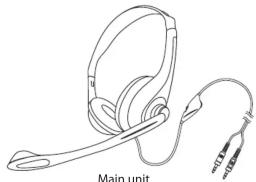
Remove all packaging from the unit. Retain the packaging. If you dispose of it please do so according to local regulations. The following items are included:
natural_image
Line drawing of a main unit headset with attached cable (no text or symbols)
Quick Start Guide (PN.:LHS10-001)
If items are missing, or damaged please contact Partmaster (UK only). Tel: 0844 8003 456 for assistance.
2 Product Overview
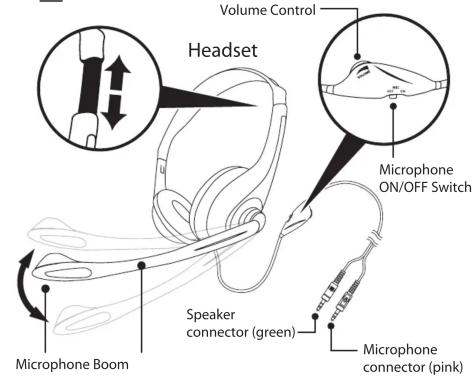
Before Use
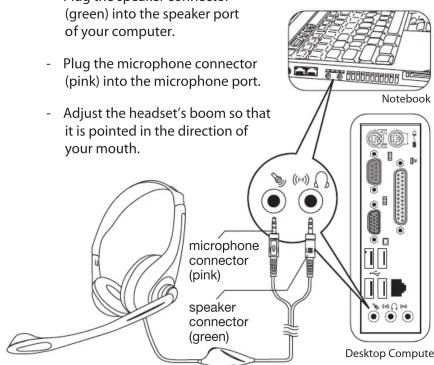
ease follow the steps for setting up headset:
- Plug the speaker connector (green) into the speaker port of your computer.
- Plug the microphone connector (pink) into the microphone port.
- Adjust the headset's boom so that it is pointed in the direction of your mouth.
Warnings
Please follow these precautions for the safety:
- To avoid damage to your hearing always ensure volume is turned down to a minimum before using the headset.
- Keep your headset away from sources of heat, such as heat registers, radiators, stoves and other similar appliances.
- Keep your headset away from sources of liquids, such as washbasins and bathtubs.
- Protect your headset from dampness.
- Not recommend for small children. Children may choke through entanglement. May also contain small parts.
Partmaster
co.uk
customers only) Calls charged at National Rate.
Visit Partmaster.co.uk today for the easiest way to buy electrical spares and accessories. With over 1 million spares and accessories available we can deliver direct to your door the very next day. Visit www.partmaster.co.uk or call 0844 800 3456 (UK

This symbol on the product or in the instructions means that your electrical and electronic equipment should be disposed at the end of its life separately from your household waste. There are separate collection systems for recycling in the EU. For more information, please contact the local authority or your retailer where you purchased the product.
DSG Retail Ltd. • Maylands Avenue Hemel Hempstead • Hertfordshire HP2 7TG England

Marque : Logik
Modèle : LHS10
Catégorie : Casque