1155 - Montre Skmei - Notice d'utilisation et mode d'emploi gratuit
Retrouvez gratuitement la notice de l'appareil 1155 Skmei au format PDF.


| Type de produit | Montre bracelet numérique |
| Marque | Skmei |
| Modèle | 1155 |
| Diamètre du boîtier | 45 mm |
| Épaisseur du boîtier | 12 mm |
| Poids | 50 g |
| Alimentation | Pile bouton CR2032 |
| Autonomie de la pile | Environ 2 ans |
| Fonctions principales | Affichage heure, date, chronomètre, alarme, rétroéclairage LED |
| Résistance à l'eau | 50 mètres (5 ATM) |
| Matière du boîtier | Plastique ABS |
| Matière du bracelet | Silicone |
| Largeur du bracelet | 22 mm |
| Affichage | Numérique LCD |
| Entretien et nettoyage | Essuyer avec un chiffon doux et sec. Éviter l'eau chaude et les produits chimiques. |
| Sécurité | Garder hors de portée des enfants. Ne pas exposer à des températures extrêmes. |
| Pièces détachées et réparabilité | Pile remplaçable par l'utilisateur. Bracelet standard interchangeable. |
| Informations générales | Garantie 1 an. Fabriqué en Chine. |
FOIRE AUX QUESTIONS - 1155 Skmei
Questions des utilisateurs sur 1155 Skmei
0 question sur cet appareil. Repondez a celles que vous connaissez ou posez la votre.
Poser une nouvelle question sur cet appareil
Téléchargez la notice de votre Montre au format PDF gratuitement ! Retrouvez votre notice 1155 - Skmei et reprennez votre appareil électronique en main. Sur cette page sont publiés tous les documents nécessaires à l'utilisation de votre appareil 1155 de la marque Skmei.
MODE D'EMPLOI 1155 Skmei

时刻美 10 个字电子手表说明书

功能简介
◆ 10位计时功能,显示时、分、秒、日、星期。
◆ 12/24 时制选择,全自动日历
◆ EL 背光
◆ 响闹及整点报时 ◆ 1/100秒秒表及分段计时
产品功能模式:
◆ 任何模式下,按A键EL亮三秒
◆ 正常模式下,按D键转换12/24时制
◆ 正常模式下,按B键模式转换如下:

flowchart
graph LR
    A["TU 09 12:40 so 正常模式"] --> B["接8键"]
    B --> C["RL 12:00 阀钟模式"]
    C --> D["接8键"]
    D --> E["ST 00:00'00 秒表模式"]
    E --> F["按钮键"]
    F --> G["TU 09 12:40 so 时间设置模式"]
响闹模式
◆ 在正常显示模式下按B一次进入响闹时间设置模式。
按C响闹小时设置且小时将会闪动,按D改变响闹小时。
再次按C进入响闹分钟设置且分钟将会闪动,按D改变响闹分钟。
◆ 按B退出响闹时间设置模式返回正常显示模式。
响闹与整点报时开关设置:
◆ 在正常显示模式下按B一次进入响闹模式,按D进行响闹/整点报时转换及开/关设置.
◆ 只出现 “AL/ /ALM” 图标,则表示响闹为开;只出现 “CH/ /CHI” 图标,则表示整点报时为开;图标
◆ 都显示,则表示响闹与整点报时都为开;图标都不出现则都为关。
跑秒模式

flowchart
graph TD
    A["在正常显示模式下按B两次"] --> B["进入跑秒状态"]
    B --> C["按D开始"]
    C --> D["按C停止"]
    D --> E["按C归零"]
    E --> F["按C读数跑秒隐藏"]
    F --> G["按C跑秒继续"]
    G --> H["按D停止"]
    H --> I["按B退出"]
    I --> J["按D停止"]
    J --> K["按C退出"]
时间与日历模式
◆ 在正常显示模式下按B三次进入时间与日历设置模式并且秒钟将闪动,按D归零;
◆ 按C进入小时设置且小时将会闪动,按D改变小时。
◆ 再次按C进入分钟设置且分钟将会闪动,按D改变分钟。
按C第三次将进入月份设置日月份将会闪动,按D改变月份
按C第三次将进入月份设置且月份将会闪动,按D改变月份。按C第四次将进入日期设置且日期将会闪动,按D改变日期
按C第五次将进入星期设置且星期将会闪动,按D改变星期。
按C第五次将进入星期设置且星期特会内动,按D改支星期。按B退出时间与日历设置模式并且返回正常显示模式。
按B退出时间与日历设置模式并且返回正常显示模式。
注意事项:在游泳或洗车时,可以使用本表,但不能在水中操作按钮。
Skmei 10 Digits Digital Watch Instruction
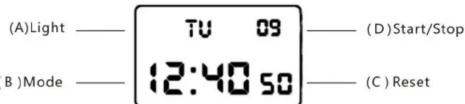
A. Features
◆ 10 Digits LCD Display, Display Hour, Minute, Second, Day and Week
◆ Chime hourly and Daily Alarm
◆ 12 / 24H format selectable, Auto Calendar
◆ 1/100 second Chronograph with split functions
◆ EL backlight
B. Operational Manual :
◆ At any state ,press A key EL backlight for 3s
◆ In normal display Mode, Press D key to convert 12/24H
◆ Press B key to convert mode:

Alarm Setting :
◆ in normal display Mode, press B key once enter into Alarm Mode
◆ Press C key the Hours will flash, Press D key to adjust the correct hour for your Alarm.
◆ Press C key the Minutes will flash. Press D key to adjust the correct minutes.
◆ Press B key to exit.
Alarm & Chime ON/OFF :
In normal mode press B key once enter into alarm mode, press D key to ON/OFF the Alarm&Chime function, Press B key to exit.
If just appear the icon "AL/ /ALM" means Alarm function ON, if just appear the "CH/ /CHI" means Chime function ON, if the two icon all appear mean two function ON, other wise means OFF
Chronograph functions :
◆ In normal display mode: press B key twice, enter Chronograph mode
◆ Press D to start, press D again to suspend, press D again to continue, press D to suspend again,......when
◆ suspend press C key back to 0:00:00.
In Chronograph mode, press D key to start, press C key enter into split function, press C key again to get the first group record, but the second group still processing in the back ground, press C key again to continue the second group, press C key again to read the second group record.....when the final group finished, Press D key to stop the SPL function, press C key read the final group(SUM) record, press C key again to clear the record to zero.
- In normal Mode, press B key three times to enter setting mode and the seconds will flashing. Press D key to zero.
- Press C key the Hours will flash. Press D key to adjust correct Hours
◆ Press C key the Minute will flash. Press D key to adjust the correct Minutes.
◆ Press C key the Month will flash. Press D key to adjust correct Month
◆ Press C key the Date will flash. Press D key to adjust correct date
◆ Press C key the week will flash. Press D key to adjust the correct week.
◆ Press B key to exit.

Time & Date Setting :
Marque : Skmei
Modèle : 1155
Catégorie : Montre