
Disney Planes (Wii U) - Jeu vidéo NINTENDO - Notice d'utilisation et mode d'emploi gratuit
Retrouvez gratuitement la notice de l'appareil Disney Planes (Wii U) NINTENDO au format PDF.


| Marque | Nintendo |
| Modèle | Disney Planes (Wii U) |
| Type de produit | Jeu vidéo sur disque |
| Plateforme | Wii U |
| Éditeur | Nintendo |
| Genre | Simulation de vol, aventure |
| Nombre de joueurs | 1 joueur, multijoueur local (2 joueurs) |
| Classification PEGI | 3+ |
| Langue disponible | Français, anglais |
| Date de sortie | 2013 |
| Dimensions (boîtier) | 13,5 × 1,5 × 19 cm |
| Poids (boîtier) | Environ 100 g |
| Alimentation | Non applicable (disque) |
| Contenu de la boîte | Disque de jeu, manuel d'instructions |
| Fonctions principales | Voler dans l'univers de Disney, accomplir des missions, collectionner des objets |
| Entretien et nettoyage | Nettoyer le disque avec un chiffon doux et sec, éviter les rayures |
| Sécurité | Convient aux enfants de 3 ans et plus, pas de petit accessoire |
| Pièces détachées et réparabilité | Disque remplaçable, boîtier standard |
FOIRE AUX QUESTIONS - Disney Planes (Wii U) NINTENDO
Questions des utilisateurs sur Disney Planes (Wii U) NINTENDO
0 question sur cet appareil. Repondez a celles que vous connaissez ou posez la votre.
Poser une nouvelle question sur cet appareil
Téléchargez la notice de votre Jeu vidéo au format PDF gratuitement ! Retrouvez votre notice Disney Planes (Wii U) - NINTENDO et reprennez votre appareil électronique en main. Sur cette page sont publiés tous les documents nécessaires à l'utilisation de votre appareil Disney Planes (Wii U) de la marque NINTENDO.
MODE D'EMPLOI Disney Planes (Wii U) NINTENDO
WiiU™
PLANES

natural_image
Illustration of three animated airplanes flying in the sky with a star-adorned shield in the background (no text or symbols on main subjects)INSTRUCTION BOOKLET
PRESS THE HOME BUTTON WHILE THE GAME IS RUNNING, THEN SELECT TO VIEW THE ELECTRONIC MANUAL.
PLEASE CAREFULLY READ THE Wii U™ OPERATIONS MANUAL COMPLETELY BEFORE USING YOUR Wii U HARDWARE SYSTEM, DISC OR ACCESSORY. THIS MANUAL CONTAINS IMPORTANT HEALTH AND SAFETY INFORMATION.
IMPORTANT SAFETY INFORMATION: READ THE FOLLOWING WARNINGS BEFORE YOU OR YOUR CHILD PLAY VIDEO GAMES.
WARNING - SEIZURES
- Some people (about 1 in 4000) may have seizures or blackouts triggered by light flashes or patterns, and this may occur while they are watching TV or playing video games, even if they have never had a seizure before.
- Anyone who has had a seizure, loss of awareness, or other symptom linked to an epileptic condition should consult a doctor before playing a video game.
- Parents should watch their children play video games. Stop playing and consult a doctor if you or your child has any of the following symptoms:
Convulsions Eye or muscle twitching Altered vision Loss of awareness Involuntary movements Disorientation
• To reduce the likelihood of a seizure when playing video games:
1. Sit or stand as far from the screen as possible.
2. Play video games on the smallest available television screen.
3. Do not play if you are tired or need sleep.
4. Play in a well-lit room.
5. Take a 10 to 15 minute break every hour.
WARNING - REPETITIVE MOTION INJURIES AND EYESTRAIN
Playing video games can make your muscles, joints, skin or eyes hurt. Follow these instructions to avoid problems such as tendinitis, carpal tunnel syndrome, skin irritation or eyestrain:
- Avoid excessive play. Parents should monitor their children for appropriate play.
Take a 10 to 15 minute break every hour, even if you don't think you need it. - If your hands, wrists, arms or eyes become tired or sore while playing, or if you feel symptoms such as tingling, numbness, burning or stiffness, stop and rest for several hours before playing again.
- If you continue to have any of the above symptoms or other discomfort during or after play, stop playing and see a doctor.
CAUTION - MOTION SICKNESS
Playing video games can cause motion sickness in some players. If you or your child feel dizzy or nauseous when playing video games, stop playing and rest. Do not drive or engage in other demanding activity until you feel better.
IMPORTANT LEGAL INFORMATION
REV-F
This game is not designed for use with any unauthorized device. Use of any such device will invalidate your Nintendo product warranty. Copying and/or distribution of any Nintendo game is illegal and is strictly prohibited by intellectual property laws.

CONTENTS
Controls 2
Flight School 4
Story Mode 5
Free Flight 5
Air Rallies 5
Balloon Pop 5
Multiplayer 5
Collectibles 6
Customer Support 8
Warranty....9
Trademarks are property of their respective owners. Wii U is a trademark of Nintendo. © 2012 Nintendo.
CONTROLS
You can pilot a plane with the Wii U GamePad, Wii Remote, or both the Wii Remote and Nunchuk. Visit Game Options to switch between Normal and Inverted control.

Wii U GamePad (Standard) Wii U GamePad (Motion)
| Left Control Stick(Move Up/Down) | GamePad(Tilt Forward/Back) | Pitch (Nose Down/Up) |
| Left Control Stick(Move Left/Right) | GamePad(Tilt Left/Right) | Yaw (Nose Left/Right) |
| ZR Button (Hold) ZR Button (Hold) | Boost | |
| B Button (Hold) B Button (Hold) | Brake | |
| A Button A Button | Use SPECIAL ITEMor POWER-UP | |
| Right Control Stick(Move Up) | GamePad(Gesture Back) | 180° Tum Around |
| Right Control Stick(Move Down) | GamePad(Gesture Forward) | 360° Loop |
| Right Control Stick(Move Left/Right) | GamePad(Gesture Left/Right) | Barrel Roll (Left/Right) |
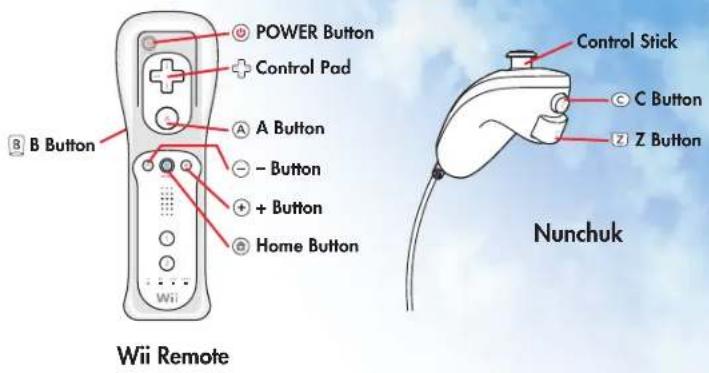
Wii Remote Wii Remote & Nunchuk
| Control Stick(Up/Down) | Wii Remote(Tilt Down/Up) | Pitch (Nose Down/Up) |
| Control Stick(MoveLeft/Right) | Wii Remote(Twist Left/Right) | Yaw (Nose Left/Right) |
| B Button (Hold) B Button (Hold) | Boost | |
| C Button (Hold) | Control Pad(Press Down) (Hold) | Brake |
| A Button A Button | Use SPECIAL ITEMor POWER-UP | |
| Control Pad(Press Up) | Wii Remote(Whip Up) | 180° Turn Around |
| Control Pad(Press Down) | Wii Remote(Whip Down) | 360° Loop |
| Control Pad(Press Left/Right) | Wii Remote(Whip Left/Right) | Barrel Roll (Left/Right) |
FLIGHT SCHOOL
Conquer your fear of heights and take to the skies for a daring mid-air adventure that will test your pilot skills and your sense of humor. After a few flight lessons with Skipper, throttle forward over the world of Cars, just like in Disney's hit movie Planes. Fly solo or with a wingman to complete flight objectives or challenge each other to an Air Rally race or a Balloon Pop challenge. And if you just want to stretch your wings, get airborne with a leisurely Free Flight. Just don't look down!
BASIC FLIGHT
Flying is easy in Disney Planes. Where the nose goes, your plane will follow! Pitch your nose up to fly higher into the sky and down to fly closer to the ground. Point it left to bank left and right to bank right. That's it!
Your plane cruises at a safe, efficient speed, but if you want to win the race, you have to push it. Press and hold Boost to go faster.
And if you need to make a tight turn, hit the Brakes to slow down.
Remember that hitting solid objects will damage your plane's engine and slow your speed. So, fly safe!
ADVANCED FLIGHT
Now let's push the envelope and get to the tricks.
180° Turn Around
This move starts out like a loop, but ends halfway at the top, with the nose pointed the way you came from.
360° Loop
Doing a 360 is like a lap around the racetrack; you go a long way to end up right where you started!
Barrel Rolls
Barrel Roll left or right to make quick in-flight course changes to dodge obstacles or clear an Air Rallies race ring.

natural_image
Illustration of a cartoon-style orange and white toy airplane flying against a blue sky with clouds (no text or symbols)STORY MODE
Play as your favorite Disney Planes characters as they take part in their adventures after Dusty's first Wings Around the Globe Race.

natural_image
Illustration of a yellow and red toy airplane flying against a blue sky (no text or symbols)FREE FLIGHT
Explore levels at your own pace, practice your skills, or look for Landmark Puzzle Pieces. The Propwash Junction level is open from the start. Improve your Wing Rank to open more airspace.
AIR RALLIES
Race against the clock in a time trial or race against up to five other planes around a sepecial air race course. Miss a gate and you'll fall behind! Sometimes precise flying is better than fast flying.
BALLOON POP
In this test of flying precision and steely nerve, you'll race to pop as many balloons as you can in the shortest amount of time. Red balloons are worth the most points.
MULTIPLAYER
Fly with a friend to complete Story Mode missions and explore levels together in Free Flight. Or challenge a friend to an Air Rallies race or a Balloon Pop challenge.
During Story Mode and Free Flight, press the + Button with a connected Wii Remote at any time to Drop-In. Drop-Out of the game at any time by pressing the - Button.
During Air Rallies, be sure to select the two player option before beginning the race. No dropping into a race after it has already started. That would be cheating!
Player 1 uses the Wii U GamePad to control and view the game. Player 2 uses the Wii Remote and Nunchuk for control and views the flight on the television connected to the Wii U console.
(Player 1 will always use the Wii U GamePad, and Player 2 will always use either a Wii Remote, or a Wii Remote + Nunchuk.)
COLLECTIBLES
Find these collectibles throughout the game. Some will be out in the open, some will be a little difficult to find, and some are hidden inside other objects. Fly into them while Boosting to bust them out.
Wing Points
Find and collect Wing Points to increase your score and improve your Wing Rank. Go for Platinum Wings!

Speed Upgrades (Speed Meters)
Collect Speed Upgrades to increase your overall speed. The more you collect, the faster you will go!

Landmark Puzzle Pieces
Each Free Flight map has ten Landmark Puzzle Pieces. Find and collect them to unlock and create Landmark Postcards.
natural_image
Red toy airplane flying against a blue sky with clouds (no text or symbols visible)6
NOTES

natural_image
Model of a red and blue propeller airplane flying against a blue sky with clouds (no text or symbols visible)CUSTOMER SUPPORT INFORMATION
Internet Support
To access support for Disney Interactive Studios on the internet, point your browser to disney.com/videogames/support.
Games Hints and Tips
Game hints and tips are available on our Customer Support website. To view hints and tips for this game, point your browser to disney.com/videogames/support.
Mailing Address
If you wish to write us, our address is:
Disney Interactive Studios Customer Support
1200 Grand Central Avenue
Glendale, CA 91201-8823

natural_image
Cartoon fighter jet flying in the sky with clouds, no visible text or symbols8
© Disney.
LIMITED WARRANTY
PUBLISHER WARRANTS THE RECORDING MEDIUM ON WHICH THE SOFTWARE IS RECORDED TO BE FREE FROM DEFECTS IN MATERIALS AND WORKMANSHIP UNDER NORMAL USE FOR A PERIOD OF NINETY (90) DAYS FROM THE DATE OF PURCHASE AS EVIDENCED BY A COPY OF THE SALES RECEIPT OR PACKING SLIP. PUBLISHER'S ENTIRE LIABILITY AND YOUR EXCLUSIVE REMEDY WILL BE REPLACEMENT OF THE DEFECTIVE RECORDING MEDIUM(S) OR REFUND OF THE PURCHASE PRICE (AT PUBLISHER'S ELECTION) UPON RETURN OF THE SOFTWARE TO PUBLISHER WITH A COPY OF YOUR PROOF OF PURCHASE. PUBLISHER WILL HAVE NO RESPONSIBILITY TO REPLACE A RECORDING MEDIUM DAMAGED BY ACCIDENT, ABUSE OR MISAPPLICATION. ANY IMPLIED WARRANTIES AND/OR CONDITIONS ON THE RECORDING MEDIUM, INCLUDING THE IMPLIED WARRANTIES AND/OR CONDITIONS OF MERCHANTABILITY AND FITNESS FOR A PARTICULAR PURPOSE, ARE LIMITED IN DURATION TO NINETY (90) DAYS FROM THE DATE OF PURCHASE OR DELIVERY. THIS WARRANTY GIVES YOU SPECIFIC LEGAL RIGHTS, AND YOU MAY ALSO HAVE OTHER RIGHTS WHICH VAR FROM JURISDICTION TO JURISDICTION. YOU EXPRESSLY ACKNOWLEDGE AND AGREE THAT USE OF THE SOFTWARE IS AT YOUR SOLE RISK. THE SOFTWARE AND RELATED DOCUMENTATION ARE PROVIDED "AS IS" AND WITHOUT WARRANTIES AND/OR CONDITIONS OF ANY KIND EITHER EXPRESS OR IMPLIED. PUBLISHER EXPRESSLY DISCLAIMS ALL WARRANTIES AND/OR CONDITIONS, EXPRESS OR IMPLIED, WITH RESPECT TO THE SOFTWARE AND RELATED DOCUMENTATION, INCLUDING, BUT NOT LIMITED TO, THE IMPLIED WARRANTIES AND/OR CONDITIONS OF MERCHANTABILITY AND FITNESS FOR A PARTICULAR PURPOSE. PUBLISHER DOES NOT WARRANT THAT THE FUNCTIONS CONTAINED IN THE SOFTWARE WILL BE UNINTERRUPTED OR ERROR-FREE OR THAT DEFECTS IN THE SOFTWARE WILL BE CORRECTED. FURTHERMORE, PUBLISHER DOES NOT WARRANT OR MAKE ANY REPRESENTATIONS REGARDING THE USE OR THE RESULTS OF THE USE OF THE SOFTWARE AND RELATED DOCUMENTATION IN TERMS OF THEIR CORRECTNESS, ACCURACY, RELIABILITY, OR OTHERWISE. THE LIMITATIONS OF LIABILITIES DESCRIBED IN THIS SECTION ALSO APPLY TO THE THIRD PARTY SUPPLIE OF MATERIALS USED IN THE SOFTWARE. NO ORAL OR WRITTEN INFORMATION OR ADVICE BY PUBLISHER OR AN AUTHORIZED REPRESENTATIVE OF PUBLISHER SHAI CREATE WARRANTIES AND/OR CONDITIONS OR IN ANY WAY INCREASE THE SCOPE O THIS LIMITED WARRANTY. YOU (AND NOT PUBLISHER) ASSUME THE ENTIRE COST OF ALL NECESSARY SERVICING, REPAIR OR CORRECTION. SOME JURISDICTIONS DO NOT ALLOW THE EXCLUSION OF IMPLIED WARRANTIES, SO THE ABOVE EXCLUSION MAY NOT APPLY TO YOU. UNDER NO CIRCUMSTANCES, INCLUDING NEGLIGENCE, SHALL PUBLISHER BE LIABLE FOR ANY INDIRECT, INCIDENTAL, SPECIAL OR CONSEQUENTIAL DAMAGES THAT RESULT FROM THE USE OF, OR THE INABILITY TO USE, THE SOFTWARE OR RELATED DOCUMENTATION, EVEN IF PUBLISHER OR AN AUTHORIZED REPRESENTATIVE OF PUBLISHER HAS BEEN ADVISED OF THE POSSIBILITY OF SUCH DAMAGES. SOME JURISDICTIONS DO NOT ALLOW THE LIMITATION OR EXCLUSION OF LIABILITY OR INCIDENTAL OR CONSEQUENTIAL DAMAGES, SO THE ABOVE LIMITATION OR EXCLUSION MAY NOT APPLY TO YOU. IN NO EVENT SHALL PUBLISHER'S TO LIABILITY TO YOU FOR ALL DAMAGES, LOSSES, AND CAUSES OF ACTION [WHETHER IN CONTRACT, TORT (INCLUDING NEGLIGENCE) OR OTHERWISE] EXCEED THE AMOUNT PAID BY YOU FOR THE SOFTWARE. IF YOU NEED TO REPLACE A USER-DAMAGED GAM DISC, PLEASE CALL THE NUMBER LISTED UNDER TELEPHONE SUPPORT. THERE IS \$20.00 FEE TO REPLACE A USER-DAMAGED GAME DISC.
9

- WiiU™
- PLANES
- WARNING - SEIZURES
- WARNING - REPETITIVE MOTION INJURIES AND EYESTRAIN
- CAUTION - MOTION SICKNESS
- IMPORTANT LEGAL INFORMATION
- CONTENTS
- CONTROLS
- FLIGHT SCHOOL
- BASIC FLIGHT
- ADVANCED FLIGHT
- 180° Turn Around
- 360° Loop
- Barrel Rolls
- STORY MODE
- FREE FLIGHT
- AIR RALLIES
- BALLOON POP
- MULTIPLAYER
- COLLECTIBLES
- Wing Points
- Speed Upgrades (Speed Meters)
- Landmark Puzzle Pieces
- NOTES
- CUSTOMER SUPPORT INFORMATION
- Internet Support
- Games Hints and Tips
- Mailing Address
- LIMITED WARRANTY
Marque : NINTENDO
Modèle : Disney Planes (Wii U)
Catégorie : Jeu vidéo