
Dr. Mario (NES) - Jeu vidéo NINTENDO - Notice d'utilisation et mode d'emploi gratuit
Retrouvez gratuitement la notice de l'appareil Dr. Mario (NES) NINTENDO au format PDF.


| Type de produit | Jeu vidéo |
| Plateforme | Nintendo Entertainment System (NES) |
| Genre | Puzzle |
| Nombre de joueurs | 1 à 2 joueurs (en alternance) |
| Éditeur | Nintendo |
| Année de sortie | 1990 |
| Format | Cartouche NES |
| Dimensions (cartouche) | Environ 12,5 x 8 x 1,5 cm |
| Poids (cartouche) | Environ 50 g |
| Alimentation | Fournie par la console NES |
| Fonctions principales | Éliminer les virus en associant des capsules de couleurs identiques |
| Modes de jeu | Mode A (joueur seul), Mode B (vitesse croissante), Mode VS (2 joueurs) |
| Contrôles | Manette NES : croix directionnelle pour déplacer la capsule, bouton A pour tourner dans le sens horaire, bouton B pour tourner dans le sens antihoraire |
| Niveaux de difficulté | 0 (faible) à 20 (élevé), réglable avant la partie |
| Musique | Bande-son originale de Nintendo, dont le thème « Fever » |
| Entretien et nettoyage | Nettoyer les contacts de la cartouche avec un chiffon doux et sec. Éviter les liquides. |
| Sécurité | Ne pas exposer la cartouche à l'humidité, à la chaleur excessive ou à la lumière directe du soleil. |
| Pièces détachées et réparabilité | Pas de pièces détachées disponibles. La cartouche ne contient aucun composant réparable par l'utilisateur. |
| Langue | Anglais (la notice peut être multilingue) |
| Informations générales | Dr. Mario est un jeu de puzzle classique où le joueur incarne le docteur Mario et doit éliminer des virus colorés à l'aide de capsules. Disponible sur NES, Game Boy et d'autres plateformes. |
FOIRE AUX QUESTIONS - Dr. Mario (NES) NINTENDO
Questions des utilisateurs sur Dr. Mario (NES) NINTENDO
0 question sur cet appareil. Repondez a celles que vous connaissez ou posez la votre.
Poser une nouvelle question sur cet appareil
Téléchargez la notice de votre Jeu vidéo au format PDF gratuitement ! Retrouvez votre notice Dr. Mario (NES) - NINTENDO et reprennez votre appareil électronique en main. Sur cette page sont publiés tous les documents nécessaires à l'utilisation de votre appareil Dr. Mario (NES) de la marque NINTENDO.
MODE D'EMPLOI Dr. Mario (NES) NINTENDO

GAME BOY™ Nintendo
DRxMARIO™
INSTRUCTION BOOKLET
DMG-VU-USA
This official seal is your assurance that Nintendo has reviewed this product and that it has met our standards for excellence in workmanship, reliability and entertainment value. Always look for this seal when buying games and accessories to ensure complete compatibility with your Game Boy System.

Thank you for selecting the Dr. Mario™ Game Pak for your Nintendo® Game Boy.™ Please read this instruction booklet thoroughly to ensure maximum enjoyment of your new game. Then save this booklet fou future reference.
CONTENTS
MY NAME IS DR. MARIO 3
CONTROLLER FUNCTIONS 4
STARTING THE GAME 6
HOW TO ELIMINATE VIRUSES 8
1 PLAYER GAME 10
2 PLAYER GAME 12
Precautions
1) If you play for long periods of time, take a 10 to 15 minute break every hour or so.
2) This equipment is precision built. Do not use or store it under conditions of extreme temperature, or subject it to rough handling or shock. Do not disassemble the unit.
3) Do not touch the connectors. Do not get them wet or dirty. Doing so may damage the Game Pak and/or GAME BOY.
4) Do not clean with benzene, alcohol or other such solvents.
5) Always check the Game Pak edge connector for foreign material before inserting the Game Pak into the GAME BOY.
6) Store the Game Pak in its protective sleeve when not in use.
©1990 Nintendo of America Inc.
TM and R Trademarks of Nintendo of America Inc.
MY NAME IS DR. MARIO
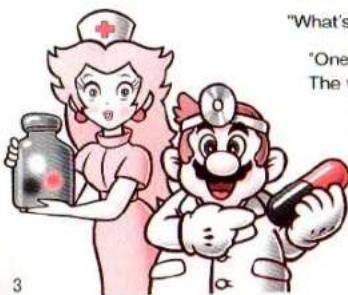
Hi everybody! I'm Mario. How's it going? Over the last few years, I've been involved in some pretty wild adventures. Now, believe it or not, I work in the virus research lab at the Mushroom Kingdom Hospital. Today I'm about to begin my research as usual.
"Dr. Mario, something terrible has happened!"
"What's wrong, nurse Toadstool?"
"One of the experiments has gone out of control. The viruses are spreading quickly!"
"Oh No! We've got to do something! I have just developed a new vitamin that should be able to take care of it. I sure hope this stuff works!"
CONTROLLER FUNCTIONS

• + Control Pad
• Moves vitamin capsules left and right.

- Pressing down drops a vitamin capsule down quickly.
- On the menu screen, the + Control Pad moves the cursor.
• A Button

B Button

START Button
- Starts the game.
- Pauses and unpauses during game play.
SELECT Button
- Moves cursor on the title screen.
If you press the A Button, B Button, START and SELECT at the same time, the game will reset and return to the title screen.
STARTING THE GAME
After you power up the game, you'll see the title screen. Here, you can select a 1 or 2 PLAYER game by using the SELECT Button. (To play a two player game, you must use a Video Link cable and another Game Boy with a Dr. Mario game.) Then press the START Button to move to the menu screen.
Menu Screen

VIRUS LEVEL LEVEL METER SPEED —
MUSIC TYPE

• VIRUS LEVEL
The higher the number, the more viruses you start with. Move the arrow mark by using the + Control Pad.
- SPEED
This controls the speed at which the vitamin capsules drop. You can select from LOW, MED and HI.
• MUSIC TYPE
Choose between two musical selections: FEVER and CHILL. You can also turn the music OFF if you wish.
After making your selections, press the START Button to begin playing.
In the 2 PLAYER mode, both players can set their options as they wish. You can use this to give one player a handicap.
*YOU is you, COM is your competitor.
HOW TO ELIMINATE VIRUSES
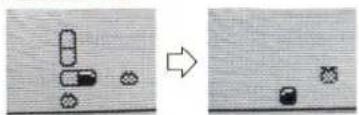
As the vitamin capsules drop use the A or B Button to rotate them. Try to match up four of the same color in a vertical or horizontal row. If you do this, all four will disappear. With a little practice you'll be able to get rid of all of the viruses!
EXAMPLE 1
natural_image
Two-panel image showing a game scene with blocks and a rocket, one in progress and the other in a cropped view (no text or symbols)Four of the same color are in a vertical row. These four disappear, taking the virus with them.
EXAMPLE 2

natural_image
Two-panel diagram showing a transformation from a grid of cells to an array of cells, with an arrow indicating the process (no text or symbols present)Four of the same color are in a horizontal row. These four disappear, but the virus remains because it is a different color.
Types of vitamin capsules and viruses.
There are six types of vitamin capsules:

BLACK BLACK

GRAY GRAY

WHITE WHITE

BLACK GRAY

WHITE BLACK

GRAY WHITE
There are three types of viruses:

BLACK

GRAY

WHITE
\* Advice From Dr. Mario
Mastering continuous capsule elimination.

The white column disappears

The remaining vitamins fall

Another column disappears
This is what we call continuous capsule elimination. It doesn't just have to be two rows or columns. You can eliminate three, four or even more! This is a very important tactic in the 2 PLAYER game.

HOW TO PLAY A 1 PLAYER GAME
Dr. Mario destroys the viruses by throwing vitamin capsules into the contaminated bottle. When all of the viruses in a bottle are destroyed, you progress to the next stage. If the bottle gets filled all the way to the top, the game is over.

Scoring
You receive points when you destroy a virus. The points depend on the SPEED setting and the number of viruses destroyed at once.
| SPEEDNumber of destroyed viruses | LOW | MED | HI |
| 1 | 100 | 200 | 300 |
| 2 | 200 | 400 | 600 |
| 3 | 400 | 800 | 1200 |
| 4 | 800 | 1600 | 2400 |
| 5 | 1600 | 3200 | 4800 |
| 6 | 3200 | 6400 | 9600 |
※Even if you destroy more than six viruses at once, you will only receive points for destroying six.
\*Advice from Dr.Mario
- Watch the title screen for a while. It will show you a demonstration game that will help you get the hang of the game play.
- You will see something special each time you clear level 5, 10, 15, or 20 at the MED or HI level.
- The speed that the vitamin capsules drop increases slightly after every 10 capsules.
- When starting out, you will do much better if you try to lay the vitamin capsules flat rather than on their ends.

HOW TO PLAY A 2 PLAYER GAME
TM
Using the Video Link cable, you can enjoy Dr. Mario in a special 2 PLAYER mode.
(1) Before starting play
You need the following before starting a
2 PLAYER game.
-2 GAME BOY units
-2 Dr. MARIO Game Paks
-1 Video Link cable

(1) Connect the Video Link cable as shown on the left and make sure that both Game Paks have been inserted correctly. Then turn both power switches ON at the same time.
(2) On the title screen select 2 PLAYER with the SELECT Button and press START.
Note: If step (1) is not done correctly, or if the Video Link cable is pulled out and inserted while both units are on, the game may stop. If this happens, simply turn both Game Boy Units OFF and turn them on again.
The Game Boy that selected 2 PLAYER mode can be used to make selections on the menu screen.
Both players will have a bottle on their screen. The first player to destroy all of their viruses wins and receives a crown. A player can also win a game if the other player's bottle fills up to the top. The first player to earn three crowns wins the entire match.
- Game screen
CAPSULE
BOTTLE WITH VIRUSES INSIDE

NEXT CAPSULE
SPEED
CROWNS
YOUR # OF VIRUSES LEFT
YOUR OPPONENT'S
NUMBER OF VIRUSES
\*Advice from Dr. Mario
If you eliminate two or more rows or columns at once, some random pieces will fall down on your opponents screen. One piece will fall for every row or column you eliminate (from two to four). The maximum drop is four pieces, even if you drop more rows or columns.

90-DAY LIMITED WARRANTY NINTENDO GAME PAKS
90-DAY LIMITED WARRANTY:
Nintendo warrants to the original consumer purchaser that this Nintendo Game Pak ("PAK") shall be free from defects in material and workmanship for a period of 90 days from date of purchase if a defect covered by this warranty occurs during this 90-day warranty period. Nintendo will repair or replace the PAK, at its option, free of charge.
To receive this warranty service:
- DO NOT return your defective Game Pak to the retailer.
- Notify the Nintendo Consumer Service Department of the problem requiring warranty service by calling 1-800-255-3700. Our Consumer Service Department is in operation from 4:00 A.M. to 10:00 P.M. Pacific Time, Monday through Saturday (times subject to change). Please Do Not send your Pak to Nintendo before calling the Consumer Service Department.
- If the Nintendo Service Representative is unable to solve the problem by phone, you will be provided with a Return Authorization number. Simply record this number on the outside packaging of your defective PAK (Be sure that your packaging is at least 4 inches by 6 inches as many shipping companies will not ship anything smaller), and return your PAK FREIGHT PREPAID AND INSURED FOR LOSS OF DAMAGE together with your sales slip or similar proof-of-purchase within the 90-day warranty period to:
In the United States
Nintendo of America Inc.
Consumer Service Department 4820-150th Avenue N.E.
Reynond, WA 98052
RA#
In Canada
Nintendo of Canada Ltd.
110-13460 Crestwood Place
RA#
This warranty shall not apply if the PAX has been damaged by negligence, accident, unreasonable use, modification, tampering, or by other causes unrelated to defective materials or workmanship.
REPAIR/SERVICE AFTER EXPIRATION OF WARRANTY:
If the PAK develops a problem requiring service after the 90-day warranty period, you may contact the Nintendo Consumer Service Department at the phone number noted at left. If the Nintendo Service Representative is unable to solve the problem by phone, you will be advised of the approximate cost for Nintendo to repair or replace the PAK and will be given a Return Authorization number.
You may then record this number on the outside packaging of the defective PAX (Be sure that your packaging is at least 4 inches by 6 inches as many shipping companies will not ship anything smaller) and return the defective merchandise, FREIGHT PREPAID AND INSURED FOR LOSS OR DAMAGE to Nintendo, and enclose a money order payable to Nintendo for the cost quoted you. (Repairs may also be charged on a VISA or MASTERCARD credit card.)
If after personal inspection, a Nintendo Service Representative determines the PAK cannot be repaired, it will be returned and your payment refunded.
WARRANTY LIMITATIONS:
ANY APPLICABLE IMPLIED WARRANTIES, INCLUDING WARRANTIES OF MERCHANTABILITY AND FITNESS FOR A PARTICULAR PURPOSE, ARE HEREBY LIMITED TO NINETY DAYS FROM THE DATE OF PURCHASE AND ARE SUBJECT TO THE CONDITIONS SET FORTH HEREIN. IN NO EVENT SHALL NINTENDO BE LIABLE FOR CONSEQUENTIAL OR INCIDENTAL DAMAGES RESULTING FROM THE BREACH OF ANY EXPRESS OR IMPLIED WARRANTIES.
The provisions of this warranty are valid in the United States and Canada only. Some states/provinces do not allow limitations or how long an implied warranty lasts or exclusion of consequential or incidental damages, so the above limitations and exclusion may not apply to you. This warranty gives you specific legal rights, and you may also
have other rights which vary between states/provinces.

- GAME BOY™ Nintendo
- DRxMARIO™
- CONTENTS
- Precautions
- MY NAME IS DR. MARIO
- STARTING THE GAME
- • VIRUS LEVEL
- - SPEED
- • MUSIC TYPE
- HOW TO ELIMINATE VIRUSES
- Types of vitamin capsules and viruses.
- \* Advice From Dr. Mario
- HOW TO PLAY A 1 PLAYER GAME
- OF VIRUSES IN THE BOTTLE
- Scoring
- \*Advice from Dr.Mario
- HOW TO PLAY A 2 PLAYER GAME
- \*Advice from Dr. Mario
- 90-DAY LIMITED WARRANTY NINTENDO GAME PAKS
- 90-DAY LIMITED WARRANTY:
- To receive this warranty service:
- REPAIR/SERVICE AFTER EXPIRATION OF WARRANTY:
- WARRANTY LIMITATIONS:
Marque : NINTENDO
Modèle : Dr. Mario (NES)
Catégorie : Jeu vidéo