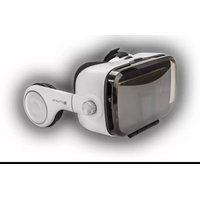
VR Spectator SOUND - Casque de réalité virtuelle 4smarts - Notice d'utilisation et mode d'emploi gratuit
Retrouvez gratuitement la notice de l'appareil VR Spectator SOUND 4smarts au format PDF.


| Type de produit | Visio-casque VR avec audio intégré |
| Marque | 4smarts |
| Modèle | VR Spectator SOUND |
| Dimensions (L x l x H) | 20 x 15 x 10 cm |
| Poids | 300 g |
| Alimentation | Batterie rechargeable USB-C, 1000 mAh |
| Autonomie | Environ 4 heures |
| Fonctions principales | Visionnage de contenu VR 360°, audio stéréo intégré, réglage interpupillaire |
| Compatibilité | Smartphones iOS et Android, écrans de 4.7 à 6.5 pouces |
| Connectivité | Bluetooth 5.0 pour audio sans fil |
| Matériau | Plastique ABS, mousse à mémoire de forme |
| Entretien et nettoyage | Nettoyer les lentilles avec un chiffon microfibre sec. Pas de produits chimiques. |
| Sécurité | Ne pas exposer à l'humidité. Utiliser dans un espace dégagé. Ne pas regarder le soleil. |
| Pièces détachées et réparabilité | Pas de pièces détachées disponibles. Réparation par le fabricant. |
| Informations générales | Convient aux adultes et enfants à partir de 12 ans. Livré avec câble USB et chiffon. |
FOIRE AUX QUESTIONS - VR Spectator SOUND 4smarts
Questions des utilisateurs sur VR Spectator SOUND 4smarts
0 question sur cet appareil. Repondez a celles que vous connaissez ou posez la votre.
Poser une nouvelle question sur cet appareil
Téléchargez la notice de votre Casque de réalité virtuelle au format PDF gratuitement ! Retrouvez votre notice VR Spectator SOUND - 4smarts et reprennez votre appareil électronique en main. Sur cette page sont publiés tous les documents nécessaires à l'utilisation de votre appareil VR Spectator SOUND de la marque 4smarts.
MODE D'EMPLOI VR Spectator SOUND 4smarts

For more information about products and warranty visit www.4smarts.com
4smarts GmbH
Postfach 102306
86013 Augsburg, Germany
WEEE-Nr.: DE 14120388


web: www.4smarts.com/contact
mail: info@4smarts.com

Check compatibility
CE
4S466591
All listed brands are trademarks of the corresponding companies.
Errors and omissions excepted, and subject to technical changes.
Our general terms of delivery and payment are applied.



4smarts®
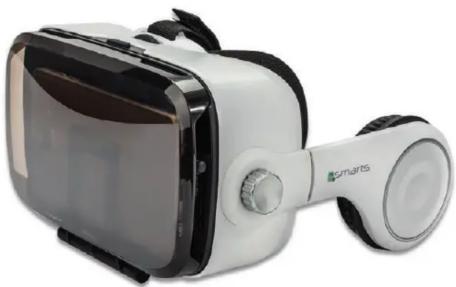
VR SPECTATOR SOUND
UNIVERSAL VIRTUAL REALITY GLASSES

natural_image
White smart glasses with black headband and connected earbuds (no visible text or symbols)THANK YOU
for choosing a quality product from 4smarts

A
B


C
DE
I. Sicherheitshinweise
- Lassen Sie das Gerät nur von Fachleuten reparieren.
- Verlegen Sie alle Kabel so, dass keine Stolpergefahr entsteht oder Fluchtwege blockiert werden.
- Wenden Sie beim Stecken des Gerätes und bei evtl. eingesetzten Adaptern niemals Gewalt an.
- Nehmen Sie die Brille bei Übelkeit, Schwindelgefühl oder Unwohlsein unverzüglich ab.
- Stellen Sie sicher, dass das Smartphone vo der Nutzung stabil im Gehäuse verankert ist
- Bei persönlichen Beschwerden oder Leiden wie z.B. Epilepsie konsultieren Sie bitte vor der ersten Nutzung Ihren Arzt.
- Achten Sie vor der Nutzung auf Ihre Umgebung. Stellen Sie sicher, dass sich während der Nutzung keine Menschen, Tiere oder zerbrechlichen und gefährlichen Gegenstände in Ihrer unmittelbaren Nähe befinden.
- Nutzen Sie das Produkt nicht bei Müdigkeit oder in berauschtem Zustand.
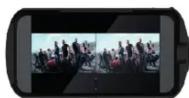
- Nutzen Sie das Produkt zu Ihrer Sicherheit ausschließlich in sitzender Position. (C)
- Laden Sie Ihr Smartphone nicht während des Spielens mit der Brille.
- Lassen Sie das Produkt nicht fallen und setzen Sie es keinen heftigen Erschütterungen aus.
- Dieses Produkt ist kein Spielzeug, geben Sie es daher nicht in Kinderhände.
II. Lieferumfang
- 4smarts Spectator SOUND Universal VR-Brille
- 3,5 mm Kabelverlängerung
- Mikrofaser-Reinigungstuch
- Feuchtes Alkohol-Reinigungstuch
III. Kompatibilität/Voraussetzungen
Smartphone-Außenmaße
- Höhe: bis zu 15,6 cm
IV. Bildbeschreibung
- Linsenregler
- Smartphone-Halterung
- Verschlussmechanismus der Smartphone-Halterung
- 3,5 mm Anschluss
- On-Ear Stereo Kopfhöhrer
- Linsen
- Größenverstellbare Kopfbänder
- Anrufannahme Taste/Lautstärkeregler
- Touch-Taste
- 3,5 mm Kabelverlängerung
-
Mikrolaser-Reinigungstuch
-
Feuchtes Alkohol-Reinigungstuch
V. Inbetriebnahme
- Entfernen Sie ggf. Schutzhüllen, Taschen und anderes Zubehör von Ihrem Smartphone.
- Stellen Sie die Kopfbänder (7) der Brille so ein, dass die Brille angenehm aber fest auf Ihrem Kopf sitzt.
- Starten Sie die entsprechende Virtual- oder Augmented-Reality App.
- Öffnen Sie die Smartphone-Halterung (3)
- Legen Sie das Smartphone wie beschrieben ein. (A)
- Verbinden Sie den 3,5mm Stecker (4) mit dem 3,5mm-Anschluss des Smartphones.
- Nutzen Sie die beigepackte 3,5mm Kabelverlängerung (10), falls erforderlich.
- Setzen Sie die Brille auf, und regeln Sie die Breite und Tiefe der Linsen an den beiden Linsen-Reglern (1), bis das Bild scharf ist. (B)
- Ziehen Sie die Kopfhörer (5) vorsichtig zurück, bis Sie auf ihren Obers anliegen
- Steuern Sie das Smartphone während der Nutzung mit den bebilderten Kontroll-Elementen (8) (9).
VI. Gewährleistung
Die 4smarts übernimmt keinerlei Haftung oder Gewährleistung für Schäden, die aus unsachgemäßer Installation, Montage und unsachgemäßem Gebrauch des Produktes oder einer Nichtbeachtung der Bedienungsanleitung und/oder der Sicherheitshinweise resultieren.
VII. Hinweis zum Umweltschutz
Elektrische und elektronische Geräte sowie Batterien dürfen nicht mit dem
- Hausmüller entsorgt werden. Der verbraucher ist gesetzlich verpflichtet, elektrische und elektronische Geräte sowie Batterien am Ende ihrer Lebensdauer an den dafür eingerichteten, öffentlichen Sammelstellen oder an die Verkaufsstelle zurückzugeben.
VI. Support
Bei defekten Produkten oder Problemen während der Installation wenden Sie sich bitte an Ihren Händler oder an die 4smarts Produktberatung.
web: www.4smarts.com/contact mail: info@4smarts.com
VII. Sprachen-Hinweis
Weitere Sprachen finden Sie unter folgendem Link: http://4smarts.com/7aac

I. Safety instructions
- The device should only be repaired by a specialist.
- Run all cables so that they do not pose a
tripping hazard or block emergency exits - Never use force when plugging in the device and the adapter (if used). - Immediately put down the glasses on feelings of dizziness, sickness or headache.
- Make sure the Smartphone is safely fixed within the housing before use.
- On medical conditions or sickness (e.g. epilepsy) please consult your doctor before the first use.
- Pay attention to your surroundings before use. Make sure you are not directly surrounded by people, animals or fragile and dangerous objects.
- Do not use this product in dazed or tired condition.
- For your own safety only use this product in sitting position. (C)
- Do not charge your phone while playing with the glasses.
- Do not drop the product and do not expose it to any major shocks.
- This product is no toy, and should not be given to children.
II. Lieferumfang
- 4smarts Spectator SOUND Universal
- 3.5mm extension cable
- Microfiber cleaning cloth
- Damp alcohol cleaning cloth
III. Compatibility/Requirements
External smartphone dimensions:
- height: up to 15.6 cm
- width: up to 8.2 cm
IV. Picture description
- Lens regulators
- Smartphone mount
- Closing mechanism of the smartphone fixation
- 3.5mm jack
- On-ear stereo headphones
- Lenses
- Adjustable headbands
B. Hook switch button/volume control - Touch button
- 3.5 mm cable extension
- Microfiber cleaning cloth
- Damp alcohol cleaning cloth
V. Operation
- Remove if necessary protection cases, bags and other accessories from your smartphone.
- Adjust the headbands (7) of the glasses so the spectacles sit tight but comfortable on your head.
- Start the related Virtual- or Augmented Reality App.
- Open the smartphone holder (3).
- Insert the smartphone as described. (A)
- Connect the 3.5mm plug (4) with the 3.5mm jack of the smartphone.
- If necessary, use the inserted 3.5mm cable extension (10).
- Put on the glasses and adjust the width and depth of the lenses on both lens regulators (1), (B)
- Pull back the headphones (5) until they sit on your ears.
- Control the smartphone with the control elements (8) (9) displayed on the picture
VI. Warranty
The 4smarts GmbH assumes no liability and provides no warranty for damage resulting from improper installation/ mounting, improper use of the product or from failure to observe the operating instructions and/or safety notes.
VII. Disposal notification
Electric and Electronic devices as well as batteries must not be disposed of with household waste. Consumers are obliged by law to return electric, electronic devices as well as batteries at the end of their service lives to the public collecting points set up for this purpose or point of sale.
VI.Support
If the product is defective or in case of problems during installation, please consult your dealer or the 4smarts product consulting. web: www.4smarts.com/contact mail: info@4smarts.com
VII. Language notification
Further languages can be found on following link: http://4smarts.com/7aac
- VR SPECTATOR SOUND
- THANK YOU
- Sicherheitshinweise
- Lieferumfang
- Kompatibilität/Voraussetzungen
- Bildbeschreibung
- Inbetriebnahme
- Gewährleistung
- Hinweis zum Umweltschutz
- Support
- Sprachen-Hinweis
- Safety instructions
- Compatibility/Requirements
- Picture description
- Operation
- Warranty
- Disposal notification
- VI.Support
- Language notification
Marque : 4smarts
Modèle : VR Spectator SOUND
Catégorie : Casque de réalité virtuelle