
BOOM Bit - Station d'accueil POLK - Notice d'utilisation et mode d'emploi gratuit
Retrouvez gratuitement la notice de l'appareil BOOM Bit POLK au format PDF.


| Type de produit | Station d'accueil avec enceinte Bluetooth portable |
| Dimensions | 18 x 8 x 8 cm |
| Poids | 0,4 kg |
| Alimentation | Batterie rechargeable lithium-ion, 5V/2A via port USB-C |
| Fonctions principales | Diffusion audio Bluetooth 5.0, station de recharge pour appareils mobiles, haut-parleur intégré, contrôle du volume et des appels mains-libres |
| Entretien et nettoyage | Nettoyer avec un chiffon doux et sec, éviter l'humidité et les produits abrasifs |
| Sécurité | Ne pas exposer à l'eau ou aux liquides, ne pas ouvrir l'appareil, utiliser uniquement le chargeur fourni |
| Pièces détachées et réparabilité | Batterie remplaçable par un professionnel agréé, autres pièces non disponibles séparément |
| Informations générales | Compatible avec smartphones et tablettes, port USB de charge en sortie (5V/1A), autonomie jusqu'à 8 heures |
FOIRE AUX QUESTIONS - BOOM Bit POLK
Questions des utilisateurs sur BOOM Bit POLK
0 question sur cet appareil. Repondez a celles que vous connaissez ou posez la votre.
Poser une nouvelle question sur cet appareil
Téléchargez la notice de votre Station d'accueil au format PDF gratuitement ! Retrouvez votre notice BOOM Bit - POLK et reprennez votre appareil électronique en main. Sur cette page sont publiés tous les documents nécessaires à l'utilisation de votre appareil BOOM Bit de la marque POLK.
MODE D'EMPLOI BOOM Bit POLK
polk Boom
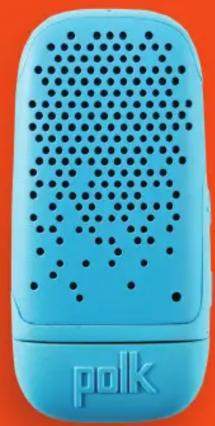
natural_image
Blue handheld electronic device with perforated grille and 'polk' logo on front (no readable text or symbols beyond branding)
natural_image
Black electronic device with perforated grille and 'puk' logo on side (no readable text or symbols beyond branding)
natural_image
Illustration of a white and teal handheld device with black dots on its surface, labeled 'polk' at the bottom (no other text or symbols visible)
natural_image
Red portable electronic device with perforated grille and 'polk' logo on front (no readable text or symbols beyond branding)
natural_image
Green handheld electronic device with perforated grille and 'polk' logo on front (no readable text or symbols beyond branding)BIT
OWNER'S MANUAL
Polk BOOM— Ready for Anything™
Enjoying music anywhere demands a product that's ready for anything. And Polk BOOM has that concept on lockdown and then some. Born on original motives with Southern California roots that run deep, Polk BOOM pushes the limits to deliver great sound for whenever you're on the go from an all-in-one speaker that's water-, dirt-, and shock-proof.
Designed with the adventurer in mind. Engineered to withstand the harshest elements. And built for durability over the long haul. It's these unique principles that propel your experience of sound to new levels. It's what inspires you to go big and move forward on the journey with your favorite music in tow—no matter what gets in the way.
BIT
Bit—The World's First Wearable Speaker
The Polk BOOM Bit is the world's first truly wearable Bluetooth speaker that immerses you in your own personal bubble of sound. Designed to clip securely to your clothing (ex. T-shirt collar, backpack, hat brim, etc.) and near your head, it seamlessly integrates with how you move, safely balancing all of your audio with your immediate surroundings. It features speakerphone capability and a standard USB for on-the-go charging—all housed in a ruggedly rubberized enclosure.
Note: Not recommended for clipping to anything more than .25" thick.
How to Power On/Off Your Bit
Press and hold the + and - buttons simultaneously until an audible cue is heard to indicate that it's powered on and searching for a device to pair with.

hold the + and - buttons until an audible cue is heard. The Bit will power off.
Note: The Bit will automatically turn off after eight minutes if no Bluetooth connection is established between it and your phone, tablet or computer.
Connecting Your Bit via Bluetooth
If you have not paired your Bit to a specific device, the Bit will automatically go into pairing mode as soon as it powers on. Go into your phone's Bluetooth settings (make sure to enable Bluetooth as well) in order to connect the Bit to your device.
Next, locate the Bit on your Bluetooth device list and select Polk BOOM Bit. You will hear an audible cue that it has paired and the blue light will begin flashing every five seconds on your Bit.
Note: A battery icon also appears next to the Bluetooth icon at the top of your phone's screen, indicating the Bit's battery level.
Controlling the Audio on Your Bit
| Play / Pause | Tap +/- buttons at same time |
| Volume Up / Down | Tap + or - buttons(audible cue sounds at max volume; mutes at lowest volume) |
| Forward Track | Hold + button for two seconds |
| Backward Track | Hold - button for two seconds. |
Note: All settings can be adjusted through your phone.
Taking Calls and Using Your Bit's Speakerphone
If your Bit is paired to your phone and there's an incoming call, your music will pause and your ringer will sound through the Bit.
Answer Call: Hold + button for two seconds
End Call: Hold - button for two seconds
Note: Remember, you can still adjust the volume on the Bit while you talk.
Charging Your Bit
The Bit features a standard USB for super easy, on-the-go charging. Simply flip open the hinged cap and insert the Bit into any USB outlet.
The LED light on the Bit turns red while plugged in and charging. The red light will then turn off when your battery is fully charged.
It takes about two hours to fully charge your Bit, giving you three hours of uninterrupted music at half volume.
Maintaining Your Seal
Ensure that the hinged cap is covering the standard USB, fully pushed in and snapped to its original position, and flush with the body of your Bit.
Factory Reset
If you're having any connectivity issues, you may need to perform a factory reset of your Bit. To do that, press the +/- buttons at the same time for eight seconds. An audible cue will follow along with a distinct "beep" sound. You will notice the LED indicator flashing every two seconds and waiting to be discovered and paired in Bluetooth mode.
Having issues with your BOOM Product?
We want to hear about it.
1 Viper Way
Vista, California USA 92081
800-377-7655
polkcs@polkaudio.com
polk
BOOM
Polk Audio, LLC
1 Viper Way
Vista, California USA 92081
www.polkboom.com


Marque : POLK
Modèle : BOOM Bit
Catégorie : Station d'accueil