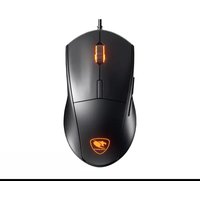
Minos XT - Souris Cougar - Notice d'utilisation et mode d'emploi gratuit
Retrouvez gratuitement la notice de l'appareil Minos XT Cougar au format PDF.


| Type de produit | Souris gaming filaire |
| Marque | Cougar |
| Modèle | Minos XT |
| Capteur | Optique, résolution jusqu'à 3200 DPI |
| Nombre de boutons | 6 boutons programmables |
| Type de connexion | USB filaire avec câble tressé |
| Longueur du câble | 1,8 mètres |
| Dimensions (L x l x h) | 125 x 65 x 35 mm |
| Poids | 85 grammes |
| Alimentation | Alimentation par câble USB, consommation 100 mA |
| Fréquence de rafraîchissement | 1000 Hz |
| Rétroéclairage | LED RGB personnalisable |
| Compatibilité | Windows 7, 8, 10, 11 ; Mac OS X 10.11 ou ultérieur |
| Matériau | Plastique ABS avec revêtement anti-glisse |
| Logiciel de configuration | Cougar UIX (téléchargeable sur le site officiel) |
| Entretien et nettoyage | Débrancher la souris, nettoyer avec un chiffon doux légèrement humide. Ne pas utiliser de solvants. |
| Sécurité | Ne pas exposer à l'humidité ou à des températures extrêmes. |
| Pièces détachées | Pieds de souris de rechange disponibles, câble USB non remplaçable par l'utilisateur. |
| Réparabilité | Réparation uniquement par un technicien agréé ; ouverture du boîtier annule la garantie. |
FOIRE AUX QUESTIONS - Minos XT Cougar
Questions des utilisateurs sur Minos XT Cougar
0 question sur cet appareil. Repondez a celles que vous connaissez ou posez la votre.
Poser une nouvelle question sur cet appareil
Téléchargez la notice de votre Souris au format PDF gratuitement ! Retrouvez votre notice Minos XT - Cougar et reprennez votre appareil électronique en main. Sur cette page sont publiés tous les documents nécessaires à l'utilisation de votre appareil Minos XT de la marque Cougar.
MODE D'EMPLOI Minos XT Cougar
www.cougargaming.com
DEFAULT BUTTON ASSIGNMENT

A Left Click
B Right Click
C Wheel Click
Backlight Cycle
E Forward
F Backward

DEUTSCH
- HERVORRAGENDE ERGONOMISCHE FORMGEBUNG - 1000 DPI - TÖRPLICHE PRÄZION
•4000 DPI - TODLICHE PRAZISION •16.9 MILLIONEN FARREN - BRILLANTE
• 16,8 MILLIONEN FARBE GAMING-ATMOSPHÄRE
• 20 MILLIONEN KLICKS TASTENSCHALTER
•6 PROGRAMMIERRARE TASTEN
• 32-BIT-ARM-PROZESSOR & 128 KB INTEGRIERTER
SPEICHER
• UNTERSTÜTZT COUGAR UIX™-SOFTWARE
ESPAÑOL
*4000 DPI- PRECISION MORTAL CON EL SENSOR
OPTICO MEJORADO -16.8 MILLONES DE
• 10.8 MILLONES DE COLORES • 20 MILLONES DE CLICKS INTERRUPTORES
• 6 BOTONES PROGRAMABLES
• PROCESADOR ARM DE 32BIT & 128 KB DE MEMORIA ON BOARD
ON-BOARD • SOPORTE D
SOFORTE DE SOFTWARE COGAR SIX
[Non-Text]
PORTUGUÊS
*4000 DPI-PRECISIÓN MORTAL CON EL SENSOR
OPTICO MEJORADO 16.9 MILLIÕES DE C
• 16.8 MILHOES DE CORES • 20 MILLIÕES DE OLIQUES
20 MILHOES DE CLIQUES INTERRUPTORES •6 BOTOES PROGRAMÁVEIS
• PROCESADOR ARM DE 32B
ON-BOARD
• SOPORTE DE SOFTWARE COUGAR UIX™
FRANÇAIS
• 4000 DPI-UNE PRÉCISION HORS-NORMES AVEC
UNCAPTEUR OPTIQUE 16.8 MILLIONS DE CO
• 16.8 MILLIONS DE COULEURS 70 MILLIONS DE CLICC • UNE
• 20 MILLIONS DE CLICS : UNE DUREE DE VIE MONSTRUIEUSE
• 6 BOUTONS PROGRAMMABLES
• PROCESSEUR 32BIT ARM ET 128KB DE MÉMOIRE
EMBARQUÉE
• COMPATIBLE AVEC LE LOGICIEL UIX™ COUGAR
HUNGARIAN
• 4000 DPI-HALÁLOS PONTOSSÁG A FELJETT
OPTIKAI ÉRZEKELOVEL
• 16.8 MILLIÓ SZÍN-TÖKÉLETES JÁTÉKOS
ATMOSZFERA
• 20 MILLIO LEUTES RAPCSOLOR • 6 PROGRAMOZHATÓ GOMB
• 32 BIT ARM PROCESSZOR & 128 KB BEÉPÍTETT
MEMÓRIA
• COUGAR UIXTM SZOFTVER TÁMOGATÁS
日本語
・4000 DPI-精密な光学センサーによる高精度
・1680万色LEDバックライト
・2千万回スイッチ
・6個のプログラムが可能なボタン
・32 bit ARMプロセッサと128 KBオンボードメモリー
- COUGAR UIX™ ソフトウェア
POLISH
• 4000 DPI-ZWIĘKSZONA PRECYZJA
• 16,8 MILIONÓW KOLORÓW PODŚWIETLENIA
• 20 MILIONÓW KLIKNIEĆ SWITCHE
- 6 PROGRAMOWALNYCH PRZYCTSKÓW
• 32-BIT PROCESOR ARM ORAZ WBUDOWANA
DAMIEĆ 128 KR
FAMIEC 128 KB
中文
·4000 DPI-配有高端光学感应器,为您带来致命
精准度
·1680万色背光
·2000万次点击按键-超耐用,超长点击寿命的
6个可编程按键
·32位ARM处理器 & 128 kb内建存储器
52位ARM处理器&TE6KB内建存储器,支撑COUGAR UIXTM软件
·艾迪COOARIX软件
한국어
4000 DPI-향상된 광학센서의 최상의 정밀도
-1680만색상-화려한게임분위가
-2 천만 클릭 - 매우 견고한 스위치
-6개의 프로그래밍 가능한 버튼
-32비트ARM프로세서및128kb온보드메모리
.COUGAR UIXTM 소프트웨어 지원
FEATURES
·4000 DPI-DEADLY PRECISION WITH ENHANCED
OPTICAL SENSOR
The PixArt PMW3325 Extreme Optical Sensor provides you with pinpoint control.
·1000 Hz POLLING RATE
1000Hz Polling Rate: Absolute control, amazing response time. No control lag. Only victory.
- 6 PROGRAMMABLE BUTTONS-OPTIMIZE EFFICIENCY,
SPEED, AND FUNCTIONS
Reassign commands or macros to any of the ergonomically located 6 programmable buttons.
• COUGAR UIX™ SYSTEM
Macros, shortcuts, and a myriad of configurations in a convenient human-focused interface.
· 128KB ON-BOARD MEMORY: PERSISTENT PROFILES
The on-board memory allows to store 1 profile on the mouse, allowing you to keep your configuration anywhere you go.
• GAMING-GRADE SCROLL WHEEL
First quality encoder + rubberized gaming wheel: 100% accurate tactile feedback.
-ON-THE-FLY DPI & POLLING RATE ADJUSTMENT
Change quickly and conveniently the settings of your mouse, switching between superior accuracy and ultra-fast movement at will.
-20 MILLION CLICKS-ULTRA DURABLE AND LONG-LIVED
SWITCHES
With a guaranteed minimum life of 2 million clicks, this mouse is going to serve you well for a long time.
• GAMING MOUSE FEET
Mouse feet designed specially for gaming, with a large area and a surface designed to optimize the speed/control relation.
-16.8 MILLION COLORS-BRILLIANT GAMING ATMOSPHERE (3 ZONE RGB)
Freely choose 1 out of 16.8 million colors to easily identify each profile and personalize the mouse's appearance.
-32-BIT ARM PROCESSOR
Superior computing speed, ultra-fast response.
РУССКИЙ
• РАЗРЕШЕНИЕ СЕНСОРА 4000 DPI
• ПОДСВЕТКА 16.8 МИЛЛИОНОВ ЦВЕТОВ • 20 МИЛЛИОНОВ КЛИКОВ ПЕРЕККІЮЧАТР
• 20 МИЛЛИОНОВ КЛИКОВ ПЕРЕК • 6 ПРОГРАММИРУЕМЫХ КНОПОК
• 32-БИТНЫЙ АРМ ПРОЦЕССОР И 128 КБ ПАМЯТИ
• СИСТЕМА COUGAR UIX™
ITALIANO
• 4000 DPI-PRECISIONE ESTREMA
• 16.8 MILLIONI DI COLORI • 20 MILLIONI DI CLICK SW
•6 PUL SANTI PROGRAMMABILI
• PROCESSORE 32 BIT ARM E 128KB DI MEMORIA INSTALLATA
• SUPPORTO PER IL SOFTWARE COUGAR UIX
SPECIFICATIONS
| Product name | MINOS XT Gaming Mouse |
| Sensor | ADNS-3050 Optical gaming sensor |
| Resolution | 4000 DPI |
| Game type | FPS / MMORPG / MOBA / RTS |
| Polling rate | 1000Hz |
| On-board memory | 128KB |
| Software | COUGAR UIXTM SYSTEM |
| Programmable buttons | 6 |
| Switching Gaming | switches |
| Profile LED backlight | 3 ZONE 16.8 million colors |
| Interface | USB plug |
| Cable length | 1.8m |
| Dimension | 125(L) X 68(W) X 38(H) mm |
The above specifications may vary by country or region
PACKAGE CONTENTS
| COUGAR MINOS XT Gaming Mouse |
| User Manual |
To achieve optimal performance, it is highly recommended that you use this product with COUGAR Mouse Pads.
UIX ^TM
The COUGAR UIX ^TM SYSTEM is the ultimate gaming device configuration tool.
SYSTEM REQUIREMENTS
Windows 10
DOWNLOAD

flowchart
graph LR
    A["1 www.cougargaming.com"] --> B["2 Download COUGAR UIXTM SYSTEM"]
ENGLISH
- Go to the COUGAR official website.
(http://www.couqargaming.com)
- Download the COUGAR UIX™ SYSTEM_MINOS XT installer from the MINOS XT download page.
ESPAÑOL
- Vaya a la web oficial de COUGAR.
(http://www.cougargaming.com)
- Descargue el instalador de COUGAR UIX™ SYSTEM_MINOS XT de la página de descarga MINOS XT.
PORTUGUÊS
- Visite o website oficial da COUGAR.
(http://www.cougargaming.com)
- Transfira o programa de instalação COUGAR UIX™ SYSTEM_MINOS XT a partir da página de transferência MINOS XT.
日本
-
COUGAR 公式サイトに移動します。 (http://www.cougargaming.com)
-
COUGAR_MINOS XT ダウンロードページから COUGAR UIXTM SYSTEM_MINOS XTのインストーラーをダウンロードします。
DEUTSCH
- Gehe zur offiziellen COUGAR Homepage.
(http://www.couqargaming.com)
- Download COUGAR UIX™ SYSTEM_MINOS XT installer von der MINOS XT download seite.
РУССКИЙ
- Перейдите на веб-сайт COUGAR.
(http://www.couqargaming.com)
- Загрузите программу установки драйвера COUGAR UIX™ SYSTEM_MINOS XT со страницы загрузок для MINOS XT
ITALIANO
-
Connettere la presa USB al PC
-
Scarica e installa i driver da http://couqargaming.com/downloads/
-
Il vostro device è pronto per essere utilizzato.
한국어
1.COUGAR공식 웹사이트
(http://www.cougargaming.com)로 이동합니다
-
MINOS XT 다운로드 페이지에서 COUGAR UIX™
-
MINOS XT 소업소드 에너지에서 COUGAR SIX SYSTEM MINOS XT 설치 프로그래은 다으므로합니다
中文
1.连上COUGAR官方网站(http://www.cougargaming.com)
2 进入 MINOS XT 的下载页面,下载 COUGAR UIIX ^TM
- 进入MINOS XT的下载 SYSTEM MINOS XT
GLOBAL WARRANTY POLICY
WARRANTY PERIODS OF COUGAR GAMING DEVICES
Product: COUGAR MONOS XT gaming mouse Warranty: 1 Year
This warranty gives you specific legal rights. You may also have other rights granted under local law.
WARRANTY AGREEMENT
- If the product has defects in material or manufacture, COUGAR will provide product repair and replacement service
within the warranty period.
- Our warranty service is based on the date of the invoice or warranty card (must be affixed with the store stamp).
If you lose the aforementioned evidence, we will apply the original shipping date of the product as the beginning date of warranty period. The shipping date will be identified by the product serial number(S/N).
CONDITIONS WHERE FREE MAINTENANCE IS NOT PROVIDED
• Any fault or damage caused by natural disasters (including storm, fire, flood, thunder, earthquake, etc).
• Any fault or damage caused by accidental factors and man-made reasons (including hit, scrape, crash, moving,
compression, stain, corrosion, use of incurred on unsuitable voltage, computer virus, riot, misuse, malicious damage, etc).
- Use in an improper operating environment (including high temperature, high humidity, water inflow, etc).
• Inability to provide the product warranty card, purchase receipt or invoice to prove the product is still within the
warranty period and the shipping date of the product is out of warranty.
• The warranty card or product serial number has been altered or its number is hard to identify
• The warranty period has expired.
• Any fault or damage caused by non-compliance with regulations stated on the user manual or improper, rough and
Why, fault of damage caused by non-compliance with regulations stated on the last month of improper, not careless treatment.
• Any fault or damage caused by use of parts not certified by COUGAR original manufacturer.
• The problem is caused by improper repair or adjustment by the buyer or any manufacturer without authorization from COUGAR.
• The product is not acquired from an authorized distributor of the company or is acquired from illicit sources.
- Paper carton, instruction and other accessories are not warranted.
DISCLAIMERS
• COUGAR does not authorize or endorse the user of COUGAR products as a part of, together with, or connected to, life support devices, medical equipment in general, military equipment, traffic or transportation-related equipment or disaster prevention systems.
• COUGAR is not liable for any damage, expense, loss, cost, injury or any other result derived from the use of COUGAR
products not specifically for PC gaming in the compatible operative systems indicated by COUGAR
• COUGAR is not liable for any damage, expense, loss, cost, injury or any other result due to use of COUGAR products
not in strict accordance with the instructions provided by COUGAR in the instruction manual.
- Software, instruction manuals, consumables (for example mouse pads, mouse feet, etc.), boxes or other external
packaging are not covered by the warranty
- For inquiries about the warranty, please contact us at service@cougargaming.com
LEGAL NOTICES
This manual was created by Compucase Enterprise and may not be completely or partially copied, passed on, distributed or stored without written consent by Compucase Enterprise.
COLUGAR® is a registered brand of Compucase Enterprise Other product and company names mentioned in this
documentation may be brands or trademarks of their respective owners.
Compucase Enterprise reserves the right to make changes concerning the contents of the manual and the technical data of the product without previous announcement.


ДАТА ИЗГОТОВЛЕНИЯ ПРОДУКЦИИ
год и месяц изготовления продукции указаны в серийном номере продукта. (существует 2 способа определения даты изготовления, оба способа описаны ниже)

После S/N: первые две цифры означают год. вторые две – месяц изготовления.
Например, S/N: H1702000001 означает, что товар был произведен в феврале 2017 года.

После S/N: если указаны буквы, то две буквы представляют цифры из таблицы ниже, и означают
год, последующие две цифры – месяц изготовления.
Например, S/N: DAG02REVI000001 означает, что товар был произведен в феврале 2017 года.
| ABCDEF | GH IJ | |||||||
| 1234567 | 890 |
• Например, AG = 17 = 2017 год
MANUFACTURER CONTACT
Compucase Enterprise Co., Ltd.
No. 225, Lane 54, An Ho Road Sec. 2 Tainan, Taiwan, R.O.C
Tel:+886-6-356-0606
Service E-Mail: service@cougargaming.com
COUGAR USA Technical Service
Tel: (833) 256-3778
Mail: rma@compucaseusa.com
https://cougargaming.com/support/contact/upload/
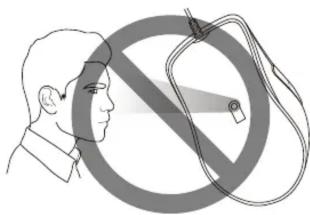
CAUTION
Please do not directly look into the optical beam!
For more information, please visit
https://couqargaming.com
Compucase Enterprise Co., Ltd
All rights reserved.
Made in China

- DEUTSCH
- ESPAÑOL
- PORTUGUÊS
- FRANÇAIS
- HUNGARIAN
- 日本語
- POLISH
- 中文
- 한국어
- FEATURES
- ·4000 DPI-DEADLY PRECISION WITH ENHANCED
- OPTICAL SENSOR
- ·1000 Hz POLLING RATE
- - 6 PROGRAMMABLE BUTTONS-OPTIMIZE EFFICIENCY,
- SPEED, AND FUNCTIONS
- • COUGAR UIX™ SYSTEM
- · 128KB ON-BOARD MEMORY: PERSISTENT PROFILES
- • GAMING-GRADE SCROLL WHEEL
- -ON-THE-FLY DPI & POLLING RATE ADJUSTMENT
- -20 MILLION CLICKS-ULTRA DURABLE AND LONG-LIVED
- SWITCHES
- • GAMING MOUSE FEET
- -16.8 MILLION COLORS-BRILLIANT GAMING ATMOSPHERE (3 ZONE RGB)
- -32-BIT ARM PROCESSOR
- РУССКИЙ
- ITALIANO
- SYSTEM REQUIREMENTS
- ENGLISH
- 日本
- GLOBAL WARRANTY POLICY
- WARRANTY PERIODS OF COUGAR GAMING DEVICES
- WARRANTY AGREEMENT
- CONDITIONS WHERE FREE MAINTENANCE IS NOT PROVIDED
- DISCLAIMERS
- LEGAL NOTICES
- ДАТА ИЗГОТОВЛЕНИЯ ПРОДУКЦИИ
- MANUFACTURER CONTACT
- CAUTION
Marque : Cougar
Modèle : Minos XT
Catégorie : Souris