
MC-E736K - Aspirateur PANASONIC - Notice d'utilisation et mode d'emploi gratuit
Retrouvez gratuitement la notice de l'appareil MC-E736K PANASONIC au format PDF.


| Marque | Panasonic |
| Modèle | MC-E736K |
| Type de produit | Aspirateur traîneau sans sac |
| Couleur | Rouge et noir |
| Dimensions (L x l x h) | 435 x 280 x 375 mm |
| Poids | 5,2 kg |
| Puissance maximale | 1800 W |
| Puissance d'aspiration | 400 air watts |
| Type de filtre | Filtre HEPA lavable |
| Capacité du réservoir | 2,2 litres |
| Longueur du cordon | 8 mètres |
| Rayon d'action | 10 mètres |
| Niveau sonore | 75 dB(A) |
| Accessoires inclus | Brosse principale, suceur fentes, brosse meubles, turbo brosse |
| Programmes | Sol, moquette, tapis |
| Entretien et nettoyage | Vidage du réservoir après chaque usage, lavage du filtre HEPA tous les 3 mois |
| Sécurité | Arrêt automatique en cas de surchauffe, protection moteur |
| Pièces détachées | Filtres, sacs (bien que sans sac), courroies, brosses |
| Réparabilité | Indice de réparabilité 7,5/10 |
| Garantie | 2 ans |
FOIRE AUX QUESTIONS - MC-E736K PANASONIC
Questions des utilisateurs sur MC-E736K PANASONIC
0 question sur cet appareil. Repondez a celles que vous connaissez ou posez la votre.
Poser une nouvelle question sur cet appareil
Téléchargez la notice de votre Aspirateur au format PDF gratuitement ! Retrouvez votre notice MC-E736K - PANASONIC et reprennez votre appareil électronique en main. Sur cette page sont publiés tous les documents nécessaires à l'utilisation de votre appareil MC-E736K de la marque PANASONIC.
MODE D'EMPLOI MC-E736K PANASONIC
Operating Instructions
Vacuum Cleaner
MC-E740UK, MC-E741UK, MC-E742UK, MC-E743UK,
MC-E735K, MC-E736K,
MC-E740, MC-E741, MC-E742, MC-E743

natural_image
Line drawing of a vacuum cleaner with armrests, placed near a sofa and a small table (no text or symbols)Panasonic
Dear Customer,
May we take this opportunity to thank you for purchasing this Panasonic Vacuum Cleaner.
We would particularly advise that you carefully study these Operating Instructions before attempting to operate the unit and that you note the listed Important Safety Instructions.
This product complies with the directives 73/23/EEC and 89/336/EEC.
TABLE OF CONTENTS
• Caution for AC Mains Lead.
- Important safety instructions/Cautions.
• Identification of main parts.
• A) How to assemble your cleaner.
• B) How to operate your cleaner.
• C) Dust bag check indicator.
• D) How to replace dust bag.
• E) Filter care.
• F) How to store your cleaner.
• G) Accessory (Optional).
REMINDER FOR CUSTOMER
The model and serial number of this product may be found on the name plate located at the back of your cleaner. You should note the model and serial number in the spaces provided and retain this book as a permanent record of your purchase.
Model Number:
Serial Number:
Date Purchased:
Where Purchased
CAUTION FOR AC MAINS LEAD
FOR YOUR SAFETY PLEASE READ THE FOLLOWING TEXT CAREFULLY
This appliance is supplied with a moulded three pin mains plug for your safety and convenience.
A 13 amp fuse is fitted in this plug.
Should the fuse need to be replaced please ensure that the replacement fuse has a rating of 13 amps and that it is approved by ASTA or BSI to BS1362.
Check for the ASTA mark 📂 or the BSI mark 🌿 on the body of the fuse
If the plug contains a removable fuse cover you must ensure that it is refitted when the fuse is replaced
If you lose the fuse cover the plug must not be used until a replacement cover is obtained
A replacement fuse cover can be purchased from your local Panasonic Dealer
IF THE FITTED MOULDED PLUG IS UNSUITABLE FOR THE SOCKET OUTLET IN YOUR HOME THEN THE FUSE SHOULD BE REMOVED AND THE PLUG CUT OFF AND DISPOSED OF SAFELY.
THERE IS A DANGER OF SEVERE ELECTRICAL SHOCK IF THE CUT OFF PLUG IS INSERTED INTO ANY 13 AMP. SOCKET.
If a new plug is to be fitted please observe the wiring code as shown below
If in any doubt please consult a qualified electrician.
IMPORTANT: The wires in this mains lead are coloured in accordance with the following code:
Blue: Neutral
Brown: Live
As the colours of the wire in the mains lead of this appliance may not correspond with the coloured markings identifying the terminals in your plug, proceed as follows:
The wire which is coloured BLUE must be connected to the terminal in the plug which is marked with the letter N or coloured BLACK.
The wire which is coloured BROWN must be connected to the terminal in the plug which is marked with the letter L or coloured RED.
Under no circumstances should either of these wires be connected to the earth terminal of the three pin plug, marked with the letter E or the Earth Symbol 1.
How to replace the Fuse
- There are two types of the supplied AC Mains Lead: Ⓐ and Ⓑ as shown below
1 Open the fuse compartment with a screwdriver.
2 Replace the fuse and fuse cover if detachable.
1 Open the fuse compartment with a screwdriver. 2 Replace the fuse and fuse cover if detachable.


TYPE A
Fuse cover Part No.: AMC8GD48AC0000
IMPORTANT SAFETY INSTRUCTIONS FOR THE USER

When using this vacuum cleaner, please observe these basic precautions. WARNING: To reduce the risk of fire, electric shock, or injury:
- Do not leave the vacuum cleaner plugged in to mains outlet. Unplug from the outlet when not in use and before cleaning the appliance or undertaking maintenance operations.
• Electric shocks can occur if used outdoors or on wet surfaces. - Do not allow to be used as a toy. Close attention is necessary when being used near children.
- Do not use with damaged cord or plug. If the vacuum cleaner is not working as it should be, or has been dropped, damaged, left outdoors, or come into contact with water, consult an authorised Panasonic Service Centre.
- Do not pull or carry by cord. use cord as a handle. close a door on cord, pull cord around sharp edges or comers. Do not run vacuum cleaner over the cord. Keep cord away from heated sufraces.
- Do not handle plug or vacuum cleaner with wet hands.
- Do not put any object into openings. Do not use with any opening blocked; keep free of dust, lint, hair and anything that may block or reduce air flow.
- Keep hair, loose clothing, fingers, and all parts of body away from openings and moving parts.
- Do not use the vacuum cleaner without filters and/or dust bag in place. Never try to patch a broken dust bag.
- Turn off all controls before unplugging.
- Use extra care when cleaning on stairs. Hold the handle of the cleaner in one hand to avoid overturned the vacuum cleaner.
- Do not use to pick up flammable or combustible liquids such as gasoline or use in areas where they may be present.
- This appliance should be serviced by an authorised Panasonic Service Centre, and only genuine Panasonic spare parts should be used.
NOTE: These vacuum cleaners are designed for general household use only and are not suitable for use in a garage, garden or to suck up liquids.
CAUTIONS
This cleaner includes an automatic thermal safety device which automatically turns off the power if the suction inlet, hose or extension wand is clogged. If this occurs, disconnect from the mains, remove the material responsible for the clogging and then wait about ten minutes, before operating your cleaner again.

natural_image
Simple line drawing of a crossed cigarette with smoke, no text or symbols present1) Never let the vacuum cleaner pick up wet matter, mud or burning ashes or materials likely to demange the init.

natural_image
Abstract black-and-white sketch of crossed tools and objects (no text or symbols)2) Before using the vaccum cleaner, remove large or sharp objects from the floor to avoid demaging the machine or the dust bag.

natural_image
Illustration of a toy car with a crossed-out black cross symbol next to a mounted device (no text or symbols present)3) Keep the cleaner away from heat sources such as electrical fires, etc.

4) Do not pull on the cord when disconnecting it from the mains, always pull on the plug body itself.
This appliance is provided with a flexible cord and if this becomes damaged, it must be repaired by Panasonic, or an Authorised Service Centre or a qualified person in order to avoid any hazard.
IDENTIFICATION OF MAIN PARTS
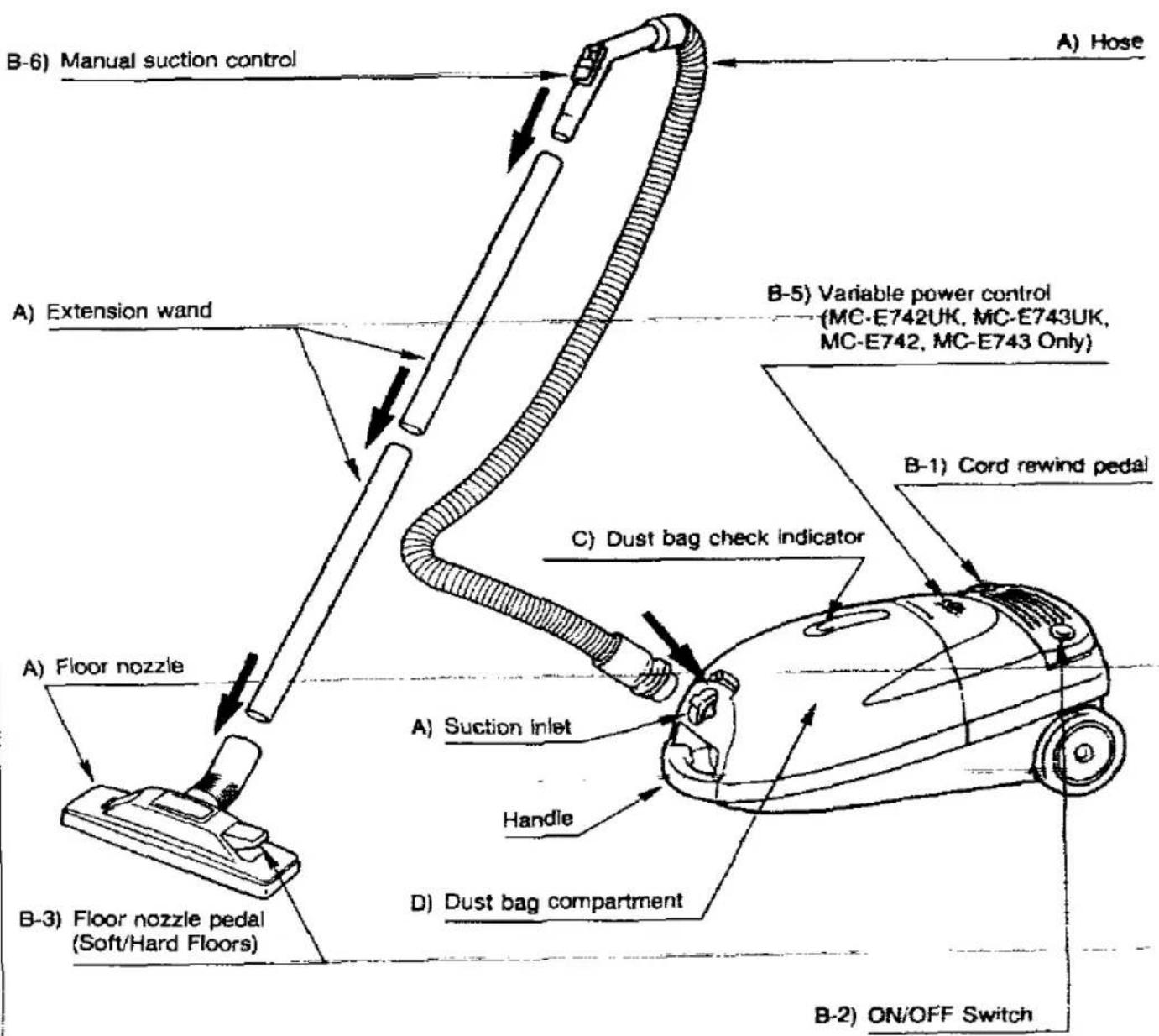
D) Paper dust bag

natural_image
Simple line drawing of a mechanical component with a gear-like cutout (no text or symbols)B-4) Accessory tray
(MC-E742UK, MC-E743UK, MC-E742, MC-E743 Only)
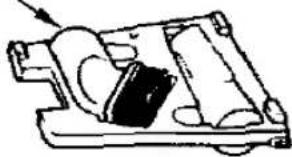
natural_image
Mechanical assembly diagram showing internal components with no visible text or symbolsNOTE: Floor nozzle and extension tube are subjects o change without notice.
A) HOW TO ASSEMBLE YOUR CLEANER
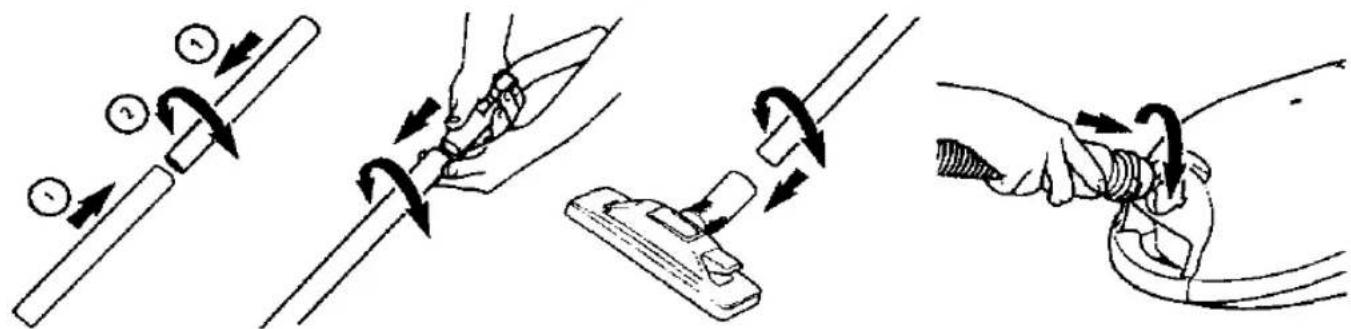
B) HOW TO OPERATE YOUR CLEANER
B-2) ON/OFF Switch
B-1) Cord connection
Automatic cord rewind

natural_image
Line drawing of a vacuum cleaner with attached cable and power outlet (no text or symbols)
natural_image
Line drawing of a hand adjusting a small car interior with a handle, showing mechanical components and arrows indicating motion (no text or symbols)Rewind the cord, pressing the pedal.
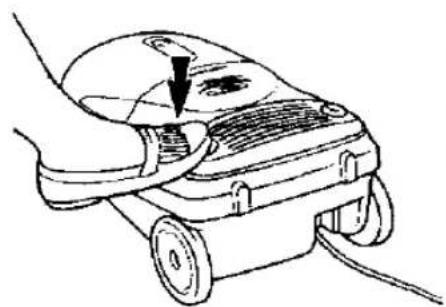
natural_image
Line drawing of a hand using a vacuum cleaner to press or install a component, with no visible text or symbols.Start or stop the cleaner pressing the pedal.
B-3) Floor nozzle selector pedal

natural_image
Technical line drawing of a mechanical component with a circular inset showing a pin or feature (no text or symbols)Hard floor

natural_image
Diagram of a tool applying material to a surface, showing a magnified view of the tool's tip (no text or symbols present)Carpet

natural_image
Technical line drawing of two mechanical components with no visible text or symbolsRegularly clean the vacuum cleaner head to remove entangled fibres
B-4) Accessories
Accessory tray (MC-E742UK, MC-E743UK, MC-E742, MC-E743 Only)
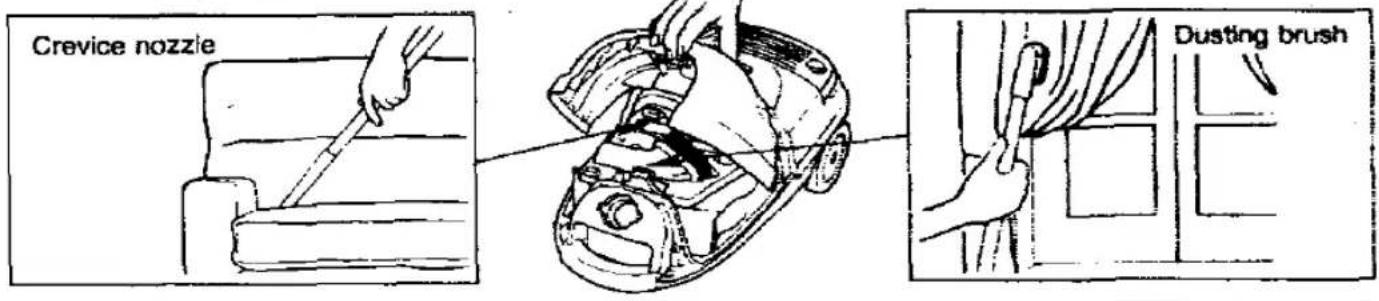
B-5) Variable Power Control (MC-E742UK, MC-E743UK, MC-E742, MC-E743 Only)
This vacuum cleaner has a variable power control to select the most suitable power required for your cleaning needs.
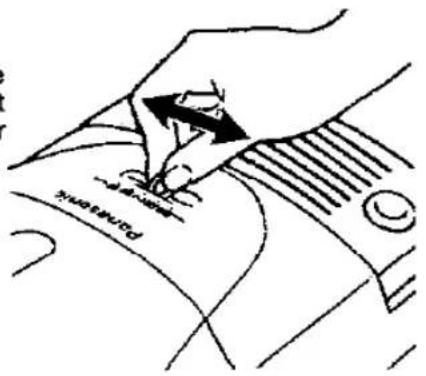
B-6) Manual suction control
Adjust the suction to suit the cleaning condition.

Curtains
Upholstery
Quick cleaning for hard flooring
For more in-grained dirt on carpets

Normal cleaning

natural_image
Four-panel illustration showing hand-cranked cleaning techniques: surface treatment, tool handling, mechanical assembly, and sand rolling (no text or symbols)
DUST BAG CHECK INDICATOR
The check bag indicator (yellow mark) will appear in the window, when airflow through the bag is insufficient. Check the paper bag, it may be full or blocked with fine dust and needs to be replaced.
NOTE: If after replaced the bag, the Indicator (yellow mark) continues appearing, check to see if the hose or connection pipe is clogged.

natural_image
Diagram of a mechanical or architectural component with internal structure and circular detail (no text or symbols)
natural_image
Diagram of a mechanical or structural component with internal components and a circular inset (no text or symbols)
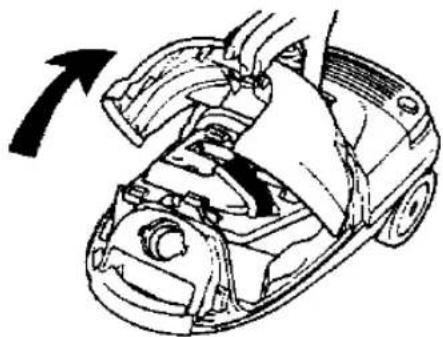
HOW TO REPLACE THE DUST BAG
natural_image
Diagram of a car's engine compartment being adjusted, showing hand positioning and valve assembly (no text or labels)
1) Pull dust cover up to remove lid and accessories tray.
2) Push the clamp forwards and take out dust bag by pulling cardboard up.
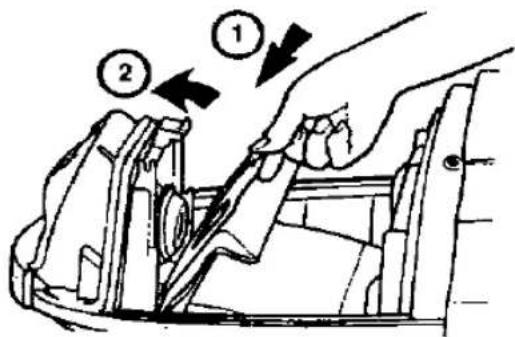

3) Insert new dust bag by guiding cardboard into the guide slots and push forwards. IMPORTANT: Dust bags should be changed regularly for maximum efficiency of vacuum cleaner.
4) Replace accessories tray and dust cover.
NOTE: When the dust bag is not installed or it has not been installed correctly, the dust cover will not close.
We recommend the use of genuine Panasonic bags Type C-2E only.

FILTER CARE
Central Filter (Fig. 1) Part No. AMC8GF03D1100
The central filter (foam filter), is installed in the dust bag compartment to protect the motor from dirt.
When it becomes dirty, simply rinse it out in warm water and dry thoroughly before replacing.
To remove the central filter, hold filter at the top (as illustrated) and pull it up.
Important: Ensure that the filter is dry before re-installing it into the cleaner.
NOTE: Never use the cleaner without the correct filters properly installed. Failure to do so may result in motor damaged.

natural_image
Technical line drawing of a car interior showing hand positioning and valve mechanism (no text or symbols)Fig. 1
IMPORTANT: Do not forget to re-install the filters before using the vacuum cleaner.

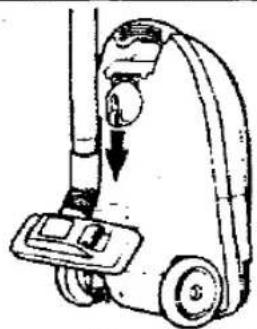
HOW TO STORE YOUR CLEANER
For easy storage and transportation, this vacuum cleaner has a clip system built onto the body, which will keep the extension wand, hose and nozzle in a vertical position.
natural_image
Illustration of a vacuum cleaner with a downward arrow indicating motion (no text or symbols)
ACCESSORY (Optional)
Cloth re-usable bag
Part. no. AMC8GF9931300

natural_image
Simple line drawing of a rectangular object with a circular opening and a small protrusion (no text or symbols)Panasonic España, S.A.
DIVISION DE ASPIRADORAS
Zona Industrial del Poligono de CELRA
17460 CELRA (Girona) SPAIN
- Operating Instructions
- Panasonic
- TABLE OF CONTENTS
- REMINDER FOR CUSTOMER
- CAUTION FOR AC MAINS LEAD
- FOR YOUR SAFETY PLEASE READ THE FOLLOWING TEXT CAREFULLY
- How to replace the Fuse
- IMPORTANT SAFETY INSTRUCTIONS FOR THE USER
- When using this vacuum cleaner, please observe these basic precautions. WARNING: To reduce the risk of fire, electric shock, or injury:
- CAUTIONS
- IDENTIFICATION OF MAIN PARTS
- DUST BAG CHECK INDICATOR
- HOW TO REPLACE THE DUST BAG
- FILTER CARE
- Central Filter (Fig. 1) Part No. AMC8GF03D1100
- HOW TO STORE YOUR CLEANER
- ACCESSORY (Optional)
Marque : PANASONIC
Modèle : MC-E736K
Catégorie : Aspirateur