
M6T - Moniteur pour bébé iBaby - Notice d'utilisation et mode d'emploi gratuit
Retrouvez gratuitement la notice de l'appareil M6T iBaby au format PDF.


| Type de produit | Moniteur pour bébé |
| Marque | iBaby |
| Modèle | M6T |
| Dimensions (caméra) | 10 x 8 x 8 cm |
| Dimensions (écran parent) | 14 x 9 x 2 cm |
| Poids (caméra) | 150 g |
| Poids (écran parent) | 200 g |
| Alimentation | Adaptateur secteur 5V/1A |
| Type d'affichage | Écran LCD 2.4 pouces |
| Résolution vidéo | 720p |
| Vision nocturne | Oui, LED infrarouge |
| Portée | Jusqu'à 300 mètres en champ libre |
| Audio bidirectionnel | Oui |
| Fonction veilleuse | Oui, intégrée à la caméra |
| Capteur de température | Oui, dans la chambre |
| Détection de pleurs | Oui |
| Entretien et nettoyage | Nettoyer avec un chiffon doux et sec |
| Consignes de sécurité | Ne pas exposer à l'eau, tenir hors de portée des enfants |
| Pièces détachées | Adaptateur secteur, câble USB, support mural |
| Réparabilité | Réparation par centre agréé recommandée |
| Informations générales | Moniteur vidéo numérique pour bébé avec écran portable |
FOIRE AUX QUESTIONS - M6T iBaby
Questions des utilisateurs sur M6T iBaby
0 question sur cet appareil. Repondez a celles que vous connaissez ou posez la votre.
Poser une nouvelle question sur cet appareil
Téléchargez la notice de votre Moniteur pour bébé au format PDF gratuitement ! Retrouvez votre notice M6T - iBaby et reprennez votre appareil électronique en main. Sur cette page sont publiés tous les documents nécessaires à l'utilisation de votre appareil M6T de la marque iBaby.
MODE D'EMPLOI M6T iBaby
User Manual
iBaby Monitor
Model: M6
Index
1 Introduction....3
1.1 The package contents....3
1.2 Product Features .... 3
1.3 Product Specifications 4
2 Appearance and Interface 5
2.1 Back of the camera....5
2.2 Bottom of the camera 6
3 Set-up and Installation 7
5 FCC Caution: 10
1 Introduction
The iBaby monitor works with your iPod touch, iPhone, iPad or Android devices such as Samsung Galaxy, Samsung Note, HTC, Google Nexus and more. You can see and hear your baby anytime, anywhere as long as you are connected to the internet (including Wi-Fi, 3G/4G network, LTE, etc.). From iBaby Care App, you set motion/sound alerts, zoom in and snap photos so you never miss an important moment. "This product is meant for providing convenience for baby monitoring. The manufacturer is not responsible for any legal liability caused by negligence."
1.1 The package contents
√ 1 Camera
√ 1 Power Adapter
√ 1 Quick Installation Guide
√ 1 Base
√ Wall Mount is sold SEPARATELY
1.2 Product Features
√ Selectable video resolution for comprehensive network bandwidth & mobile device
√ Local lullaby storage & playing
√ Full duplex two-way talkback
√ Acoustics echo cancellation technology providing nice audio quality
√ High performance P2P technology for high reliable connectivity
√ Video & audio recording (local, iBaby cloud), sharing (Facebook, Instagram, etc).
√ Pan & tilt support
1.3 Product Specifications
| Model:M6 | ||
| Features | P2P | Support P2P |
| WIFI setting | Monitor automatically get the IOS device is currently connected Wi-Fi account and password | |
| Cloud Storage | Support the pictures and videos stored in the cloud | |
| CPU | OS | Embedded Linux OS |
| CPU | 32Bit RSIC Embedded Processor | |
| Video | Compression | H.264 baseline |
| Frame rate | Max.30fps | |
| Resolution | HD(1280*720),VGA(640*480) | |
| Image Rotation | Brightness, contrast, resolution is adjustable | |
| Lens | f=4.2mm, F=2.0, Fixed Iris (2 megapixels) | |
| Lighting | Minimum illumination | 0 Lux(IR on automatically) |
| Lighting | 9pcs 12ML Infrared LEDs, 6m distance | |
| Audio | Compression | G711 |
| Audio In | One way input / Internal Microphone | |
| Audio Out | One way output / Internal Speaker | |
| Network | Network interface | N/A |
| User Access | Support 4 users visiting on the same time | |
| Protocol | TCP/IP , HTTP , UDP , DHCP , UPNP,NTP,P2P | |
| IP address | DHCP IP address | |
| WIFI | Protocol | Support 802.11b/g/n |
| Encryption | Support WEP/WPA/WPA2 encryption | |
| Setting | Monitor automatically get the IOS device is currently connected Wi-Fi account and password | |
| USB interface | Connect with IOS devices | |
| antenna port | Built-in antenna | |
| PTZ | Motor | Built-in motor control |
| Coverage | Horizontal : 355° , Vertical : 100° | |
| Other | Shape material | Plastic |
| Work environment | Indoors | |
| Power | DC5V 2A | |
| Reset | One | |
| Product power | Daytime 2.5W, night 3W | |
| Operating environment | Temperature: 0~40°C, humidity: 30°C ≤75% | |
| Storage environment | Temperature: -40°C ~ 55°C, humidity: 40°C ≤90% | |
| Size | Monitor size: 117mm(L)*117mm(W)*151mm(H)Package size: 173.5mm(L)*173.5mm(W)*175mm(H) | |
| Weight | Weight: 558g | |
| Package contents | Power Adapter, Quick start guide, Magnetic base | |
| Software | Software | IOS6.0 or later, Android4.0 or later |
| Certification | Certification | FCC CE ROSH RCM TELEC |
2 Appearance and Interface
2.1 Back of the camera

DC Power: 5V 2A power adapter (Please use the official factory power adapter to avoid possible fire hazards)
Status Light: has a total of three possible output displays, refer to latter parts of this document for their meanings
2.2 Bottom of the camera

Camera ID: Printed on the bottom of each camera as shown above
USB port: used for connecting to your iOS device
RESET button: used to reset your M6 back to factory settings
3 Set-up and Installation
a. Ensure your Android device is connected to your Wi-Fi network.
b. Download iBaby Care App from Google Play to your supported mobile device.

c. Close all of your smart phone apps running in the background.
d. Plug the power cable to the baby monitor, wait for 30 seconds until the red LED lights start flashing.
e. Connect your Android smart phone and baby monitor with a USB cable.
f. Select 'OK' when asked, 'Open iBaby Care when this USB accessory is connected?'.

g. Create an account and log in.

h. Click 'Next'.
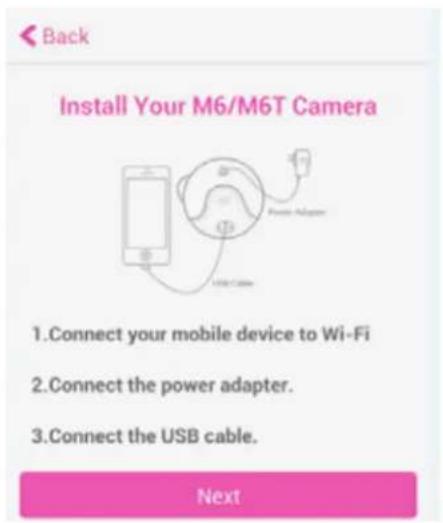
i. Type in your Wi-Fi password, and click 'Trust' button. Make sure your password is correct.
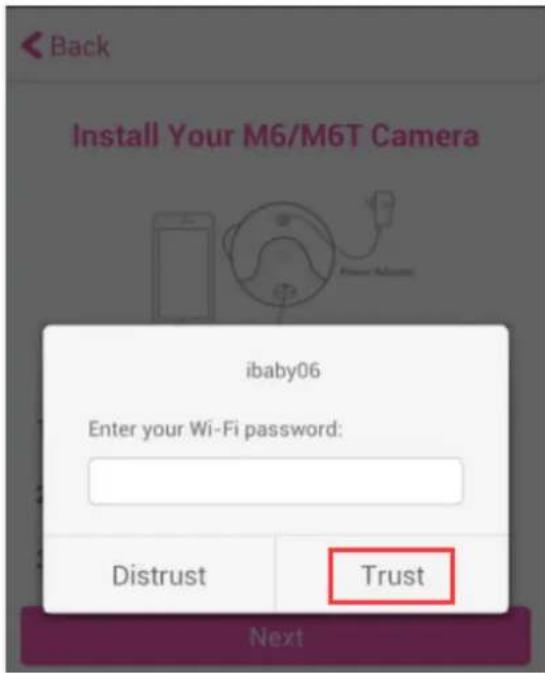
j. Proceed to follow the simple onscreen instructions to complete the setup.
5 FCC Caution:
Any Changes or modifications not expressly approved by the party responsible for compliance could void the user's authority to operate the equipment.
This device complies with part 15 of the FCC Rules. Operation is subject to the following two conditions: (1) This device may not cause harmful interference, and (2) this device must accept any interference received, including interference that may cause undesired operation.
FCC Radiation Exposure Statement:
This equipment complies with FCC radiation exposure limits set forth for an uncontrolled environment.
This equipment should be installed and operated with minimum distance 8 inches between the radiator & your body.
This transmitter must not be co-located or operated in conjunction with any other antenna or transmitter.


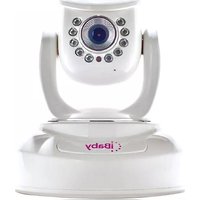

Marque : iBaby
Modèle : M6T
Catégorie : Moniteur pour bébé