
Minos X2 - Souris Cougar - Notice d'utilisation et mode d'emploi gratuit
Retrouvez gratuitement la notice de l'appareil Minos X2 Cougar au format PDF.


| Type de produit | Souris gaming |
| Marque | Cougar |
| Modèle | Minos X2 |
| Capteur | Optique PixArt 3325 |
| Résolution | Jusqu'à 10000 DPI (réglable) |
| Boutons | 6 boutons programmables |
| Rétroéclairage | RGB personnalisable |
| Connexion | Filaire USB |
| Longueur de câble | 1,8 m |
| Dimensions (L x l x H) | 124 x 64 x 38 mm |
| Poids | 65 g |
| Alimentation | USB (5V, 100 mA) |
| Matériau | Plastique ABS avec revêtement antidérapant |
| Nombre de patins | 4 patins en PTFE |
| Taux de rapport | 1000 Hz |
| Fonctions principales | Jeu, bureautique, personnalisation des macros |
| Entretien | Nettoyer avec un chiffon doux et sec |
| Sécurité | Utiliser sur une surface plane et stable |
| Pièces détachées | Non disponibles séparément (câble intégré) |
| Réparabilité | Limitée, ouverture déconseillée |
| Garantie | 2 ans (selon revendeur) |
| Accessoires inclus | Souris, manuel d'utilisation |
FOIRE AUX QUESTIONS - Minos X2 Cougar
Questions des utilisateurs sur Minos X2 Cougar
0 question sur cet appareil. Repondez a celles que vous connaissez ou posez la votre.
Poser une nouvelle question sur cet appareil
Téléchargez la notice de votre Souris au format PDF gratuitement ! Retrouvez votre notice Minos X2 - Cougar et reprennez votre appareil électronique en main. Sur cette page sont publiés tous les documents nécessaires à l'utilisation de votre appareil Minos X2 de la marque Cougar.
MODE D'EMPLOI Minos X2 Cougar
www.cougargaming.com

USER MANUAL
MINOS X2
GAMING MOUSE
REAL GEAR FOR REAL GAMERSREAL
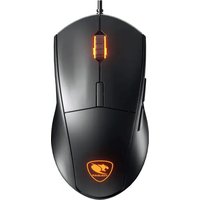
DEFAULT BUTTON ASSIGNMENT
A Left Click
B Wheel Click
Right Click
DPI Cycle
E Side Keys
HOW TO CHANGE THE POLLING RATE FROM 1000 HZ TO 125 HZ? Press and hold the "DPI cycle key" for at least 3 seconds and the backlight will change to breathing mode.

FEATURES
-3000 DPI ULTRA-PRECISE OPTICAL GAMING SENSOR
ADNS-3050 Optical gaming sensor provides you with pinpoint control.
-5-STEP ON-THE-FLY DPI FINE-TUNING
500/1000/1500/2000/3000 DPI Change quickly and conveniently the DPI settings of your mouse, switching between superior accuracy and ultra-fast movement at will.
•OMRON MICRO SWITCHES
OMRON Switches provide absolute accuracy and an incredibly long life. (20 million clicks guaranteed)
•GAMING-GRADE SCROLL WHEEL
First quality encoder + rubberized gaming wheel: 100% accurate tactile feedback.
-3 ZONE BACKLIGHT
A gaming mouse has to look the part, and Minos X2's three zone backlight provides you with the perfect gaming atmosphere.
-ANTI-SUP FLANKS
Both sides of the mouse sport a unique hexagonal pattern that improves the grip and further enhances control.
•GAMING LEVEL FEET
Mouse feet designed specially for gaming, with a large area and a surface designed to optimize the speed/control relation.
•DRIVER-FREE
Plug and Play. No need to bother installing or configuring anything, no driver conflicts, no updates. Just you and the game.
DEUTSCH
• OPTISCHER SENSOR MIT 3000 DPI
• 3-ZONE-HINTERGRUNDBELEUCHTUNG
• DPI-EINSTELLUNG ON-THE-FLY
• OMRON-SWITCHES
• HOCHWERTIGES MAUSRAD
- PLUTSCHEESTE ALISSENSEITEN
• MOLUSE-GLIDES IN PROFI-QUALITÄT
• KEINE TREIBER BENÖTIGT
ESPAÑOL
• TECNOLOGÍA CON SENSOR DE
PRECISIÓN PARA JUEGOS 3000DPI
• AJUSTE SOBRE LA MARCHA DPI
• MICROINTERRUPTORES OMRON
• PIE DE RATÓN DE GRADO PARA JUEGOS
FRANCAIS
• CAPTEUR 3000 DPI
• AJUSTEMENT ON THE FLY
• OMRON MICRO SWITCHES
• GAMING MOUSE FEET
PORTUGUÊS
•TECNOLOGIA DE SENSOR
PARA JOGOS COM PRECISÃO
DE 3000PPP
• AJUSTE DE PP INSTANTÂNEO
•MICRO INTERPRIPTORES
OMRON
РУССКИЙ
•ИГРОВОЙ СЕНСОР С
РАЗРЕШЕНИЕМ 3000 DPI
•НАСТРОИКА ДРІ ВО
ВРЕМЯ ИГРЫ
•МИКРОПЕРЕКЛЮЧАТЕЛИ
OMRON
ITALIANO
•MOUSE GAMING USB PER PC
MINOS X2
•SENSORE 3000 DPI
HUNGARIAN
• 3000DPI PRECÍZIÓS SZENZOR
TECHNOLÓGIA
• DPI ÁLLÍTÁSI LEHETŐSÉG
HASZNÁLAT KÖZBEN
• OMRON MIKROKAPCSOLÓK
• KIVÁLÓ MINÕSÉGÜ TALPAK
POLISH
• SENSOR 3000DPI
• ZMIANA DPI PODCZAS
ROZGRYWKI
• PRZEŁĄCZNIKI OMRON
• SLIZGACZE I ROLKA PRZEWIJANIA
BARDZO WYSOKIEJ JAKOSCI
한국어
•3000DPI 정밀 게이밍 센서 기술
•사용 중 DPI 조정
•OMRON 마이크로 스위치
日本語
- 解像度3000DPIでゲーミング向け精度の高いコントロール
・「オンザフライ」(ON-THE-FLY)という技術
を採用し、ゲームプレイ中に解像度を切り替え ・OMRON製ゲーミングスイッチ
・滑らかなゲーミングフィート
中文
·高效能 3000 DPI游戏级传感器技术
•ON-THE-FLY DPI 灵敏度调整
·欧姆龙微动开关
·游戏级滑顺支脚
SPECIFICATIONS
| Product name | COUGAR MINOS X2 Gaming Mouse |
| Sensor | ADNS-3050 Optical gaming sensor |
| Resolution | 500/1000/1500/2000/3000 DPI |
| Switching | OMRON gaming switches |
| LED backlight | 3 zone backlight |
| Interface | USB plug |
| Cable length | 1.8m |
| Dimension | 122(L) X 70(W) X 40(H) mm |
The above specifications may vary by country or region
PACKAGE CONTAINS
| COUGAR MINOS X2 Gaming Mouse |
| User Manual |
To achieve optimal performance, it is highly recommended that you use this product with COUGAR Mouse Pads.
SYSTEM REQUIREMENTS
Windows 7 / Windows 8 / Windows 10
GLOBAL WARRANTY POLICY
WARRANTY PERIODS OF COUGAR GAMING DEVICES
Product : COUGAR MINOS X2 gaming mouse
Warranty : 1 Year
This warranty gives you specific legal rights. You may also have other rights granted under local law. These rights may vary.
WARRANTY AGREEMENT
- If the product has defects in material or manufacture, COUGAR will provide product repair and replacement service within the warranty period.
• Our warranty service is based on the date of the invoice or warranty card (must be affixed with the store stamp). If you lose the aforementioned evidence, we will apply the original shipping date of the product as the beginning date of warranty period. The shipping date will be identified by the product serial number(S/N).
CONDITIONS WHERE FREE MAINTENANCE IS NOT PROVIDED
• Any fault or damage caused by natural disasters (including storm, fire, flood, thunder, earthquake, etc).
• Any fault or damage caused by accidental factors and man-made reasons (including hit, scrape, crash, moving, compression, stain, corrosion, use of incurred on unsuitable voltage, computer virus, riot, misuse, malicious damage, etc).
- Use in an improper operating environment (including high temperature, high humidity, water inflow, etc).
- Inability to provide the product warranty card, purchase receipt or invoice to prove the product is still within the warranty period and the shipping date of the product is out of warranty.
- The warranty card or product serial number has been altered or its number is hard to identify.
• The warranty period has expired.
• Any fault or damage caused by non-compliance with regulations stated on the user manual or improper, rough and careless treatment.
- Any fault or damage caused by use of parts not certified by COUGAR original manufacturer.
- The problem is caused by improper repair or adjustment by the buyer or any manufacturer without authorization from COUGAR.
• The product is not acquired from an authorized distributor of the company or is acquired from illicit sources.
• Paper carton, instruction and other accessories are not warranted.
DISCLAIMERS
• COUGAR product is not authorized for use as critical components in life support device or for incorrect application software or malfunction of the product.
- COUGAR is not liable for the death or damage of person or loss of property when product is using as, including but not limited to, medical equipment, military equipment, traffic equipment and disaster prevention system.
- COUGAR's warranty liability is limited to repair, replacement.
• COUGAR is not liable for any damages, expenses, lost data, lost revenues, lost savings, lost profits, or any incidental or consequential damages due to using defect product of COUGAR.
If you have any question about the warranty, please feel free to contact us.
Customer support: service@cougargaming.com
LEGAL NOTICES
This manual was created by Compucase Enterprise and may not be completely or partially copied, passed on, distributed or stored without written consent by Compucase Enterprise.
COUGAR® is a registered brand of Compucase Enterprise Other product and company names mentioned in this documentation may be brands or trademarks of their respective owners.
Compucase Enterprise reserves the right to make changes concerning the contents of the manual and the technical data of the product without previous announcement.


All other registered trademarks belong to their respective companies.
Tested to comply with FCC standards FOR HOME OR OFFICE USE
MANUFACTURER CONTACT
Compucase Enterprise Co., Ltd.
No. 225, Lane 54, An Ho Road Sec. 2 Tainan, Taiwan, R.O.C
Tel:+886-6-356-0606
Service E-Mail: service@cougargaming.com
More information you will find at cougargaming.com
Compucase Enterprise Co., Ltd.
All rights reserved.
Made in China
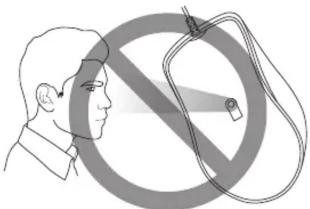
CAUTION
Please do not directly look into the optical beam!
natural_image
Illustration of a person facing a large no-smoking symbol with a magnifying glass (no text or symbols present)

- MINOS X2
- DEFAULT BUTTON ASSIGNMENT
- FEATURES
- -3000 DPI ULTRA-PRECISE OPTICAL GAMING SENSOR
- -5-STEP ON-THE-FLY DPI FINE-TUNING
- •OMRON MICRO SWITCHES
- •GAMING-GRADE SCROLL WHEEL
- -3 ZONE BACKLIGHT
- -ANTI-SUP FLANKS
- •GAMING LEVEL FEET
- •DRIVER-FREE
- DEUTSCH
- ESPAÑOL
- FRANCAIS
- PORTUGUÊS
- РУССКИЙ
- ITALIANO
- HUNGARIAN
- POLISH
- 한국어
- 日本語
- 中文
- SYSTEM REQUIREMENTS
- GLOBAL WARRANTY POLICY
- WARRANTY PERIODS OF COUGAR GAMING DEVICES
- WARRANTY AGREEMENT
- CONDITIONS WHERE FREE MAINTENANCE IS NOT PROVIDED
- DISCLAIMERS
- LEGAL NOTICES
- MANUFACTURER CONTACT
- CAUTION
Marque : Cougar
Modèle : Minos X2
Catégorie : Souris