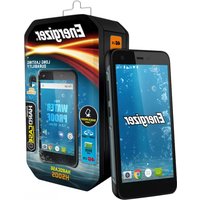
HardcaseH500S - Smartphone ENERGIZER - Notice d'utilisation et mode d'emploi gratuit
Retrouvez gratuitement la notice de l'appareil HardcaseH500S ENERGIZER au format PDF.


| Type de produit | Smartphone robuste |
| Marque | Energizer |
| Modèle | HardcaseH500S |
| Dimensions (approx.) | 160 x 80 x 15 mm |
| Poids (approx.) | 250 g |
| Alimentation | Batterie lithium-ion 5000 mAh, charge via USB-C |
| Système d'exploitation | Android (version récente) |
| Écran | 5.5 pouces, résolution HD+, protection Gorilla Glass |
| Processeur | Quad-core ou octa-core, selon variante |
| Mémoire RAM | 3 Go |
| Stockage interne | 32 Go, extensible via microSD |
| Appareil photo arrière | 13 MP avec flash LED |
| Appareil photo avant | 5 MP |
| Connectivité | Dual SIM 4G, Wi-Fi, Bluetooth, GPS, NFC |
| Résistance | IP68 (étanche et antichoc) |
| Capteurs | Empreinte digitale, accéléromètre, proximité |
| Entretien et nettoyage | Nettoyer avec un chiffon doux et sec. Ne pas utiliser de produits abrasifs. |
| Sécurité | Verrouillage d'écran (code, motif, empreinte) |
| Pièces détachées et réparabilité | Batterie remplaçable, écran réparable par un professionnel |
| Informations générales | Smartphone robuste conçu pour les conditions extrêmes |
FOIRE AUX QUESTIONS - HardcaseH500S ENERGIZER
Questions des utilisateurs sur HardcaseH500S ENERGIZER
0 question sur cet appareil. Repondez a celles que vous connaissez ou posez la votre.
Poser une nouvelle question sur cet appareil
Téléchargez la notice de votre Smartphone au format PDF gratuitement ! Retrouvez votre notice HardcaseH500S - ENERGIZER et reprennez votre appareil électronique en main. Sur cette page sont publiés tous les documents nécessaires à l'utilisation de votre appareil HardcaseH500S de la marque ENERGIZER.
MODE D'EMPLOI HardcaseH500S ENERGIZER
Energizer®

HARDCASE H500S

1.1

1.2
2.1
![graph TD A["1 Device"] --> B["2 Printer"] B --> C["3 Printer"] C --> D["4 Printer"]](/content/2026/06/1327461/images/8aa7df6d1c46f0053d38bfeb1a864e01de65f3673ba5056a513f62faf19aa861.jpg)
2.2
2.3
![graph TD A["1 Device"] --> B["2 Printer"] B --> C["3 Printer"] C --> D["4 Printer"] style A fill:#f9f,stroke:#333 style B fill:#ccf,stroke:#333 style C fill:#cfc,stroke:#333 style D fill:#fcc,stroke:#333](/content/2026/06/1327461/images/4078a35f3a26568596a057370de55363f838e7e97614aa85929f8e6dc4028fd0.jpg)
3.2
INTRODUCING YOUR MOBILE PHONE
Learn about your mobile phone's keys, display and icons.
Keys
From the front view of your phone you will observe the following elements:
(See 1.1 - Page 1)
The following table offers you a quick description about the phone's keys:
| Item | Key Function | |
| 1 | Power button | Allow you to turn on/off the device and to lock the screen. |
| 2 | Volume | Allow you to adjust the volume of ringing and notifications. Also allows you to adjust the volume of multimedia content playback. |
| 3 | Back | Allow you to return to the previous menu or screen. Also allow you to close some applications. |
| 4 | Home | It takes you directly to the home screen, leaving any application open. |
| 5 | Menu | Allow you to access to the functions menu of the application or screen you are. |
Screen
The screen of your mobile phone is designed as follows:
(See 1.2 - Page 1)
Icons
Learn about the icons that are displayed on the top of the screen, indicating the status of the phone:
 | Signal strength |  | Wi-Fi connection |
 | Bluetooth On |  | USB connected |
 | Battery meter |  | New message |
 | Vibration profile |  | New email |
 | Roaming indicator |  | Alarm active |
 | Headset connected |  | Silent profile |
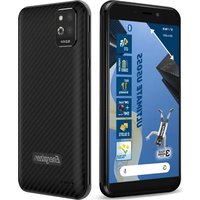


Marque : ENERGIZER
Modèle : HardcaseH500S
Catégorie : Smartphone