Puri - Clavier Cougar - Notice d'utilisation et mode d'emploi gratuit
Retrouvez gratuitement la notice de l'appareil Puri Cougar au format PDF.


| Type de produit | Clavier mécanique gaming |
| Marque | Cougar |
| Modèle | Puri |
| Dimensions (L x l x H) | 440 x 130 x 30 mm (estimation) |
| Poids | 950 g (estimation) |
| Alimentation | USB 2.0, câble détachable tressé de 1,8 m |
| Type de switch | Mécanique Cherry MX ou équivalent (selon variante) |
| Rétroéclairage | RGB par touche, effets personnalisables |
| Anti-ghosting | 100 % anti-ghosting avec N-key rollover |
| Touches multimédia | Oui, touches dédiées (volume, lecture, etc.) |
| Logiciel de configuration | Cougar UIX (téléchargeable sur le site officiel) |
| Mémoire interne | Profils intégrés (jusqu'à 3) |
| Repos poignets | Intégré, amovible (optionnel) |
| Matériau | Plastique ABS brossé, finition mate |
| Entretien et nettoyage | Débrancher avant nettoyage ; utiliser un chiffon microfibre sec ou légèrement humide ; ne pas utiliser de produits abrasifs. |
| Sécurité | Utiliser dans un environnement sec à l'abri des liquides ; ne pas exposer à des températures extrêmes. |
| Pièces détachées et réparabilité | Touches et switch remplaçables (certains modèles) ; câble USB détachable ; contacter le SAV Cougar. |
| Informations générales | Garantie 2 ans ; compatible Windows, macOS, Linux ; marque Cougar. |
FOIRE AUX QUESTIONS - Puri Cougar
Questions des utilisateurs sur Puri Cougar
0 question sur cet appareil. Repondez a celles que vous connaissez ou posez la votre.
Poser une nouvelle question sur cet appareil
Téléchargez la notice de votre Clavier au format PDF gratuitement ! Retrouvez votre notice Puri - Cougar et reprennez votre appareil électronique en main. Sur cette page sont publiés tous les documents nécessaires à l'utilisation de votre appareil Puri de la marque Cougar.
MODE D'EMPLOI Puri Cougar
www.cougargaming.com
PURI
THE GAMER'S ULTIMATE WEAPON
REAL GEAR FOR REAL GAMERSREAL
FEATURES
ENGLISH
• COMPACT AND STURDY DESIGN
Solid and stable, Puri's minimalist design brings you all the key features of a pro gaming keyboard without burdening you with extras you don't need. Quality and strength meet in this superb gaming tool.
• CHERRY MX MECHANICAL SWITCHES
The original mechanical switches from Germany are also the best on the market. With 50 million clicks per switch of guaranteed flawless performance, Cherry switches bring you the response and reliability you want.
- BACKLIGHT EFFECTS (20 PRESET + 10 CUSTOMIZABLE) Simple and elegant, Puri's backlight functionality gives you all you need. Start enjoying 20 preset modes that cover the most commonly needed patterns (uniform, wave, breathing, etc.) and 10 modes for you to customize!
• MAGNETIC PROTECTIVE COVER
No cloth or mesh pouches here: to truly protect your keyboard both at home and on the go, you need (and we are happy to give you!) a solid cover. Puri's magnetically attached cover will protect it from water spills, bread crumbs or pressure when traveling.
DEUTSCH
• SCHÜTZENDE ABDECKUNG MIT MAGNETHALTER
• ABNNEHMBARES KABEL
• 20 BELEUCHTUNGS-EFFEKTE CHERRY MECHANISCHE SWT
•CHERRY MECHANISCHE SWITCHES •N. KEY ROLLOVER IM USR RETRIER
• RUTSCHEFSTE GUMMI-FÜSSE
ESPAÑOL
• MAGNÉTICO TAPA PROTECTORA
• CABLE DETACHABLE
• 20 EFECTOS DE RETROILUMINACIÓN
• TECLADOS MECANICO CHERRY MX
• N-KEY ROLLOVER
• 1000 Hz POLLING RATE / 1MS RESPONSE TIME
PORTUGUÊS
• MAGNÉTICO CAPA PROTETORA
• CABO DESTACÁVEL
• 20 EFEITOS DE LUZ DE FUNDO
• TECLADOS MECÂNICOS CHERRY MX
• N-KEY ROLLOVER
• 1000 Hz POLLING RATE / 1MS RESPONSE TIME
РУССКИЙ
• МАГНИТНЫЕЗАЩИТНАЯ КРЫШКА
• СЪЕМНЫЙ КАБЕЛЬ
• 20 ЭФФЕКТ ПОДСВЕТКИ
• МЕХАНИЧЕСКИЕ КЛАВИШИ CHERRY MX
• N-KEY ROLLOVER
• 1000 Hz POLLING RATE / 1MS RESPONSE TIME
POLISH
• OSŁONA OCHRONNA
• ODŁĄCZANY KABEL
• 20 EFEKTÓW PODŚWIETLENIA
• MECHANICZNE PRZEŁĄCZNIKI CHERRY MX
• N-KEY ROLLOVER W TRYBIE USB
• RAPORTOWANIE 1000Hz / CZAS REAKCJI 1MS
FRANÇAIS
• HOUSSE DE PROTECTION MAGNÉTIQUE
• CÂBLE DÉTACHABLE
• 20 EFFETS DE RÉTROÉCLAIRAGE
• SWITCHS MÉCANIQUES CHERRY MX
• N-KEY ROLLOVER
• TEMPS DE RÉPONSE 1MS/ FRÉQUENCE 1000Hz
• N-KEY ROLLOVER IN USB MODE
N-KEY directly in USB mode, without need for a USB
to PS/2 adapter
Unlimited simultaneous key presses.
• FUNCTION KEY SHORTCUTS
FN key combos allow you to quickly access multimedia
functions and lock the WIN & application key.
• 1000 Hz POLLING RATE / 1 ms RESPONSE TIME
• DEDICATED MULTIMEDIA FUNCTION KEYS
• 3-STEP HEIGHT AND ANGLE ADJUSTMENT
• CABLE MANAGEMENT SYSTEM
CABLE MANAGEMENT SYSTEM • BRAIDED CABLE & GOLDEN-PLATED CONNECTOR
- WINDOWS & APPLICATION KEY LOCK
- WINDOWS & APPLICATION KEY LOCK Avoid kicking yourself out of games by locking the
Avoid kicking yourself out of games by locking the Windows key in-game with an easy shortcut.
• DRIVER-FREE
Plug and Play. No need to bother installing or
configuring anything, no driver conflicts, no updates.
Just you and the game.
HUNGARIAN
• MÁGNESES PROTEKTOR FEDÉL
• LEVEHETÖ KÁBEL
• 20 PROGRAMOZOTT FÉNYHATÁS
• CHERRY MX MECHANIKUS KAPCSOLÓK
• N-KARAKTERES PUFFER USB ÜZEMMÖDBAN
(N-KEY ROLLOVER)
• 1000Hz-ES MINTAVETELEZES / 1MS-OS VALASZIDÖ
ITALIANO
• COPERTURA PROTETTIVA MAGNETICA
• CAVO STACCABILE
• 20 EFFETTI DI RETROILLUMINAZIONE
•CHERRY MX SWITCH MECCANICI
• N-KEY ROLLOVER IN MODALITA' USB
• 1000Hz POLLING RATE / 1MS RESPONSE TIME
日本語
・磁気保護カバー
- 取り外し、可能なケーブル
-取り外も可能なもの -20 ペターミド「D ペターミル」と
- 20パターンLEDバックライトモード CUERBY-MY カニカル フィッチ使用
- CHERRY MX メカニカル・スイッチ使用
・Nキーロールオーバー対応
- 1000Hzレポートレート/1MS応答速度
한국어
-자기보호 커버
•탁착식 케이블
•20 가지 백라이트 효과
•CHERRY MX 기계신키
CHERRY MIX → |P| = N. KEY POLY OVER
• N-KEY ROLLOVER
•1000 Hz POLLING RATE / 1MS 응답촉도
中文
·磁铁保护防尘盖
·分离式线材
·20种背光效果
·CHERRY MX 机械式开关
N. KEY ROU OVER / 100% 王冲宝按键
• N-KEY ROLLOVER / 100%无冲突按键
·1000 Hz轮询速率 / 1MS响应时间
DEFAULT GAMING BACKLIGHT SETTINGS
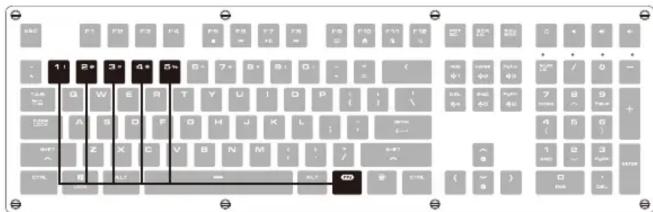
Backlight 1 : Press the Fn key + 1
Backlight 2: Press the Fn key + 2
Backlight 3 · Press the Fn key + 3
Backlight 3 : Press the Fn key + 5 Backlight 4 : Press the Fn key + 4
Backlight 4 : Press the Fn key + 4 Backlight 5 : Press the Fn key + 5


PACKAGE CONTAINS
| COUGAR PURI Gaming Keyboard |
| User Manual |
SYSTEM REQUIREMENTS
Windows 7, Windows 8, Windows 10
SPECIFICATIONS
| Product name | PURI Gaming Keyboard | Interface | USB plug |
| Key switch | Cherry MX mechanical switch | Cable length | 1.8m |
| N-key rollover | Yes ( USB mode support ) | Dimension 150(L) | X 460(W) X 40(H) mm |
| Polling rate 1000Hz | Material | Steel / Plastic | |
| Full key backlight Yes | Weight 1.4kg |
The above specifications may vary by country or region

- Depends on diverse languages and regions, the keyboard layout will be different.
 |  |  |  |  |
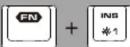 Press the Fn key + INS key to change different backlight effects. Press the Fn key + INS key to change different backlight effects. |  Press the Fn key + HOME key to change different backlight effects. Press the Fn key + HOME key to change different backlight effects. | 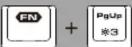 Press the Fn key + PgUp key to change different backlight effects. Press the Fn key + PgUp key to change different backlight effects. |  Press the Fn key + DEL key to change different backlight effects. Press the Fn key + DEL key to change different backlight effects. |  Press the Fn key + PgDn key to change different backlight effects. Press the Fn key + PgDn key to change different backlight effects. |
| 1 STEADY+ Brightness adjustment | 1 RIPPLE+ Brightness adjustment+ Backlight effects speed | 1 SNAKE+ Brightness adjustment+ Backlight effects speed | 1 WAVE+ Brightness adjustment+ Backlight effects speed+ Backlight effects direction | 1 STAR+ Brightness adjustment+ Backlight effects speed |
| 2 GRADIENT+ Brightness adjustment | 2 REACTIVE+ Brightness adjustment+ Backlight effects speed | 2 RHYTHM+ Brightness adjustment+ Backlight effects speed | 2 CIRCLE+ Brightness adjustment+ Backlight effects speed+ Backlight effects direction | 2 STAR-2+ Brightness adjustment+ Backlight effects speed |
| 3 BREATHING+ Brightness adjustment+ Backlight effects speed | 3 ARROW+ Brightness adjustment+ Backlight effects speed | 3 RAIN+ Brightness adjustment+ Backlight effects speed | 3 WAVE-2+ Brightness adjustment+ Backlight effects speed+ Backlight effects direction | 3 WAVE-4+ Brightness adjustment+ Backlight effects speed+ Backlight effects direction |
| 4 VANISH+ Brightness adjustment+ Backlight effects speed | 4 AREA+ Brightness adjustment+ Backlight effects speed | 4 RIPPLE-2+ Brightness adjustment+ Backlight effects speed | 4 WAVE-3+ Brightness adjustment+ Backlight effects speed+ Backlight effects direction | 4 FLOW+ Brightness adjustment+ Backlight effects speed |
| CUSTOMIZE BACKLIGHT EFFECTS: KEY BY KEYThere are 10 custom lighting effects in totalStep 1: Press the Fn key + 1~0Step 2: Press the Fn key + END keyStep 3: Press the key you want to light up.Then, you can continue to set other keys.When you finish all settings, press the Fn key + END key again to store it.RESTORE THE DEFAULT SETTING FN + ESC | ||||
GLOBAL WARRANTY POLICY
WARRANTY PERIODS OF COUGAR GAMING DEVICES
Product : COUGAR PURI gaming keyboard
Warranty : 1 Year
This warranty gives you specific legal rights. You may also have other rights granted under local law. These rights may vary.
WARRANTY AGREEMENT
- If the product has defects in material or manufacture, COUGAR will provide product repair and replacement service within the warranty period.
- Our warranty service is based on the date of the invoice or warranty card (must be affixed with the store stamp). If you lose the aforementioned evidence, we will apply the original shipping date of the product as the beginning date of warranty period. The shipping date will be identified by the product serial number(S/N).
CONDITIONS WHERE FREE MAINTENANCE IS NOT PROVIDED
- Any fault or damage caused by natural disasters (including storm, fire, flood, thunder, earthquake, etc). - Any fault or damage caused by accidental factors and man-made reasons (including hit, scrape, crash, moving, compression, stain, corrosion, use of incurred on unsuitable voltage, computer virus, riot, misuse, malicious damage, etc)
- Use in an improper operating environment (including high temperature, high humidity, water inflow, etc). - Inability to provide the product warranty card, purchase receipt or invoice to prove the product is still within the warranty period and the shipping date of the product is out of warranty.
• The warranty card or product serial number has been altered or its number is hard to identify.
• The warranty period has expired.
• Any fault or damage caused by non-compliance with regulations stated on the user manual or improper, rough and careless treatment.
• Any fault or damage caused by use of parts not certified by COUGAR original manufacturer.
- The problem is caused by improper repair or adjustment by the buyer or any manufacturer without authorization from COUGAR.
- The product is not acquired from an authorized distributor of the company or is acquired from illicit sources. - Paper carton, instruction and other accessories are not warranted.
DISCLAIMERS
- COUGAR product is not authorized for use as critical components in life support device or for incorrect application software or malfunction of the product.
• COUGAR is not liable for the death or damage of person or loss of property when product is using as, including but not limited to, medical equipment, military equipment, traffic equipment and disaster prevention system.
• COUGAR's warranty liability is limited to repair, replacement.
- COUGAR is not liable for any damages, expenses, lost data, lost revenues, lost savings, lost profits, or any incidental or consequential damages due to using defect product of COUGAR.
If you have any question about the warranty, please feel free to contact us.
Customer support: service@cougargaming.com
CUSTOMIZE BACKLIGHT EFFECTS: KEY BY KEY
There are 10 custom lighting effects in total
LEGAL NOTICES
This manual was created by Compucase Enterprise and may not be completely or partially copied, passed on, distributed or stored without written consent by Compucase Enterprise.
COUGAR® is a registered brand of Compucase Enterprise Other product and company names mentioned in this documentation may be brands or trademarks of their respective owners.
Compucase Enterprise reserves the right to make changes concerning the contents of the manual and the technical data of the product without previous announcement.



All other registered trademarks belong to their respective companies.
ДАТА ИЗГОТОВЛЕНИЯ ПРОДУКЦИИ
год и месяц изготовления продукции указаны в серийном номере продукта
(существует 2 способа определения даты изготовления, оба способа описаны ниже)

После S/N: первые две цифры означают год, вторые две – месяц изготовления.
Например, S/N: H1702000001 означает, что товар был произведен в феврале 2017 года.

После S/N: если указаны буквы, то две буквы представляют цифры из таблицы ниже,
и означают год, последующие две цифры – месяц изготовления.
Например, S/N: DAG02REVI000001 означает, что товар был произведен в феврале 2017 года.
| A | B | C | D | E | F | G | H | I | J |
| 1 | 2 | 3 | 4 | 5 | 6 | 7 | 8 | 9 | 0 |
Например, AG = 17 = 2017 год
MANUFACTURER CONTACT
COUGAR USA Technical Service
Tel: (833) 256-3778
Mail: rma@compucaseusa.com
https://cougargaming.com/support/contact/upload/
Compucase Enterprise Co., Ltd.
No. 225, Lane 54, An Ho Road Sec. 2 Tainan, Taiwan, R.O.C
Tel:+886-6-356-0606
Service E-Mail:service@cougargaming.com
تعليمات التركيب و الأمان:
يُنصح بعد البقاء دون تغير وضعية اليدين لساعات طويلة.
لا تستخدم لوحه المفاتيح على الارض، ودراعيك اسندها على المكتب.
الTZRM بالوضعية الصحية و المربحة عند إستخدام لوحه المفانيج.
يجب التاشد من توصيل كافه التوصيلات بالشكل الصحي.
احفظ الجهاز بعيدا عن مصادر المياه و الرطوبه.
الفصل النيار الكهرياني قورا في حالة الاستباه بوجود التماس.
نالكّد بان مصر الطاقة للك ماسب لما يحناجه هذا الجهار.
Compucase Enterprise Co.,Ltd.
All rights reserved. More information you will Mendean Cduigargamin


- PURI
- FEATURES
- ENGLISH
- DEUTSCH
- ESPAÑOL
- PORTUGUÊS
- РУССКИЙ
- POLISH
- FRANÇAIS
- HUNGARIAN
- ITALIANO
- 日本語
- 한국어
- 中文
- DEFAULT GAMING BACKLIGHT SETTINGS
- PACKAGE CONTAINS
- SYSTEM REQUIREMENTS
- GLOBAL WARRANTY POLICY
- WARRANTY PERIODS OF COUGAR GAMING DEVICES
- WARRANTY AGREEMENT
- CONDITIONS WHERE FREE MAINTENANCE IS NOT PROVIDED
- DISCLAIMERS
- CUSTOMIZE BACKLIGHT EFFECTS: KEY BY KEY
- There are 10 custom lighting effects in total
- LEGAL NOTICES
- ДАТА ИЗГОТОВЛЕНИЯ ПРОДУКЦИИ
- MANUFACTURER CONTACT
Marque : Cougar
Modèle : Puri
Catégorie : Clavier