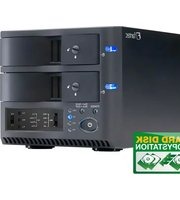
Fantec QB-35US3-6G - Baie de disques

QB-35US3-6G - Baie de disques Fantec - Notice d'utilisation et mode d'emploi gratuit

Retrouvez gratuitement la notice de l'appareil QB-35US3-6G Fantec au format PDF.

📄 5 pages Français FR Télécharger 💬 Question IA 10 questions ⚙️ Specs
Notice Fantec QB-35US3-6G - page 1
Choisissez votre langue et indiquez votre email : nous vous enverrons une version traduite specifiquement.
Type de produit Baie de disques externe
Marque Fantec
Modèle QB-35US3-6G
Facteur de forme 3,5 pouces
Nombre de baies 1
Interface USB 3.0 (compatible USB 2.0)
Standards de disque pris en charge SATA I/II/III (6 Gbit/s)
Alimentation Adaptateur secteur externe (12 V)
Dimensions (L x l x H) env. 200 x 120 x 70 mm
Poids env. 500 g (sans disque)
Matériau du boîtier Aluminium et plastique
Systèmes d'exploitation compatibles Windows, macOS, Linux
Fonctionnalités Plug and Play, gestion thermique passive
Entretien Nettoyer avec un chiffon doux et sec, éviter l'humidité
Sécurité Ne pas ouvrir le boîtier, utiliser sur une surface stable
Pièces détachées Aucune pièce détachée disponible
Réparabilité Non réparable par l'utilisateur
Contenu de l'emballage Baie de disques, adaptateur secteur, câble USB, notice
Garantie 2 ans

FOIRE AUX QUESTIONS - QB-35US3-6G Fantec

Comment installer un disque dur dans le boîtier Fantec QB-35US3-6G ?
Retirez le boîtier en faisant glisser la partie avant. Insérez le disque dur SATA de 3,5 pouces en alignant les connecteurs. Remettez le boîtier en place. Branchez l'alimentation et le câble USB.
Le boîtier ne détecte pas le disque dur, que faire ?
Vérifiez que le disque est correctement inséré et que l'alimentation est branchée. Essayez un autre câble USB ou un autre port. Si le disque est neuf, il doit être initialisé dans le système d'exploitation (via la gestion des disques).
Quels types de disques durs sont compatibles ?
Le boîtier accepte les disques durs SATA de 3,5 pouces (HDD ou SSD) avec interface SATA I, II ou III (jusqu'à 6 Gbit/s). La capacité maximale dépend du système, mais théoriquement aucun limite matérielle.
Puis-je utiliser le boîtier avec Windows, Mac ou Linux ?
Oui, le boîtier est compatible avec Windows (7/8/10/11), macOS (10.x et supérieur) et Linux. Aucun pilote supplémentaire n'est nécessaire.
Quelle est la vitesse de transfert maximale ?
Avec USB 3.0, la vitesse peut atteindre 5 Gbit/s (théorique). En pratique, elle dépend du disque et du système. Utilisez un câble USB 3.0 et un port compatible pour de meilleures performances.
Comment nettoyer le boîtier Fantec QB-35US3-6G ?
Débranchez-le et utilisez un chiffon doux et sec pour essuyer la surface. Évitez les produits chimiques, l'alcool ou l'eau qui pourraient endommager les composants.
Que faire si le voyant d'alimentation ne s'allume pas ?
Vérifiez que l'adaptateur secteur est branché correctement et que la prise fonctionne. Si le problème persiste, essayez un autre adaptateur compatible (12 V). Sinon, contactez le support Fantec.
Le boîtier chauffe-t-il normalement ?
Une certaine chaleur est normale, surtout avec des disques durs mécaniques. Le boîtier est conçu avec une ventilation passive. Assurez-vous qu'il n'est pas obstrué et placez-le sur une surface plane.
Puis-je utiliser ce boîtier avec un SSD de 2,5 pouces ?
Le boîtier est conçu pour les disques de 3,5 pouces. Un SSD de 2,5 pouces peut être installé avec un adaptateur de montage (non fourni), mais il risque de ne pas être maintenu correctement.
Où puis-je télécharger la notice d'utilisation ?
La notice est disponible gratuitement au format PDF sur des sites comme notice-facile.com. Recherchez 'Fantec QB-35US3-6G notice' ou consultez le site officiel de Fantec.

Questions des utilisateurs sur QB-35US3-6G Fantec

0 question sur cet appareil. Repondez a celles que vous connaissez ou posez la votre.

Poser une nouvelle question sur cet appareil

L'email reste privé : il sert seulement à vous prévenir si quelqu'un répond à votre question.

Aucune question pour l'instant. Soyez le premier à en poser une.

Téléchargez la notice de votre Baie de disques au format PDF gratuitement ! Retrouvez votre notice QB-35US3-6G - Fantec et reprennez votre appareil électronique en main. Sur cette page sont publiés tous les documents nécessaires à l'utilisation de votre appareil QB-35US3-6G de la marque Fantec.

MODE D'EMPLOI QB-35US3-6G Fantec

fantec

USB3.0

SUPERSPEED 5 Gbps

Fantec QB-35US3-6G - fantec - 1

3.0 Gb/s

Fantec QB-35US3-6G - fantec - 2

INTERNAL COOLER

Fantec QB-35US3-6G - fantec - 3

ENERGY+

FANTEC 43AY US3.0 FANTEC QB-35US3-6G

4HDD 3BAY

SUPERSPEED

USB

3.0

6G

SATA III
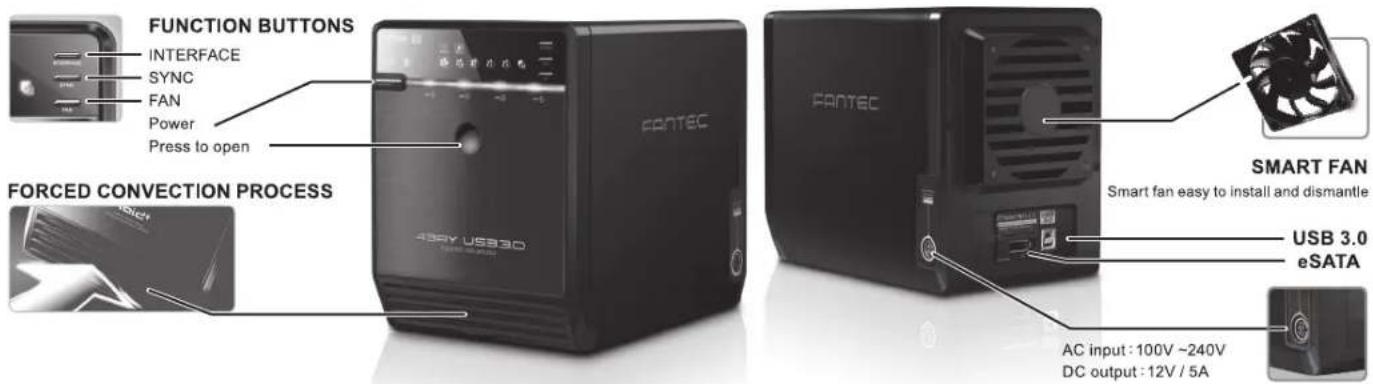
FUNCTION BUTTONS INTERFACE SYNC FAN Power Press to open FORCED CONVECTION PROCESS FANTEC 430Y USB3D SMART FAN Smart fan easy to install and dismantle USB 3.0 eSATA AC input: 100V ~240V DC output: 12V / 5A

Fantec QB-35US3-6G - 4HDD 3BAY - 2
FRONT PANEL

1 2 3 4 5 6 7 8 9 10 11 12 13 14 15 16 17 18 19 43AY US33.0 HANTCO 08-35/63-6G

DESCRIPTION

1Bluepower on
Orangestandby
2eSATAon/off line
3USBon/off line
4eSATAin use / access
5USBin use / access
6Fan speedlevel 1
7Fan speedlevel 2
8Fan speedlevel 3
9Synchronization3 modes:
BlueWhen the PC is off, the device goes off in 15 seconds.
OrangeWhen the PC is off, the device goes to sleeping mode.
OffSynchronization is off.
10PowerPrees 3 seconds to power off the device.
11-14HDD1 / HDD2 / HDD3 / HDD4 active
15Smart Fan automatic mode
16Smart Fan manual mode
17Interface switch
18Synchronization mode switch
19Smart fan Switch: auto, manual and fan speed from level 1 to level 3Button 17 and 18 need to be pressed for 3 seconds to switch the device's mode.This design will prevent accidental execution of these functions.

Fantec QB-35US3-6G - 4HDD 3BAY - 4
REAR PANEL

Diagram of a computer rear panel with labeled components including ventilation slots and ports

DESCRIPTION

① eSATA port
② USB 3.0 port
③ Smart fan

Fantec QB-35US3-6G - 4HDD 3BAY - 6
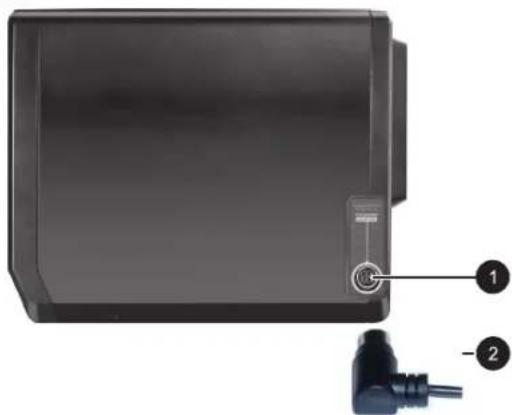
SIDE PANEL right

Fantec QB-35US3-6G - 4HDD 3BAY - 7

natural_image Black rectangular electronic device with a small connector and two labeled connectors (no visible text or symbols)

DESCRIPTION

① DC Jack

② DC Power

Fantec QB-35US3-6G - 4HDD 3BAY - 8
HDD HANDLE

Fantec QB-35US3-6G - 4HDD 3BAY - 9

Fantec QB-35US3-6G - 4HDD 3BAY - 10
FRONT COVER

Fantec QB-35US3-6G - 4HDD 3BAY - 11

Fantec QB-35US3-6G - 4HDD 3BAY - 12
METAL FRAME

Fantec QB-35US3-6G - 4HDD 3BAY - 13

Fantec QB-35US3-6G - 4HDD 3BAY - 14

Please use the provided handles to secure the 4 HDDs with screws.

Fantec QB-35US3-6G - 4HDD 3BAY - 15

natural_image Black hard drive with a black screwdriver resting on top (no visible text or symbols)

Fantec QB-35US3-6G - 4HDD 3BAY - 16

Press the circular deepening to open the cover.
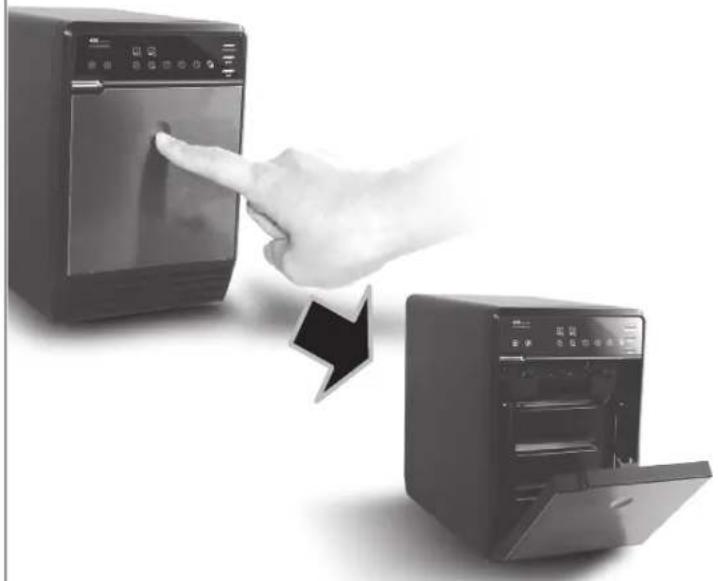
Fantec QB-35US3-6G - 4HDD 3BAY - 17

natural_image Hand pointing at a kitchen appliance screen, next to an open refrigerator with a door (no visible text or symbols)

Fantec QB-35US3-6G - 4HDD 3BAY - 18

Press down the rib to detach the metal frame and remove it.
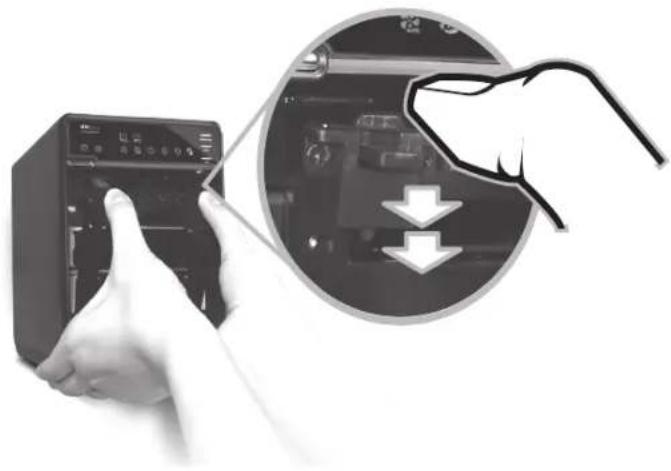
Fantec QB-35US3-6G - 4HDD 3BAY - 19

natural_image Hand inserting a device into a control panel, with a magnified inset showing a hand pressing down a device (no text or symbols visible)

Fantec QB-35US3-6G - 4HDD 3BAY - 20

Take the transport paper board out of the device.
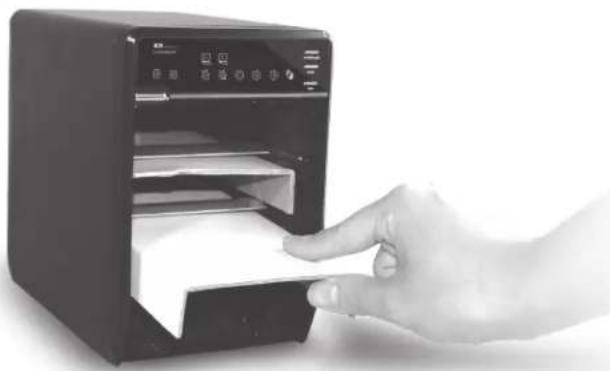
Fantec QB-35US3-6G - 4HDD 3BAY - 21

natural_image Hand inserting a digital device into a paper airplane (no visible text or symbols)

Fantec QB-35US3-6G - 4HDD 3BAY - 22

Slide 4 HDDs into the chassis and make sure they are securely installed in order from up to down.

Fantec QB-35US3-6G - 4HDD 3BAY - 23

natural_image Hand inserting a CD into a black microwave oven (no visible text or symbols)

NOTE: Make sure the HDD1 is securely installed in slot 1. Otherwise the PC may not recognize the device. The content of slot 2 - 4 may very.

Fantec QB-35US3-6G - 4HDD 3BAY - 24

Adjust the metal frame that was removed back to the chassis and close the cover (based on how it was opened in Step 2).

Fantec QB-35US3-6G - 4HDD 3BAY - 25

Connect the FANTEC QB-35US3-6G to the power adapter. Follow this sequence: 1) power supply connect to the housing. 2) power supply connect with socket. Plug in USB or eSATA cable in the rear panel and power on the device.

Fantec QB-35US3-6G - 4HDD 3BAY - 26

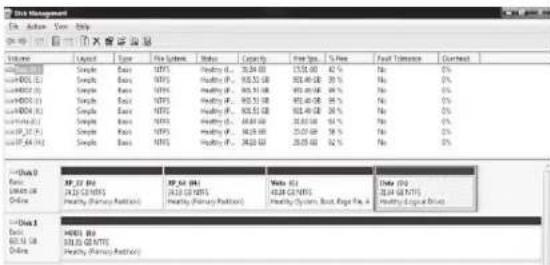
If the HDD is unformatted, you have to initialize it at your PC. Please run the steps as followed: At first click "Start", "Execute" at your Windows based PC and key in "diskmgmt.msc". After that please press the "RETURN" key.

Diskmgmt.msc
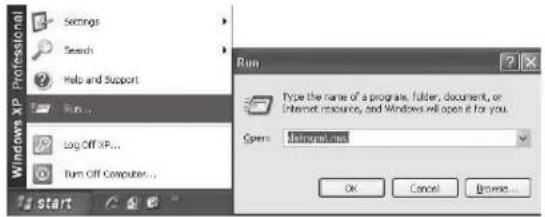
Settings Search Help and Support Run... Log Off XP... Run Off Computer... Start Run Type the name of a program, folder, document, or Internet resource, and Windows will open it for you. Open: Install net OK Cancel Browse...

Disk Management File Edit View Tools Help Options 1.0000000000000000000000000000000000000000000000000000000000000000000000000000000000000000000000000 Disk (1) Disk (2) Disk (3) Disk (4) Disk (5) Disk (6) Disk (7) Disk (8) Disk (9) Disk (10) Disk (11) Disk (12) Disk (13) Disk (14) Disk (15) Disk (16) Disk (17) Disk (18) Disk (19) Disk (20) Disk (21) Disk (22) Disk (23) Disk (24) Disk (25) Disk (26) Disk (27) Disk (28) Disk (29) Disk (30) Disk (31) Disk (32) Disk (33) Disk (34) Disk (35) Disk (36) Disk (37) Disk (38) Disk (39) Disk (40) Disk (41) Disk (42) Disk (43) Disk (44) Disk (45) Disk (46) Disk (47) Disk (48) Disk (49) Disk (50) Disk (51) Disk (52) Disk (53) Disk (54) Disk (55) Disk (56) Disk (57) Disk (58) Disk (59) Disk (60) Disk (61) Disk (62) Disk (63) Disk (64) Disk (65) Disk (66) Disk (67) Disk (68) Disk (69) Disk (70) Disk (71) Disk (72) Disk (73) Disk (74) Disk (75) Disk (76) Disk (77) Disk (78) Disk (79) Disk (80) Disk (81) Disk (82) Disk (83) Disk (84) Disk (85) Disk (86) Disk (87) Disk (88) Disk (89) Disk (90) Disk (91) Disk (92) Disk (93) Disk (94) Disk (95) Disk (96) Disk (97) Disk (98) Disk (99) Disk (100) Initiate Disk Select one or more disks to initiate Disk ✓ Disk 3 OK Cancel

Create a new partition and format the hard drive: Next→finish

Disk Management File Edit View Help Volume Lock Type No Status Status Catality Prest Space % Free Final Tools (1) Partition Back Healthy 931.51 GB 931.51 GB 100% No (2) Partition Back Healthy 931.51 GB 931.51 GB 100% No □Data (X) □Insta (Y) □IP_36 (Z) □IP_64 (X) □Work 0 Back 149.05 GB Online XP_37 (C:) 34.50 GB/NTS Healthy System XP_64 (C:) 34.50 GB/NTS Healthy Vista (E:) 40.05 GB/NTS Healthy Data (I:) 31.04 GB/ Healthy (1) 931.51 GB Unloaded (2) 931.51 GB Healthy Workbox 2 Back 931.51 GB Unloaded Workbox 3 Back 931.51 GB Unloaded Workbox 4 Back 931.51 GB Unloaded Initiative Dock Properties Help

Format finished
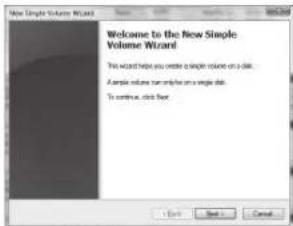
New Partition Wizard Welcome to the New Partition Wizard This wizard helps you create a partition or a close disk. About disk is a physical disk that currently primary partners, extended patterns, and logical keys. You can use any version of Windows in MS-OS to get access to patterns or have disks. To continue, click Now.

Diskmgmt.msc
Programs disinigmt See all results Search to the Internet disinigmt.msc Text Documents Pictures Music Games Search Recent Items Computer Network Connect To Control Panel Default Programs Help and Support

Initialize Disk if it is a new one.

Computer Management File Action Help Computer Management Tool System Task User Coordinate Event Manager Share Manager Inability and Security Security Manager Manage Edit Management Services and Applications Device 0 Basic 100% CI Database Deluxe Deluxe Data Proprietor Impact Deluxe Data To the following portion order for the selected data: in PDF (Water Use Record) [27] [28] [29] [30] Note: The PDF contains only one record in the previous version of the file. It is recommended to be an important file that is not allowed in before being completed. A/Name Edit Management Main Editor Not finished

Format finished

Data Management Ex: Action View: http System Layout Type File System Status Capacity Free Ops % Rate Fast Tolerance Current Single Base NTFS Healthy (1, 30.00) 15.50 60 42% No 0% Single Base NTFS Healthy (1, 90.50 58 30.00 30%) No 0% Single Base NTFS Healthy (1, 90.50 58 30.00 30%) No 0% Single Base NTFS Healthy (1, 90.50 58 30.00 30%) No 0% Single Base NTFS Healthy (1, 90.50 58 30.00 30%) No 0% Single Base (1, 30.00) 15.50 60 42% No 0% Single Base NTFS Healthy (1, 30.00) 15.50 60 42% No 0% Single Base NTFS Healthy (1, 30.00) 15.50 60 42% No 0% #Data Basic (4/22/22 NTFS) Healthy (Primary Position) XP_22_tkt (4/22/22 NTFS) Healthy (Primary Position) XP_22_tkt (4/22/22 NTFS) Healthy (Primary Position) WP_22_tkt (4/22/22 NTFS) Healthy (Primary Position) Watts (6) (4/28/28 NTFS) Healthy Systems Boot, Rigs, No, 4 Data (6) (4/28/28 NTFS) Healthy Logical Bus #Data Basic (4/28/28 NTFS) Healthy (Primary Position)

New Single Volume Wizard Welcome to the New Single Volume Wizard This wizard helps you create a simple volume on a disk. A simple volume can only be on a single disk. To continue, click Next

Fantec QB-35US3-6G - 4HDD 3BAY - 35

Macintosh 10.X 0.S

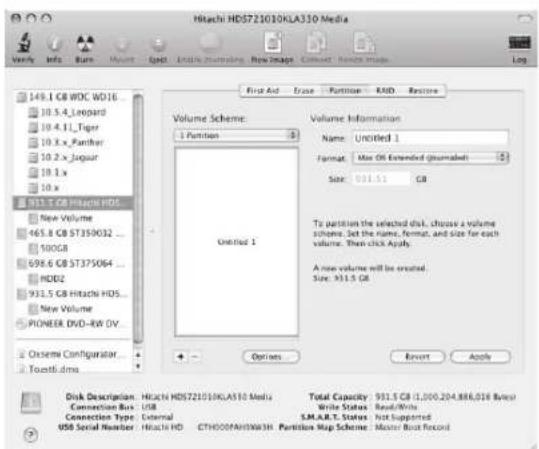
In "Disk Utility" function to "Erase" or "Partition" disk.
Disk Utility 19

Hitachi HD5721010KLA310 Media Volume Info Burr Volume Spct Initial Subscribers New Image Current Toutti Data Log 149.1 GB WOC WD16 10.5.4 Leopard 10.4.1 Tiger 10.3 x Panther 10.2 x Jaguar 10.1 x 10 x 931.5 GB Hitachi HDS... New Volume 465.8 GB ST350032 ... 500GB 698.6 GB ST375064 ... HDD2 931.5 GB Hitachi HDS... New Volume PIONEER DVD-RW DV... Ossem Configurator... Toxtti.dms Volume Scheme: 1 Partition Untitled 1 Volume Information Name Untitled 1 Format Max Off Extended (Unmarked) Size 931.5 GB To partitions the selected disk, choose a volume scheme. Set the name, format, and size for each volume. Then click Apply. A new volume will be created. Size: 931.5 GB Options Revert Apply Disk Description: Hitachi HD5721010KLA310 Media Total Capacity: 931.5 GB (1,000,204,888,018 Bytes) Connection Bus: USB Connection Type: External USB Serial Number: Hitachi HD CTHOOOFAHWA3H Partition Map Scheme: Master Boot Record

A If the FANTEC QB-35US3-6G (2-4 HDDs installed) is connected to the PC with eSATA cable and the PC does not recognize these 4 SATA HDDs, please check if the eSATA controller supports Port Multiplier or update the eSATA driver version.
B If the FANTEC QB-35US3-6G (2-4 HDDs installed) takes too long to initial, please check if the HDD is securely installed or update the eSATA driver version.
C If the transfer rate seems to be too low, please check if the SATA HDD jumper is set up in 1.5 or 3.0 Gbps.
D If there is noise with the fan, unscrew the fan, take out the cover, clean the fan and assemble it back.

Fantec QB-35US3-6G - Macintosh 10.X 0.S - 3

natural_image Close-up of a screwdriver inserted into a black vented fan (no text or symbols visible)

E If you forgot to attach the metal frame before you closed the cover, simply press the down the rib as shown below. The cover will slowly release and open outwards. Please do not attempt to open the cover with something sharp.

AISOV USB35 100.00.25

F To take the HDD out from the device, slightly press down the handle and pull it out.

Fantec QB-35US3-6G - Macintosh 10.X 0.S - 5

natural_image Hand inserting a card into a computer tower (no visible text or symbols)

A USB port of your PC must support power-off function so that the device would go to standby mode. Setting up motherboard's (power management) in S3 is strongly recommended. For more details, please refer to user guide of motherboard BIOS setting.
B Smart fan controlled by the built-in thermal sensor and it comes with 2 modes (auto / manual) and 3 levels of speed:

Lowbelow45°C1200rpm
Mediumbetween45°C~55°C1800rpm
Highhotter than55°C2500rpm

Alternative the USB and eSATA interface can be connected at 2 working PCs but only 1 interface can be used at one time. You can switch between USB and eSATA by pressing the INTERFACE button at the FANTEC QB-35US3-6G. The interface selection is only for Macintosh to Macintosh or Windows to Windows system.
Simply press the POWER button to power the device on and press the button for 3 seconds to power off the device.
E Operation System : Windows Vista / 7 / 8 / 8.1 (32/64bit), Macintosh 10.x, Linux
F Maximum HDD capacity: 4TB each HDD (status: August 2014), 4 single hard drives are displayed at PC (JBOD)
USB3.0 transfer data up to 5 Gbps eSATA transfer data up to 3 Gbps
Hot-plug for USB / eSATA interface
USB1.1 / 2.0 / 3.0 compatible

Operation Environment:

■ Temperature: 0°C\~60°C
■ Humidity: 0%\~90% R.H.

Fantec QB-35US3-6G - Macintosh 10.X 0.S - 6

Please contact our support department with any questions!

www.fantec.de

www.fantec-forum.de

E-Mail: service@fantec.de
Sommaire Cliquez un titre pour y accéder
Assistant notice
Powered by Anthropic
En attente de votre message
Informations produit

Marque : Fantec

Modèle : QB-35US3-6G

Catégorie : Baie de disques