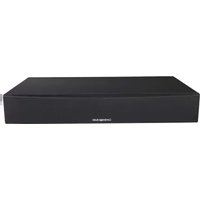
TV2 - Barre de son CAMBRIDGE - Notice d'utilisation et mode d'emploi gratuit
Retrouvez gratuitement la notice de l'appareil TV2 CAMBRIDGE au format PDF.


| Type de produit | Barre de son |
| Marque | Cambridge |
| Modèle | TV2 |
| Dimensions (L x H x P) | 950 x 80 x 100 mm |
| Poids | 2,5 kg |
| Alimentation | Secteur 100-240 V, 50/60 Hz |
| Puissance de sortie | 60 W RMS |
| Nombre de canaux | 2.1 (stéréo + caisson intégré) |
| Connectivité | Bluetooth, HDMI ARC, entrée optique, entrée AUX 3,5 mm |
| Fonctions principales | Amplification audio, télécommande, modes son (nuit, dialog, sport) |
| Entretien et nettoyage | Chiffon doux et sec. Ne pas utiliser de produits abrasifs. |
| Sécurité | Ne pas exposer à l'humidité ou aux sources de chaleur. Débrancher avant nettoyage. |
| Pièces détachées et réparabilité | Réparation par professionnel recommandée. Pièces disponibles sur demande. |
FOIRE AUX QUESTIONS - TV2 CAMBRIDGE
Questions des utilisateurs sur TV2 CAMBRIDGE
0 question sur cet appareil. Repondez a celles que vous connaissez ou posez la votre.
Poser une nouvelle question sur cet appareil
Téléchargez la notice de votre Barre de son au format PDF gratuitement ! Retrouvez votre notice TV2 - CAMBRIDGE et reprennez votre appareil électronique en main. Sur cette page sont publiés tous les documents nécessaires à l'utilisation de votre appareil TV2 de la marque CAMBRIDGE.
MODE D'EMPLOI TV2 CAMBRIDGE
TV2 tv sound plinth with bluetooth
PLACEMENT! TV2 IS DESIGNED TO BE PLACED UNDER YOUR TV. THE TV MUST HAVE A BASE NO WIDER THAN 550MM (21.5") AND NO DEEPER THAN 300MM (12") AND MUST WEIGH NO MORE THAN 30KG (66LBS). IF THE TV BASE IS TOO LARGE TO FIT, PLACE TV2 ON A LOWER SHELF OF YOUR TV RACK.
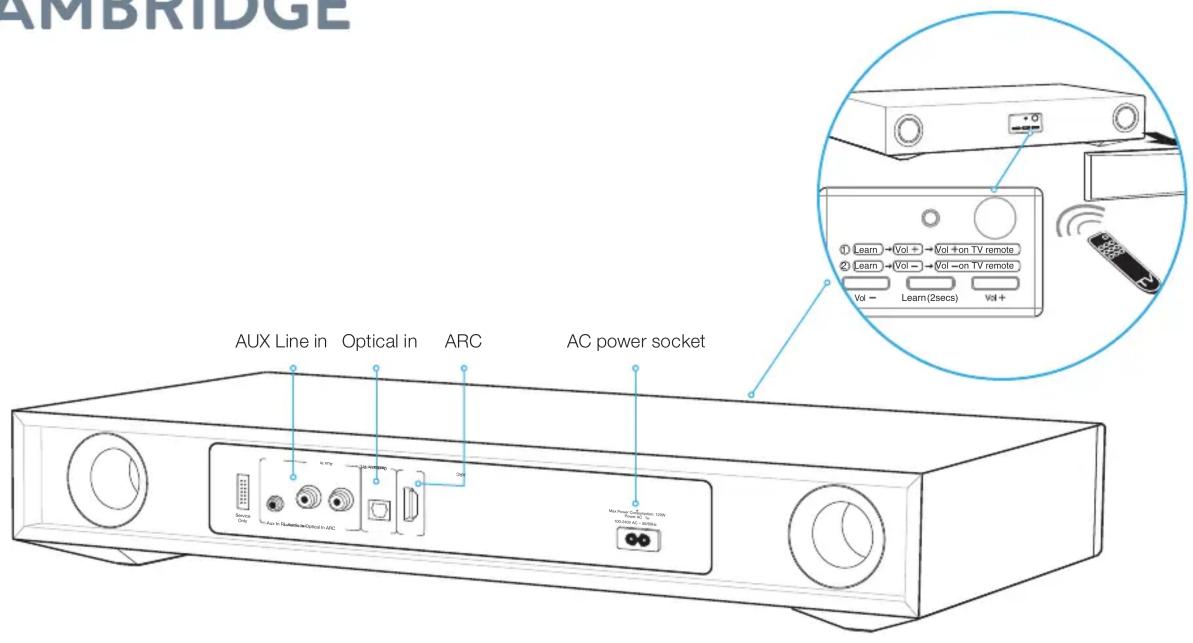
TV CONNECTIONS
Only one audio connection to your TV is required, in order of preference:
- Optical: If available on your TV, use this for best quality.
- ARC: If your TV has a socket labelled ARC use this connection.
- RCA: Connect both left and right channels to your TV.
- AUX In: Connect to the headphone output of your TV if neither ARC or optical are available on your TV.
Note: If the 3.5mm socket is used it takes priority over the RCA input which will be muted.
BLUETOOTH SET-UP
TV2 is equipped with Bluetooth to allow wireless playback from any Bluetooth equipped phone, tablet or computer.
- Select the Bluetooth input BT on the remote.
- To connect a Bluetooth device to TV2, press and hold the BT button and the Blue LED will blink.
- Consult the instructions of the Bluetooth device to connect to TV2. Successful pairing will be signalled by a 'beep' from the unit and the Blue LED will stop flashing.
Once paired, music from your device will play through the unit.
To add another Bluetooth device, repeat from step 2. TV2 will store up to 8 paired devices in memory.
LEARNING YOUR TV REMOTE
Remove the fabric grille and locate the control panel. Follow the instructions remembering to point your TV remote at the control panel whilst learning.
TOP TIPS
SOUND MODES
There are 4 different modes that can be selected to enhance your sound experience. You can also Increase or decrease the Subwoofer output.
TV: Greatly improved TV sound.
Music: Enhances stereo music and music videos.
Film: Designed to get the best sound from movies.
Voice: Enhances voices to improve intelligibility.
AUTO POWER DOWN
To save power, TV2 will automatically turn off after 20 minutes if no sound is playing from your TV.
AUTO POWER ON
When you turn on your TV, TV2 will detect the sound and automatically turn on.
TV2 is only able to decode LPCM(PCM) 2.0 format signal, Please ensure your source output setting is set to LPCM(PCM).
Marque : CAMBRIDGE
Modèle : TV2
Catégorie : Barre de son