
PCF-605 - Compteur d'énergie Profile - Notice d'utilisation et mode d'emploi gratuit
Retrouvez gratuitement la notice de l'appareil PCF-605 Profile au format PDF.


| Type de produit | Compteur d'énergie |
| Marque | Profile |
| Modèle | PCF-605 |
| Alimentation | 230 V AC, 50 Hz |
| Tension nominale | 230 V |
| Courant nominal | 10 A (max 60 A) |
| Précision | Classe B (EN 50470) |
| Affichage | Écran LCD à 6 chiffres |
| Dimensions (L x H x P) | 36 x 110 x 65 mm |
| Poids | 120 g |
| Fonctions principales | Mesure de consommation active (kWh), compteur partiel, indicateur de puissance |
| Entretien | Dépoussiérer avec un chiffon sec et doux |
| Nettoyage | Utiliser un linge humide sans solvant |
| Sécurité | Ne pas ouvrir l'appareil, risque d'électrocution |
| Pièces détachées | Non disponibles séparément, appareil scellé |
| Réparabilité | Appareil non réparable par l'utilisateur |
| Garantie | 2 ans |
| Température de fonctionnement | -10°C à 45°C |
| Humidité | ≤ 80% HR sans condensation |
FOIRE AUX QUESTIONS - PCF-605 Profile
Questions des utilisateurs sur PCF-605 Profile
0 question sur cet appareil. Repondez a celles que vous connaissez ou posez la votre.
Poser une nouvelle question sur cet appareil
Téléchargez la notice de votre Compteur d'énergie au format PDF gratuitement ! Retrouvez votre notice PCF-605 - Profile et reprennez votre appareil électronique en main. Sur cette page sont publiés tous les documents nécessaires à l'utilisation de votre appareil PCF-605 de la marque Profile.
MODE D'EMPLOI PCF-605 Profile
Thank you for purchasing this Profile product. Please note: It is important that you read this manual before using the product. And be sure to save this manual for possible use later.
Please note
The Energy Meter must be charged before use. After 15 minutes, the LCD screen will be operational, but to fully charge the battery, the device must be plugged into the mains for at least 12 hours.
The Energy Meter is the easiest way for you to measure the energy costs of connected appliances.
Technical data
- Operating voltage: 230V AC (50/60 Hz) alternating current (AC)
■ Maximum power of connected appliances: 3680 W
■ Maximum current: 16A - Input/ Output: via earthed socket
- Operating temperature: + 10 to +40°C
■ Energy display: 0 kWh to 999.9 kWh
■ Maximum registration time: 9999 hours
■ Only use indoors (IP20)
Correct use
The measurement range of the Energy Meter is 5W to 3680W. Exact measurement of values below or above this range is not possible. Use outside this range can overload and damage the unit.
- The Energy Meter was designed to monitor and measure electric appliances.
- The Energy Meter is approved only for use with 230V AC.
- Only 230V AC, 50/60Hz electric appliances may be connected.
- The maximum power of the connected loads may not exceed 3680W (maximum amperage 16A).
- Use of the Energy Meter is only allowed indoors in dry environments. Use in the open air is strictly prohibited!
- Always heed the instructions on the identification label located on the connected power cables.
- Use other than that described above can result in damage to the product and the risk of short circuit, fire, electric shocks, etc.
- The product as a whole may not be converted or modified. The safety instructions must be followed strictly.
Safety instructions
- The manufacturers accept no liability for damage to objects or persons that arises from incorrect use or noncompliance with the safety prescriptions. All damage claims resulting in such cases are void.
- The Energy Meter may only be connected to regulated outlets (230V AC, 50/60Hz- 10/16A) with a ground.
-
The connected appliances may not use more than 3680W (16A).
-
The operating temperature of the connected appliance must be between 10° and 40° .
- High temperatures, especially when measuring high levels of electrical power, can result in overheating and damage to the Energy Meter.
- Avoid use in extreme weather conditions and in the vicinity of inflammable gases, moisture and dust.
- For safety reasons, the unit may never be operated in a wet or damp environment.
- During cleaning or maintenance, disconnect each source of power from the Energy Meter. The battery and the LCD screen can retain a charge, even when the unit is disconnected from all sources of power.
- Insert no metal parts or other objects in the Energy Meter.
- If it is established that safe use is no longer possible, take the Energy Meter out of operation and ensure that it is not mistakenly put back into operation by someone else. If there is visible damage to the Energy Meter, it must be taken out of service immediately.
Features
■ Display of current time (24-hour clock), day, energy consumption in Watts and billing rate.
- Display of total time connected, energy consumed and the cost of energy consumed.
- Display of total registered times, total time and percentages.
■ Programmable day and night rates.
Configuration, connection and operation
- The procedure for setting the time and the billing rate is the following:

Setting the current time and day
-
Simultaneously press the “+” and “-” buttons to enter the system configuration. The first setting is the current time.
-
Use the “+” button to increase the value of the flashing position from 0 to
9; use the “-” button to decrease the value of the flashing position.
3. Press the "MODE" button to move the next position.
4. After setting the day, push the "MODE" button again – billing rate 1 for the system can now be configured.

Setting billing rate 1 (day rate)
- Set the start time for billing rate
- For example day rate starts at 7.00 a.m.
- Set rate 1. All values are introduced in quantities of eurocents.
E.g. 1.00€ = 100cent
- Use the “+” button to increase the value of the flashing position from 0 to 9; use the “-” button to decrease the value of the flashing position.
- Press the "MODE" button to move to the next position.
- Press the "MODE" button - billing rate 2 for the system can now be configured.
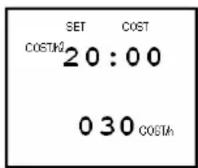
Setting billing rate 2 (night rate)
- Set the start time for billing rate
- For example, the night rate starts at 9.00 p.m.
-
Set rate 2. For example 0.30€ equals 030 cents.
-
Use the "+" button to increase the value of the flashing position from 0 to 9; use the "-" button to decrease the value of the flashing position.
- Press the "MODE" button to move to the next position.
- Pressing the button for longer than 5 seconds will accept your settings and return you to the display screen. If you only have 1 rate, set billing rate 1 to 00h00 and the cost per KWh. Set the time for billing rate 2 also to 00h00 and enter the cost per KWh, equal as rate 1.
Reset
Press "mode, +,-" at the same time. All data that were measured will be reset after 5 seconds.
Introduction to display screens
There are 3 display screens that contain three different types of data. Use the "MODE" button to select the type of screen you wish to view.

Display 1 Current time (24-hour clock), day, current consumption of the connected appliance and current cost per hour.

Display 2 Total registered time, total energy consumed per Kwh and cost per Kwh of actual energy consumed (only indicates both values if at least 1 KWh has been used). Costs are
expressed in Euro's, for example 3.2 is three euros and 20 cents.

Display 3 Total registered time, total time worked and percentage of time worked.
Maintenance
- Check the Energy Meter regularly for damage.
- Use only a dry, soft cloth to clean the unit and the LCD screen.
■ Use no cleaning products.
■ Never immerse the unit in water. - Maintenance and repairs may only be performed by technicians familiar with the applicable regulations.
Declaration of conformity
ELTRA NV, Pachtgoedstraat 2, 9140 Temse, Belgium hereby declares that the product PCF-605 satisfies all essential requirements and other relevant stipulations of LVD directive 2006/95/EC, and has been tested according to the following standards:
EN 61010-1:2001
The original declaration of conformity can be obtained at www.profileDIY.com
Guarantee
The guarantee period for PCF-605 is 2 years, and begins on the date of purchase.
During the guarantee period, Eltra NV will repair all defects due to shortcomings in material or manufacturing. Eltra NV may choose to repair or replace the defective device.
Eltra NV is not required to repair or replace units that were subject to damage, improper use, or modifications or changes that were made after the date of purchase.
Bring the defective unit, together with the original proof of purchase, to the shop where it was purchased.
Always include a note describing the problem.
Damage claims
Eltra NV can may not be held liable for damage of whatever kind if the unit was not correctly installed according to the prescribed installation instructions, or for damage resulting from unforeseen circumstances such as natural disasters, lightning strikes,... Thus, all costs resulting from these situations are exclusively for the expense of the buyer, and are not covered by the guarantee conditions.
Eltra nv, Pachtgoedstraat 2, 9140 Temse, BELGIUM Eltra DIYeuronet / Elar bv, Ambachtsstraat 8, 5405 AM Uden, THE NETHERLANDS
www.eltra.eu
www.profileDIY.com

- PLEASE NOTE
- TECHNICAL DATA
- CORRECT USE
- SAFETY INSTRUCTIONS
- FEATURES
- CONFIGURATION, CONNECTION AND OPERATION
- SETTING THE CURRENT TIME AND DAY
- SETTING BILLING RATE 1 (DAY RATE)
- SETTING BILLING RATE 2 (NIGHT RATE)
- RESET
- INTRODUCTION TO DISPLAY SCREENS
- MAINTENANCE
- DECLARATION OF CONFORMITY
- GUARANTEE
- DAMAGE CLAIMS
Marque : Profile
Modèle : PCF-605
Catégorie : Compteur d'énergie