
AP70 Autopilot - Pilote automatique marine SIMRAD - Notice d'utilisation et mode d'emploi gratuit
Retrouvez gratuitement la notice de l'appareil AP70 Autopilot SIMRAD au format PDF.


| Type de produit | Pilote automatique maritime |
| Marque | Simrad |
| Modèle | AP70 Autopilot |
| Catégorie | Pilotes automatiques |
| Dimensions (boîtier de commande) | 150 x 100 x 50 mm (environ) |
| Poids | 0,5 kg (environ) |
| Alimentation | 12 V DC ou 24 V DC |
| Consommation électrique | 0,5 A maximum (hors pompe) |
| Protection | Indice IPX5 (éclaboussures) |
| Compatible avec | Systèmes de navigation Simrad, NMEA 2000 |
| Fonctions principales | Maintien du cap, navigation sur waypoint, modes pilotage automatique, commande manuelle |
| Affichage | Écran LCD rétroéclairé |
| Interfaces | NMEA 2000, bus Simrad |
| Entretien et nettoyage | Essuyer avec un chiffon doux légèrement humide, éviter les produits abrasifs et l'eau salée stagnante |
| Sécurité | Coupe-circuit automatique en cas de défaut ; arrêt d'urgence manuel |
| Pièces détachées et réparabilité | Contactez le service client Simrad pour les pièces de rechange ; réparation par un technicien agréé |
| Informations générales | Conçu pour une utilisation en eau douce et salée ; température de fonctionnement : -10 °C à +50 °C |
| Garantie | 2 ans (selon conditions du vendeur) |
FOIRE AUX QUESTIONS - AP70 Autopilot SIMRAD
Questions des utilisateurs sur AP70 Autopilot SIMRAD
0 question sur cet appareil. Repondez a celles que vous connaissez ou posez la votre.
Poser une nouvelle question sur cet appareil
Téléchargez la notice de votre Pilote automatique marine au format PDF gratuitement ! Retrouvez votre notice AP70 Autopilot - SIMRAD et reprennez votre appareil électronique en main. Sur cette page sont publiés tous les documents nécessaires à l'utilisation de votre appareil AP70 Autopilot de la marque SIMRAD.
MODE D'EMPLOI AP70 Autopilot SIMRAD
The front panel

| No. | Description |
| 1 | CMD/Thruster. Press once to take/request command. Press and hold to activate/deactivate available thrusters |
| 2 | MENU. Press once to display the active steering mode's quick menu. Press twice to display the Settings menu |
| 3 | PWR/Light. Press to display the Light dialog. Press and hold to turn the unit ON/OFF |
| 4 | Course knob. In menus; turn to select menu item and adjust value, press to confirm. In FU mode; turn to set rudder angle. In STBY and NFU mode; press to go to FU mode. In AUTO and NoDrift mode; turn to change set heading/set course, press to capture present heading. In NAV/TRACK mode, turn to set track offset |
| 5 | PORT. In menus; press to return to previous menu level. In STBY and FU modes; press to go to NFU mode. In AUTO and NoDrift modes; press to change set heading/set course to port |
| 6 | STBD. In menus; press to confirm menu selection/enter next menu level. In STBY and FU modes; press to go to NFU steering. In AUTO and NoDrift modes; press to change set heading/set course to starboard |
| 7 | TURN. Press to display the Turn dialog |
| 8 | STBY. Press to switch the autopilot to Standby mode |
| 9 | AUTO. Press to activate Auto or NoDrift mode |
| 10 | NAV/TRACK. Press to activate NAV/TRACK (AP80) steering modes |
| 11 | WORK. Press to display the Work profile dialog |
| 12 | ALARM. Press to display the Alarm dialog (AP80 only) |
| 13 | USB connector (AP80 only) |
The screen
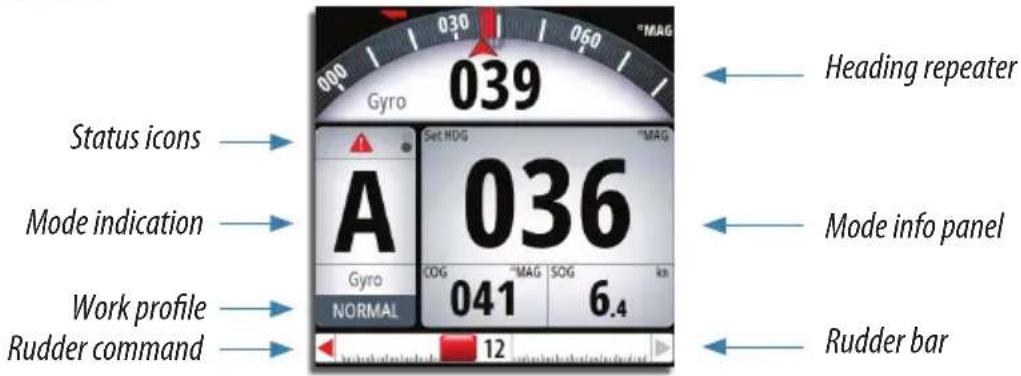
| Icon Description | |
 | Black icon if one or more thrusters are installed and in use.Shaded if the trusters are unavailable for steering |
 | Active alarm message. Red icon for alarms, yellow for warnings |
 | Control unit locked |
 | Screen alive indication - white and black “balls” fade-swap color |
The power key
 | Press and hold: Turn unit on/off | 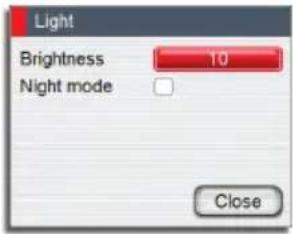 | |
| Single press: Display light dialog | |||
| Repeated presses: | Toggle preset brightness levels | ||
→ Note: If the key is held after the display is turned off, a Power failure alarm will be activated. Press any other key on the unit to silence the alarm.
Command transfer and unit lock
Take command Lock other units

Thrusters on/off

Work profiles
Show Work profile options

Select profile
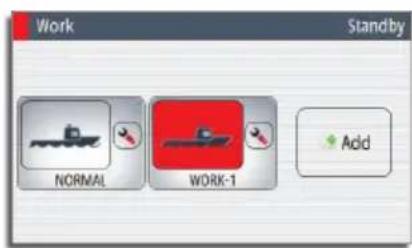

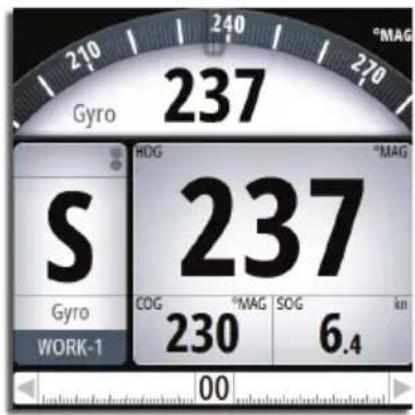
Create new profile


Edit profile


Autopilot modes
| Mode Activate Mode display | Course knob | PORT/STBD keys | |||
| Turn Press | |||||
| STBY |  | 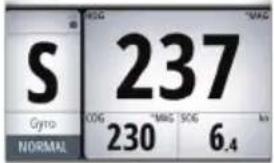 | No action | Switch to FU mode | Switch to NFU mode |
| NFU | Press PORT/STBD keys in STBY or FU mode |  | No action | Switch to FU mode | Give rudder command |
| FU | Press course knob in STBY or NFU mode |  | Set rudder angle | No action | Switch to NFU mode |
| AUTO |  AutoNoDrift AutoNoDrift |  | Change set heading | Capture present heading | Change set heading |
| NoDrift |  AutoNoDrift AutoNoDrift | 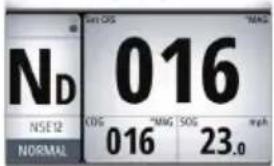 | Change set course | Capture present course | Change set course |
| NAV/TRACK |  TRACK TRACK |  | Set track offset | No action No action | Action |
Menus

1* Show Quick menu
2* Show Settings menu

Return to prev. level, Remove menu

natural_image
Simple circular diagram with three curved arrows surrounding it, no text or symbols present.Select menu item, Adjust value


Confirm selection
Quick menu, manual modes
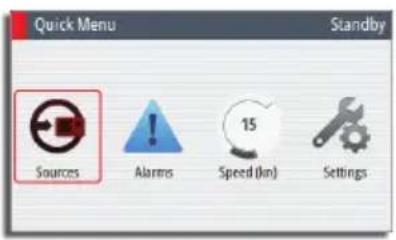
 | Automatic and manual selection |
 | List of active alarms |
 | Manual setting (Speed) |
 | See Settings menu |
Quick menu, automatic and navigation modes

 | Manual setting (Rudder, Counter Rudder, Speed and Track response*)* NAV/TRACK mode only |
 | See Settings menu |
Settings menus
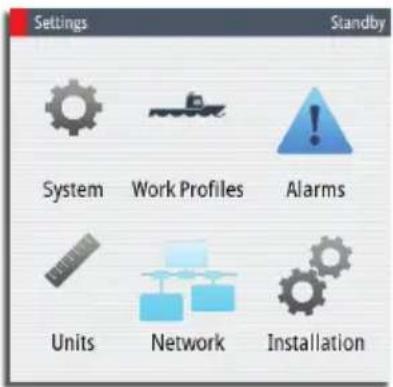
| System settings Standby Language English (US) Light and sound... Time... Advanced... About | ||
| Work Profiles Standby Name Enabled Active NORMAL ✓ ✓ LOAD ✓ New... | ||
| Alarms settings Standby Active... Alarms History... Settings... | ||
| Units settings Standby Units Distance NM Distance small m Speed kn Wind speed kn Depth m Heading *MAG - | ||
| Network settings Standby Network Sources... Device list Diagnostics SimNet groups... Damping... | ||
| Installation settings Standby Installation Dockside drives... Dockside boat... Dockside drive system configuration Compass calibration... Seatrial drives... Seatrial boat... | ||
Alarms

| Option Result | |
| ACK Stops | the siren and removes the alarm dialog. The alarm icon will remain active, and the alarm will be included in the alarm listing |
| Mute Mutes | the siren locally. The alarm dialog remains on the display |
Marque : SIMRAD
Modèle : AP70 Autopilot
Catégorie : Pilote automatique marine