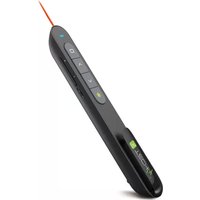
ITC-LASER76 - Pointeur sans fil Techly - Notice d'utilisation et mode d'emploi gratuit
Retrouvez gratuitement la notice de l'appareil ITC-LASER76 Techly au format PDF.


| Type de produit | Pointeur sans fil |
| Marque | Techly |
| Modèle | ITC-LASER76 |
| Dimensions (L x l x h) | 10 x 2 x 1,5 cm |
| Poids | 20 g (avec piles) |
| Alimentation | 2 piles AAA (non incluses) |
| Portée sans fil | Jusqu'à 15 mètres |
| Type de laser | Laser rouge, classe 2 |
| Puissance laser | < 1 mW |
| Fonctions principales | Avancement/recul diapositives, pointeur laser, pointeur virtuel |
| Connectivité | Récepteur USB 2.0 (intégré dans le pointeur) |
| Sécurité | Éviter tout contact visuel avec le faisceau laser |
| Entretien et nettoyage | Essuyer avec un chiffon doux et sec |
| Pièces détachées | Piles AAA, récepteur USB |
| Réparabilité | Non réparable par l'utilisateur |
| Couleur | Noir (principalement) |
| Garantie | 2 ans |
FOIRE AUX QUESTIONS - ITC-LASER76 Techly
Questions des utilisateurs sur ITC-LASER76 Techly
0 question sur cet appareil. Repondez a celles que vous connaissez ou posez la votre.
Poser une nouvelle question sur cet appareil
Téléchargez la notice de votre Pointeur sans fil au format PDF gratuitement ! Retrouvez votre notice ITC-LASER76 - Techly et reprennez votre appareil électronique en main. Sur cette page sont publiés tous les documents nécessaires à l'utilisation de votre appareil ITC-LASER76 de la marque Techly.
MODE D'EMPLOI ITC-LASER76 Techly

In compliance with EU Directive WEEE this product is marked with this symbol. It means that used electrical and electronic products should not be mixed with general household waste. There is a separate collection system for these products in compliance with WEEE directive, otherwise contaminative and hazardous substances can pollute the environment.

With the CE sign, Techly ® ensures that the product is conformed to the basic European standards and directives.
www.techly.com

EN U


WIRELESS PRESENTER
INSTALLATION


Take out the mini USB receiver.

- Plug the USB receiver into USB port.

- Operate the wireless presenter.
- Turn off the wireless presenter.

8
CHARGING THE WIRELESS PRESENTER
-
LOW POWER INDICATION When the power is low, the red LED will flash slowly to remind the user to recharge the wireless presenter.
-
RECHARGING THE WIRELESS PRESENTER Connect the wireless presenter to a USB port, the red LED will stop flashing and keep red to show the wireless presenter is being recharged. If the red LED turns off, it means the recharge is completed. Normally the recharging time is about two hours.

the wireless
presenter via PC
9
FREQUENTLY ASKED QUESTIONS
-
How to know the battery is out of power? Turn on the power switch of the presenter, then press laser button to check if the laser can be turned on. If the laser cannot be turned on, usually it means the battery is out of power or the laser diode is broken and need replacement. In other case, if the LED on the wireless presenter starts to flash slowly, it means the power is low and the battery needs to be recharged.
-
Why does the laser pointer not work? First, check the power switch. Second, check whether the wireless presenter is in low power or out of power. If the LED flashes slowly, it means the power is low and the battery needs to be recharged. If all the other buttons can work, only the laser pointer cannot work, the laser diode may need replacement. Third, check the place of anode and cathode of battery. Before putting a battery into the presenter, remember to remove the plastic cover of the battery.
10
www.techly.com


WIRELESS PRESENTER
User's manual
ITC-LASER76
1

Be sure to carefully read this user's manual before using the wireless presenter and keep it for future reference.

WARNING: RISK OF INJURY! Laser beams can cause permanent damage to the eyes. Do not look into the laser beam or shine the laser beam into your eyes, other peoples' eyes, or the eyes of pets. Be careful when pointing it towards reflective surfaces. Keep this device away from Children. This is a working tool, not a toy. It should only be used by adults. Information in this document is subject to change without notice. No part of this document may be reproduced or transmitted in any form or by any means, electronic, and political, for any purpose, without prior permission of the seller. The seller provides this document without warranty, or condition of any kind. The seller may make improvements or changes in the product described in this document at any time.
INTRODUCTION Featuring a pen-like design, alt-tabbing and hyperlink functions in presentations, it is an intuitive and easy to use tool for any and all presentations. Thanks to the built in laser pointer you can point out details to your audience while you present from up to 100 meters range. The USB connector is securely placed within the presenter itself, making sure you are always ready.
FEATURES
PowerPoint, Keynote and Prezi support. The functions of page down and page up buttons can be switched between Page Down/Up, Left/Right Arrow and Up/Down Arrow, by pressing the page down and page up buttons at the same time.
- 2.4G RF frequency, which is an ISM free frequency and can be used world-wide. Up to 100 meters' wireless range, By using frequency hopping technology to improve the signal to noise ratio. It is Omni-directional and as such allows for the control of devices in other rooms.
- Through UniCoding 6 technology, the transmitter can control 1 up to 6 USB receivers.
- Support functions including Page up and Page
- Support hyperlinks function in PowerPoint.
- Soft Silica Gel buttons allow for comfortable use.
Storable receiver for easy carrying. The USB receiver can be stored inside the wireless 8. presenter.
Safe laser class complies with EN60825-1. - Easy control of volume up/down.
- Compatible with USB3.0, plug and play.
- Three ways to save power consuming by auto standby, deep sleeping and power switch.
- 360mAh Polymer Lithium battery and low power reminding function. The led will flash slowly when the power is low.
- 2.4 GHz frequency, which is an 10V free
frequency and can be used world-wide. Up
100 meters' wireless range, By using frequen
hopping technology to improve the signal to
noise ratio. It is Omni-directional and as such
noise ratio: it is omni-directional and as such allow for the control of devices in other areas
allows for the control of devices in other room - Through UniCoding 6 technology, the
transmitter can control 1 up to 6 USB receive - Support functions including Page up and Pa
n - Cap - Connection of file function in PowerPoint
- Support hyperlinks function in PowerPoint.
- Soft Silica Gel buttons allow for comfortable
7 use.
Storable receiver for easy carrying. The USB
Storable receiver for easy carrying. The OOD
rece - presenter.
Safe laser class complies with EN60825-1. - Easy control of volume up/down
- Compatible with USB3.0, plug and play
- Compatible with OSB3.0, plug and play.
- Three ways to save power consuming by au
standby, deep sleeping and power switch. - 360mAh Polymer Lithium battery and low po
reminding function. The led will flash slowly.
Terminating function. The led will hash slowly
when the power is low.
[Non-Text]
[Non-Text]
[Non-Text]
The Ground Truth image displays a single, solid horizontal line. According to Rule 2 (UNDERSCORE & LINE RULES), this is a stylistic or background line, not a placeholder underscore. Therefore, the OCR result must ignore it. The provided OCR content is "____", which consists of four underscores. This is an incorrect interpretation of the line as a placeholder, violating the rule that stylistic lines must be ignored. The OCR has hallucinated underscores where none should exist based on the GT's visual context. Hence, the OCR result is inconsistent with the Ground Truth.
3
The Ground Truth image displays a single, solid horizontal line. According to Rule 2 (UNDERSCORE & LINE RULES), this is a stylistic or background line, not a placeholder underscore. Therefore, the OCR result must ignore it. The provided OCR content is "____", which consists of four underscores. This is an incorrect interpretation of the line as a placeholder, violating the rule that stylistic lines must be ignored. The OCR has hallucinated underscores where none should exist based on the GT's visual context. Hence, the OCR result is inconsistent with the Ground Truth.
[Non-Text]
[Non-Text]
[Non-Text]
[Non-Text]
[Non-Text]
[Non-Text]
[Non-Text]
[Non-Text]
[Non-Text]
[Non-Text]
[Non-Text]
[Non-Text]
[Non-Text]
[Non-Text]
[Non-Text]
[Non-Text]
[Non-Text]
[Non-Text]
[Non-Text]
[Non-Text]
[Non-Text]
[Non-Text]
[Non-Text]
[Non-Text]
[Non-Text]
[Non-Text]
[Non-Text]
[Non-Text]
[Non-Text]
[Non-Text]
[Non-Text]
[Non-Text]
[Non-Text]
[Non-Text]
[Non-Text]
[Non-Text]
[Non-Text]
[Non-Text]
[Non-Text]
[Non-Text]
[Non-Text]
[Non-Text]
[Non-Text]
[Non-Text]
[Non-Text]
[Non-Text]
[Non-Text]
[Non-Text]
[Non-Text]
[Non-Text]
[Non-Text]
[Non-Text]
[Non-Text]
[Non-Text]
[Non-Text]
[Non-Text]
[Non-Text]
[Non-Text]
[Non-Text]
[Non-Text]
[Non-Text]
[Non-Text]
[Non-Text]
[Non-Text]
[Non-Text]
[Non-Text]
[Non-Text]
[Non-Text]
[Non-Text]
[Non-Text]
[Non-Text]
[Non-Text]
[Non-Text]
[Non-Text]
[Non-Text]
[Non-Text]
[Non-Text]
[Non-Text]
[Non-Text]
The Ground Truth image displays a single, solid horizontal line. According to Rule 2 (UNDERSCORE & LINE RULES), if the GT contains lines used for stylistic emphasis or as background elements (like ruled paper), the OCR result must ignore them. The line in the GT is clearly a stylistic/background line, not a placeholder for text. Therefore, the OCR should not have output any underscores. Outputting `____` constitutes an error under Rule 2, as it hallucinates placeholder symbols where none are semantically intended. Hence, the OCR result is inconsistent with the Ground Truth.
[Non-Text]
[Non-Text]
[Non-Text]
[Non-Text]
[Non-Text]
[Non-Text]
[Non-Text]
[Non-Text]
[Non-Text]
[Non-Text]
[Non-Text]
[Non-Text]
[Non-Text]
[Non-Text]
[Non-Text]
[Non-Text]
[Non-Text]
[Non-Text]
[Non-Text]
[Non-Text]
[Non-Text]
[Non-Text]
[Non-Text]
[Non-Text]
[Non-Text]
[Non-Text]
[Non-Text]
[Non-Text]
[Non-Text]
[Non-Text]
[Non-Text]
[Non-Text]
[Non-Text]
[Non-Text]
[Non-Text]
[Non-Text]
[Non-Text]
[Non-Text]
[Non-Text]
[Non-Text]
[Non-Text]
[Non-Text]
[Non-Text]
[Non-Text]
[Non-Text]
[Non-Text]
[Non-Text]
[Non-Text]
[Non-Text]
[Non-Text]
[Non-Text]
[Non-Text]
[Non-Text]
[Non-Text]
[Non-Text]
[Non-Text]
[Non-Text]
[Non-Text]
[Non-Text]
[Non-Text]
[Non-Text]
[Non-Text]
[Non-Text]
[Non-Text]
[Non-Text]
[Non-Text]
[Non-Text]
[Non-Text]
[Non-Text]
[Non-Text]
[Non-Text]
[Non-Text]
[Non-Text]
[Non-Text]
[Non-Text]
[Non-Text]
[Non-Text]
[Non-Text]
[Non-Text]
[Non-Text]
[Non-Text]
[Non-Text]
[Non-Text]
[Non-Text]
[Non-Text]
[Non-Text]
[Non-Text]
[Non-Text]
[Non-Text]
[Non-Text]
[Non-Text]
[Non-Text]
[Non-Text]
[Non-Text]
[Non-Text]
[Non-Text]
[Non-Text]
[Non-Text]
[Non-Text]
[Non-Text]
[Non-Text]
this user's manual before using
FEATURES
-
PowerPoint, Keynote and Prezi support, The
-
Power dilt, reynote and Pezi support. The functions of page down and page up button
functions of page down and page up buttons can be switched between Page Down/In
can be switched between Page Down/Up,
Left/Right Arrow and Up/Down Arrow, by
pressing the page down and page up button
the
2 3.4G
[Non-Text]
[Non-Text]
[Non-Text]
(No text)
The Ground Truth image displays a single, solid horizontal line. According to Rule 2 (UNDERSCORE & LINE RULES), this is a stylistic or background line, not a placeholder underscore. Therefore, the OCR result must ignore it and output nothing or only meaningful text. The provided OCR content is "____", which consists of four underscores. This is an incorrect interpretation of the line as a placeholder, violating the rule that stylistic lines must be ignored. The OCR has hallucinated underscores where none should exist based on the GT's visual context. Hence, the OCR result is inconsistent with the Ground Truth.
3

Marque : Techly
Modèle : ITC-LASER76
Catégorie : Pointeur sans fil