
Classic Mini: Super Entertainment System - Console NINTENDO - Notice d'utilisation et mode d'emploi gratuit
Retrouvez gratuitement la notice de l'appareil Classic Mini: Super Entertainment System NINTENDO au format PDF.


| Type de produit | Console de salon miniature |
| Marque | Nintendo |
| Modèle | Classic Mini: Super Entertainment System |
| Dimensions (L x l x h) | environ 105 x 45 x 130 mm |
| Poids | environ 210 g |
| Alimentation | 5 V via câble USB (adaptateur secteur non inclus) |
| Consommation électrique | 2,5 W |
| Processeur | ARM Cortex-A7 à 1 GHz |
| Mémoire RAM | 256 Mo DDR3 |
| Stockage interne | 512 Mo de mémoire flash pour les jeux |
| Nombre de jeux préinstallés | 21 jeux classiques |
| Sortie vidéo | HDMI (câble inclus) |
| Résolution maximale | 720p (ajustable) |
| Son | Stéréo via HDMI |
| Manette incluse | 1 manette filaire identique à la Super Nintendo |
| Connectivité | 2 ports manette (avant), 1 port HDMI, 1 port USB (alimentation) |
| Contenu de la boîte | Console, 1 manette, câble HDMI, câble USB, notice |
| Entretien et nettoyage | Nettoyer avec un chiffon doux et sec. Ne pas utiliser de solvants ni de liquides. |
| Sécurité | Ne pas exposer à l'humidité, aux températures extrêmes. Utilisation par enfants sous surveillance. |
| Pièces détachées et réparabilité | Manettes supplémentaires disponibles séparément. Réparation par centre agréé. |
| Garantie | 2 ans |
| Pays de fabrication | Chine |
| Année de sortie | 2017 |
FOIRE AUX QUESTIONS - Classic Mini: Super Entertainment System NINTENDO
Questions des utilisateurs sur Classic Mini: Super Entertainment System NINTENDO
0 question sur cet appareil. Repondez a celles que vous connaissez ou posez la votre.
Poser une nouvelle question sur cet appareil
Téléchargez la notice de votre Console au format PDF gratuitement ! Retrouvez votre notice Classic Mini: Super Entertainment System - NINTENDO et reprennez votre appareil électronique en main. Sur cette page sont publiés tous les documents nécessaires à l'utilisation de votre appareil Classic Mini: Super Entertainment System de la marque NINTENDO.
MODE D'EMPLOI Classic Mini: Super Entertainment System NINTENDO
English
Health and Safety Information
Please read and observe the health and safety information. Failure to do so could result in injury or damage. Adults should supervise the use of this product by children.
WARNING – SEIZURES
- Some people (about 1 in 4000) may have seizures or blackouts triggered by light flashes or patterns, and this may occur while they are watching TV or playing video games, even if they have never had a seizure before.
- Anyone who has ever experienced seizures, loss of awareness or any other symptom linked to an epileptic condition should consult a doctor before playing video games.
- Parents or legal guardians should monitor children when they play video games. Stop playing and consult a doctor if you or your child have any unusual symptoms, such as: convulsions, eye or muscle twitching, loss of awareness, altered vision, involuntary movements or disorientation.
To reduce the likelihood of a seizure when playing video games, follow these precautions:
-
Do not play if you are tired or need sleep.
-
Play in a well-lit room.
-
Take a break of 10 to 15 minutes every hour.
WARNING – EYE STRAIN AND MOTION SICKNESS
Playing video games can make your eyes hurt after a sustained period of time. Playing video games can also cause motion sickness in some players. Follow these instructions to avoid eye strain, dizziness or nausea:
- Avoid excessively long play sessions. Parents or legal guardians should monitor their children for appropriate play.
Take a break of 10 to 15 minutes every hour, even if you don't think you need it.
- If your eyes become tired or sore while playing, or if you feel dizzy, nauseated or tired, stop and rest for several hours before playing again.
• If you continue to have any of the above symptoms or other discomfort during or after play, stop playing and see a doctor.
WARNING – REPETITIVE MOTION INJURIES
Playing video games can make your muscles, joints or skin hurt after a few hours. Follow these instructions to avoid problems such as tendonitis, carpal tunnel syndrome or skin irritation:
- Avoid excessively long play sessions. Parents or legal guardians should monitor their children for appropriate play.
Take a break of 10 to 15 minutes every hour, even if you don't think you need it.
- If your hands, wrists or arms become tired or sore while playing, or if you feel symptoms such as tingling, numbness, burning or stiffness, stop and rest them for several hours before playing again.
- If you continue to have any of the above symptoms or other discomfort during or after play, stop playing and see a doctor.
WARNING – ELECTRICAL SAFETY
To avoid risk of overheating, fire, explosion, electric shock, injury, deformation and/or malfunction:
- Do not use the console during a lightning storm.
- Do not disassemble, make alterations to or try to repair the console.
- Do not step on, forcefully bend or pull on the cables of the console. When unplugging the console from the power supply, turn off the console first and pull on the plug rather than the cable.
- Do not allow liquids or foreign substances to enter the console. In the event liquid (e.g. water, juice, oil or pet urine) or foreign substances enter the console, immediately stop using it, turn the power off, disconnect the console from the power supply and contact Nintendo Customer Support for advice on how to proceed
- Only use an AC adapter that is compatible with this console, such as the separately sold Nintendo USB AC adapter (CLV-003(UKV)/CLV-003(EUR)) or another USB-compatible 5V/1A (5W) output AC adapter. Please make sure to use an AC adapter that has been approved for use in your country, and read its instruction manual to ensure that it is able to supply power to this console.
- When connecting the USB cable to the console or to a power supply, make sure the connector on the USB cable is orientated correctly and then insert it straight into the USB port.
- Do not touch connector terminals with your fingers or metal objects.
- Do not touch the console with wet, sweaty or oily hands.
- Do not use voltage transformers intended for use in other countries, or incandescent-specific light dimmers because it may change the power voltage.
- Do not overload the circuit by connecting an excessive amount of equipment to plug sockets or wiring accessories (e.g. connecting a series of multi-plug adapters).
- If you hear a strange noise, see smoke or smell something strange when using the console, immediately turn off the power, disconnect the console from the power supply and contact Nintendo Customer Support.
WARNING – GENERAL
Not suitable for young children – strangulation hazard. The cord of the controller can coil around the neck. Do not place the console or its accessories within reach of young children or pets.
Children may place the cables or other accessories into their mouths and cause injury.
Please immediately dispose of any unwanted packaging after removing the products. Small children may accidentally swallow packing materials.
Use your console carefully
Do not use or store the console in a high temperature or humid environment, such as:
- Areas exposed to direct sunlight
• Near a heat source, such as a stove or heater
• On top of a thermal or deep-piled carpet
• On top of audiovisual equipment - Areas without ventilation, such as in a vehicle during the summer
Do not use or store the console in places with high levels of dust, fumes or tobacco smoke. If dust or other foreign material forms on the terminals or connectors of the console or cables, remove it using a vacuum cleaner, dry cloth or other appropriate product.
Do not use or place the console in places where the temperature can suddenly change and cause condensation, such as in front of air conditioning units. If condensation forms, turn the console off and wait until the water droplets have evaporated.
The console is for indoor use only.
Do not expose the console to severe physical shock.
Do not use excessive force when connecting cables or other accessories.
Only use compatible accessories.
If the console is damaged, please contact Nintendo Customer Support. Do not touch damaged areas. Avoid contact with any leaking fluid.
Getting Started
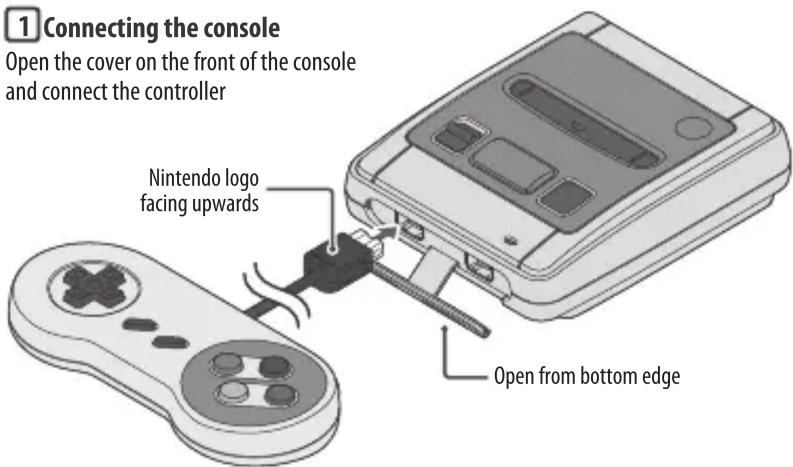
1 Connecting the console
Open the cover on the front of the console and connect the controller
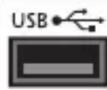
Connecting to a power supply
Please use one of the following:
- Nintendo USB AC adapter (CLV-003(UKV)/CLV-003(EUR)) (sold separately)
- USB-compatible 5V/1A (5W) output AC adapter (sold separately)
Note: While some USB-compatible devices may be able to supply power to the console, Nintendo cannot recommend any particular device. Please make sure to follow the instructions of any third-party device.


natural_image
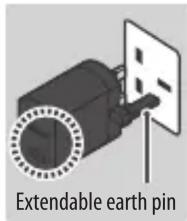
Simple icon showing a monitor and a circular button with a minus sign, no text or symbols present.Note: The illustration above shows the UK version of the Nintendo USB AC adapter. Pull out the earth pin before inserting the plug into the socket.

HDMI port on TV or monitor


WARNING
Make sure the connectors on the cables are orientated correctly and then insert them straight into the correct ports.
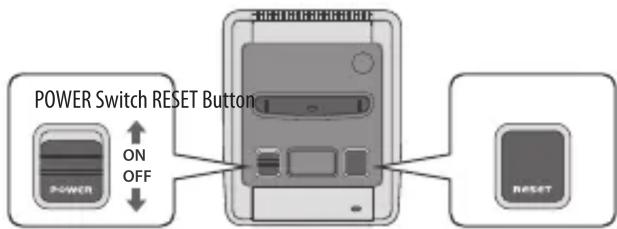
2 Turn the console on
The HOME Menu will be displayed. You can now choose a game to play.
Pressing the RESET Button while playing a game will create a suspend point and return you to the HOME Menu.
After Playing
In order to avoid malfunction or loss of data, please first turn the console off before disconnecting the AC adapter from the socket and/or disconnecting the USB cable from the console.
Warranty Information
To find out how to receive warranty information, see support.nintendo.com
- English
- Health and Safety Information
- WARNING – SEIZURES
- WARNING – EYE STRAIN AND MOTION SICKNESS
- WARNING – REPETITIVE MOTION INJURIES
- WARNING – ELECTRICAL SAFETY
- WARNING – GENERAL
- Use your console carefully
- Getting Started
- Connecting the console
- Connecting to a power supply
- WARNING
- Turn the console on
- After Playing
- Warranty Information
Marque : NINTENDO
Modèle : Classic Mini: Super Entertainment System
Catégorie : Console