
8020X - Smartphone DORO - Notice d'utilisation et mode d'emploi gratuit
Retrouvez gratuitement la notice de l'appareil 8020X DORO au format PDF.


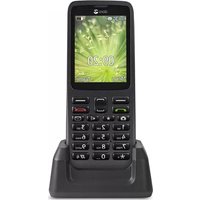
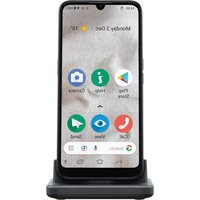
| Type de produit | Smartphone pour seniors |
| Marque | Doro |
| Modèle | 8020X |
| Dimensions (H x L x P) | 153 x 73 x 11 mm |
| Poids | 160 g |
| Alimentation | Batterie lithium-ion 2000 mAh, rechargeable par câble micro-USB |
| Autonomie en veille | Jusqu'à 400 heures (2G) |
| Autonomie en communication | Jusqu'à 10 heures (2G) |
| Écran | Écran tactile capacitif 5 pouces, résolution 480 x 854 pixels |
| Appareil photo | Appareil photo arrière 5 MP, flash LED |
| Fonctions principales | Appels, SMS, messagerie, appareil photo, radio FM, haut-parleur, bouton d'urgence, interface simplifiée, agenda, calculatrice, alarme |
| Options de menu | Polices larges, contrastes élevés, retour sonore, numérotation rapide |
| Entretien et nettoyage | Éteindre l'appareil avant nettoyage ; utiliser un chiffon doux et sec, éviter les produits chimiques |
| Sécurité | Bouton d'urgence dédié (appel vers contacts programmés), fonction de localisation, mode d'emploi des consignes de sécurité fourni |
| Pièces détachées et réparabilité | Batterie amovible, coque arrière amovible, réparation possible par centres agréés Doro |
| Accessoires inclus | Chargeur secteur, câble micro-USB, batterie, notice d'utilisation |
| Informations générales | Smartphone robuste adapté aux seniors, compatibilité 4G, guide vocal, certification IP52 (résistance aux éclaboussures) |
FOIRE AUX QUESTIONS - 8020X DORO
Questions des utilisateurs sur 8020X DORO
0 question sur cet appareil. Repondez a celles que vous connaissez ou posez la votre.
Poser une nouvelle question sur cet appareil
Téléchargez la notice de votre Smartphone au format PDF gratuitement ! Retrouvez votre notice 8020X - DORO et reprennez votre appareil électronique en main. Sur cette page sont publiés tous les documents nécessaires à l'utilisation de votre appareil 8020X de la marque DORO.
MODE D'EMPLOI 8020X DORO
Doro 8020X Quick Start Guide
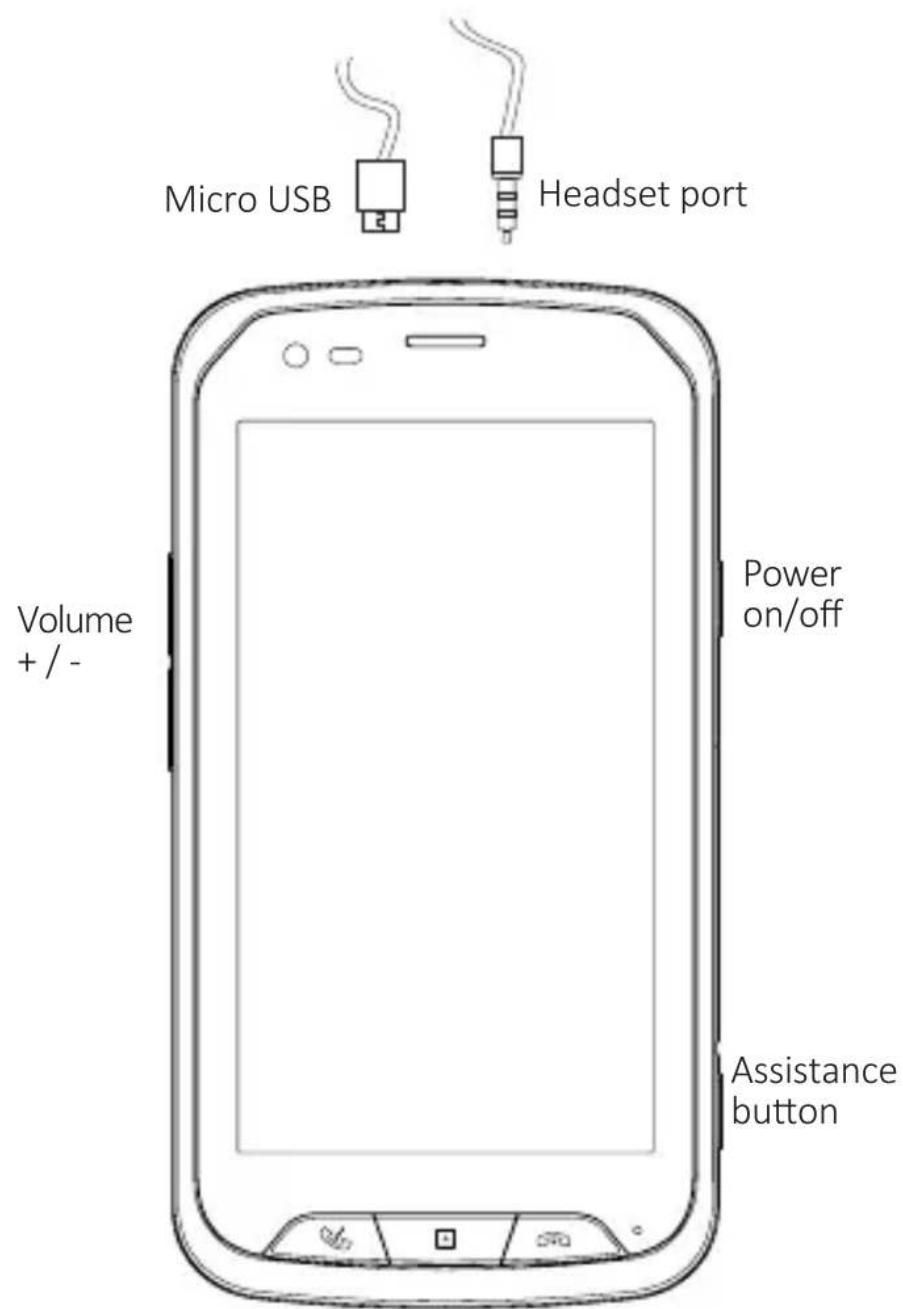
HomeEnd callAnswer call
Live life. doro
TABLE OF CONTENTS
- Unboxing your new phone ....3
Package contents ....3
- Starting up the device ....4
Insert memory card and SIM card....4
Charging the battery 4
Turn on the phone 5
First Start-Up 5
PC connection and files transfer 6
Presentation of the phone icons....6
- Phone functions ....7
To make a call....7
To receive a call 7
The home screen....7
-
Assistance button ....7
-
Resetting the phone ....8
Hardware reboot....8
Factory reset......8
-
Safety instructions ....8
-
Care and maintenance ....11
-
Warranty ....12
-
Copyright and other notices ......12
-
Specific Absorption Rate (SAR) 13
-
Correct disposal of this product ....13
-
Correct disposal of batteries in this product .....14
-
Specifications ....14
-
EU Declaration of conformity ....15
1. UNBOXING YOUR NEW PHONE
The first step is to unbox the phone and assess the items and equipment included in the delivery. Make sure to read through the manual so you can familiarise yourself with the equipment and the basic functions.
- The items supplied with the device and any available accessories may vary depending on the region or service provider.
- The supplied items are designed for this device and may not be compatible with other devices.
- Appearances and specifications are subject to change without prior notice.
- You can purchase additional accessories from your local Doro retailer. Make sure they are compatible with the device before purchase.
- Only use batteries, chargers and accessories that have been approved for use with this particular model. Connecting other accessories may be dangerous and may invalidate the phone's type approval and warranty.
Package contents
Check that the following is included in the product box:
- Device
- USB charger
- Quick start guide
- Stereo headset
- USB cable
- Card tool
2. STARTING UP THE DEVICE

CAUTION
Since this device has a non-removable battery, all attempts of device disassembly (battery cover included) will void the warranty.

Insert memory card and SIM card
-
Open the plastic cap on the right side of the phone to access the micro SIM and micro SD card slots as shown:
-
Use the tool provided in the box to insert the SIM card, making sure that the cut off corner is on the right place. This device accepts micro SIM or 3FF SIM card. Use of incompatible SIM cards may damage the card or the device, and may corrupt data stored on the card. If your SIM format is not compatible, contact your operator.
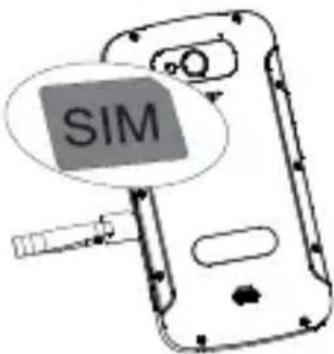
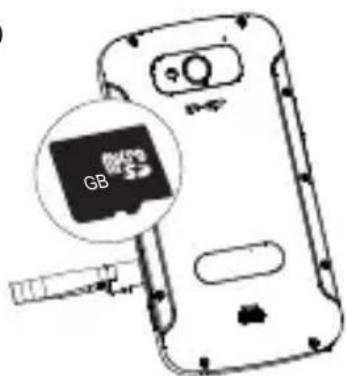
- If you have a memory card (Micro SD format), insert it in the memory card slot as described:
Note: It is possible to insert and remove your SD card while the mobile is switched on without affecting its operation. It is recommended to unmount your card in
Settings → Storage → Unmount SD card
before removing it in case the mobile is turned on. It allows to not corrupting some of the data on the SD card.
Charging the battery
A micro USB cable and a charger are provided with your phone.
- First, connect the USB port in the charger.
- Then, connect the micro USB plug of the cable to the connector of your phone and plug in the charger to an electrical outlet to start charging the battery.
Turn on the phone
Once you've fully charged the device:
- Turn it on by pressing and holding the Power ON / OFF key. Keep it pressed until the display lights up.
- Enter your SIM card PIN if requested, then select √ to confirm. Tap ✗ to erase.
- Wait for the phone to start.
Note: In case of any problem, you have the option to restart your device by pressing the Power ON / OFF key for more than 10 seconds.
First Start-Up
Note! When turning on your phone, the installed applications may need to be updated. Application updates requires Internet connection and can take a few minutes. A Wi-Fi connection is preferable. The phone may appear a bit slow during the update.
- When you are starting your mobile phone for the first time, an intuitional configuration help is started.
- To be able to fully use your new smartphone you need a Google Account. If you don't have one yet, no worries, as you will be guided through a account setup when starting the phone for the first time.
Tip: By setting the option Back up your phone's apps...your data is backed up at your Google Account which allows you to access your configurations any time at your Google account and to transfer the data to any other Android™ device.
PC connection and files transfer
- A Micro USB-cable allows you to connect your mobile phone to your computer and to transfer all types of documents (images, music,...) from your computer to your mobile phone or reverse. The mobile phone is detected as a multimedia device and you can copy/paste the files from your computer to your mobile phone.
- Once your mobile phone is connected to your computer, a message USB Connected... is displayed in the notification bar.
- In the notification screen click on the Touch for more options and select USB for file transfer in order to make sure that the internal and external memory (micro SD card) is accessible via your computer.
Presentation of the phone icons

Current signal strength

No network available

Flight mode active

2G connection

3G connection

3G+ connection

4G connection

You are connected to a foreign network, roaming fees might apply

Wi-Fi is activated

Hotspot Wi-Fi

Alarm activated

Bluetooth is activated

Battery charge level

Battery is charging

New voice mail is received

Missed call

New SMS/MMS received

New e-mail is received

Connected to USB

Downloading in progress

Synchronisation in progress
3. PHONE FUNCTIONS
To make a call
- Press the button 📄 or the phone app.
- Select number or contact.
- Press 📁 to make a call.
- Press ☐ to end the call.
Tip: For international calls, always use + before the country code for best operation. Long press 0 (zero) for the international prefix +.
To receive a call
-
Press ☐ to answer. Alternatively press ☐ to reject directly (busy signal).
-
Press ☐ to end the call.
The home screen
Your phone has a Home screen on which you can install your Applications and/or Widgets. You have also the possibility to add new screens by sweeping an application or a widget from the last screen available to the right border.
- Press to ☐ return to the Home screen.
4. ASSISTANCE BUTTON
In order to possibly make everyday safer, the phone has an assistance button. The assistance button makes it easy to contact the help numbers you have predefined in the Assistance number list. Before the assistance button can be used, the assistance function has to be activated, phone numbers added to the number list and, the text message edited with the information you want to send.
- Press and hold the Assistance button to configure it. Select how to activate the assistance function:
- Press 3 times to activate by pressing the button 3 times within 1 second.
- Long press to activate by pressing and holding the button for approximately 3 seconds, or press it twice within 1 second.
5. RESETTING THE PHONE
Hardware reboot
This device has an internal battery and therefore the hardware cannot be rebooted by the removal of the battery. Should you need to reboot the hardware, if your device becomes frozen and unresponsive, press and hold the Power key for more than 10 seconds to reboot it. After the device is rebooted, it will restart automatically.
Factory reset
If you reset your phone to the settings that were configured at the factory, all of your personal data from internal phone storage, including information about your Google Account, any other accounts, your system and application settings, and any downloaded applications will be erased. Resetting the phone does not erase any system software updates you’ve downloaded or any files on your microSD card, such as music or photos.
- On the Settings screen, touch Backup & reset → Factory data reset.
- When prompted, touch Reset phone, and then touch ERASE EVERYTHING. The mobile phone resets the settings to the original factory settings, and then restarts.
6. SAFETY INSTRUCTIONS

CAUTION
The unit and the accessories can contain small parts. Keep all of the equipment out of the reach of small children. The mains adapter is the disconnect device between the product and mains power. The mains socket outlet must be close to the equipment and easily accessible.
Network services and costs
Your device is approved for use on the 4G LTE FDD 3 (1800), 7 (2600), 20 (800) MHz / WCDMA 1 (2100), 2 (1900), 5 (850), 8 (900) MHz / GSM 850, 900, 1800, 1900 MHz networks. To use the device, you need a subscription with a service provider. Using network services may result in traffic costs. Some product features require support from the network, and you may need to subscribe to them.
Operating environment
Follow the rules and laws that apply wherever you are, and always turn off the unit whenever its use is prohibited or can cause interference or hazards. Only use the unit in its normal user position.
Parts of the unit are magnetic. The unit can attract metal objects. Do not keep credit cards or other magnetic media near the unit. There is a risk that information stored on them can be erased.
Wi-Fi (WLAN)
This equipment may be operated in all European countries.
The 5150 - 5350 MHz band is restricted to indoor use only.
| AT | BE | BG | CH | CY | CZ | DE | DK | EE | ES | FI | FR |
| GR | HR | HU | IE | IS | IT | LI | LT | LU | LV | ME | MK |
| MT | NL | NO | PL | PT | RO | RS | SE | SI | SK | TR | UK |
Medical units
The use of equipment that transmits radio signals, for example, mobile phones, can interfere with insufficiently protected medical equipment. Consult a doctor or the manufacturer of the equipment to determine if it has adequate protection against external radio signals, or if you have any questions. If notices have been put up at health care facilities instructing you to turn off the unit while you are there, you should comply. Hospitals and other health care facilities sometimes use equipment that can be sensitive to external radio signals.
Implanted medical devices
To avoid potential interference, manufacturers of implanted medical devices recommend a minimum separation of 15 cm between a wireless device and the medical device.
Persons who have such devices should:
• Always keep the wireless device more than 15 cm from the medical device.
- Should not carry the phone in a breast pocket.
- Hold the wireless device to the ear opposite the medical device.
If you have any reason to suspect that interference is taking place, turn the phone off immediately. If you have any questions about using your wireless device with an implanted medical device, consult your health care provider.
Areas with explosion risk
Always turn off the unit when you are in an area where there is a risk of explosion. Follow all signs and instructions. There is a risk of explosion in places that include areas where you are normally requested to turn off your car engine. In these areas, sparks can cause explosion or fire which can lead to personal injury or even death. Turn off the unit at filling stations, and any other place that has fuel pumps and auto repair facilities. Follow the restrictions that apply to the use of radio equipment near places where fuel is stored and sold, chemical factories and places where blasting is in progress. Areas with risk for explosion are often – but not always – clearly marked. This also applies to below decks on ships; the transport or storage of chemicals; vehicles that use liquid fuel (such as propane or butane); areas where the air contains chemicals or particles, such as grain, dust or metal powder.
Li-Polymer battery
This product contains a Li-Polymer battery. There is a risk of fire and burns if the battery pack is handled improperly.

WARNING
Danger of explosion if battery is incorrectly replaced. To reduce risk of fire or burns, do not disassemble, crush, puncture, short external contacts, expose to temperature above 60° C ( 140° F), or dispose of in fire or water. Recycle or dispose of used batteries according to the local regulations or reference guide supplied with your product.
Removing/replacing the battery
- To remove/replace the battery, contact an authorised service centre. Please find latest information at www.doro.com.
- For your safety, you must not attempt to remove the battery. If the battery is not properly removed, it may lead to damage to the battery and device, cause personal injury, and/or result in the device being unsafe.
- Doro does not accept liability for any damage or loss if these warnings and instructions are not followed.
Protect your hearing
This device has been tested to comply with the Sound Pressure Level requirement laid down in the applicable EN 50332-1 and/or EN 50332-2 standards.

WARNING

Excessive exposure to loud sounds can cause hearing damage. Exposure to loud sounds while driving may distract your attention and cause an accident. Listen to a headset at a moderate level, and do not hold the device near your ear when the loudspeaker is in use.
Emergency calls
IMPORTANT!
Mobile phones use radio signals, the mobile phone network, the terrestrial network and user-programmed functions. This means that connection cannot be guaranteed in all circumstances. Therefore, never rely only on a mobile phone for very important calls such as medical emergencies.
GPS/Location based functions
Some products provide GPS/Location based functions. Location determining functionality is provided “As is”. No representation or warranty are made as to the accuracy of such location information. Use of location-based information by the device may not be uninterrupted or error free and may additionally be dependent on network service availability.
Please note that functionality may be reduced or prevented in certain environments such as building interiors or areas adjacent to buildings.

WARNING
Do not use GPS functionality in a manner which causes distraction from driving.
Vehicles
Radio signals can affect electronic systems in motor vehicles (for example, electronic fuel injection, ABS brakes, automatic cruise control, air bag systems) that have been incorrectly installed or are inadequately protected. Contact the manufacturer or its representative for more information about your vehicle or any additional equipment.
Do not keep or transport flammable liquids, gases or explosives together with the unit or its accessories. For vehicles equipped with air bags: Remember that air bags fill with air with considerable force.
Do not place objects, including fixed or portable radio equipment in the area above the airbag or the area where it might expand. Serious injuries may be caused if the mobile phone equipment is incorrectly installed and the airbag fills with air. It is prohibited to use the unit in flight. Turn off the unit before you board a plane. Using wireless telecom units inside a plane can pose risks to air safety and interfere with telecommunications. It may also be illegal.
Protect your personal data
Protect your personal data and prevent leakage or misuse of sensitive information:
- While using your device, be sure to back up important data.
- When disposing of your device, back up all data and then reset your device to prevent misuse of your personal information.
- Carefully read the permissions screen when downloading applications. Be particularly cautious with applications that have access to many functions or to a significant amount of your personal information.
- Check your accounts regularly for unapproved or suspicious use. If you find any sign of misuse of your personal information, contact your service provider to delete or change your account information.
- In the event your device is lost or stolen, change the passwords on your accounts to protect your personal information.
- Avoid using applications from unknown sources and lock your device with a pattern, password, or PIN.
Malware and viruses
To protect your device from malware and viruses, follow these use to do so may result in damages or loss of data that may not be covered by the warranty service.
- Do not download unknown applications.
- Do not visit untrusted websites.
- Delete suspicious messages or email from unknown senders.
- Set a password and change it regularly.
- Deactivate wireless features, such as Bluetooth, when not in use.
- If the device behaves abnormally, run an antivirus program to check for infection.
- Run an antivirus program on your device before you launch newly-downloaded applications and files.
- Do not edit registry settings or modify the device's operating.
7. CARE AND MAINTENANCE
Your unit is a technically advanced product and should be treated with the greatest care. Negligence may void the warranty.
- The charger is not water-resistant. Keep it dry. Protect the charger from water or vapour. Do not touch the charger with wet hands, otherwise it may lead to a short circuit, a malfunction of the device and an electric shock to the user.
- Do not use or keep the unit in dusty, dirty environments. The unit's moving parts and electronic components can be damaged.
- Do not keep the unit in warm places. High temperatures can reduce the lifespan for electronic equipment, damage batteries and distort or melt certain plastics.
- Do not keep the unit in cold places. When the unit warms up to normal temperature, condensation can form on the inside and can damage the electronic circuits.
- Do not try to open the unit in any other way than that which is indicated here.
- Do not drop or shake the unit. If it is treated roughly the circuits and precision mechanics can be broken.
- Do not use strong chemicals to clean the unit.
- Do not disassemble, open, crush, bend, deform, puncture or shred.
- Do not modify or remanufacture, attempt to insert foreign objects into the battery, expose to fire, explosion or other hazard.
- Only use the battery for the system for which it is specified.
- Only use the battery with a charging system that has been qualified with the system per IEEE-Std-1725. Use of an unqualified battery or charger may present a risk of fire, explosion, leakage, or other hazard.
- Do not short circuit a battery or allow metallic conductive objects to contact battery terminals.
- Replace the battery only with another battery that has been qualified with the system per this standard, IEEE-Std-1725. Use of an unqualified battery may present a risk of fire, explosion, leakage or other hazard.
- Promptly dispose of used batteries in accordance with local regulations.
- Battery usage by children should be supervised.
- Improper battery use may result in a fire, explosion or other hazard.
For devices that utilize a USB port as a charging source, the device's user manual shall include a statement that the device shall only be connected to CTIA certified adapters, products that bear the USB-IF logo or products that have completed the USB-IF compliance program.
The advice applies to the unit, battery, power adapter and other accessories. If the phone is not working as it should, please contact the place of purchase for service.
Don't forget the receipt or a copy of the invoice.
Maintaining water and dust resistance
Your de vic ei swat er-and dust- resistant (I P67). Follow the below tips to keep the water- and dust-resistance of your device. Failure to do so may result in damage to your device.
- Do not immerse the device in water deeper than 1m and keep it submerged for more than 30 minutes.
- Do not expose the device to water moving with force, such as running water from taps, ocean waves, or waterfalls.
- Do not open the device's covers when the device is in water or in very humid places, such as swimming pools or bathrooms.
- If the device is exposed to clean water, dry it thoroughly with a clean, soft cloth. If the device is exposed to other liquids, rinse it with clean water and dry it thoroughly with a clean, soft cloth. If you do not follow these instructions, the device's performance and appearance may be affected.
- If the device has been immersed in water or the microphone, speaker, or receiver is wet, sound may not be heard clearly. Wipe the device dry.
- The water-resistant design of the device can cause it to vibrate slightly in certain conditions, for example when the volume level is high. This is due to the protective membranes and is normal and do not affect the device's performance.
- The touchscreen and other features may not work properly if the device is used in water.
- Your device has been tested in a controlled environment and certified to be water-and dust-resistant in specific situations (meets requirements of classification IP67 as described by the international standard IEC 60529). Despite this classification, it is still possible for your device to be damaged in certain situations.
8. WARRANTY
This product is guaranteed for a period of 24 months and for original accessories for a period of 12 months (such as the battery, charger, charging cradle or handsfree kit) which may be delivered with your device, from the date of purchase. In the unlikely event of a fault occurring during this period, please contact the place of purchase. Proof of purchase is required for any service or support needed during the guarantee period.
This guarantee will not apply to a fault caused by an accident or a similar incident or damage, liquid ingress, negligence, abnormal usage, non-maintenance or any other circumstances on the user's part. Furthermore, this guarantee will not apply to any fault caused by a thunderstorm or any other voltage fluctuations. As a matter of precaution, we recommend disconnecting the charger during a thunderstorm.
Please note that this is a voluntary manufacturer's warranty and provides rights in addition to, and does not affect statutory rights of end-users.
9. COPYRIGHT AND OTHER NOTICES
Copyright© 2017 Doro AB. All rights reserved.
Other product and company names mentioned herein may be the trademarks of their respective owners.
Any rights not expressly granted herein are reserved. All other trademarks are property of their respective owners.
To th e maximum extent pe m itt ed b y ap plicable la w, un de rno ci rc ur Doro or any of its licensors be responsible for any loss of data or income or any special, incidental, consequential or indirect damages howsoever caused.
Doro does not provide a warranty for or take any responsibility for the functionality, content, or end-user support of third-party apps provided with your device. By using an app, you acknowledge that the app is provided as is. Doro does not make any representations, provide a warranty, or take any responsibility for the functionality, content, or end-user support of third-party apps provided with your device.
Content copyright
The unauthorised copying of copyrighted materials is contrary to the provisions of the Copyright Laws of the United States and other countries. This device is intended solely for copying non-copyrighted materials, materials in which you own the copyright, or materials which you are authorised or legally permitted to copy.
If you are uncertain about your right to copy any material, please contact your legal advisor.
Open source licenses
You are entitled to receive a copy of the source code of software licensed under an open source license that gives you the right to receive the source code for that software (for example GPL or LGPL) to you on an appropriate media, against an administrative fee covering Doro AB's cost for handling the distribution and costs for media. Please direct such request to Doro AB, Open Source Software Operations, Magistratsvagen 10, SE 226 43 Lund, Sweden. To be valid, such a request must be made within three (3) years from the date of the distribution of this product by Doro AB, or in the case of code licensed under the GPL v3 for as long as Doro AB offers spare parts or customer support for this product model.
10. SPECIFIC ABSORPTION RATE (SAR)
This device meets applicable international safety requirements for exposure to radio waves. Your mobile device is a radio transmitter and receiver. It is designed not to exceed the limits for exposure to radio waves (radio frequency electromagnetic fields) recommended by international guidelines from the independent scientific organization ICNIRP (International Commission of Non-Ionizing Radiation Protection). The radio wave exposure guidelines use a unit of measurement known as the Specific Absorption Rate, or SAR. The SAR limit for mobile devices is 2 W/kg averaged over 10 grams of tissue and include a substantial safety margin designed to assure the safety of all persons, regardless of age and health.
Tests for SAR are conducted using standard operating positions with the device transmitting at its highest certified power level in all tested frequency bands. The highest SAR values under the ICNIRP guidelines for this device model are:
Head SAR: 0.436 W/kg
Body SAR: 0.897 W/kg
During normal use, the SAR values for this device are usually well below the values stated above. This is because, for purposes of system efficiency and to minimize interference on the network, the output power of your mobile device is automatically decreased when full power is not needed for the call. The lower the power output of the device, the lower its SAR value.
This device meets RF exposure guidelines when used against the head or when positioned at least 1.5 cm away from the body. When a carry case, belt clip or other form of device holder is used for body-worn operation, it should not contain metal and should provide at least the above stated separation distance from the body. The World Health Organization (WHO) has stated that current scientific information does not indicate the need for any special precautions when using mobile devices. If you are interested in reducing your exposure, they recommend you reduce your usage or use a hands-free accessory to keep the device away from your head and body.
11. CORRECT DISPOSAL OF THIS PRODUCT
(Waste Electrical & Electronic Equipment) (Applicable in countries with separate collection systems)
This marking on the product, accessories or manual indicates that the product and its electronic accessories (e.g. charger, headset, USB cable) should not be disposed of with other household waste. To prevent possible harm to the environment or human health from uncontrolled waste disposal, please separate these items from other types of waste and recycle them responsibly to promote the sustainable reuse of material resources.
Household users should contact either the retailer where they purchased this product, or their local government office, for details of where and how they can take these items for environmentally safe recycling. Business users should contact their supplier and check the terms and conditions of the purchase contract. This product and its electronic accessories should not be mixed with other commercial wastes for disposal. This product is RoHS compliant.
12. CORRECT DISPOSAL OF BATTERIES IN THIS PRODUCT

(Applicable in countries with separate collection systems)
The marking on the battery, manual or packaging indicates that the battery in * this product should not be disposed of with other household waste. Where marked, the chemical symbols Hg, Cd or Pb indicate that the battery contains mercury, cadmium or lead above the reference levels in EC Directive 2006/66. If batteries are not properly disposed of, these substances can cause harm to human health or the environment. To protect natural resources and to promote material reuse, please separate batteries from other types of waste and recycle them through your local, free battery return system.
13. SPECIFICATIONS
Network bands (MHz)
[maximum radio-frequency
power/dBm]:
2G GSM 850 (33), 900 [33], 1800 [30], 1900 [30]
3G UMTS 1 (2100) [24], 2 (1900) [24], 5 (850) [24], 8 (900) [24]
4G LTE FDD 3 (1800) [24], 7 (2600) [24], 20 (800)
Operating system: Android 6.0
SIM card size Micro SIM (3FF)
Wi-Fi (MHz) [maximum radio- IEEE 802.11 b/z/σ (2413 - 2473) [10]
frequency power/dBm]: IEEE 802.11 b/g/n (2412 - 2472) [19]
Bluetooth (MHz) [maximum 4.0 (2402 - 2480) [10]
radio-frequency power/dBm]: 4.0 (2482 - 2486) [10]
GPS receiver: Category 3
Dimensions: 140 mm x 74 mm x 13 mm
Weight: 185 g (including battery)
Battery: 3.8 V / 3000 mAh Li-Polymer battery
Image format: BMP, GIF, JPG, PNG
Video format: AVI, MP4, 3GP, 3GP2
Audio format: WAV, AMR, MIDI, MP3, AAC
Main camera resolution: 5 MP
Front camera resolution: VGA
Camera digital zoom: 4x
Display: Size 4.5"
Resolution 480 x 854
Colour Depth 16 M
RAM: 1 GB
Internal memory: 8 GB
External memory MicroSD, microSDHC, microXDHC max. 128 GB
Sensors: Accelerometer, light, proximity, compass,
Operating ambient Min: 32°F (0°C)
temperature: Max: 104°F (40°C)
Charging ambient temperature: Min: 32°F (0°C)
Charging ambient temperature: Max: 104°F (40°C)
Min: -4°F (-20°C)
Storage temperature: Max: 140°F (60°C)
14. EU DECLARATION OF CONFORMITY
EU Declaration of Conformity
CE 1588
Hereby, we declare that the following designated product:
- Model: Doro 8020X.
- Type: LTE/WCDMA/GSM.
Bluetooth 4.0, WiFi 802.11 b/g/n 2.4GHz, GPS/A-GPS, FM radio
complies with the essential requirements and other relevant provisions of Radio and Telecommunications Equipment Directive (R&TTE Directive 1999/5/EC).
The assessment of the product's compliance regarding the requirements of the Radio and Telecommunications Equipment Directive (R&TTE Directive 1999/5/EC) has been executed by the American Certification Body (Notified Body No. 1588), based on the followings standards:
Safety EN 60950-1:2006+A11:2009+A1:2010+A12:2011+A2:2013
EMC EN 301 489-1 V1.9.2, EN 301 489-3 V1.6.1, EN 301 489-7 V1.3.1, EN 301 489-17 V2.2.1, EN 301 489-24 V1.5.1, EN 55020:2007+A11:2011, EN 55032:2012+AC:2013
Radio EN 301 511 V12.1.1, EN 301 908-1 V7.1.1, EN 301 908-2 V7.1.1, EN 301 908-13 V7.1.1, EN 300 328 V1.9.1, EN 300 440-2 V1.4.1
Health EN 50360:2001+A1:2012, EN 50566:2013+AC:2014, EN 62479:2010.
This product is in compliance with the directive 2011/65/EU (RoHS – Restriction of Hazardous Substances Directive).
The present declaration is the responsibility of the manufacturer:
Mobiwire SAS
79, avenue François Arago 92017 NANTERRE Cedex
Bruno MORTREUX, CEO
07/03/2017

©2017 Doro AB. All rights reserved.
English (EN)
QSG_Doro_8020X_(75x135)_v10_en_20170307_2


- DORO 8020X QUICK START GUIDE
- TABLE OF CONTENTS
- UNBOXING YOUR NEW PHONE
- PACKAGE CONTENTS
- STARTING UP THE DEVICE
- CAUTION
- INSERT MEMORY CARD AND SIM CARD
- CHARGING THE BATTERY
- TURN ON THE PHONE
- FIRST START-UP
- PC CONNECTION AND FILES TRANSFER
- PRESENTATION OF THE PHONE ICONS
- PHONE FUNCTIONS
- TO MAKE A CALL
- TO RECEIVE A CALL
- THE HOME SCREEN
- ASSISTANCE BUTTON
- RESETTING THE PHONE
- HARDWARE REBOOT
- FACTORY RESET
- SAFETY INSTRUCTIONS
- NETWORK SERVICES AND COSTS
- OPERATING ENVIRONMENT
- WI-FI (WLAN)
- MEDICAL UNITS
- IMPLANTED MEDICAL DEVICES
- AREAS WITH EXPLOSION RISK
- LI-POLYMER BATTERY
- WARNING
- REMOVING/REPLACING THE BATTERY
- PROTECT YOUR HEARING
- EMERGENCY CALLS
- IMPORTANT
- GPS/LOCATION BASED FUNCTIONS
- VEHICLES
- PROTECT YOUR PERSONAL DATA
- MALWARE AND VIRUSES
- CARE AND MAINTENANCE
- MAINTAINING WATER AND DUST RESISTANCE
- WARRANTY
- COPYRIGHT AND OTHER NOTICES
- CONTENT COPYRIGHT
- OPEN SOURCE LICENSES
- SPECIFIC ABSORPTION RATE (SAR)
- CORRECT DISPOSAL OF THIS PRODUCT
- CORRECT DISPOSAL OF BATTERIES IN THIS PRODUCT
- SPECIFICATIONS
- EU DECLARATION OF CONFORMITY
Marque : DORO
Modèle : 8020X
Catégorie : Smartphone