
SCRUBTEC 130 E - Ordinateur de poche NILFISK - Notice d'utilisation et mode d'emploi gratuit
Retrouvez gratuitement la notice de l'appareil SCRUBTEC 130 E NILFISK au format PDF.


| Type de produit | Ordinateur de poche robuste |
| Marque | Nilfisk |
| Modèle | SCRUBTEC 130 E |
| Dimensions (L x l x H) | 200 x 100 x 30 mm |
| Poids | 500 g |
| Écran | Écran tactile résistif 4 pouces, 480 x 800 pixels |
| Processeur | ARM Cortex-A8 1 GHz |
| Mémoire RAM | 512 Mo |
| Mémoire interne | 4 Go flash |
| Alimentation | Batterie lithium-ion rechargeable 3000 mAh, autonomie 8 h |
| Connectivité | USB 2.0, Wi-Fi 802.11 b/g/n, Bluetooth 4.0 |
| Fonctions principales | Gestion de tâches, navigation GPS, lecteur de codes-barres intégré, appareil photo 5 MP |
| Protection | IP65 (résistant à la poussière et aux projections d'eau) |
| Système d'exploitation | Windows Embedded Handheld 6.5 |
| Entretien et nettoyage | Nettoyer avec un chiffon doux et sec ; éviter les produits abrasifs |
| Sécurité | Utiliser dans un environnement sec et à l'abri des chutes |
| Pièces détachées et réparabilité | Batterie, câble USB, adaptateur secteur, stylet disponibles |
| Température de fonctionnement | -10 à 50 °C |
| Certifications | CE, FCC, RoHS |
FOIRE AUX QUESTIONS - SCRUBTEC 130 E NILFISK
Questions des utilisateurs sur SCRUBTEC 130 E NILFISK
0 question sur cet appareil. Repondez a celles que vous connaissez ou posez la votre.
Poser une nouvelle question sur cet appareil
Téléchargez la notice de votre Ordinateur de poche au format PDF gratuitement ! Retrouvez votre notice SCRUBTEC 130 E - NILFISK et reprennez votre appareil électronique en main. Sur cette page sont publiés tous les documents nécessaires à l'utilisation de votre appareil SCRUBTEC 130 E de la marque NILFISK.
MODE D'EMPLOI SCRUBTEC 130 E NILFISK
Operating guidelines
- SCRUBTEC 130 E
ATTENTION! Do not use the machine before you have read and understood the Instructions for use manual

natural_image
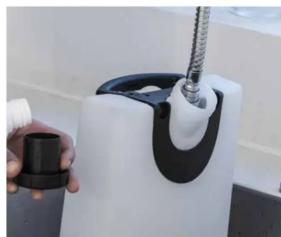
Hand holding a blue and white cleaning bag next to a mechanical device with orange cables (no text or symbols visible)- Release the handle to remove the tank assembly.
natural_image
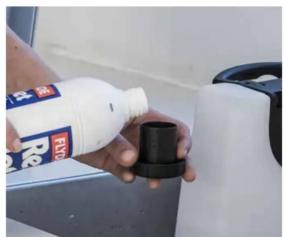
Close-up of a hand holding a black tool next to a white mechanical device with a black handle and threaded shaft (no visible text or symbols)- Fill the solution tank with a clean water. The clean water temperature must not exceed 40^ C.
natural_image
Person pouring liquid from a bottle into a container (no visible text or symbols)- The tank cap can be used for dosing the detergent. One full cap is 30ml giving 1% detergent of the 3L tank capacity. (*)
natural_image
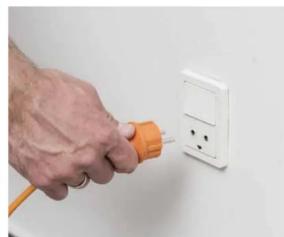
Hand using an orange plug to apply electrical power outlet to a white wall socket (no text or symbols visible)- Connect the power plug to the electrical socket.
natural_image
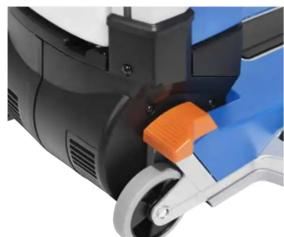
Close-up of a blue and black industrial machine with orange handle (no visible text or symbols)- Use the orange pedal to put the machine in working position.

natural_image
Close-up of a hand pressing a black button on a device (no visible text or symbols)- When machine is in working position press the main button and start cleaning.
natural_image
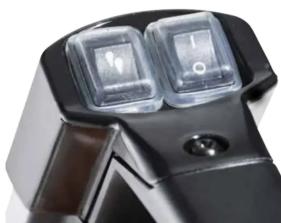
Close-up of a black handheld device with two transparent buttons and a circular button, no visible text or symbols.- Make sure also the solution switch is on and in same position as the main switch.

natural_image
Person standing beside a blue circular cleaning or dust removal machine in a workshop (no visible text or symbols)- Move the machine with the handle and start cleaning the floor.

natural_image
Close-up of a blue and silver robotic device with a black control panel (no visible text or symbols)- For double scrubbing, use the pedal to lift/lower squeegees.

natural_image
Hand holding a white kitchen sink with a curved handle (no text or symbols visible)- When necessary, empty the recovery and refill the solution tank to continue working.
natural_image
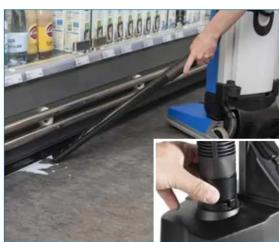
Industrial machine with attached spray bottle and hand operating a tool (no visible text or symbols)- To use the manual suction hose press the main button to start the machine in upright position. Turn the hose connection to ON and use the suction tube. When done press the switch and turn hose connection to OFF. (**)

- Park the machine in upright position and turn off the main switch.
natural_image
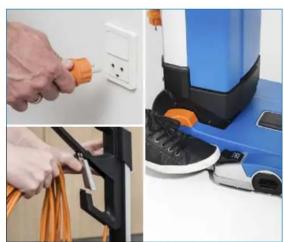
Composite image showing a hand inserting a cable into an electrical outlet and a blue appliance with orange components (no visible text or symbols)- Disconnect the power plug from the electrical socket and rewind the cable from the machine and place it in the cable holder.

natural_image
Person pouring liquid from a blue spray bottle into a stainless steel kitchen sink (no visible text or symbols)- Empty the recovery and solution tank. Clean them with water.

natural_image
Two-panel image showing hands installing or adjusting a device component, one with a circular knob and the other holding a smartphone (no visible text or symbols)- Check and clean the solution and vacuum filter regularly.
natural_image
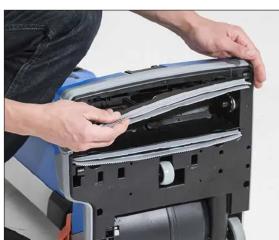
Person installing or adjusting a mechanical device with visible internal components (no text or symbols)- Remove the squeegee bars.

natural_image
Person opening a blue and black industrial machine with white insulation material (no visible text or symbols)- Unscrew by turning the knob clockwise to remove the cylindrical brush.

natural_image
Person washing a kitchen sink with water splashing (no text or symbols visible)- Clean the squeegee bars and the cylindrical brush with water.

natural_image
Blue and black cleaning power supply unit with attached hose (no visible text or symbols)- Clean the machine using a damp cloth and where needed use a neutral cleaning product. Then store the machine in a clean and dry place.
(*) ALWAYS FOLLOW THE DETERGENT DOSING RECOMMENDATION ON THE LABEL OF THE CHEMICAL PRODUCT USED.
(**) THE MANUAL SUCTION HOSE IS AN OPTIONAL ACCESSORY.


Marque : NILFISK
Modèle : SCRUBTEC 130 E
Catégorie : Ordinateur de poche