
300Mx - Téléphone KONFTEL - Notice d'utilisation et mode d'emploi gratuit
Retrouvez gratuitement la notice de l'appareil 300Mx KONFTEL au format PDF.


| Type de produit | Téléphone de conférence |
| Marque | Konftel |
| Modèle | 300Mx |
| Dimensions (L x l x H) | 240 x 240 x 75 mm |
| Poids | 1,2 kg |
| Alimentation | Adaptateur secteur 12 V DC |
| Consommation électrique | 5 W (max) |
| Type de microphone | Omnidirectionnel intégré |
| Portée du microphone | Jusqu'à 8 mètres |
| Haut-parleur | Intégré, 3 W |
| Connectivité | Bluetooth, USB, RJ45 (Ethernet), ligne téléphonique |
| Protocoles supportés | SIP, H.323, Skype for Business |
| Fonctions principales | Appels conférence, mise en attente, transfert d'appel, répertoire, haut-parleur mains libres |
| Affichage | Écran LCD rétroéclairé |
| Entretien et nettoyage | Nettoyer avec un chiffon doux et sec. Ne pas utiliser de produits abrasifs. |
| Sécurité | Ne pas exposer à l'humidité, aux températures extrêmes ou aux chocs. |
| Pièces détachées et réparabilité | Câble USB, adaptateur secteur, câble téléphone disponibles. Réparation par un technicien agréé. |
| Informations générales | Utilisation en intérieur uniquement. Température de fonctionnement : 0°C à 40°C. |
FOIRE AUX QUESTIONS - 300Mx KONFTEL
Questions des utilisateurs sur 300Mx KONFTEL
0 question sur cet appareil. Repondez a celles que vous connaissez ou posez la votre.
Poser une nouvelle question sur cet appareil
Téléchargez la notice de votre Téléphone au format PDF gratuitement ! Retrouvez votre notice 300Mx - KONFTEL et reprennez votre appareil électronique en main. Sur cette page sont publiés tous les documents nécessaires à l'utilisation de votre appareil 300Mx de la marque KONFTEL.
MODE D'EMPLOI 300Mx KONFTEL
CALLS
Answering and making calls
→ Press 📋 to answer an incoming call.
→ Dial the number and press to make a call.
→ Press an arrow key to open a call list containing previously dialled numbers. Call using 📋.
→ Press and hold an alphanumeric button for two seconds to call a contact in the phonebook.
During a call
→ Adjust the speaker volume using the keys 🔊 and 🔍
→ Press ⚡ to turn off the microphone.
→ Press 📋 to put the call on hold.
Both the microphone and the speaker are turned off and the call is on hold.
→ Press the same button again to reconnect the call.
MULTI-PARTY CALLS
① Note that different PBXs may require different signals. If you experience problems making multi-party calls: Please refer to the manual for information about how to make necessary settings and to your tele phone administrator or service provider for specific settings.
Adding a party to a call
→ Press the Button during the call.
Calls in progress are put on hold and a second dialling tone is heard.
Dial the second participant's number, press and wait for an answer.
→ Press the 📂 button and then 3 to connect all the meeting participants or 📂 to return to the previous call.
The conference guide
You can create groups of up to six people via ⚙ > CONF. GUIDE > ADD GROUP.
→ Press the 🎨conference) button and choose a conference group. Press OK if you want to see who is in the group and 🔍 to make the call.
→ Follow the instructions in the guide and answer with OK or • ←.
Calls in progress are put on hold when the next participant calls.
→ Press the 📄conference) button to connect all the meeting participants.

KONFTEL.COM
QUICK START GUIDE
Konftel 300Mx 4G
natural_image
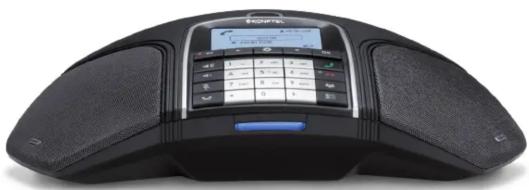
Close-up of a black Siemens 300-branded mobile phone with a digital keypad and sound waves (no visible text or symbols)The Konftel 300Mx 4G is a battery-operated wireless conference phone that can be connected to mobile networks (4G/3G/2G) or PCs (USB).
A user guide with detailed instructions about connectivity options and features is available on our website konftel.com.
DESCRIPTION

SD memory card port
It is possible to record a call in progress and use the Konftel 300Mx 4G as a dictaphone.
Press the • ← button to start and stop recording.
Recordings can be accessed via the menu.
Charging the battery
Charge the battery by placing the Konftel 300Mx 4G on the charging stand or plug the power cable into the Konftel 300Mx 4G.
A fully-charged battery provides up to 30 hours of talk time. The Konftel 300Mx 4G lets you know when there is less than one hour of talk time left.
Display symbols

LEDs
Flashing blue Incoming call
Steady blue light Call in progress
Flashing red Hold, microphone and speaker turned off
Steady red light Mute, microphone turned off
GETTING STARTED
Initial use
→ Open the battery cover and insert the SIM card as illustrated.

→ Insert the battery as shown in the picture.

→ Enter the SIM card's PIN code and confirm with OK.
→ Place the conference phone in the middle of the table.
Place the conference phone at least 20 cm from the users.
Connection to a PC
→ Connect the Konftel 300Mx 4G to a computer using the USB cable provided.
→ Check that Konftel 300Mx 4G USB Audio is selected as the sound unit in the computer's settings.
When connected to a PC, the Konftel 300Mx 4G functions as a conference unit for VoIP calls, which means that
speakers and microphones are activated, as is advanced sound management in OmniSound®.
Bridge connection
As default, the sound via the mobile network and USB is bridge-connected. It is possible to turn off the bridging if you do not want any sound from the computer to be heard during mobile calls.
→ Press the button.
→ Confirm with OK or cancel with • ←
Navigate in menus and make settings
The Konftel 300Mx 4G menu contains the following options:
CALL LIST PHONE BOOK
CONF GUIDE RECORDING
MESSAGES SETTINGS
STATUS
→ Press ★.
→ Select the option you want from the menu using the arrow keys. Press OK to confirm.
→ Cancel the setting or go back one level in the menu by pressing • ←.
→ Quit the menu by pressing ✦gain.
① Note that after you have made changes to a setting, you must press OK to activate the setting.


- CALLS
- Answering and making calls
- During a call
- MULTI-PARTY CALLS
- Adding a party to a call
- The conference guide
- QUICK START GUIDE
- Konftel 300Mx 4G
- DESCRIPTION
- SD memory card port
- Charging the battery
- Display symbols
- LEDs
- GETTING STARTED
- Initial use
- Connection to a PC
- Bridge connection
- Navigate in menus and make settings
- CALL LIST PHONE BOOK
- CONF GUIDE RECORDING
- MESSAGES SETTINGS
- STATUS
Marque : KONFTEL
Modèle : 300Mx
Catégorie : Téléphone