0931 - Montre Skmei - Notice d'utilisation et mode d'emploi gratuit
Retrouvez gratuitement la notice de l'appareil 0931 Skmei au format PDF.


| Type de produit | Montre numérique |
| Marque | Skmei |
| Modèle | 0931 |
| Dimensions du boîtier | Environ 45 mm de diamètre, 12 mm d'épaisseur |
| Longueur du bracelet | Environ 22 cm (ajustable) |
| Largeur du bracelet | 20 mm |
| Poids | Environ 50 g |
| Alimentation | Pile bouton CR2032 |
| Autonomie de la pile | Environ 2 ans |
| Type d'affichage | LCD numérique |
| Étanchéité | 3 ATM (résiste aux éclaboussures) |
| Fonctions principales | Heure, date, chronomètre, alarme, rétroéclairage |
| Matériau du boîtier | Plastique ABS |
| Matériau du bracelet | Silicone |
| Verre | Plastique résistant |
| Entretien et nettoyage | Nettoyer avec un chiffon doux et sec. Éviter les produits chimiques. |
| Sécurité | Éviter les chocs violents, l'exposition à des températures extrêmes et le contact avec des solvants. |
| Pièces détachées et réparabilité | Pile remplaçable par l'utilisateur. Autres pièces non disponibles séparément. |
| Informations générales | Montre sport numérique idéale pour un usage quotidien. Fonctionne avec 3 boutons latéraux. |
FOIRE AUX QUESTIONS - 0931 Skmei
Questions des utilisateurs sur 0931 Skmei
0 question sur cet appareil. Repondez a celles que vous connaissez ou posez la votre.
Poser une nouvelle question sur cet appareil
Téléchargez la notice de votre Montre au format PDF gratuitement ! Retrouvez votre notice 0931 - Skmei et reprennez votre appareil électronique en main. Sur cette page sont publiés tous les documents nécessaires à l'utilisation de votre appareil 0931 de la marque Skmei.
MODE D'EMPLOI 0931 Skmei
Operation Manual
A. Features
➢ 12 Digits LCD Display, Display Hour, Minute, Second, Month, Day and Week
Daily Alarm and Chime hourly
➢ 12 / 24H format, Auto Calendar
➢ 1/100 second Chronograph with split functions
LED backlight
B. Operational Manual
In any Mode Press A Key for LED light ON for 3s
➢ Press B key to convert the mode as following:
LIGHT(A)
MODE(B)
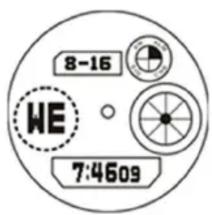
(D) START/STOP
(C)RESET

flowchart
graph LR
    A["Normal Time Display Mode"] -->|Press B Key| B["Chronograph"]
    B -->|Press B Key| C["Alarm"]
    C -->|Press B Key| D["Time Setting Mode"]
Chronograph function
In normal display mode: press B key once, enter Chronograph mode
➢ Press D to start, press D again to suspend, press D again to continue, press D to suspend again, .....when suspend, press C key back to 0:00:00.
In Chronograph mode, press D key to start, press C key enter into split function. press C key again to get the first group record, but the second group still processing in the back ground, press C key again to continue the second group, press C key again to read the second group record.....when the final group finished, Press D key to stop the SPL function, press C key read the final group(SUM) record, press C key again to clear the record to zero.
Alarm Setting
In normal display Mode, press B key twice to the Alarm mode
➢ Press C key the Hours will flash, press D key the adjust the Alarm Hours.
➢ Press C key again the Minutes will flash, press D key to adjust the Alarm Minutes
▶ Press B key to exit.
Alarm&Chime ON/OFF
In normal display mode press B key twice enter the alarm mode, press D key for Noise and ON/OFF the Alarm and Chime function, If only "ALM" icon means when the time is alarm time will chime, if only "CHM" icon ON, means every Hour will chime; if the two icon ON means in alarm time and every Hour will chime.
Time & Date Setting
In normal display Mode, press B key three times to enter time setting mode and the icon of seconds will flashing. Press D key to zero.
➢ Press C key and the icon of Hours will flash. Press D key to reach the correct Hours (Pay attention: AM/PM, “H” is 24 hour format)
➢ Press C key and the icon of the Minute will flash. Press D key to reach the correct Minutes.
➢ Press C key and the icon of the Month will flash. Press D key to reaches the current Month
➢ Press C key and the icon of the Date will flash. Press D key to reach the current date
➢ Press C key and the icon of the week will flash. Press D key to adjust the day
▶ Press B key to exit.
Marque : Skmei
Modèle : 0931
Catégorie : Montre