Nintendogs + Cats (3DS) - Jeu NINTENDO - Notice d'utilisation et mode d'emploi gratuit
Retrouvez gratuitement la notice de l'appareil Nintendogs + Cats (3DS) NINTENDO au format PDF.


| Type de produit | Jeu vidéo |
| Marque | Nintendo |
| Modèle | Nintendogs + Cats |
| Plateforme | Nintendo 3DS |
| Genre | Simulation de vie |
| Date de sortie originale | 2011 |
| Développeur | Nintendo EAD |
| Éditeur | Nintendo |
| Classification PEGI | 3+ |
| Langues disponibles | Multilingue (français, anglais, etc.) |
| Nombre de joueurs | 1 |
| Fonctions principales | Adoption, soins, dressage, concours, photographie |
| Utilisation de l'écran tactile | Oui |
| Utilisation du microphone | Oui (appeler l'animal) |
| Utilisation de l'appareil photo | Oui (photos avec réalité augmentée) |
| Dimensions de la carte de jeu | Environ 3,5 cm × 3,5 cm × 0,2 cm |
| Poids de la carte | Environ 3 g |
| Alimentation | Pile de la console Nintendo 3DS |
| Entretien et nettoyage | Nettoyer la carte avec un chiffon doux et sec |
| Sécurité | Tenir hors de portée des jeunes enfants (petites pièces) |
| Pièces détachées | Non applicable (jeu complet) |
| Informations générales | Jeu de soin d'animaux avec chiens et chats en 3D |
FOIRE AUX QUESTIONS - Nintendogs + Cats (3DS) NINTENDO
Questions des utilisateurs sur Nintendogs + Cats (3DS) NINTENDO
0 question sur cet appareil. Repondez a celles que vous connaissez ou posez la votre.
Poser une nouvelle question sur cet appareil
Téléchargez la notice de votre Jeu au format PDF gratuitement ! Retrouvez votre notice Nintendogs + Cats (3DS) - NINTENDO et reprennez votre appareil électronique en main. Sur cette page sont publiés tous les documents nécessaires à l'utilisation de votre appareil Nintendogs + Cats (3DS) de la marque NINTENDO.
MODE D'EMPLOI Nintendogs + Cats (3DS) NINTENDO
Thank you for choosing the nintendogs™ + cats game for the Nintendo 3DS™ system.
Please note that, for this manual, "Nintendo 3DS" refers to both Nintendo 3DS and Nintendo 3DS XL.
Please read this manual carefully before using the software. Please also read your operations manual for more details and tips to help you enjoy your playing experience.
IMPORTANT
Before using this software, read all content within the Health and Safety Information application on the HOME Menu.
To access this application, tap the icon on the HOME Menu, then tap Open and read the contents of each section carefully. When you are finished, press HOME to return to the HOME Menu.
You should also thoroughly read your operations manual, including the "Health and Safety Information" section, before using this software.
CAUTION - STYLUS USE
To avoid fatigue and discomfort when using the stylus, do not grip it tightly or press it hard against the screen. Keep your fingers, hand, wrist and arm relaxed. Long, steady, gentle strokes work just as well as many short, hard strokes.
Protecting Your Privacy
This software allows you to share information, such as portions of your nintendogs + cats experience, with other users through local communication and online services. Keep the following in mind when sharing personal information through these features.
To protect your privacy, do not give out personal information such as last name, phone number, birth date, age, school, e-mail, or home address when communicating with others.
IMPORTANT
Your Nintendo 3DS system and this software are not designed for use with any unauthorized device or unlicensed accessory. Such use may be illegal, voids any warranty, and is a breach of your obligations under the User Agreement. Further, such use may lead to injury to yourself or others and may cause performance issues and/or damage to your Nintendo 3DS system and related services. Nintendo (as well as any Nintendo licensee or distributor) is not responsible for any damage or loss caused by the use of such device or unlicensed accessory. Except as authorized, copying of any Nintendo software is illegal and is strictly prohibited by domestic and international intellectual property laws. "Back-up" or "archival" copies are not authorized.
Nintendo respects the intellectual property of others, and we ask Nintendo 3DS software Content Providers to do the same. In accordance with the Digital Millennium Copyright Act in the US, the Electronic Commerce Directive in the EU, and other applicable law, we have adopted a policy of removing, in appropriate circumstances and at our sole discretion, any Nintendo 3DS software that appears to infringe anyone else's intellectual property. If you believe your intellectual property rights are being infringed, please visit www.nintendo.com/ippolicy to view the full policy and understand your rights.
© 2011 Nintendo.
Trademarks are property of their respective owners. Nintendo 3DS is a trademark of Nintendo.

This product uses the LC Font
by Sharp Corporation. LCFONT, LC Font and the LC logo mark are trademarks of Sharp Corporation. CTR-P-ADBE-USZ
natural_image
A fluffy white dog sitting on a surface with a cat and a cat in the background (no visible text or symbols)
There are three versions of nintendogs + cats. Every puppy and kitten breed can be unlocked with any version of the game by progressing through the game or by using the StreetPass™ feature.
nintendogs + cats uses the Nintendo 3DS system clock. Be aware that changing the system clock will temporarily affect your nintendogs + cats progress.
When caring for living dogs and cats, the trainer holds ultimate responsibility for their survival and well-being. The pets in nintendogs + cats don't age and always remain puppies and kittens, unlike real puppies and kittens. If you are thinking about getting a real pet, be sure to consult with your family about whether you're ready for that responsibility.
Taking home a new puppy or kitten is always a big, happy event—it's like having a brand-new member of the family. You'll need to care for your new pet, play with it, and go on outings together? Most importantly, you'll need to give it lots of love. Of course, it's not all about lavishing your pet with attention. Pupples and kittens have specific characteristics depending on bread, and each has worked in personal as an owner. You're going to have fun getting to know their individual habits and personalities. You'll also be responsible for raising well-trained pets. Do your best to train them well, establish a close bond, and have fun with your new friends:
Get Started at the Kennel It all begins at the kennel, where you'll go to pick but the perfect pup to take home with you. Tap the nintedogs + cats icon on the Nintendo 3DS HOME Menu, and then tap Open to go to the kennel. Note: If you're continuing a game you've already started playing, just tap Open on the HOME Menu to head straight to your home.
Which Puppy Will You Choose? The kennel is full of great puppies looking for a good home. When you touch the puppy, silhouette on the lower screen (Touch Screen) using your styling, you'll notice that you are petting the dog that appears on the top screen. Move @ to change your view and see the puppy from different angles.
How to Choose Your Puppy After you get the puppy for a while, you'll be allowed to pick any dog available at the kennel. If you pick out a breed and coat color you like, you'll see a selection of those pups up close. When you see the one you want, tap Choose This Dog. Note: The next time you go to the kennel, you'll be able to pick out a kitten!
Take Your Puppy Home It takes a while for a new puppy to get used to a new home up the window on the touch Screen to call your puppy over, and then give it lots of attention and love. After a white, your puppy will calm down. Note. Sometimes you don't have to touch to call your puppy over. If you bring your face close to the screen or whistle to get its attention, your puppy may come running over to you! Note: The system's inner-facing camera is used for facial recognition and will not be used for other purposes.
Give Your Puppy a Name Once your puppy has calmed down, It's time to give it a name; ○ Call Your Puppy's Name Face your puppy and call but its new name a few times. Your puppy will remember its name in the same tune of voices and volume you use the first time, so be sure to say it the same way every time.
© Take Note of Your Puppy's Name Once your puppy learns its name, you should make a note of it by ordering the name using the keyboard on the Touch Screen. Touch the letters to spell out your puppy's name, and then tap OK when you're done. Note: The name you use here will be made public and shared with other owners via StreetPass (page 12). Be careful not to use offensive language or personally identifying information, such as your last name, phone number, birth date, school, etc.
Is Your Dog Having a Hard Time Learning Its Name? When your puppy understands you, a will appear. If your puppy doesn't understand, a will appear. You'll need to say the name multiple times before your puppy learns it. When repeating your dog's name, be sure to use the same volume and tone of voice. After saying your dog's name multiple times, you may accidentally find yourself leaning closer to the microphone than recommended, speaking too loudly, or changing your time. Keep these tips in mind when you are teaching your dog its name: ● Make sure you are about six inches away from the microphone. ● Use your normal speaking volume. ● Use the same name every time. Don't use nicknames or draw out the last syllable of the name. ● Pronounce the name clearly from start to end. ● Until your puppy has learned its name, don't hand your game to another player once you've started.
After you bond with your puppy by calling its name and petting it, you'll be able to start teaching it tricks. Training your pup to do tricks is a fun and rewarding activity you can do together.
How to Teach Your Puppy to Sit Down
When your dog is able to start learning tricks, you'll be prompted with a sequence that will show you how to teach it to sit down. Read the instructions on the screen and then say "sit down," repeating it as many times as necessary until your dog learns the command. You can read the instructions by tapping Help. One thing to keep in mind: avoid long pauses between words when teaching voice commands, as this can confuse your puppy.

Note: After your puppy has learned how to sit down, you'll be able to view tutorials on a variety of other tricks by tapping Tricks on your puppy's status screen (page 8).
After Learning "Sit Down"
Once your puppy has learned to sit down, you'll be able to go out and play with all of the game's features.
Note: To learn how to care for your puppy and about your home, see page 8.
To save the current condition of your pets, home, and items, tap the Save icon on your main home screen.
Whenever you stop playing the nintendogs + cats game, always be sure to tap the Save button to save your progress.

Save
Deleting Save Data
After launching the game, press and hold Ⓐ + Ⓑ + Ⓗ + Ⓨ when the nintendogs + cats title screen appears to delete all of your save data.
Data can be lost due to user action, such as repeatedly powering off and on the system or removing the Game Card or SD Card while saving. Data loss may also be caused by poor connectivity, due to dirt or dust in the system's ports. Please be aware that in these cases data cannot be restored.
Give Your Puppy Something to Eat or Drink
If your pet gets hungry or thirsty, please feed it and give it something to drink. Check your pet's status screen (page 8) to see if it is hungry or thirsty.
Play with Toys and Accessories
It's fun to play with toys and dress up your pets with accessories. If you call your pup's name after throwing a toy, it just might fetch the toy for you.
Brush and Shampoo Your Pet
If you notice that your pet is looking a little dirty, you can give it a good brushing or even a bath and shampoo.
Take Photos
Tap the 📄 icon or press 📁/® to take 3D photos of your pets. You can view the photos you take in Nintendo 3DS Camera from your system's HOME Menu.
Use Your Journal
From the journal (page 11), you can communicate with other owners via the StreetPass™ feature.
Arrange Furniture
If you place furniture like a sofa or bed in your room, your pets may hop on and take a nap.
Go for a Walk
When taking your puppy out for a walk, you can give the leash a tug to signal where you want it to go. There are lots of places you can discover when you're out for a walk, including the park, café, gym, or shops. And if you select the Pedometer feature, close your system, and carry it around with you as you go about your day, each step you take counts toward taking your pup for a walk.
Enter Competitions
Your dog can only enter the same competition twice per day. If you try to adjust the Nintendo 3DS system clock, you won't be able to enter competitions for a while.
Disc Competition
In this
competition, you'll toss a flying disc, and your puppy has to catch it and

bring it back. The farther away your pup catches it, the more points you earn!
Lure Coursing
In this race, you reel in a lure to lead your puppy to the finish line. Fastest to the finish wins!
Obedience Trial
Your pup can show off the tricks it has mastered within a time limit. This competition makes use of the AR Cards included with your Nintendo 3DS system.
Go Shopping
You can buy things from a variety of shops. Need money? Don't worry—you'll earn prize money when you win competitions.
You'll also find items during walks that you can sell at the Secondhand Shop to earn money.

flowchart
graph TD
    A["Pet Suppliers"] --> B["Accessories"]
    B --> C["Infarkers"]
    C --> D["Securityboxed"]
    D --> E["Secured Area"]
    E --> F["Pet Huts"]
    style A fill:#f9f,stroke:#333
    style B fill:#ccf,stroke:#333
    style C fill:#cfc,stroke:#333
    style D fill:#fcc,stroke:#333
    style E fill:#cff,stroke:#333
    style F fill:#ffc,stroke:#333
1 Pet Supplies
Buy food and drink, toys, and other things here.
Accessories
Here you can buy fun and stylish accessories for your pup. You can try them on before you buy.
③ Interiors
Here you can buy furniture for your room or even order a complete renovation of your entire home in a new style.
Secondhand
At this shop, you can sell unwanted items. You can also trade in materials that your puppy finds during walks for more useful stuff!
Kennel
Buy a new puppy or kitten here.
Pet Hotel
You can keep up to three dogs or cats at home. If you can't take care of a pet for any reason, you can always drop off or "donate" it here. Once you donate a pet, you can never get it back, so be sure this is what you want before you do it.
In your home, you can play with your puppy or kitten, take care of them, or just see what they're up to.

1 Camera
Tap this icon to take a photo of whatever is pictured on the top screen.
② Your puppy or kitten
The view will focus on the pet you tap.
③ Status info
Tap this icon to view detailed status information.
4 Call
Tap this button to call your pup or kitten over to you. If you've tapped a specific pet icon first, that pet will come to you.
Save
Save your current progress, including your puppies and kittens, the state of your room, and your items.
6 Journal
Tap to view the journal screen.
7 Supplies
View your items, and select items you want to use.
8 Go out
Take your puppy out.
Change Your View
Press Ⓐ/☒/☒/☒/☒ to change your view.
Take Photo
Snap a photo of what's happening in your room (pictured on the top screen) with L/R. The photos you take will be saved to the SD Card and can be viewed in Nintendo 3DS Camera from the HOME Menu.
9 Interacting with Your Puppy
This screen appears after you tap the Call button and your pet has come over. To pet your puppy or kitten, use your stylus to rub its silhouette on the Touch Screen. If the brush or treat icons are displayed, you can tap them to use those items.
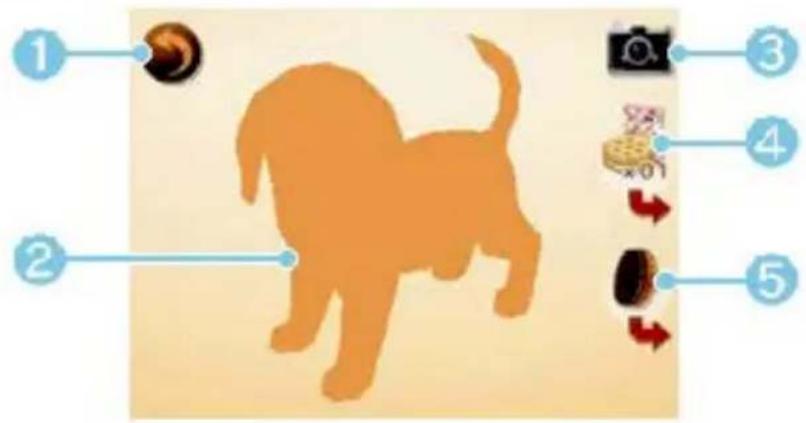
1 Back (page 8)
Go back to the main home screen.
② Silhouette
Rub your puppy or kitten's silhouette to pet it.
3 Camera
Touch 📄 or press 📁/® to take a photo.
4 Treat
Touch to give your pet a treat. Touch → to change the currently selected treat.
5 Brush
Touch to brush your pet's coat. Touch → to change to a different type of brush, if you have one.
Kittens are different from puppies in so many ways!
Choose a Kitten
The kennel also has lots of kittens. Once you've taken home your first puppy, kittens will be available to choose from at the kennel.

natural_image
Three kittens running on a grassy field with a wooden fence in the background (no text or symbols visible)About Kittens
Kittens are different from puppies—they don't come over to you as much. Cats can be a little bit aloof sometimes. You also can't teach them tricks, so just let them wander around and do what they like. Sometimes they'll find interesting items and bring them to you.

natural_image
A small brown tabby cat standing on a wooden surface, holding a white gift box with a blue ribbon, against a green outdoor background (no text or symbols visible).Taking Care of Your Kitten
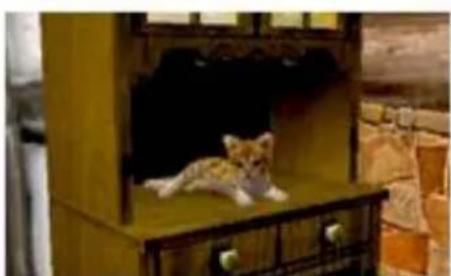
When your kitten gets hungry, feed it kitten food. Kittens love climbing to high places, so if you buy tall furniture, they'll be happy.
natural_image
A small cabbal cat lying on a wooden cabinet with ornate wood trim, in a rustic indoor setting (no text or symbols visible)You can communicate with other owners via StreetPass (page 12) using the journal.
Using the Journal for the First Time
The first time you open your journal, you'll be prompted to create a new journal save file on your SD Card and register nintendogs + cats for StreetPass on your system. If you don't create this save file, you won't be able to use StreetPass or even use the journal at all.
Note: To activate StreetPass, you'll need to read and agree to the User Agreement. For more information about the User Agreement, please refer to the System Settings.
Journal-Screen Controls
When you open your journal, you'll see the screen below. You can use your stylus to take notes in your journal too.
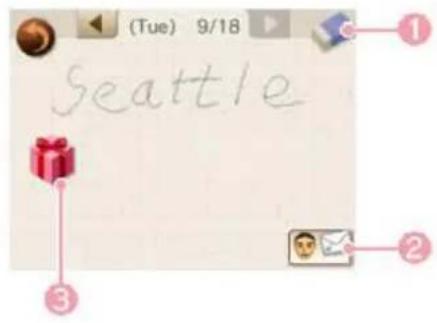

Eraser
Drag and slide over notes you've written to erase them.

Owner info
With the owner-information feature, you can select your Mii™ character, set a present to hand out, select a photo you've taken, and enter a short message to the world.
Note: If you haven't made a Mii character in the Mii Maker™ application, your nickname won't appear in your owner info. Once you create your own Mii and set it on the owner-information screen, your name will appear.

StreetPass info
Tap to see information about owners you've encountered in StreetPass. You can even meet up with their puppies or kittens at the park.
This software uses StreetPass (local wireless communication) for letting you share portions of your nintendogs + cats experience with other players and interact with their puppies or kittens using the StreetPass feature.
What You Can Do with StreetPass (1)
When you've had a successful StreetPass exchange, here are some of the things that will happen:
Note: To communicate using this feature, all players must activate StreetPass for this software.
- Your owner
information, pets, and a preselected photo and present are sent to the other owne
From your
journal, you can view another owner's information
and receive a present from him or her.
To play with
that owner and their pet at the park, tap Meet Up at the Park.

- If you meet a
lot of owners via StreetPass, more types of puppies may
become available in the kennel.

Note: Once you've connected via StreetPass with a particular owner, you won't be able to exchange with them again for a while.
You can disable StreetPass functionality via Parental Controls.
Note: Refer to your operations manual for information on how to set up Parental Controls.
Activating StreetPass
To activate StreetPass, follow these instructions.

Open Your Journal (page 11)
Open your journal, and register nintendogs + cats for use with StreetPass on your system.

Set Your Owner Information (page 11)
Open your journal, and set your Mii™ character, photo, message, and present. You'll only be able to send photos taken in-game of your dog or cat.

Carry Your System Around with You
Simply close your system and carry it around with you when you are out and about. When you come into contact with other nintendogs + cats owners also using StreetPass, your system will exchange game data with them.
Note: To use StreetPass, you'll need to have your system powered on and wireless communications enabled.
After a Successful StreetPass Exchange
When you've successfully exchanged game data with another owner, you'll see a

sticker in your journal. You can tap that sticker to see information about the owner.
Deactivating StreetPass
To deactivate StreetPass, open System Settings, select Data
Management, and then select
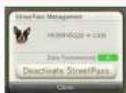
StreetPass Management. Tap the icon for this software title, and then select Deactivate StreetPass.
Note: Once you've deactivated StreetPass, you can register it again from the journal.
Playing with AR Cards
If you select the AR Camera from your room's supplies screen, you can use AR Cards to make your puppy or kitten appear in your world! You can take 3D photos, and if it's a puppy, you can have it perform tricks.
Using AR Cards
When playing AR Card games, you may have to move around the area while holding the Nintendo 3DS system. Make sure you have enough room, and hold the system firmly with both hands while playing.
Using SpotPass

This software supports the automatic download of special items via an Internet connection. A sticker will be placed in your journal when you've received SpotPass data.
Note: Data received through SpotPass is saved on SD Cards. As a result, it is recommended that you keep an SD Card inserted in your system at all times.
Activating SpotPass
Just like with StreetPass, you can register and start using the SpotPass™ feature through the journal. Before you can use SpotPass, you must first accept the Nintendo 3DS Service User Agreement and set up an Internet connection.
Note: For more information about Internet settings and the User Agreement, refer to the system's operations manual.
Deactivating SpotPass
You can deactivate SpotPass in your Notifications from your system's HOME Menu.
What You Can Do with Nintendo Network™
This software supports the Nintendo Network.
You can download special items using SpotPass.
The Nintendo Network logo appears on the packages of software supporting the Nintendo Network.
About Nintendo Network

NINTENDO NETWORK
Nintendo Network is the name of Nintendo's network service that enables users to enjoy games and other content via the Internet. It provides access to a wide range of network services, including the ability to play games with people around the world, purchase and download games/content, and exchange images and messages.
14 Support Information
Nintendo Customer Service SUPPORT.NINTENDO.COM
USA/Canada: 1-800-255-3700
Latin America/Caribbean: (001) 425-558-7078
1 Important Information
Getting Started
2 Introduction
3 Your First Puppy
4 Teach Your Puppy to Sit Down
5 Saving Your Game
Life with Your Pet
6 At Home
7 Going Out
8 Caring for Your Pets
9 Interacting with Your Puppy
10 Life with Your Kitten
StreetPass and AR Cards
11 Your Journal
12 StreetPass
13 More Fun Stuff You Can Do
Troubleshooting
14 Support Information
- IMPORTANT
- CAUTION - STYLUS USE
- Protecting Your Privacy
- © 2011 Nintendo.
- How to Teach Your Puppy to Sit Down
- After Learning "Sit Down"
- Deleting Save Data
- Give Your Puppy Something to Eat or Drink
- Play with Toys and Accessories
- Brush and Shampoo Your Pet
- Take Photos
- Use Your Journal
- Arrange Furniture
- Go for a Walk
- Enter Competitions
- Disc Competition
- In this
- Lure Coursing
- Obedience Trial
- Go Shopping
- Pet Supplies
- Accessories
- ③ Interiors
- Secondhand
- Kennel
- Pet Hotel
- Camera
- ② Your puppy or kitten
- ③ Status info
- Call
- Save
- Journal
- Supplies
- Go out
- Change Your View
- Take Photo
- Interacting with Your Puppy
- Choose a Kitten
- About Kittens
- Taking Care of Your Kitten
- Using the Journal for the First Time
- Journal-Screen Controls
- Eraser
- Owner info
- StreetPass info
- What You Can Do with StreetPass (1)
- Activating StreetPass
- After a Successful StreetPass Exchange
- Deactivating StreetPass
- Playing with AR Cards
- Using AR Cards
- Using SpotPass
- Activating SpotPass
- Deactivating SpotPass
- What You Can Do with Nintendo Network™
- About Nintendo Network
- Support Information
- Getting Started
- Life with Your Pet
- StreetPass and AR Cards
- Troubleshooting
Marque : NINTENDO
Modèle : Nintendogs + Cats (3DS)
Catégorie : Jeu