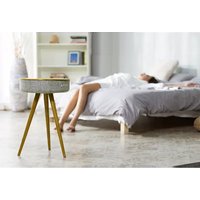
AirTable (AW) - Station d'accueil SALORA - Notice d'utilisation et mode d'emploi gratuit
Retrouvez gratuitement la notice de l'appareil AirTable (AW) SALORA au format PDF.


| Type de produit | Station d'accueil |
| Marque | Salora |
| Modèle | AirTable (AW) |
| Compatibilité | Ordinateurs portables et tablettes avec USB-C |
| Connectivité | USB-C (x1), USB-A 3.0 (x2), HDMI (x1), Ethernet RJ45 (x1), prise jack 3.5 mm (x1) |
| Alimentation | USB-C Power Delivery (5V/2A ou adaptateur secteur PD 60W non inclus) |
| Charge de l'appareil | Jusqu'à 60 W via USB-C |
| Transfert de données | USB 3.0 jusqu'à 5 Gbit/s |
| Sortie vidéo | HDMI 2.0 jusqu'à 4K à 30 Hz |
| Dimensions (L x l x H) | 20 x 8 x 2 cm |
| Poids | 250 g |
| Matériau | Aluminium et plastique |
| Température de fonctionnement | 0 °C à 40 °C |
| Humidité de fonctionnement | 20 % à 80 % |
| Entretien et nettoyage | Nettoyer avec un chiffon doux et sec. Ne pas utiliser de produits abrasifs. |
| Sécurité | Ne pas exposer à l'eau, à l'humidité excessive ou à des températures extrêmes. |
| Pièces détachées | Câble USB-C de remplacement disponible auprès du fabricant. |
| Réparabilité | Contacter le service client Salora pour toute réparation. |
| Garantie | 2 ans |
FOIRE AUX QUESTIONS - AirTable (AW) SALORA
Questions des utilisateurs sur AirTable (AW) SALORA
0 question sur cet appareil. Repondez a celles que vous connaissez ou posez la votre.
Poser une nouvelle question sur cet appareil
Téléchargez la notice de votre Station d'accueil au format PDF gratuitement ! Retrouvez votre notice AirTable (AW) - SALORA et reprennez votre appareil électronique en main. Sur cette page sont publiés tous les documents nécessaires à l'utilisation de votre appareil AirTable (AW) de la marque SALORA.
MODE D'EMPLOI AirTable (AW) SALORA
Manual
Bluetooth tower speaker
Model: Salora airTable

natural_image
Line drawing of a simple four-legged table with three legs and a top plate (no text or symbols)Thank you for purchasing our Bluetooth Tower speaker Salora airTable. In order to make the best and safest use of this product, please read these instructions carefully and keep them for further reference.
- Power On/Off
A. Press and hold the POWER button, from the speaker you will hear "Power On". The speaker will enter into Bluetooth mode by default and "Pairing" will be heard. The speaker is ready to pair with different mobile devices such as a smart phone or tablet. First you need to enable Bluetooth on your external source. B. Press and hold the POWER button again and the speaker will be turned off, from the speaker you will hear "Power Off".
2.AUX auto switch
You can connect a mobile audio device such as a smart phone, tablet or computer to the AUX connector. The AUX mode will be activated automatically and the Bluetooth mode with its blue LED light will be turned off. When you disconnect the device from the AUX connector, the Bluetooth mode will be activated automatically, you will hear "Pairing".
- Bluetooth connection and audio Playback
A. When the speaker is in Bluetooth mode, it will automatically switch to Pairing state, the blue indicator will blink.
Enable Bluetooth on your mobile device, the Bluetooth device name of the speaker is Salora airTable.
B. The speaker will start pairing, once the connection has been established, you will hear "Connected". The blue indicator will remain steadily lit. If pairing has failed, the blue indicator will blink.
C. After establishing the connection you are able to play the music of your choice from your mobile device. If you would like to interrupt playback, you can press briefly on the PLAY/PAUSE/PHONE button. To resume playback, press the PLAY/PAUSE/PHONE button again.
D. If you would like to disconnect the mobile device from the speaker, you press and hold the PLAY/PAUSE/PHONE button. The connection will be disconnected and, if you desire, you can pair another mobile device with your speaker. E. For the best sound quality make sure that the distance between the speaker and the mobile device does not exceed 10 meters. If you would place the mobile device farther away from the speaker it will affect the sound quality.
- Making a call via Bluetooth
A. As soon as a call comes in from the connected mobile phone, you will hear "Incoming call" (in case the call comes from an Android smart phone), or "Cell phone rings" (in case the call comes from an iPhone). To answer the call you briefly press the PLAY/PAUSE/PHONE button. Speak into the microphone of the speaker so that the caller can hear your voice clearly. Press the
1
PLAY/PAUSE/PHONE button again briefly to hang up. If you wish to refuse a call press and hold the PLAY/PAUSE/PHONE button.
B. If you would like to call the last number in the memory of the speaker, you can do so by pressing twice the PLAY/PAUSE/PHONE button. It will automatically dial the last number that you have been called by.
- Voice prompts
A. "Power on": You have made a connection with the power supply (when you turn on the speaker)
B. "Power off": When you disconnect the speaker from the power supply (when you turn off the speaker)
C."Pairing": The speaker will try to pair with a mobile device (when making a connection in Bluetooth mode, from the AUX mode and back to Bluetooth mode) D."Connected": When the connection between the speaker and the mobile device has been successful.
E. "Disconnected pairing": When the Bluetooth has been disabled. (If you would like to disconnect your mobile device from the speaker, press and hold the
PLAY/PAUSE/PHONE button).
F. "Incoming call": When a call comes in from an Android smart phone G. "Cell phone rings": When a call comes in from an iPhone.
H."Low battery": The speaker gives a warning that you have a low battery and it needs to be recharged.
6.Volume controls
A. Press the + button to increase the volume (The speaker offers 20 levels by default when it is turned on, with a total capacity of 30 levels).
B. Press the - button to decrease the volume (The speaker offers 20 levels by default when it is turned on, with a total capacity of 30 levels).
- Automatic Power off
When the speaker is turned on and there has been no Bluetooth connection, no LINE IN signal or the Bluetooth connection has been disabled after a period of 10 minutes of inactivity, the speaker will automatically turn off. You will hear "Power Off".
- Charging through USB port
When the speaker is turned on or the AC adaptor has been plugged in to the power supply, you are able to charge your iPhone or Android smart phone via the USB 2.1A/1A port. When the speaker is turned off you cannot charge your extern mobile device via the USB ports.
2
- Low Battery prompt and charging the battery
A. When the battery is running low, you will hear "Low Battery" to remind you that you need to recharge the battery of the speaker. If you don't charge the battery the speaker will automatically turn off.
B.Plug the A/C adaptor in the DC IN port and into the power supply, the charging red LED indicator will light up as the battery of the speaker will be charged. As soon as the battery is completely charged, the red indicator light will turn off. Warning: Please make sure that you are using the original A/C adaptor for charging, if you don't, it could take more time to charge or it doesn't charge at all. It could even cause fire which could lead to severe personal injuries.
Description of product


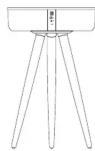

3

- POWER ON/OFF
2.PLAY/PAUSE/PHONE
3.VOLUME-
4.VOLUME+
- MICROPHONE
6.LED INDICATOR 7.USB 1.2A/USB 1A
- USB 1.2A/USB 1A 8 LED CHARGING INDICATOR
8.LED C 9.DC IN
10 AUX
- RESET
4
ASSEMBLING STEPS

-
Open the box, take out the speaker and put it on a flat surface with the fixing mounting holes upwards.
-
Take one of the wooden tripod feet and put in one of the holes.
3.Turn it firmly clockwise until it's tightly fixed
- Fasten the other two feet in the same way.
5.Now the tripod has been securely fixed. 6.Turn the speaker and place it on a firm
- turn the speaker and place it on a firm, level surface (floor).
Warning:
-
The maximum carrying capacity of this product is 5kg . Do not put any objects on the speaker, heavier than 5kg . Failure to follow the warning information may result in property damage and/or personal injury, for which the manufacturer is not liable.
-
This product is not intended to be used as a seat, no adult, child or animal should sit on this speaker. Failure to follow the warning information may result in property damage and/or personal injury, for which the manufacturer is not liable.
5
Marque : SALORA
Modèle : AirTable (AW)
Catégorie : Station d'accueil